Bubuka
Thank you for choosing the Opal Selfie Stick OP-Sel-BT-01. This manual provides essential information for the safe and effective use of your device. Please read it thoroughly before operation and retain it for future reference.
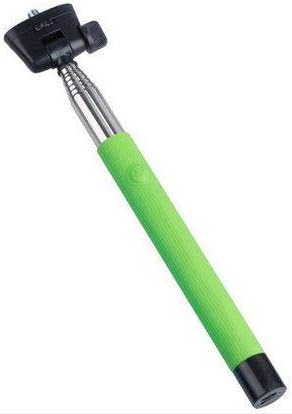
Gambar 1: The Opal Selfie Stick OP-Sel-BT-01 in green, showing its extendable arm, phone holder, and comfortable grip.
Fitur produk
- warna: Héjo
- Bahan utama: Baja
- Kapasitas Beban Max: 500 g
- Konektipitas: Nirkabel (Bluetooth)
- Sistem anu cocog: Android 3.0 ka luhur, ios 4.0 sareng di luhur
Disetél
- Unfold the Selfie Stick: Gently pull the phone holder section upwards to extend the stick.
- Saluyukeun Panyekel Telepon: Buka telepon clamp and securely place your smartphone within it. Ensure the phone is centered and stable. The clamp is designed to hold various phone sizes.
- Daya Hurung: Locate the power button (if applicable, usually on the handle) and press it to turn on the selfie stick. An indicator light may illuminate.
Parentah Operasi
Papasangan Bluetooth
- Ensure the selfie stick is powered on and in pairing mode (indicator light may flash rapidly).
- Dina telepon pinter anjeun, buka Setélan > Bluetooth.
- Hurungkeun Bluetooth sareng milarian alat anu sayogi.
- Select "Opal OP-Sel-BT-01" or a similar name from the list of devices.
- Once paired, the indicator light on the selfie stick may turn solid or turn off, indicating a successful connection.
Nyokot Poto/Video
- Buka aplikasi kaméra smartphone anjeun.
- Manjangkeun iteuk selfie ka panjang nu dipikahoyong.
- Posisikeun telepon anjeun pikeun moto anu dipikahoyong.
- Press the shutter button on the selfie stick handle to capture a photo or start/stop video recording.
Pangropéa
- beberesih: Wipe the selfie stick with a soft, dry cloth. Do not use abrasive cleaners or solvents.
- Panyimpenan: Store the device in a cool, dry place away from direct sunlight and extreme temperatures. Retract the stick fully before storage.
- Perawatan batré: If the selfie stick has a rechargeable battery, ensure it is charged periodically even when not in use to maintain battery health.
Pamérésan masalah
| Masalah | Mungkin Cukang lantaranana | Solusi |
|---|---|---|
| Teu tiasa dipasangkeun sareng telepon | Selfie stick not in pairing mode; Bluetooth off on phone; battery low. | Ensure stick is on and in pairing mode. Turn phone's Bluetooth off/on. Charge the selfie stick. |
| Shutter button not working | Not paired; camera app settings. | Verify successful Bluetooth pairing. Check camera app settings for volume button shutter control. |
| Phone not stable in clamp | Phone not centered; clamp not fully secured. | Re-position phone to be centered. Ensure clamp is firmly gripping the phone. |
spésifikasi
- model: OP-Sel-BT-01
- merek: Opal
- warna: Héjo
- Bahan utama: Baja
- Kapasitas Beban Max: 500 g
- Konektipitas: Nirkabel (Bluetooth)
- Sistem Operasi anu Dirojong: Android 3.0+, ios 4.0+
- ASIN: B091DBB122
- Tanggal munggaran sayogi: 30 Maret 2021
Garansi sareng Rojongan
For information regarding warranty coverage or technical support, please refer to the documentation included with your purchase or visit the official Opal websitus. Sarat garansi khusus tiasa bénten-bénten gumantung kana daérah sareng pangecér.
Émbaran Kasalametan
- Ulah ngalaan alat ieu kana suhu anu ekstrim, kalembaban, atanapi sinar panonpoé langsung salami waktos anu lami.
- Jauhkeun tina jangkauan barudak.
- Ulah nyobian ngabongkar atawa ngaropéa alat. Ieu tiasa ngabatalkeun garansi sareng nyababkeun karusakan.
- Ensure your phone is securely fastened in the clamp before extending the stick.


