1. Bubuka
This manual provides essential information for the safe and effective operation, maintenance, and troubleshooting of your Crown CT11023 Multi-function Plunge Router. Please read this manual thoroughly before using the tool to ensure proper handling and to prevent injury or damage.
1.1 Émbaran Kasalametan
Always observe general power tool safety guidelines. Failure to follow these instructions may result in electric shock, fire, and/or serious injury.
- Kasalametan Area Gawé: Tetep wewengkon gawé beresih jeung well-cahayana. Wewengkon nu pabalatak atawa poek ngondang kacilakaan.
- Kasalametan listrik: Ulah ngalaan alat listrik ka hujan atawa kaayaan baseuh. Hindarkeun kontak awak sareng permukaan bumi atanapi grounded.
- Kasalametan Pribadi: Salawasna nganggo panyalindungan panon, panyalindungan dédéngéan, sareng masker lebu. Pakéan anu leres; ngahindarkeun pakéan atawa perhiasan leupas.
- Pamakéan sareng Perawatan Alat: Ulah maksakeun alat kakuatan. Anggo alat kakuatan anu leres pikeun aplikasi anjeun. Pegatkeun sambungan colokan ti sumber listrik samemeh nyieun sagala panyesuaian, ngaganti asesoris, atawa nyimpen parabot kakuatan.
1.2 Dimaksudkeun pamakéan
The Crown CT11023 Multi-function Plunge Router is designed for routing wood, plastic, and similar materials. It is suitable for creating decorative edges, grooves, dados, and other woodworking joints. This tool is intended for domestic and light professional use.
2. Produk Langkungview
Familiarize yourself with the components of your Crown CT11023 Plunge Router before operation.
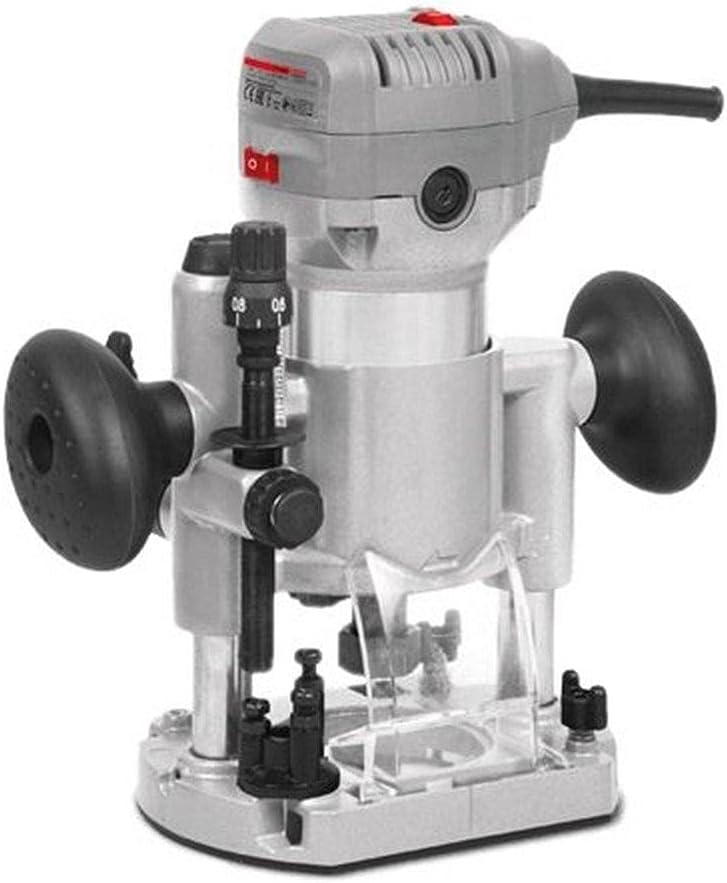
Gambar 2.1: Gemblengna view of the Crown CT11023 Multi-function Plunge Router. This image displays the main body, handles, depth adjustment mechanism, and power switch.
2.1 Komponén utama
- Perumahan motor: Contains the electric motor.
- cecekelan: Ergonomic grips for control during operation.
- Saklar kakuatan: Kontrol hurung/pareum pikeun motor.
- Kenop adjustment jero: Used to precisely set the routing depth.
- Plunge Lock Lever: Secures the router at a desired depth.
- Mur Collet: Ngamankeun bit router dina tempatna.
- Plat dasar: Provides a stable surface for guiding the router over the workpiece.
- Port ékstraksi lebu: For connecting a dust collection system (if applicable).

Gambar 2.2: Samping view of the Crown CT11023 Router, illustrating a fixed base attachment. This configuration is often used for edge routing or when a compact form factor is preferred.

Gambar 2.3: Sisi séjén view of the Crown CT11023 Router, showing a different base configuration, potentially for trimming or specialized routing tasks. Note the black grip for enhanced control.
3. Setélan
3.1 Instalasi Bit
- Pastikeun router dicabut tina sumber kakuatan.
- Press and hold the spindle lock button (if present) to prevent the spindle from rotating.
- Loosen nut collet ngagunakeun rengkuh disadiakeun.
- Insert the router bit into the collet, ensuring at least 3/4 of the shank is seated. Do not bottom out the bit.
- Tighten the collet nut firmly with the wrench. Do not overtighten.
- Leupaskeun konci spindle.
3.2 adjustment jero
- Pastikeun router tos dicabut tina colokanna.
- Tempatkeun router dina tempat anu datar sareng mata bor anu dipikahoyong parantos dipasang.
- Lepaskeun tuas konci plunge.
- Turunkeun router dugi ka mata bor némpél permukaan benda kerja.
- Engage the plunge lock lever to hold the router at this zero depth.
- Adjust the depth adjustment knob or scale to the desired routing depth.
- Release the plunge lock lever before starting the router.
4. Nyuping
4.1 Powering on / Pareum
- Pikeun Ngahurungkeun: Ensure the router bit is clear of the workpiece. Press the power switch to the "ON" position. Allow the motor to reach full speed before contacting the workpiece.
- Pareuman: Release the power switch or press it to the "OFF" position. Wait for the bit to stop completely before setting the tool down.
4.2 Téhnik Routing
- Arah Eupan: Always feed the router against the rotation of the bit. This provides better control and prevents the router from "climbing" over the workpiece.
- Potongan deet: For deeper cuts, make multiple shallow passes instead of one deep pass. This reduces strain on the motor and bit, and improves cut quality.
- Kaamanan workpiece: Salawasna clamp your workpiece securely to a stable surface.
- Latihan: Practice on scrap material before routing your final workpiece.
5. Pangropéa
Regular maintenance ensures the longevity and safe operation of your router.
5.1 beberesih
- Salawasna cabut alat sateuacan beberesih.
- Anggo sikat lemes atanapi hawa anu dikomprés pikeun miceun lebu sareng runtah tina liang ventilasi sareng di sakitar daérah collet.
- Ngusap luar nganggo iklanamp lawon. Ulah make bahan kimia atawa pangleyur kasar.
- Keep the base plate clean to ensure smooth gliding over the workpiece.
5.2 Panyimpenan
- Simpen router di tempat anu garing, aman, sareng teu kahontal ku barudak.
- Ensure the power cord is neatly coiled and not kinked.
- Remove any router bits from the collet before storage.
6. Cara ngungkulan
Bagian ieu alamat masalah umum Anjeun bisa sapatemon jeung router Anjeun.
| Masalah | Mungkin Cukang lantaranana | Solusi |
|---|---|---|
| Router teu ngamimitian. | Teu aya catu daya; saklar rusak; masalah motor. | Check power connection. Ensure switch is "ON". If problem persists, consult qualified service personnel. |
| Poor cut quality (e.g., burning, rough edges). | Dull bit; incorrect feed rate; wrong bit for material; excessive depth of cut. | Replace or sharpen bit. Adjust feed rate. Use appropriate bit. Make multiple shallow passes. |
| Geter kaleuleuwihi. | Mata bor leupas; mata bor bengkok; bantalan ruksak. | Ensure bit is securely tightened. Replace bent bit. If bearings are suspected, seek professional service. |
7. Spésifikasi
Technical data for the Crown CT11023 Multi-function Plunge Router.
| Fitur | Rincian |
|---|---|
| Nomer modél | CT11023 |
| merek | Mahkota |
| Sumber Daya | Kabel Listrik |
| Input kakuatan | 710 W |
| Ukuran Collet | 6 mm |
| Item Beurat | 209 g (0.21 kg) |
| Dimensi produk | 10 x 20 x 37 cm |
| Warna | Kulawu-Hideung |
8. Garansi jeung Rojongan
For warranty information, please refer to the warranty card included with your product or contact your local Crown dealer. Keep your purchase receipt as proof of purchase.
For technical support or service inquiries, please contact Crown customer service or an authorized service center. Contact details can typically be found on the manufacturer's official websitus atanapi dina bungkusan produk.


