1. Produk Langkungview
The ChunHee Solar Sound & Light Alarm (Model SL02-3) is an outdoor security device designed to deter intruders and animals using a loud siren and flashing lights. It is solar-powered with a USB charging backup, making it suitable for various outdoor applications.
Fitur konci:
- 129dB Siren and 6 LED Flash Warning: Provides a powerful deterrent that can be heard and seen from a distance.
- Sénsor gerak: Detects movement within a 5-8 meter range and a 125° sensing angle.
- Desain awét: Sturdy ABS casing with IP65 waterproof and dustproof rating for outdoor use.
- Sababaraha Modeu Operasi: Four selectable modes for different security needs.
- Dual ngecas: Supports solar charging as the primary power source and USB charging for backup during prolonged cloudy periods.

Gambar 1: Hareupeun view of the ChunHee Solar Sound & Light Alarm, highlighting its compact design and motion sensor.
2. Eusi Paket
Pastikeun yén sadaya item aya dina pakét anjeun:
- ChunHee Solar Motion Sensor Alarm Light (3 units for this model)
- Kabel Ngecas USB (3 unit)
- Installation Kit (3 sets of screws and wall plugs)

Figure 2: Illustration of the alarm units, USB cables, and installation kit included in the package.
3. Setup jeung Instalasi
Follow these steps to set up and install your ChunHee Solar Sound & Light Alarm:
- Muatan Awal: Before first use, ensure the device is fully charged. Place the solar panel in direct sunlight for at least 8 hours, or use the provided USB cable for DC charging (less than 1 hour).
- Pilih Lokasi: Milih lokasi nu narima ample direct sunlight for optimal solar charging. The device should be positioned to cover the desired detection area.
- Pamasangan: Use the included installation kit to securely mount the alarm to a wall, fence post, or other suitable surface. The device features a stainless steel rack for easy screw-in mounting.
- Daya Hurung: Locate the ON/OFF button on the back of the device. Press it once to activate the alarm.

Gambar 3: Detil view of the alarm's back panel, showing the solar panel, ABS casing, motion sensor, stainless steel rack, DC charging port, and ON/OFF button.

Gambar 4: Kelample of mounting the alarm on a fence to create a perimeter alert system.
4. Parentah Operasi
The ChunHee Solar Sound & Light Alarm features four operating modes. Press the power button on the back of the device to cycle through the modes.
| Modus | Katerangan | Aktipkeun |
|---|---|---|
| Modeu 1: 24-hour Sound and Light Alarm | The alarm will activate with both sound and flashing lights upon motion detection, operating continuously for 24 hours. | Pencét tombol daya sakali. |
| Modeu 2: 24-hour Flash Silent Alarm | The alarm will activate with flashing lights only upon motion detection, operating continuously for 24 hours without sound. | Press power button a second time. |
| Modeu 3: Night Sound and Light Alarm | The alarm will activate with both sound and flashing lights upon motion detection, operating only during nighttime (12 hours). It charges during the day. | Press power button a third time. |
| Modeu 4: Night Flash Silent Alarm | The alarm will activate with flashing lights only upon motion detection, operating only during nighttime (12 hours) without sound. It charges during the day. | Press power button a fourth time. |
| Pareuman | Nonaktipkeun alarm. | Press power button a fifth time. |
Catetan: To switch between modes, ensure the solar panel is exposed to light (day state) or covered (night state) as appropriate for modes 3 and 4 to register correctly.

Figure 5: Visual representation of the four working modes and how to select them.
Video 1: Demonstration of how to operate the ChunHee Solar Motion Sensor Alarm, including mode switching.
5. Ngecas
The alarm supports two charging methods:
- Ngecas Surya: The integrated solar panel charges the internal battery during daylight hours. Ensure the device is placed in an area with direct sunlight for optimal charging. A full solar charge takes approximately 8 hours.
- Ngecas USB: For faster charging or during prolonged periods of low sunlight, use the provided USB cable. Connect the cable to the DC charging port on the back of the device and a 5V USB power adapter (not included). DC charging takes less than 1 hour.
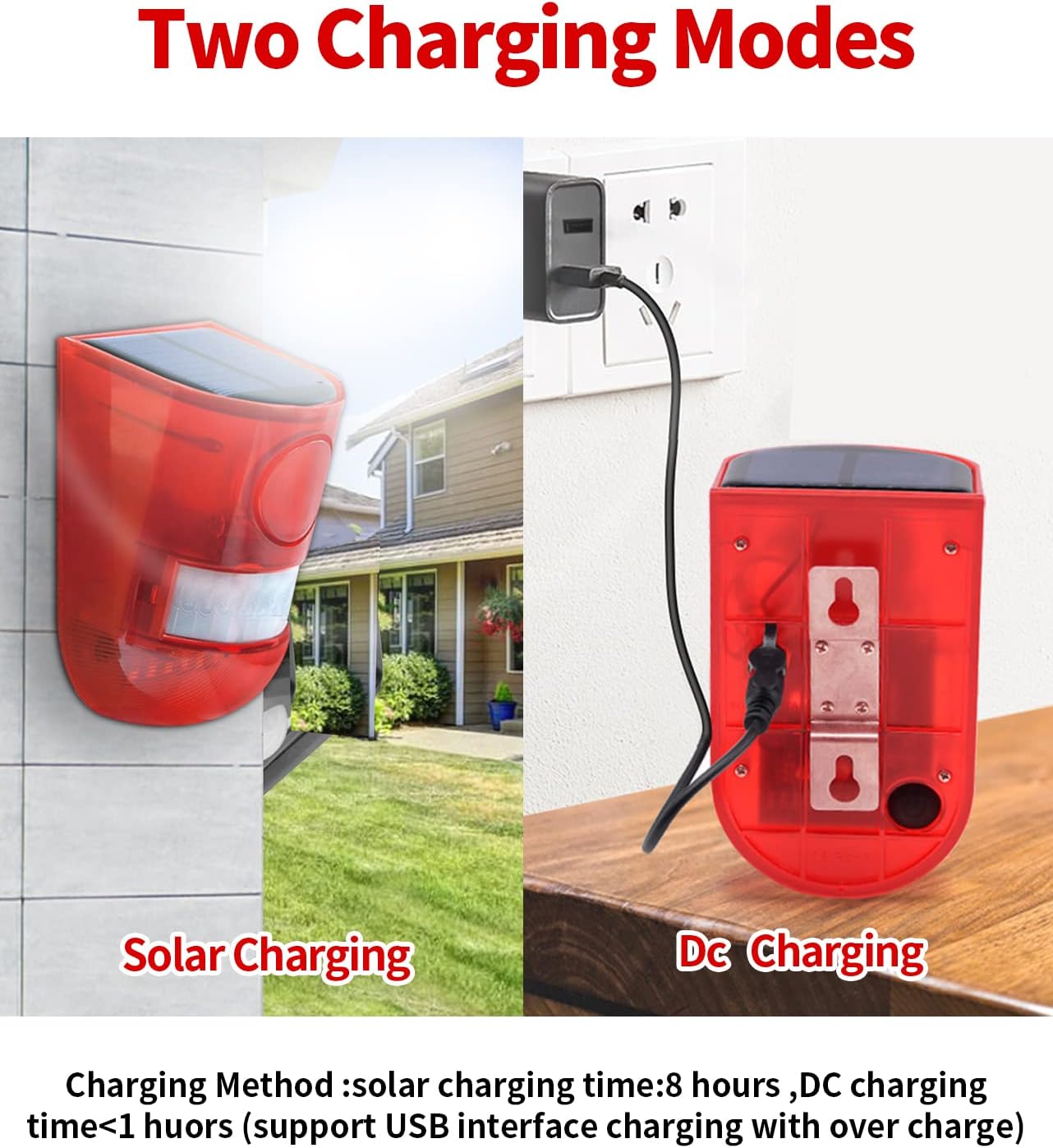
Figure 6: Illustration of the two charging methods: solar charging and DC USB charging.
6. Pangropéa
To ensure optimal performance and longevity of your ChunHee Solar Sound & Light Alarm, follow these maintenance guidelines:
- Panel surya bersih: Rutin ngusap panel surya ku lemes, damp cloth to remove dust, dirt, or debris that may obstruct sunlight and reduce charging efficiency.
- Pariksa Pamasangan: Periodically inspect the mounting screws and bracket to ensure the device remains securely attached.
- Kahirupan batré: The device uses a Lithium-Ion battery. While designed for long-term use, battery performance may degrade over time. Ensure regular charging to maintain battery health.
- Résistansi Cuaca: The device is IP65 waterproof and dustproof, designed to withstand outdoor conditions. However, avoid submerging it in water or exposing it to extreme temperatures beyond its operating range.
7. Cara ngungkulan
If you encounter issues with your ChunHee Solar Sound & Light Alarm, refer to the following common problems and solutions:
| Masalah | Mungkin Cukang lantaranana | Solusi |
|---|---|---|
| Alarm not activating. | Low battery, incorrect mode selected, motion sensor obstructed. | Charge the device fully. Ensure the correct operating mode is selected. Clear any obstructions from the motion sensor. |
| Siren is too loud/quiet (no volume control). | The device has a fixed siren volume (129dB). | Consider placement further from residential areas if noise is an issue, or use flash-only modes. |
| Alarm palsu. | Movement from trees/foliage, small animals, or strong winds. | Adjust the mounting angle or location to minimize detection of non-threats. Consider using night-only modes if daytime false alarms are frequent. |
| Device not charging via solar. | Insufficient sunlight, dirty solar panel. | Relocate the device to an area with more direct sunlight. Clean the solar panel. Use USB charging as an alternative. |
Video 2: A short video demonstrating the motion detection and alarm activation of the ChunHee Solar Alarm.
8. Spésifikasi
| Fitur | Rincian |
|---|---|
| Nomer modél | SL02-3 |
| merek | ChunHee |
| Sumber Daya | Solar Powered |
| Jenis Batré | Lithium-Ion (3 AAA batteries required, included) |
| Voltage | 5 Volt (DC) |
| Tingkat Noise | 129 desibel |
| Rentang Sénsor gerak | 5-8 Méter |
| Sudut Sensing | 125 darajat |
| Métode kontrol | Touch (button) |
| Tipe Pamasangan | Screw-In (Wall-Mounted) |
| Bahan | Sturdy made & corrosion-resistant plastic (ABS) |
| Dimensi produk | 3.94 x 4.72 x 3.94 inci (10 x 12 x 10 cm) |
| Item Beurat | 1.15 pon |
| Pamakéan | Jero rohangan / Luar |
| Peunteun waterproof | IP65 |
9. Garansi jeung Rojongan
The ChunHee Solar Sound & Light Alarm comes with a garansi 1 taun ti tanggal beuli.
For technical support, warranty claims, or any questions regarding your product, please contact ChunHee customer service through the retailer where the product was purchased or visit the official ChunHee store page on Amazon: ChunHee Store.


