Produk Leuwihview
The Amoper 30X Coin Magnifier is a portable, rechargeable metal eye loupe designed for detailed observation of various items such as coins, currency, stamps, textiles, optical components, and jewelry. It features a 30x magnification lens, built-in white LED lights, and UV lights for enhanced visibility and specialized inspection.

Image: The Amoper 30X Coin Magnifier, showing its compact design and the included USB charging cables.
Fitur konci
- 30X ngagedekeun: Provides clear and detailed views of small objects.
- Batré anu tiasa dicas deui: Equipped with a built-in lithium battery and micro USB charging cable for extended use without needing to purchase disposable batteries.
- Durable Metal Material: Constructed from solid zinc alloy with a black paint finish for durability.
- Panjang Fokus Tetep: Designed for optimal clarity without manual adjustment, simply place the object on the scaled base.
- Modeu Pencahayaan Ganda: Features 3 white LED lights for general magnification and 3 UV lights for currency detection or other specialized uses.
- Skala Terpadu: The base includes a scaled measurement for assessing object size (0.5mm and 1/16 inch markings).
- Desain portabel: Compact size (2.3 x 2.1 x 2.0 inches) and lightweight (5.82 oz) for easy carrying.
- Kasus pelindung: Comes with a soft artificial leather case to protect the lens during transport and storage.

Image: Visual representation of the magnifier's construction, emphasizing its zinc alloy body, optical glass lens, LED lighting, and integrated scale.
Disetél
Ngecas Alat
Before first use, ensure the magnifier is fully charged. The device is equipped with a rechargeable lithium battery.
- Locate the micro USB charging port on the side of the magnifier.
- Connect the provided micro USB charging cable to the magnifier's port.
- Sambungkeun tungtung kabel USB anu sanésna kana sumber daya USB anu cocog (contona, port USB komputer, adaptor témbok USB).
- A red indicator light will illuminate during charging. The light will turn off or change color (if applicable) when charging is complete.
- A full charge typically provides up to eight hours of continuous use.
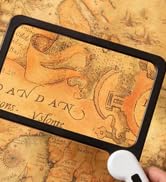
Image: The magnifier connected to a charging cable, with the red charging indicator light visible.
Parentah Operasi
Ngagunakeun Magnifier
The Amoper 30X Coin Magnifier is designed for ease of use with a fixed focal length, eliminating the need for manual focus adjustment.
- Place the magnifier directly onto a flat surface.
- Position the object you wish to examine in the center of the scaled base, directly beneath the lens.
- Look through the top lens to view the magnified details of the object.
- To measure the object, align it with the 0.5mm or 1/16 inch markings on the base.

Image: The magnifier with its dimensions labeled, indicating the 1-inch lens diameter and the location of the light switch.

Image: The magnifier in use, placed over various currencies and coins to demonstrate its application for detailed inspection.
Ngoperasikeun Lampu
The magnifier features a soft silicone button to control the built-in lights.
- Press the soft silicone button once to turn on the 3 white LED lights. These lights provide bright illumination for general magnified observation.
- Press the button a second time to switch to the 3 UV lights. These are useful for detecting security features on currency, stamps, or other items.
- Press the button a third time to turn off all lights.

Image: A hand holding the magnifier, demonstrating the bright LED lights illuminating a small flower, highlighting its use for delicate items.

Image: The magnifier with its UV light activated, casting a purple glow, suitable for checking security features.
Pangropéa
- Ngabersihan lensa: Use a soft, lint-free cloth specifically designed for optical lenses to gently wipe the glass lens. Avoid abrasive materials or harsh chemicals that could scratch or damage the lens coating.
- Ngabersihan awak: The zinc alloy body can be wiped clean with a soft, damp cloth. Ensure the device is dry before storage.
- Panyimpenan: When not in use, store the magnifier in its provided soft artificial leather case to protect it from dust, scratches, and impacts. Store in a cool, dry place away from direct sunlight and extreme temperatures.
- Perawatan batré: Pikeun manjangkeun umur batré, ulah sering ngosongkeun batréna. Cas deui alat sacara rutin, sanaos henteu dianggo terus-terusan.
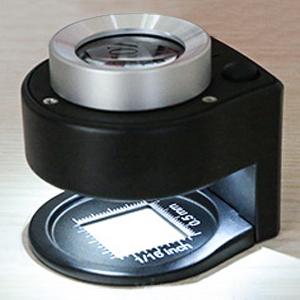
Image: The Amoper 30X Coin Magnifier alongside its soft artificial leather protective case.
Pamérésan masalah
- Lampu teu hurung:
- Ensure the battery is charged. Connect the magnifier to a power source using the USB cable and check if the charging indicator light illuminates.
- Press the power button firmly. Try pressing it multiple times to cycle through the white, UV, and off modes.
- Gambar katingalina burem:
- Ensure the object is placed directly on the scaled base, in direct contact with the magnifier's bottom surface. The magnifier has a fixed focal length and requires the object to be at a specific distance.
- Clean the lens using a soft, lint-free optical cleaning cloth. Dust or smudges on the lens can impair clarity.
- hirup batré pondok:
- Pastikeun alat tos dicas pinuh sateuacan dianggo.
- Avoid leaving the lights on unnecessarily.
- Battery performance may decrease over time with prolonged use, which is normal for rechargeable batteries.
spésifikasi
| Atribut | Rincian |
|---|---|
| merek | Amoper |
| Nomer modél | MCSP50 |
| Kakuatan Magnification | 30x |
| Bahan Lensa | Kaca |
| Bahan cecekelan | Logam (Paduan Séng) |
| Warna | Hideung |
| Dimensi produk | 2 "L x 2.3" W |
| Item Beurat | 7.1 ons (200 gram) |
| Jenis Batré | 1 batré Lithium Ion (kaasup, tiasa dicas deui) |
Garansi sareng Rojongan
For information regarding warranty coverage, technical support, or customer service for your Amoper 30X Coin Magnifier, please refer to the product packaging or contact Amoper customer support directly. Specific warranty details are not provided in this manual.
You may also visit the official Amoper store on Amazon for more information: Amoper Store