Bubuka
This manual provides detailed instructions for the safe and efficient operation, maintenance, and troubleshooting of your BE COOL Air Cooler, Model BCP5AC2101F. Please read this manual thoroughly before using the appliance and keep it for future reference.
Parentah Kasalametan penting
- Salawasna pastikeun alat ieu disimpen dina permukaan anu stabil sareng rata.
- Ulah neuleumkeun alat, ari, atawa nyolok kana cai atawa cairan séjén.
- Unplug the appliance from the power outlet before cleaning, filling, or performing any maintenance.
- Jauhkeun alat tina jangkauan barudak sareng piaraan.
- Ulah meungpeuk inlets hawa atawa outlet. Pastikeun ventilasi nyukupan di sabudeureun unit.
- Anggo ngan ukur cai ledeng anu bersih dina tangki cai. Ulah nambahkeun bahan kimia atanapi aditif naon waé.
- Upami kabel listrik ruksak, éta kedah digentos ku produsén, agén jasa, atanapi jalma anu mumpuni anu sami pikeun nyegah bahaya.
- Perkakas ieu kanggo panggunaan rumah tangga di jero rohangan wungkul.
Produk Leuwihview
Familiarize yourself with the components of your BE COOL Air Cooler.

Gambar 1: Hareupeun view of the BE COOL Air Cooler, showing the main fan grille, water level indicator, and "BE COOL" logo.

Figure 2: Top control panel with buttons for Timer, Cool, Speed, and On/Off, along with indicator lights.

Figure 3: Diagram illustrating key features: integrated dust filter, timer function, and remote control operation.
Disetél
1. Ngabongkar bungkusan
Carefully remove the air cooler from its packaging. Retain the packaging for future storage or transport.
2. Ngapasangkeun Roda
The appliance comes with 4 castor wheels for easy mobility. Insert each wheel into the designated slots at the bottom of the unit until they click securely into place.
3. Ngeusian Tangki Cai
The BE COOL Air Cooler features a 5-liter water tank. For cooling and humidifying functions, the tank must be filled with water.
- Pastikeun alat dicabut tina colokan listrik.
- Locate the water tank opening, typically at the bottom rear or side of the unit.
- Carefully pour clean tap water into the tank. Do not exceed the "MAX" fill line indicated on the water level indicator.
- For enhanced cooling, you may add ice packs (not included) to the water tank if available.
- Close the water tank opening securely.
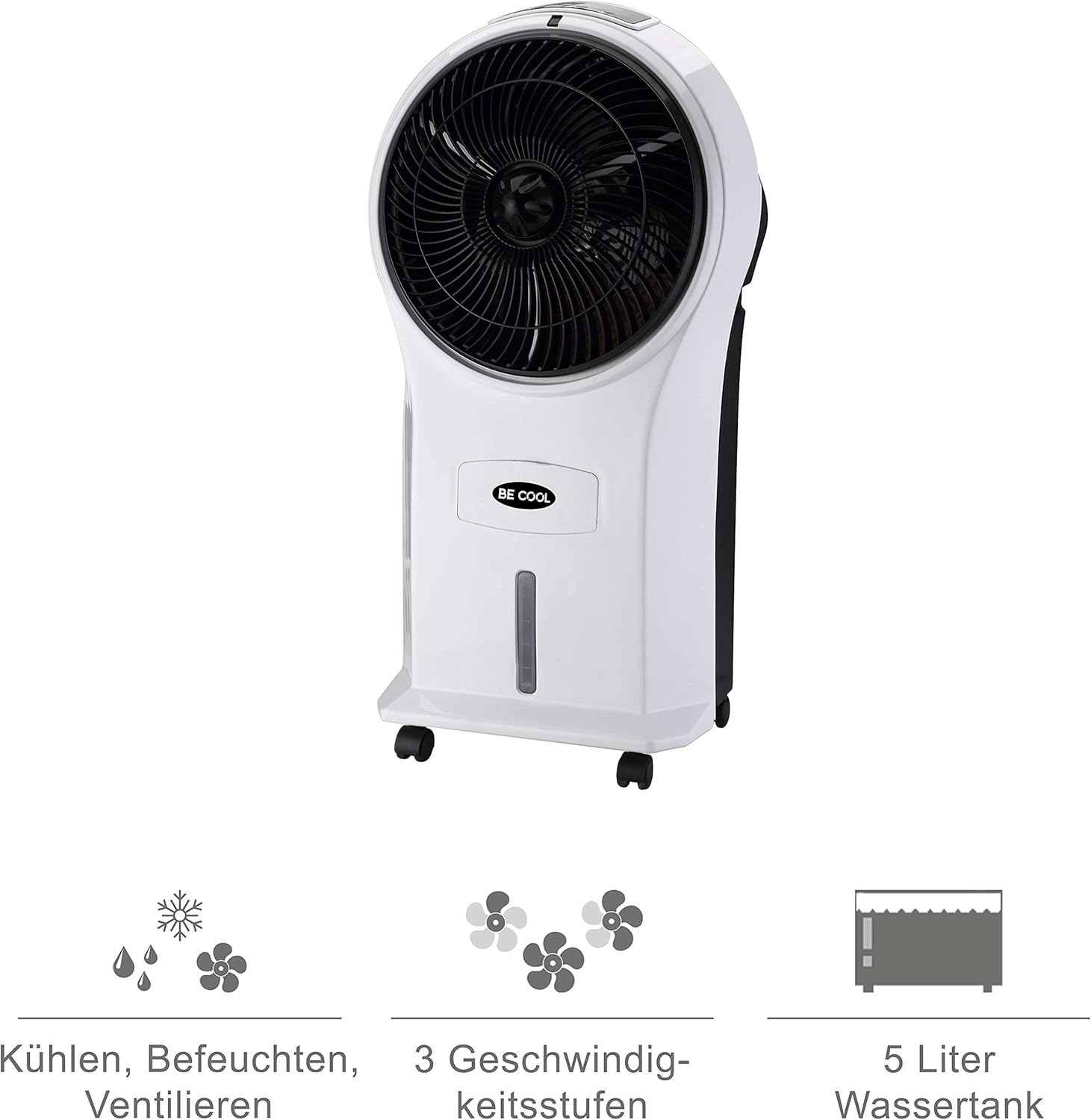
Figure 4: Visual representation of the 3-in-1 functions (cooling, humidifying, ventilating), 3 speed levels, and the 5-liter water tank capacity.
Parentah Operasi
1. Daya Hurung / Pareum
Colokkeun kabel listrik kana stop kontak anu cocog. Pencét Hurung/Pareuman tombol dina panel kontrol atawa kadali jauh pikeun ngahurungkeun atawa mareuman unit.
2. Nyaluyukeun Fan Speed
Pencét éta Laju button repeatedly to cycle through the three available fan speeds: Low, Medium, and High. The corresponding indicator light will illuminate.
3. Cooling and Humidifying Function
To activate the cooling and humidifying function, ensure the water tank is filled. Press the Tiis button. The unit will begin to draw water from the tank to cool and humidify the air. This function can reduce room temperature by up to 8°C.
4. Fungsi Timer
The air cooler features a 7-hour timer. Press the Timer button repeatedly to set the desired operating time in increments (e.g., 1 hour, 2 hours, 4 hours, up to 7 hours). The unit will automatically turn off once the set time has elapsed.
5. Pamakéan Remote Control
The included remote control allows for convenient operation from a distance. Ensure the remote control has batteries installed (batteries not included). Point the remote control towards the front of the air cooler when operating.
6. Air Purification
The integrated filter helps to purify the air by trapping dust, pollen, mites, bacteria, and unpleasant odors, contributing to a cleaner indoor environment.

Figure 5: The BE COOL Air Cooler positioned in a bedroom, demonstrating its compact size and portability.

Figure 6: The BE COOL Air Cooler in an office environment, highlighting its suitability for various indoor spaces.
Pangropéa
Pangropéa rutin mastikeun kinerja anu optimal sareng umur panjang pendingin hawa anjeun.
1. Ngabersihan Saringan Udara
The air filter should be cleaned regularly, especially if the unit is used frequently or in dusty environments.
- Cabut colokan alat tina stop kontak listrik.
- Locate and remove the air filter, usually found at the back of the unit.
- Gently clean the filter with a soft brush or vacuum cleaner to remove dust. For deeper cleaning, rinse with lukewarm water and mild detergent.
- Ngidinan saringan ka hawa garing lengkep sateuacan nyelapkeun deui kana unit.
2. Ngabersihan Tangki Cai
To prevent mold and mildew growth, clean the water tank weekly or as needed.
- Unplug the appliance and empty any remaining water from the tank.
- Ngusap bagian jero bak ku kaén anu lembut dampdikumbah ku solusi detergent hampang.
- Rinse the tank thoroughly with clean water to remove any detergent residue.
- Keunkeun tanki nepi ka garing sagemblengna sateuacan ngeusian deui atanapi nyimpen unitna.
3. Beberesih éksternal
Ngusap bagian luar unit kalayan lemes, damp lawon. Ulah make cleaners abrasive atawa pangleyur.
4. Panyimpenan
If storing the air cooler for an extended period, ensure the water tank is empty and clean, and the unit is dry. Store it in a cool, dry place, preferably in its original packaging.
Pamérésan masalah
Tingali kana bagian ieu pikeun masalah umum sareng solusina.
| Masalah | Mungkin Cukang lantaranana | Solusi |
|---|---|---|
| Unit teu hurung. | Taya catu daya; Tombol daya teu dipencet. | Check if the power cord is securely plugged in. Press the On/Off button. |
| Taya pangaruh cooling. | Water tank empty; Cool function not activated. | Fill the water tank. Press the Cool button. |
| Aliran hawa lemah. | Air filter clogged; Fan speed set too low. | Clean the air filter. Increase the fan speed. |
| Bau anu teu pikaresepeun. | StagCai dina tangki kosong; Saringan kotor. | Empty and clean the water tank. Clean or replace the air filter. |
| Kadali jauh teu jalan. | Batré pareum atanapi teu dipasang kalayan leres; Halangan antara remot sareng unit. | Replace batteries. Ensure no obstructions and point directly at the unit. |
spésifikasi
- model: BCP5AC2101F
- Tipe: 3-in-1 Evaporative Air Cooler (Cooler, Humidifier, Fan)
- Konsumsi Daya: 45 Watt
- Kapasitas Aliran Udara: 17.5 cubic meters per minute (1050 m³/h)
- Kapasitas Tangki Cai: 5 liter
- Laju kipas: 3 (Henteu, Sedeng, Luhur)
- Timer: Nepi ka 7 jam
- Tipe Kontrol: Remote Control, Manual Buttons
- Ukuran (L x W x H): 31.5 x 27 x 61 cm (12.4 x 10.6 x 24 inci)
- beurat: 2.9 Kilogram (6.4 lbs)
- warna: Bodas/Hideung
- Komponén Kaasup: Main unit, Remote control, 4 Castor wheels
Garansi sareng Rojongan
For warranty information or technical support, please refer to the warranty card included with your purchase or contact Be Cool customer service. Keep your proof of purchase for warranty claims.
For further assistance, you may visit the official Be Cool store on Amazon: Be Cool Store


