1. Parentah Kasalametan
Please read all instructions carefully before operating the dehumidifier and retain this manual for future reference. Failure to follow these instructions may result in electric shock, fire, or personal injury.
- Pastikeun catu daya cocog sareng voltage dieusian dina labél rating.
- Ulah ngoperasikeun unit ieu nganggo kabel atanapi colokan anu ruksak. Upami kabel suplaina ruksak, éta kedah digentos ku produsén, agén layananna, atanapi jalmi anu mumpuni pikeun nyingkahan bahaya.
- Do not block the air inlet or outlet. Maintain at least 20 cm clearance around the unit.
- Ulah nyelapkeun ramo atawa objék asing kana inlet / outlet hawa.
- Always place the unit on a level, stable surface to prevent water spillage.
- Unplug the unit before cleaning, moving, or performing any maintenance.
- Do not use the unit in areas where flammable gases or liquids are stored.
- Alat ieu henteu dimaksudkeun pikeun dianggo ku jalma (kalebet murangkalih) anu ngirangan kamampuan fisik, indrawi atanapi mental, atanapi kirang pangalaman sareng pangaweruh, kecuali aranjeunna dipasihan pangawasan atanapi petunjuk ngeunaan panggunaan alat ku jalma anu tanggung jawab kana kasalametanana.
- Barudak kedah diawaskeun pikeun mastikeun yén aranjeunna henteu maén sareng alatna.
- The refrigerant R290 is used in this dehumidifier. Handle with care and ensure proper ventilation.
2. Produk Langkungview
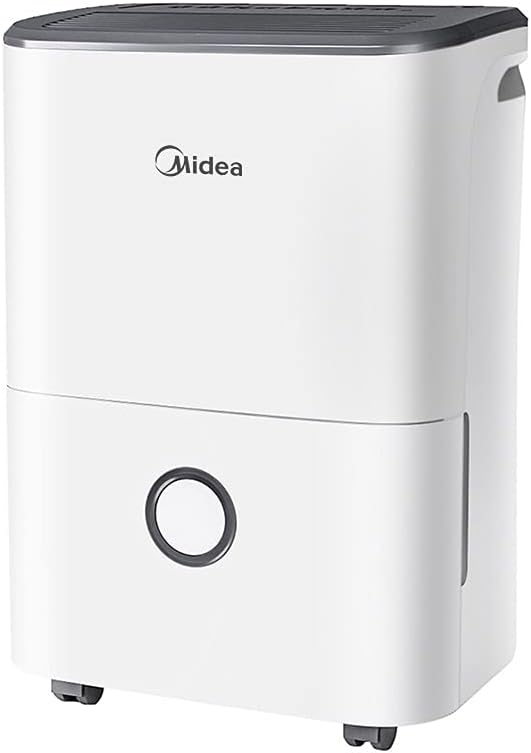
The Carrier Midea DF-20DEN7-WF is an efficient dehumidifier designed to reduce excess moisture in indoor environments, preventing issues such as condensation, mold growth, and musty odors. It is suitable for various rooms including bathrooms, cellars, laundry rooms, kitchens, and poorly ventilated areas.
Fitur konci:
- Kamampuh Dehumidification Tinggi: Up to 20 liters per 24 hours.
- App Capable: Remote monitoring and control via a smartphone application.
- Intelligent Dehumidifier Mode: Automatic humidity control between 45% and 55%.
- Desain portabel: Equipped with flexible wheels for easy movement.
- Environmentally Friendly Refrigerant: Uses R290, a natural, freon-free, and low-carbon refrigerant.
- Timer 24 Jam: Ngidinan pikeun operasi dijadwalkeun.
- Tangki cai anu tiasa dicabut: 3-liter capacity with anti-spill features.
Komponén produk:


3. Setélan
3.1 Ngabongkar bungkusan
- Sacara saksama piceun dehumidifier tina bungkusanna.
- Cabut sadaya bahan bungkus, pita, sareng pilem pelindung.
- Pariksa heula bisi aya karusakan nalika pangiriman. Upami ruksak, ulah dioperasikeun sareng hubungi layanan palanggan.
3.2 Nempatkeun
- Tempatkeun dehumidifier dina permukaan anu teuas sareng rata anu tiasa nahan beuratna nalika tangki cai pinuh.
- Ensure there is at least 20 cm (8 inches) of space around the unit for proper airflow. Do not place it against a wall or furniture that could obstruct the air inlets or outlets.
- Pikeun kinerja anu optimal, tutup sadaya panto sareng jandéla di rohangan tempat dehumidifier dianggo.
- Hindarkeun nempatkeun unit caket sumber panas atanapi dina sinar panonpoé langsung.
3.3 Wheel Installation (Optional)
The dehumidifier comes with flexible wheels for easy mobility. These can be attached or removed as desired.
- Taliti Dengdekkeun unit pikeun ngakses handap.
- Insert the wheels into the designated slots on the base of the unit until they click into place.
- Ensure all four wheels are securely attached before returning the unit to an upright position.
3.4 Sambungan Daya
- Colokkeun kabel listrik kana stop kontak listrik grounded.
- Do not use extension cords or multi-plugs, as this may pose a fire hazard.
3.5 App Setup (Optional)
The dehumidifier is app-capable, allowing for remote monitoring and control.
- Download the Midea app from your smartphone's app store (iOS or Android).
- Follow the in-app instructions to create an account and connect your dehumidifier to your home Wi-Fi network.
- Once connected, you can control the unit, set schedules, and monitor humidity levels from your smartphone.
4. Parentah Operasi
4.1 Powering on / Pareum
- To turn the unit on, press the Power button on the control panel. The unit will start operating in its default mode.
- To turn the unit off, press the Power button again.
4.2 Nyetel Tingkat Kalembaban anu Dihoyongkeun
The dehumidifier features an intelligent dehumidifier mode that automatically controls room humidity within a comfortable range.
- Press the 'Mode' or 'Humidity' button (refer to control panel icons) to cycle through available humidity settings or modes.
- The intelligent mode aims to maintain humidity between 45% and 55% depending on the room temperature.
- You may also be able to manually set a target humidity percentage using the '+' and '-' buttons.
4.3 Fungsi Timer
The 24-hour timer allows you to schedule when the unit turns on or off.
- To set Auto-On Timer: With the unit off, press the 'Timer' button. Use '+' and '-' to set the desired delay (in hours) before the unit turns on.
- To set Auto-Off Timer: With the unit on, press the 'Timer' button. Use '+' and '-' to set the desired delay (in hours) before the unit turns off.
- The timer indicator light will illuminate when the timer is active.
4.4 Manajemén tank cai
The dehumidifier will automatically stop operating when the 3-liter water tank is full. The 'Tank Full' indicator light will illuminate.
- Taliti tarik kaluar tank cai ti hareup unit.
- Kosongkeun cai anu dikumpulkeun kana tilelep atanapi solokan.
- Slide the empty water tank back into the unit until it is securely in place. The unit will resume operation automatically.
4.5 Drainase Kontinyu (Opsional)
For continuous operation without needing to empty the water tank, you can connect a drain hose (not included) to the continuous drainage port on the back of the unit. Ensure the hose is sloped downwards to allow gravity drainage.
5. Pangropéa
Pangropéa rutin ngajamin kinerja optimal sareng manjangkeun umur dehumidifier anjeun.
5.1 Ngabersihan Saringan Udara
Saringan hawa kedah dibersihkeun unggal dua minggu atanapi langkung sering gumantung kana panggunaan sareng kualitas hawa.
- Pareuman dehumidifier sareng cabut colokan tina stop kontak listrik.
- Locate the air filter (usually at the back or side of the unit). Remove it carefully.
- Clean the filter with a vacuum cleaner to remove dust and debris. For heavy dirt, wash it gently with warm, soapy water.
- Rinse the filter thoroughly and allow it to air dry completely before reinstalling. Do not expose to direct sunlight or high heat.
- Selapkeun deui saringan garing kana unit.
5.2 Ngabersihan Exterior
- Ngusap bagian luar unit kalayan lemes, damp lawon.
- Ulah make bahan kimia kasar, cleaners abrasive, atawa pangleyur, sabab ieu bisa ngaruksak beungeut cai.
5.3 beberesih tank cai
Ngabersihan tank cai périodik pikeun nyegah kapang jeung mildew tumuwuh.
- Cabut bak cai sareng kosongkeun cai anu sésana.
- Ngumbah tank jeung detergent hampang jeung cai haneut.
- Bilas sacara saksama sareng ngantepkeun hawa garing sateuacan disimpen deui kana unit.
5.4 Panyimpenan
Upami unit henteu dianggo kanggo waktos anu panjang:
- Kosong sareng bersihkeun bak cai.
- Ngabersihan saringan hawa.
- Cabut unit sareng coil kabel listrik kalayan rapih.
- Store the dehumidifier in an upright position in a cool, dry place, away from direct sunlight and extreme temperatures.
6. Cara ngungkulan
Sateuacan ngahubungan layanan palanggan, mangga tingal pituduh ngungkulan ieu di handap pikeun masalah umum.
| Masalah | Mungkin Cukang lantaranana | Solusi |
|---|---|---|
| Unit teu hurung. | Taya catu daya. Kabel listrik henteu dicolokkeun sacara aman. Water tank full or not properly installed. | Pariksa stop kontak listrik. Ensure power cord is firmly plugged in. Empty water tank and ensure it is correctly seated. |
| Dehumidifier henteu ngumpulkeun cai. | Suhu kamar rendah teuing. Saringan hawa mampet. Setélan kalembaban luhur teuing. Panto/jandéla dibuka. | Dehumidifiers operate best above 5°C (41°F). Ngabersihan saringan hawa. Turunkeun setélan kalembaban anu dipikahoyong. Tutup sadaya panto sareng jandéla. |
| Unit ribut. | Unit henteu dina permukaan anu rata. Saringan hawa mampet. Halangan kipas. | Tempatkeun unit dina permukaan anu rata sareng stabil. Ngabersihan saringan hawa. Check for any obstructions in the fan area. |
| Cai bocor tina unit. | Tangki cai henteu dipasang leres. Unit is tilted. Continuous drainage hose is blocked or improperly connected. | Reinstall water tank correctly. Ensure unit is on a level surface. Check and clear the drainage hose, ensure proper slope. |
7. Spésifikasi Téknis
| Fitur | Spésifikasi |
|---|---|
| Nomer modél | DF-20DEN7-WF |
| merek | Pamawa |
| Kapasitas Dehumidification | 20 Liter / 24 jam |
| Kapasitas Tangki Cai | 3 liter |
| Disarankeun Lantai Area | Nepi ka 40 Méter pasagi |
| Daya / Wattage | 440 watt |
| Voltage | 230V |
| Tingkat Noise | 46 desibel |
| Refrigerant | R290 |
| Ukuran produk (D x W x H) | 26D x 35W x 51H séntiméter |
| Item Beurat | 15.1 kg |
| Jumlah Speeds | 2 |
| Fitur husus | Anti-Spill, Removable Tank, App Capable, Auto Shutoff |
| Bahan | Logam, Plastik |
8. Garansi jeung Rojongan
This Carrier Midea dehumidifier is covered by a manufacturer's warranty. Please refer to the warranty card included with your purchase for specific terms, conditions, and duration of coverage.
Rojongan Palanggan:
For technical assistance, warranty claims, or service inquiries, please contact your local Carrier or Midea authorized service center. Ensure you have your model number (DF-20DEN7-WF) and proof of purchase available when contacting support.
You can also visit the official Carrier or Midea websitus kanggo sumber daya dukungan tambahan sareng inpormasi kontak.


