1. Bubuka
This manual provides essential information for the safe and efficient operation, maintenance, and troubleshooting of your GBC AutoFeed+ 230X Paper Shredder. Please read these instructions thoroughly before using the shredder and retain them for future reference.
2. Émbaran Kasalametan
Observe the following safety precautions to prevent injury or damage to the shredder:
- Jaga leungeun, buuk, jeung pakean anu leupas jauh tina liang asupna kertas.
- Jauhkeun barudak sareng piaraan tina mesin penghancur.
- Ulah nyemprotkeun aerosol atawa pelumas kana mesin penghancur.
- Cabut colokan mesin penghancur runtah sateuacan mindahkeun, ngabersihkeun, atanapi ngosongkeun tempat runtah.
- Do not shred metal objects, large paper clips, or non-approved materials.
- Pastikeun mesin penghancur disimpen dina permukaan anu stabil sareng rata.
3. Produk Langkungview
The GBC AutoFeed+ 230X is designed for efficient and secure document destruction in small office environments. It features both automatic and manual feed options.

Gambar: Hareupeun view of the GBC AutoFeed+ 230X Paper Shredder, showing the auto-feed tray and control panel.
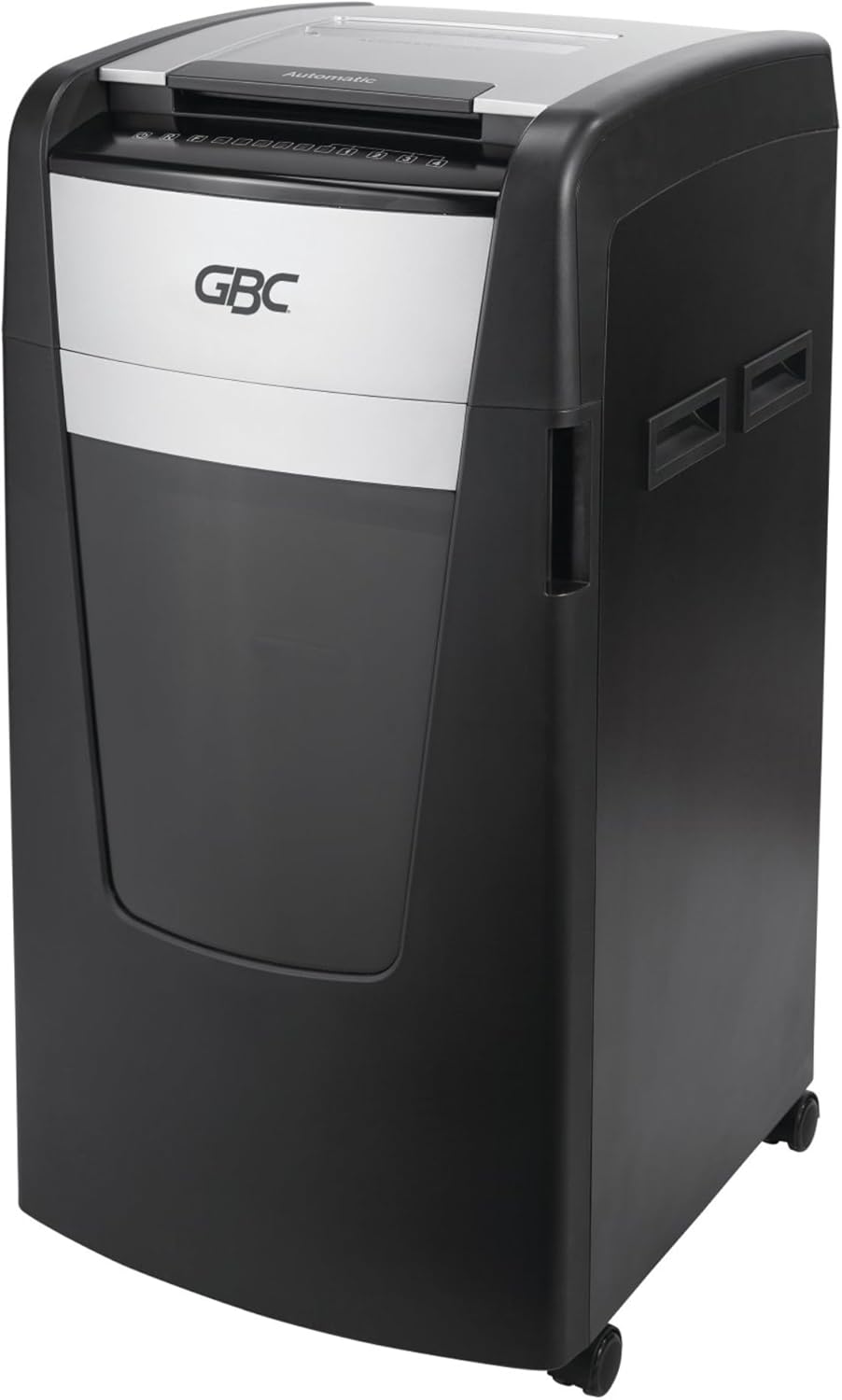
Gambar: Sisi view of the GBC AutoFeed+ 230X Paper Shredder, highlighting its compact design and casters for mobility.
4. Setélan
- Ngabongkar bungkusan: Carefully remove the shredder from its packaging. Retain packaging materials for potential future transport or service.
- panempatan: Position the shredder on a flat, stable surface. Ensure adequate space around the unit for ventilation and access to the waste bin. The shredder dimensions are approximately 19 x 17 x 29 inches.
- Tempat Sampah: Ensure the 16-gallon waste bin is correctly inserted into the shredder cabinet. The shredder will not operate if the bin is not properly seated.
- Sambungan Daya: Colokkeun kabel listrik kana stop kontak listrik standar.
- Daya Hurung: Locate the main power switch, typically on the back or side of the unit, and turn it to the 'ON' position.
5. Operasi
5.1 Auto-Feed Operation
The AutoFeed+ feature allows for hands-free shredding of multiple sheets.
- Buka panutup baki asupan otomatis.
- Stack up to 230 sheets of paper neatly into the auto-feed chamber. Ensure papers are flat and free of folds.
- Close the auto-feed tray cover. The shredder will automatically begin processing the documents.

Image: A person loading a stack of documents into the auto-feed tray of the GBC shredder, demonstrating the hands-free operation.

Image: A visual guide showing the three steps of auto-feed shredding: 'Stack' papers, 'Shut' the lid, and the machine 'Shreds' automatically.
5.2 Manual Feed Operation
For smaller quantities or specific items, use the manual feed slot.
- Insert up to 10 sheets of paper at a time into the manual feed slot.
- Credit cards must be manually inserted one at a time into the designated slot.

Image: A graphic comparing the AutoFeed method (up to 600 sheets, though this model is 230) and the Manual Feed method (up to 15 sheets, though this model is 10), highlighting the versatility of the shredder.
5.3 Shredding Capabilities
The GBC AutoFeed+ 230X can shred:
- Paper (up to 230 sheets auto-feed, 10 sheets manual feed)
- Klip kertas
- Staples
- Kartu kiridit (ngan ukur pikeun manual)
5.4 Tingkat Kaamanan
This shredder provides P-4 Level Security with a Super Cross-Cut style, creating small particles for enhanced data protection.
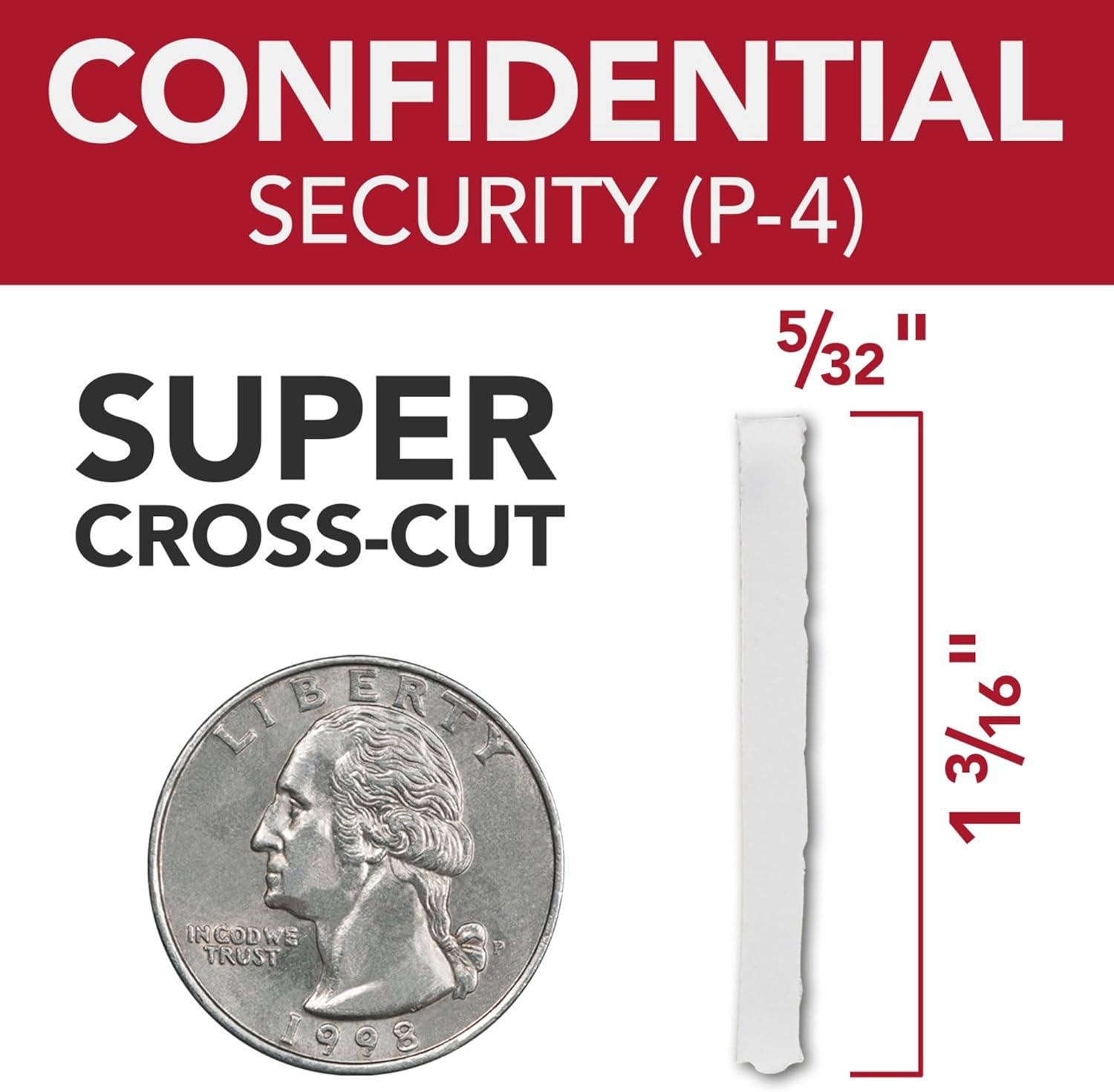
Image: A graphic illustrating the P-4 Super Cross-Cut shred size (5/32" x 1 3/16") next to a US quarter for scale, demonstrating the high level of security.
5.5 Continuous Run Time
The shredder features a 30-minute continuous run time, allowing for extended shredding sessions before requiring a cool-down period.

Image: An icon displaying '30 min Run Time', indicating the shredder's continuous operation capability.
5.6 Operasi Tenang
Designed with an ultra-quiet motor, this shredder minimizes noise disruption in office environments.

Image: An icon depicting a speaker with sound waves, labeled 'Quiet Shredding', highlighting the low noise level during operation.
6. Pangropéa
Pangropéa rutin mastikeun kinerja anu optimal sareng manjangkeun umur mesin shredder anjeun.
- Oiling: Apply shredder oil regularly to the cutting blades. Follow the instructions provided with your shredder oil for frequency and application method. This helps maintain cutting efficiency and prevents jams.
- Ngosongkeun Tempat Sampah: Empty the 16-gallon waste bin when the 'Bin Full' indicator illuminates. Overfilling can lead to jams and reduced performance.
- beberesih: Periodically clean the exterior of the shredder with a soft, dry cloth. Do not use abrasive cleaners or solvents.
- Pencegahan Macét: The shredder features auto forward and reverse functions to help prevent and clear minor jams. Avoid exceeding the sheet capacity.
7. Cara ngungkulan
Tingali tabel di handap pikeun masalah umum sareng solusina.
| Masalah | Mungkin Cukang lantaranana | Solusi |
|---|---|---|
| Shredder teu hurung. | No power, waste bin not seated, main switch off. | Check power cord, ensure bin is fully inserted, turn main switch ON. |
| Kertas macét. | Overfed paper, foreign object. | Use reverse function. If persistent, unplug, carefully remove paper. Do not force. |
| Shredder eureun nalika operasi. | Overheat protection, waste bin full. | Allow to cool down (approx. 30 minutes). Empty waste bin. |
| Reduced shredding performance. | Bilah-bilahna peryogi diminyakan. | Apply shredder oil as per maintenance instructions. |
8. Spésifikasi
| Fitur | Rincian |
|---|---|
| Nomer modél | WSM1757606 |
| merek | GBC |
| Tipe Parut | Super Cross-Cut |
| Tingkat Kaamanan | P-4 |
| Kapasitas Eupan Otomatis | Ngantos 230 lambar |
| Kapasitas Eupan Manual | Ngantos 10 lambar |
| Kapasitas Tong Sampah | 16 galon |
| Kontinyu Run Time | 30 menit |
| Item Beurat | 55.6 pon |
| Dimensi produk | 19 x 17 x 29 inci |
| Fitur husus | Operasi sepi |
9. Garansi jeung Rojongan
For warranty information, product support, or service inquiries, please refer to the official GBC websitus atanapi hubungi layanan palanggan GBC sacara langsung. Simpen resi pameseran anjeun salaku bukti pameseran.


