1. Bubuka
The AmScope LED-144W-ZK is a 144-LED intensity adjustable ring light designed for stereo microscopes and camera applications. This illuminator provides cool, even, intense, and focused shadow-free illumination, enhancing visibility for detailed work. It features variable intensity control and operates with a wide range of power supplies (100-240V).
2. Émbaran Kasalametan
- Ensure the power adapter is connected to a compatible power outlet (100-240V, 50-60Hz).
- Do not open the unit; there are no user-serviceable parts inside.
- Jauhkeun alat ieu tina cai atanapi kalembaban anu kaleuleuwihi.
- Avoid direct eye exposure to the LED light at maximum intensity.
- Unplug the power adapter before cleaning or moving the unit.
3. Eusi Paket
Pastikeun yén sadaya item aya dina bungkusan:
- 1x AmScope LED-144W-ZK 144 LED Ring Light
- 1x Power Adapter (100-240V)
- 1x 1-7/8" (48 mm) Ring Adapter
4. Produk Langkungview
The AmScope LED-144W-ZK ring light is designed for optimal illumination in microscopy. Key features include:
- 144 bright white LED bulbs for intense and focused shadow-free illumination.
- Adjustable intensity control for precise lighting adjustments.
- Wide power input compatibility: 100-240V, 50-60Hz with auto-switching.
- Color temperature of 6000K for natural daylight simulation.
- Designed with a 2.5" (62.5mm) inside diameter and 3.64" (92.5mm) overall outside diameter.
- Includes a 1-7/8" (48 mm) ring adapter for versatile mounting.

Figure 4.1: Complete AmScope LED-144W-ZK package contents, including the 144 LED ring light, power adapter, and a smaller ring adapter.
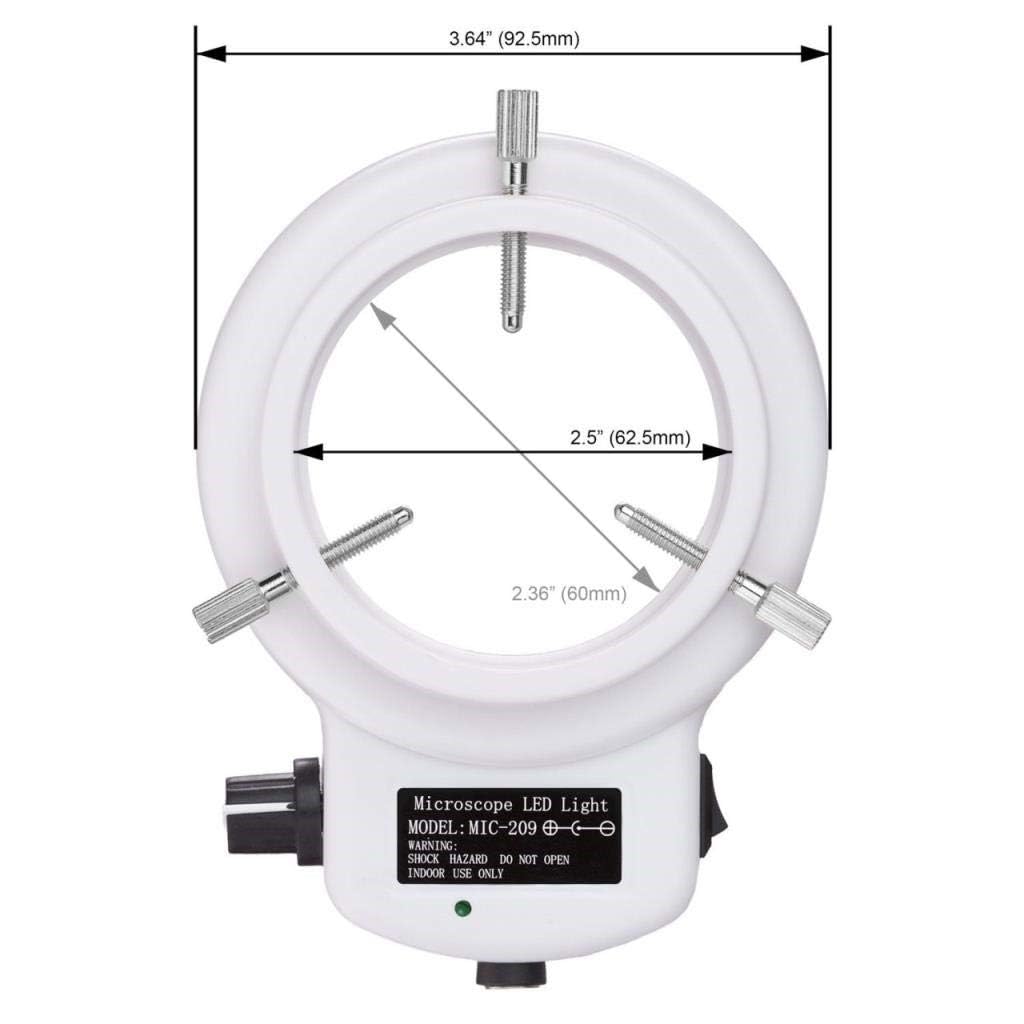
Gambar 4.2: Hareupeun view of the AmScope LED-144W-ZK ring light, illustrating its 2.5 inch (62.5mm) inner diameter and 3.64 inch (92.5mm) outer diameter.
5. Setélan
- Identipikasi Titik Pasang: Locate the appropriate mounting area on your stereo microscope. The ring light is designed to fit objectives with a diameter up to 2.5 inches (62.5mm). For smaller objectives, the included 1-7/8" (48 mm) ring adapter can be used.
- Pasangkeun Lampu Cincin:
- Loosen the three thumbscrews on the ring light.
- Carefully slide the ring light onto the microscope objective or the provided ring adapter, ensuring it is seated securely.
- Gently tighten the three thumbscrews to secure the ring light in place. Avoid over-tightening to prevent damage.

Gambar 5.1: Underside view of the AmScope LED-144W-ZK ring light, highlighting the three mounting screws and the 2.5 inch (62.5mm) mounting diameter.
- Sambungkeun Kakuatan: Plug the power adapter into the DC input port on the ring light. Then, plug the power adapter into a standard electrical outlet (100-240V).

Figure 5.2: An AmScope LED-144W-ZK ring light properly installed on a stereo microscope, demonstrating its typical application.
6. Parentah Operasi
- Hurungkeun/Pareuman: Locate the power switch on the side of the ring light. Flip the switch to the "ON" position to turn on the LEDs. Flip it to "OFF" to turn them off.
- Saluyukeun Caang: Use the rotary knob, typically located next to the power switch, to adjust the intensity of the LED illumination. Turn the knob clockwise to increase brightness and counter-clockwise to decrease it. Adjust the brightness to achieve optimal viewing conditions without glare.
7. Pangropéa
- beberesih: Ensure the unit is unplugged before cleaning. Use a soft, dry cloth to wipe the exterior of the ring light. Do not use liquid cleaners or abrasive materials, as these may damage the LEDs or housing.
- Panyimpenan: When not in use for extended periods, store the ring light in a clean, dry environment, protected from dust and extreme temperatures.
- Pamariksaan: Periodically inspect the power cord and adapter for any signs of damage. If damage is found, discontinue use and contact support.
8. Cara ngungkulan
| Masalah | Mungkin Cukang lantaranana | Solusi |
|---|---|---|
| No light from LEDs | Power adapter not connected or faulty. Power switch is off. | Ensure power adapter is securely plugged into both the ring light and a working electrical outlet. Turn the power switch to the "ON" position. Test the outlet with another device. |
| Uneven or dim illumination | Brightness knob set too low. LEDs are dirty. | Rotate the brightness knob clockwise to increase intensity. Gently clean the LED surface with a soft, dry cloth. |
| Ring light is loose on microscope | Mounting screws are not tightened. Incorrect adapter used. | Gently tighten the three thumbscrews on the ring light. Ensure the correct ring adapter (if needed) is used and properly seated. |
9. Spésifikasi
| Modél | LED-144W-ZK |
| Sumber Cahaya | 144 bohlam LED |
| Suhu Warna | 6000K |
| Input kakuatan | 100-240V, 50-60Hz (Auto-switching) |
| Diaméterna jero | 2.5" (62.5 mm) |
| Overall Outside Diameter | 3.64" (92.5 mm) |
| Ring Adapter Diameter | 1-7/8" (48 mm) |
| Bahan | palastik |
| Warna | Bodas |
| Item Beurat | 0.01 ons |
| Dimensi produk | 7.09 x 5.79 x 2.13 inci |
| Alat nu cocog | Stereo Microscopes, Cameras |
10. Garansi jeung Rojongan
Garansi: This AmScope LED-144W-ZK ring light comes with a one-year warranty against manufacturing defects.
Rojongan: For further assistance, technical support, or warranty claims, please visit the official AmScope Store or refer to the comprehensive user manual available in PDF format.


