1. Bubuka
Thank you for choosing the CREATE WINDCALM M Ceiling Fan. This manual provides essential information for the safe installation, operation, and maintenance of your new ceiling fan. Please read this manual thoroughly before installation and keep it for future reference.

Image 1.1: The CREATE WINDCALM M Ceiling Fan, showcasing its sleek design, accompanying remote control, and the smartphone app interface for smart control.
2. Parentah Kasalametan
Salawasna turutan tindakan pencegahan kaamanan dasar nalika masang sareng ngoperasikeun alat listrik pikeun ngirangan résiko kahuruan, sengatan listrik, sareng cilaka pribadi.
- Pastikeun catu daya dipegatkeun samemeh dipasang atawa diropéa.
- Pamasangan kedah dilakukeun ku tukang listrik anu mumpuni atanapi jalmi anu kompeten.
- The mounting structure must be capable of supporting the fan's weight.
- Ulah nyelapkeun objék kana bilah kipas bari kipas beroperasi.
- Jauhkeun barudak sareng piaraan tina kipas nalika operasi.
- This fan is suitable for indoor and outdoor covered areas.
3. Eusi Paket
Carefully unpack all components and check against the list below. If any items are missing or damaged, contact customer support immediately.
- Unit Motor Kipas Langit-langit
- Kipas Angin (3x)
- Ningkatna Kurung
- Kadali jauh
- Mounting Hardware (screws, anchors, washers)
- Instruksi Manual
4. Setup jeung Instalasi
Turutan léngkah ieu pikeun instalasi anu leres. Pamasangan profésional disarankeun.
- Nyiapkeun Lokasi Pasang: Ensure the ceiling joist or support structure can hold the fan's weight (approximately 6.22 kg).
- Pasang Bracket Pemasangan: Secure the mounting bracket to the ceiling using the provided screws and anchors. Ensure it is firmly attached.
- Wiring: Connect the fan's electrical wires to your household wiring according to local electrical codes. The fan operates on 240 Volts. Ensure correct connection of Live (L), Neutral (N), and Ground (Earth) wires.
- Pasangkeun Unit Kipas: Carefully lift the fan motor unit and attach it to the mounting bracket. Many models include a hook to temporarily hang the fan while wiring.
- Pasang Bilah Kipas: Attach the three fan blades to the motor unit using the provided screws. Ensure all screws are tightened securely.

Gambar 4.1: Detil view of the fan's central unit, showing the robust construction and points for blade attachment.

Image 4.2: The ceiling fan seamlessly integrated into a room, demonstrating its aesthetic appeal and compact design.
5. Operasi
Your CREATE WINDCALM M Ceiling Fan can be controlled via the included remote control or the CREATE mobile application (for Wi-Fi enabled models).
5.1. Fungsi Jauh Jauh
- Hurungkeun/Pareuman: Ngahurungkeun atanapi mareuman kipas.
- Kontrol laju: Adjusts fan speed through 6 settings.
- Timer: Setel kipas pikeun mareuman otomatis saatos 1, 2, atanapi 4 jam.
- Modeu usum panas/usum tiis: Ngarobah arah rotasi sabeulah.
5.2. Summer/Winter Operation
The fan features a reversible motor for year-round comfort.
- Modeu Usum Panas (Rotasi Saarah Jarum Jam): Pushes cool air downwards, creating a refreshing breeze. This mode helps to cool the room by circulating air.
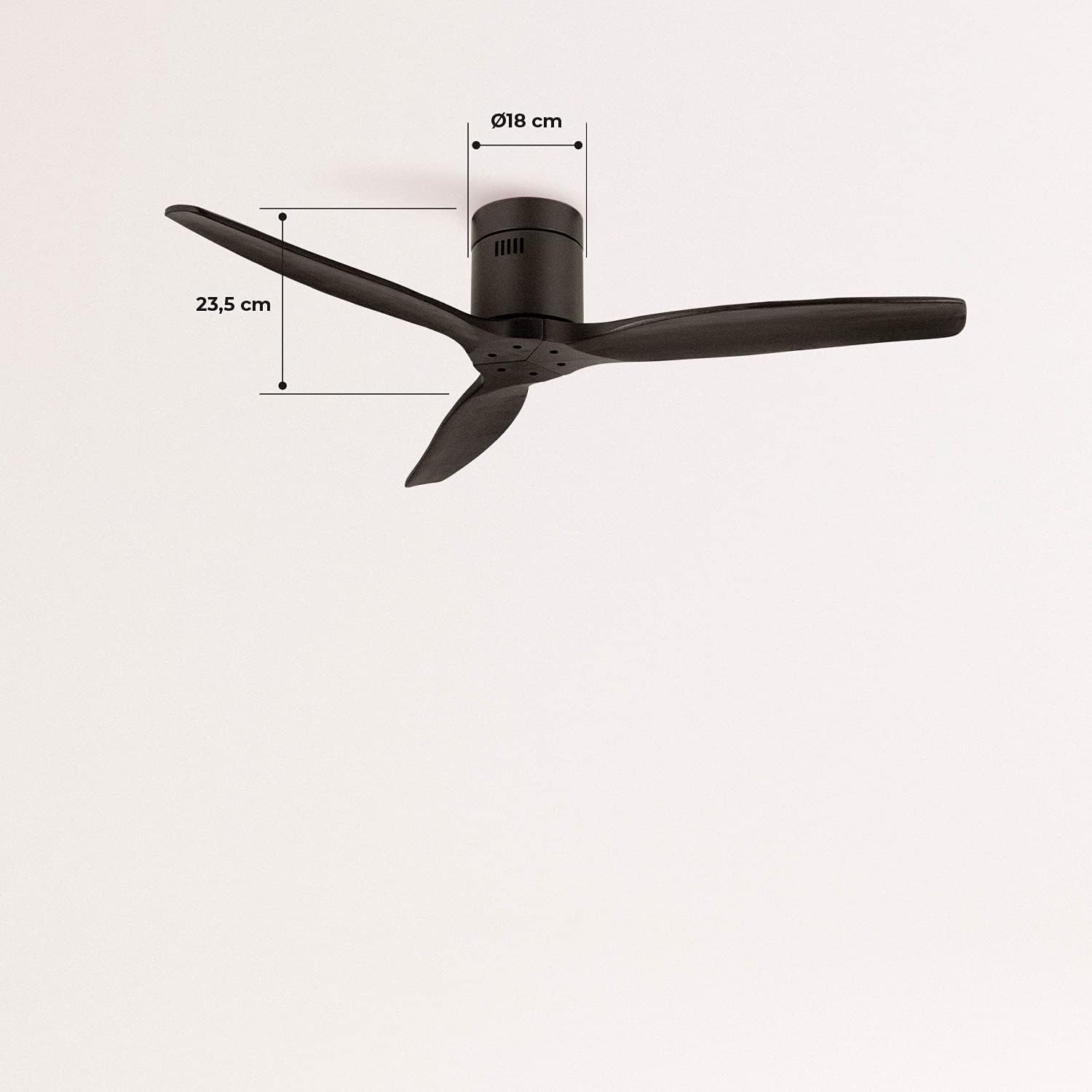
Image 5.1: Visual representation of the fan's airflow in Summer Mode, where cool air is directed downwards.
- Modeu Usum (Rotasi Searah Jarum Jam): Draws cool air upwards, circulating warm air trapped near the ceiling downwards. This helps to distribute heat more evenly, reducing heating costs.

Image 5.2: Visual representation of the fan's airflow in Winter Mode, where warm air is recirculated from the ceiling.
5.3. Wi-Fi and App Control (Smart Option)
If your model includes the Wi-Fi option, download the CREATE app to control and program your fan from your smartphone. Follow the in-app instructions for pairing your device.
6. Pangropéa
Pangropéa rutin ngajamin kinerja optimal sareng umur panjang kipas anjeun.
- beberesih: Debu bilah kipas sareng perumahan motor sacara teratur kalayan lembut, damp lawon. Ulah make cleaners abrasive atawa pangleyur.
- Inspeksi sabeulah: Périodik pariksa yen sakabeh screws sabeulah kedap. bilah leupas bisa ngabalukarkeun wobbling jeung noise.
- Pelumasan Motor: The fan's DC motor is permanently lubricated and does not require additional oiling.
7. Cara ngungkulan
Upami anjeun mendakan masalah sareng kipas anjeun, tingali masalah sareng solusi umum ieu:
| Masalah | Mungkin Cukang lantaranana | Solusi |
|---|---|---|
| Kipas angin teu hurung | No power supply; Remote control battery low; Incorrect wiring. | Pariksa pemutus sirkuit; Ganti batré jarak jauh; Pariksa sambungan kabel. |
| Kipas angin ngagelebug | screws sabeulah leupas; wilah henteu saimbang; bracket dipasang leupas. | Tighten all blade screws; Ensure blades are correctly installed; Check mounting bracket for secure attachment. |
| Sora kaleuleuwihi | Komponen leupas; Masalah motor. | Check all screws and connections; If noise persists, contact customer support. |
| Kadali jauh teu jalan | Batré lemah/pareum; Remot teu dipasangkeun. | Replace battery; Refer to remote pairing instructions in the full manual (if applicable). |
| Masalah konektipitas Wi-Fi | Incorrect network password; Router too far; App issues. | Verify Wi-Fi password; Move router closer or use a Wi-Fi extender; Reinstall app or check for updates. |
8. Spésifikasi
| Fitur | Spésifikasi |
|---|---|
| merek | NYIPTA |
| Nomer modél | 93531_182750 |
| Warna | Hideung |
| Gaya | Tanpa Cahaya |
| Sumber Daya | Kabel Listrik |
| Voltage | 240 volt |
| Wattage | 40 Watt |
| Tiupan hawa | 210 Cubic meters per minute |
| Tingkat Noise | 50 dB |
| Panjang sabeulah | 66 séntiméter |
| diaméterna | 132 séntiméter |
| Dimensi produk | 132D x 132W x 23.5H cm |
| Item Beurat | 6.22 kg |
| Fitur husus | Enteng |

Image 8.1: Key dimensions of the fan, including its 132 cm diameter and 66 cm blade length.

Image 8.2: Additional dimensions, highlighting the fan's height of 23.5 cm and the 18 cm diameter of the motor housing.
9. Garansi jeung Rojongan
Your CREATE WINDCALM M Ceiling Fan comes with a standard warranty. For specific warranty terms and conditions, please refer to the documentation included with your purchase or visit the official CREATE website. In case of any issues or for technical support, please contact CREATE customer service. The seller, CREATE, offers support and assistance for product-related inquiries.


