Bubuka
This manual provides detailed instructions for the Google Pixel Buds A-Series wireless earbuds. These earbuds are designed to deliver high-quality audio and feature a comfortable, secure fit with multiple eartip sizes and a stabilizer arc. They are compatible with Android, iOS, and other Bluetooth 4.0+ devices.
Naon dina Box
- Google Pixel Buds A-Series Earbuds
- Ngecas Case
- Kabel Ngecas USB-C
- Eartips (Leutik, Sedeng, Gedé)
- Pituduh Mimitian Gancang (henteu kalebet dina manual digital ieu)

Image: Google Pixel Buds A-Series earbuds securely placed within their white charging case, which is open to reveal the earbuds.
Disetél
1. Papasangan awal
For Android Devices (One-Tap Pairing):
- Ensure your Android device is unlocked and has Bluetooth enabled.
- Open the charging case of your Pixel Buds A-Series next to your Android device.
- A pairing notification will appear on your device's screen. Tap to connect.
- Follow any on-screen prompts to complete the setup, including installing the Pixel Buds app for additional features.
For iOS and Other Bluetooth 4.0+ Devices:
- With the earbuds in the charging case, open the lid.
- Press and hold the pairing button on the back of the charging case until the status light begins to pulse white.
- On your device, navigate to Bluetooth settings and select "Pixel Buds A-Series" from the list of available devices.
- Pastikeun pasangan dina alat anjeun.
2. Ngahontal Pas anu Aman
The Pixel Buds A-Series come with three sizes of eartips (small, medium, large) and a flexible stabilizer arc to ensure a comfortable and secure fit.
- Experiment with different eartip sizes to find the best seal for your ears. A good seal is crucial for optimal sound quality and bass response.
- Gently insert each earbud into your ear, rotating slightly until the stabilizer arc tucks comfortably into your ear's concha.

Gambar: A close-up view of a single Google Pixel Bud A-Series earbud, highlighting its ergonomic design, eartip, and stabilizer arc.
Parentah Operasi
1. Toél Kontrol
The Pixel Buds A-Series feature touch controls on the outer surface of each earbud.
- Ketuk Tunggal: Maénkeun/Pareuman audio, Jawab/Réngsékeun telepon.
- Ketok Ganda: Skip forward a track, Decline call.
- Ketuk Tripel: Skip backward a track.
- Pencét jeung tahan: Activate Google Assistant (Android only), or hear notifications.
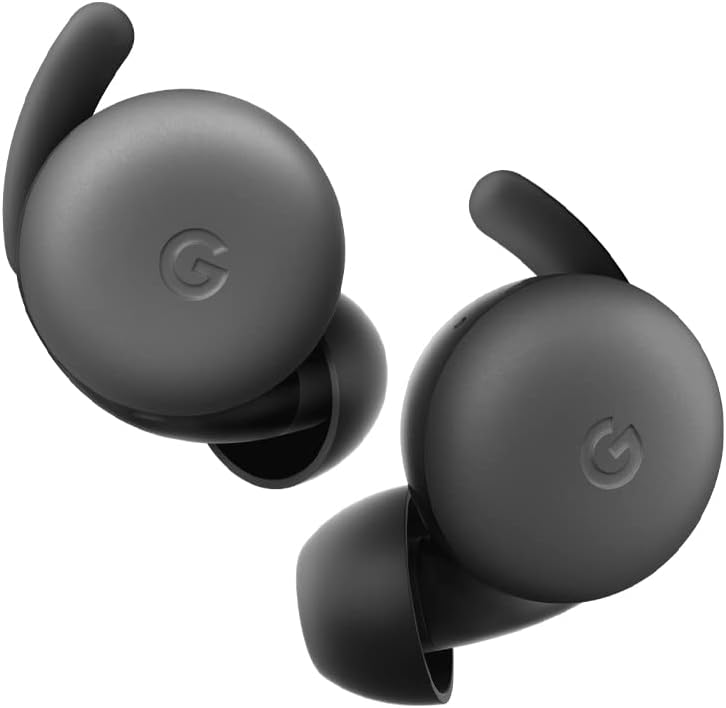
Image: A pair of Google Pixel Buds A-Series earbuds, showcasing their compact design and the 'G' logo on the touch-sensitive surface.
2. Integrasi Asisten Google
With a compatible Android device, you can access Google Assistant directly from your Pixel Buds A-Series.
- Say "Hey Google" or "Ok Google" to activate the Assistant hands-free.
- Alternatively, press and hold either earbud to speak to Google Assistant.
- You can ask for directions, check weather, control music, or have notifications read aloud.
3. Ngecas
The Pixel Buds A-Series provide up to 5 hours of listening time or 2.5 hours of talk time on a single charge. The charging case extends this to up to 24 hours of total listening time.
- To charge the earbuds, place them inside the charging case. The indicator light on the case will show their charging status.
- To charge the case, connect it to a USB-C power source using the provided cable. The case's indicator light will show its charging status.
Pangropéa
1. beberesih
- Regularly clean your earbuds and charging case to maintain performance and hygiene.
- Use a soft, dry, lint-free cloth to wipe the exterior of the earbuds and case.
- For eartips, gently remove them and clean with a mild soap solution and water, then rinse and dry thoroughly before reattaching.
- Hindarkeun ngagunakeun bahan abrasive atanapi bahan kimia anu kasar.
2. Panyimpenan
- Always store the Pixel Buds A-Series in their charging case when not in use to protect them and keep them charged.
- Nyimpen dina tiis, tempat garing jauh ti suhu ekstrim jeung sinar panonpoé langsung.
Pamérésan masalah
Upami anjeun mendakan masalah sareng Pixel Buds A-Series anjeun, cobian léngkah-léngkah ieu:
- Teu Aya Sora atanapi Sambungan Peuting-peuting:
- Pastikeun kadua earbuds dicas.
- Check that Bluetooth is enabled on your device and the earbuds are connected.
- Try placing the earbuds back in the case, closing the lid for a few seconds, then reopening to reset the connection.
- Pohokeun alat dina setélan Bluetooth telepon anjeun teras pasangkeun deui.
- Ensure your device is within the Bluetooth range (up to 10 meters).
- Earbuds Teu Ngecas:
- Pastikeun wadah ngecasna parantos dicas.
- Pariksa deui yén earbud parantos dipasang kalayan leres dina wadah ngecas.
- Bersihkeun kontak anu ngecas boh dina earbuds sareng di jero wadahna nganggo swab katun garing.
- Coba kabel USB-C sareng adaptor kakuatan anu béda.
- Kualitas Sora goréng:
- Ensure you have a secure fit with the correct eartip size.
- Clean the earbud mesh and eartips.
- Check your device's audio settings and equalizer.
spésifikasi
| Ngaran modél | Piksel Buds A-Seri |
| Téhnologi konektipitas | Nirkabel (Bluetooth 5.0) |
| Alat nu cocog | Android, iOS, and Bluetooth 4.0+ devices |
| Kahirupan Batré (Earbuds) | Nepi ka 5 jam ngadangukeun, 2.5 jam waktos ngobrol |
| Kahirupan Batré (kalayan Case Ngecas) | Up to 24 hours listening |
| Tingkat Résistansi Cai | Water Resistant (IPx4 rating for earbuds) |
| Tipe Kontrol | Touch (Media Control, Google Assistant) |
| Item Beurat | 1.9 ons (total) |
| Diménsi (Earbud) | 0.81 x 1.15 x 0.69 inci |
| Rentang Frékuénsi | 20 Hz - 20,000 Hz |
| Rentang Bluetooth | 10 méter |
Garansi sareng Rojongan
For detailed warranty information and customer support, please refer to the official Google Pixel Buds support websitus. Anjeun biasana tiasa mendakan sumber daya dukungan, FAQ, sareng pilihan kontak di g.co/pixelbuds/help.
The Pixel Buds A-Series are designed to be repairable, but any repair, disassembly, or damage may affect the water resistance rating.


