Bubuka
This manual provides essential instructions for the safe and efficient operation, setup, and maintenance of your GBC ShredMaster AUTO+ 50X Auto Feed Cross Cut Shredder. Please read this manual thoroughly before using the shredder and retain it for future reference.
The GBC ShredMaster AUTO+ 50X is designed for shredding paper documents and credit cards, offering a P-4 security level for confidential information. It features both automatic and manual feed options for convenience.
Émbaran Kasalametan
- Jaga leungeun, buuk, jeung pakean anu leupas jauh tina liang asupna kertas.
- Jauhkeun barudak sareng piaraan tina mesin penghancur.
- Do not spray any flammable products onto the shredder or use near flammable materials.
- Cabut colokan mesin penghancur runtah sateuacan mindahkeun, ngabersihkeun, atanapi ngosongkeun tempat runtah.
- Do not shred metal objects, large paper clips, or adhesive labels as these can damage the cutting mechanism. Small paper clips and staples are generally acceptable for this model.
- Operate the shredder on a flat, stable surface.
Disetél
- Ngabongkar bungkusan: Carefully remove the shredder from its packaging. Ensure all packing materials are removed from around the shredder and inside the waste bin.
- panempatan: Position the shredder on a level, stable surface near a power outlet. Ensure there is adequate space around the unit for ventilation and access to the waste bin.
- Sambungan Daya: Colokkeun kabel listrik kana stop kontak listrik standar.
- Tempat Sampah: Pastikeun tempat runtah dipasangkeun kalayan leres kana wadah mesin penghancur. Mesin penghancur moal tiasa dianggo upami tempat runtah henteu dipasang kalayan leres.
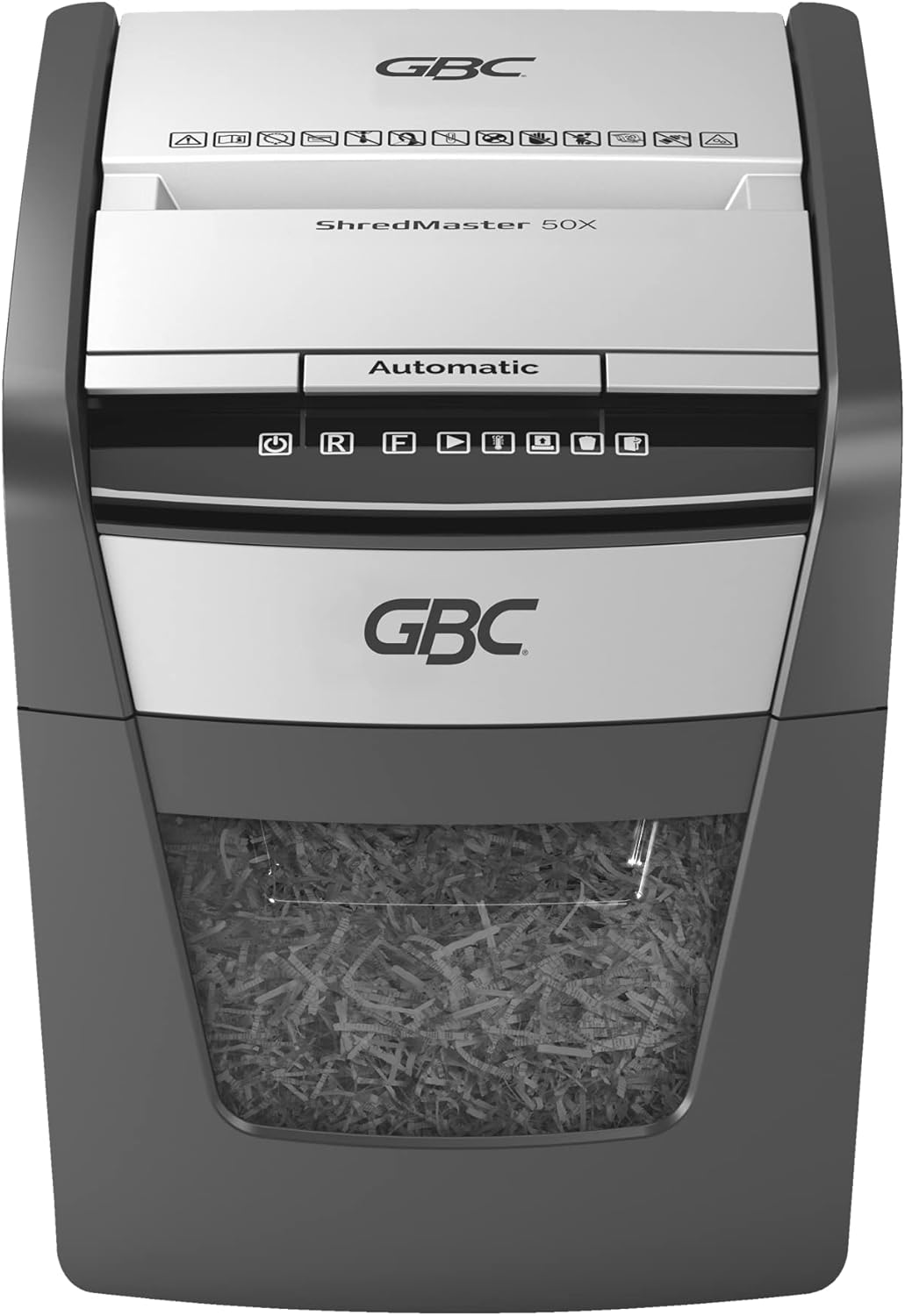
Parentah Operasi
Kontrol Panel Langkungview
The control panel features intuitive touch controls for easy operation.

Automatic Feed Operation
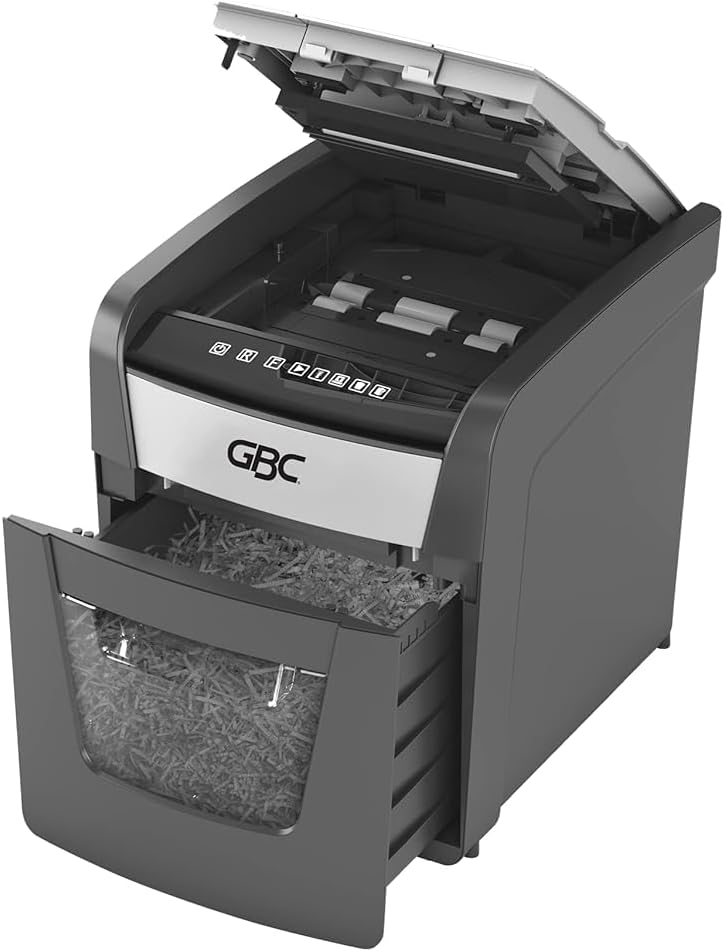
The AUTO+ 50X features an automatic feed tray for shredding up to 50 sheets of 80 gsm paper at once.
- Ensure the shredder is plugged in and the waste bin is correctly inserted.
- Lift the automatic feed tray cover.
- Stack up to 50 sheets of paper neatly into the automatic feed tray. Ensure there are no folded or crumpled sheets.
- Close the automatic feed tray cover. The shredder will automatically detect the paper and begin shredding.


Operasi Feed Manual
For smaller quantities of paper (up to 6 sheets of 80 gsm) or credit cards, use the manual feed slot.
- Ensure the shredder is plugged in and the waste bin is correctly inserted.
- Insert paper or a credit card into the manual feed slot. The shredder will automatically start and stop.
- For credit cards, insert one card at a time into the designated slot.

Perlindungan overheat
To prevent motor overheating, the shredder is equipped with an automatic thermal overload protection system. After approximately 10 minutes of continuous shredding, the machine will automatically rest for 45 minutes to cool down. During this cool-down period, the shredder will not operate. Resume operation once the cool-down period is complete.
Pangropéa
Ngosongkeun Tempat Sampah
The shredder features an easy-to-empty 20-liter pull-out bin with a viewing window to monitor fill levels.
- Cabut colokan mesin penghancur tina stop kontak.
- Cabut tempat runtah ti hareup mesin penghancur.
- Empty the shredded material into a suitable receptacle.
- Slide the waste bin back into the shredder until it is securely seated.
- Colokkeun deui shredder kana stop kontak.

Ngaminyakan Shredder
Regular oiling of the shredder blades is recommended to maintain optimal performance and extend the life of your shredder. Use GBC shredder oil or a vegetable-based oil (avoid aerosol oils).
- Apply a thin line of shredder oil across the paper entry slot.
- Jalankeun mesin penghancur sacara terbalik salami 10 detik pikeun nyebarkeun minyak.
- Repeat this process after every 30 minutes of accumulated shredding or at least twice a month.
beberesih
Lap bagian luar mesin penghancur ku lawon anu lemes sareng garing. Entong nganggo pembersih atanapi pelarut anu abrasif.
Pamérésan masalah
| Masalah | Mungkin Cukang lantaranana | Solusi |
|---|---|---|
| Shredder teu bisa dihurungkeun. |
|
|
| Kertas macét. |
|
|
| Shredder runs slowly or makes unusual noise. |
|
|
spésifikasi
- model: G2020050X
- Jenis Parut: Palang Cut
- Tingkat Kaamanan: P-4 (DIN 66399)
- Ukuran Potongan: 4 x 28 mm confetti cut
- Auto Feed Capacity: 50 lembar (80 gsm)
- Kapasitas Feed Manual: 6 lembar (80 gsm)
- Ancur: Paper, small paper clips, staples, credit cards
- Kapasitas bin: 20 liter
- Waktu ngajalankeun: 10 minutes continuous, 45 minutes cool-down
- Perkiraan Ukuran (T x L x T): 40.6 cm x 43.2 cm x 38.1 cm (16" H x 17" W x 15" D, based on product images)
- beurat: 11.6 kg
- Sumber Daya: Kabel Listrik
- Fitur husus: Automatic Start/Stop, Jam Proof

Garansi sareng Rojongan
For warranty information and customer support, please refer to the documentation included with your purchase or visit the official GBC websitus. Simpen bukti pameseran anjeun pikeun klaim garansi.
For further assistance, you may contact GBC customer service through their official channels. Details are typically available on the manufacturer's websitus atanapi bungkusan produk.


