1. Bubuka
This manual provides comprehensive instructions for the installation, operation, and maintenance of your Defiant GA7X2D01AAP Castle Satin Nickel Single Cylinder Electronic Keypad Deadbolt. This electronic deadbolt offers enhanced security and convenience through keyless entry technology, eliminating the need for traditional keys. It is designed for ease of use and reliable performance, suitable for residential applications.
Please read this manual thoroughly before installation and operation to ensure proper functionality and to maximize the lifespan of your product.
2. Setup & Instalasi
The Defiant GA7X2D01AAP deadbolt is designed for simple installation without the need for hard wiring. It is compatible with doors ranging from 1-3/8 inches to 1-3/4 inches in thickness. Ensure you have the necessary tools, such as a screwdriver, before beginning the installation process.
2.1 Eusi pakét
Pariksa yén sadaya komponén aya sateuacan ngamimitian pamasangan:
- Electronic Keypad Assembly (Exterior)
- Rakitan Deadbolt Interior
- Kancing Deadbolt
- Piring neunggeul
- Pamasangan screws
- 2 x Konci Fisik
- Citakan Instalasi (upami kalebet)

Figure 2.1: Included components, showing the two physical keys, the strike plate, and a cylindrical mounting ring.
2.2 Pamasangan batré
The deadbolt operates on 4 AA batteries (not included). It is recommended to use new, high-quality alkaline batteries for optimal performance.
- Remove the battery cover from the interior deadbolt assembly.
- Selapkeun 4 batré AA, mastikeun polaritasna bener (+/-).
- Ganti panutup batré.
2.3 Léngkah-léngkah Pamasangan Fisik
Follow these general steps for physical installation. Refer to the detailed instructions provided in your product packaging for specific drilling and mounting procedures.
- Prepare the door: Ensure the door is properly bored for a deadbolt. The deadbolt is designed for standard door preparations.
- Install the latch: Insert the deadbolt latch into the door edge. Ensure the "UP" arrow (if present) is facing upwards.
- Install the exterior keypad assembly: Feed the cable from the exterior keypad through the door hole and align the keypad with the latch.
- Install the interior assembly: Connect the cable from the exterior keypad to the interior assembly. Secure the interior assembly to the door using the provided mounting screws.
- Install the strike plate: Secure the strike plate to the door frame, ensuring it aligns correctly with the deadbolt latch.
- Test the lock: After installation, test the deadbolt using both the keypad and the physical key to ensure smooth operation.

Gambar 2.2: Sisi view of the deadbolt latch mechanism, showing how it fits into the door edge.
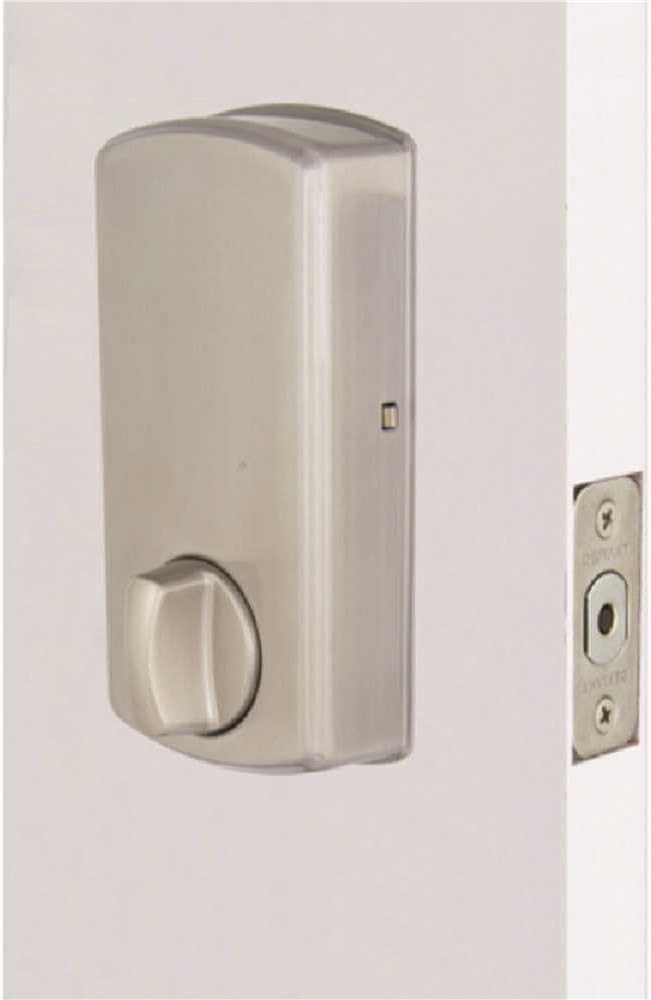
Gambar 2.3: Interior view of the deadbolt, showing the thumb turn and battery compartment.
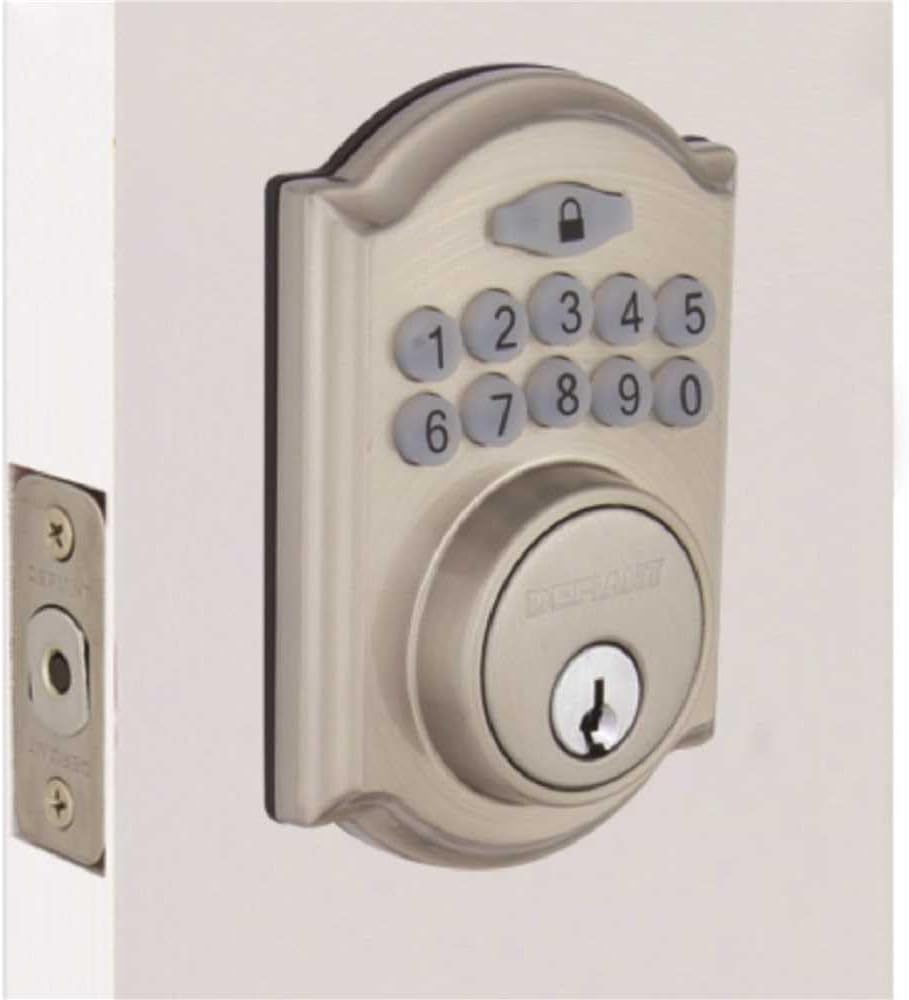
Figure 2.4: The Defiant electronic deadbolt installed on a door, providing a visual of the complete exterior assembly.
3. Parentah Operasi
Your Defiant electronic deadbolt offers convenient keyless access and customizable security features.
3.1 Keypad Leuwihview

Figure 3.1: The electronic keypad, featuring a backlit display for improved visibility in low light conditions.
The keypad is backlit for increased visibility, making it easy to operate in low-light conditions.
3.2 Nyetél Kodeu Pangguna
Refer to your product's specific programming guide for detailed steps on how to set, change, and delete user codes. Typically, this involves entering a master code followed by a sequence to add or modify user codes.
3.3 Ngonci jeung Muka konci
- Pikeun muka konci: Enter a valid user code on the keypad. The deadbolt will retract.
- Pikeun ngonci: Press the lock button on the keypad, or use the thumb turn on the interior side.
3.4 Fitur Konci Otomatis
The deadbolt features an auto-lock function with an adjustable delay, typically ranging from 10 to 99 seconds. This feature automatically locks the deadbolt after a set period once it has been unlocked, providing added security. Consult your programming guide to enable and adjust this setting.
3.5 Mode pakansi
User codes can be temporarily deactivated as needed, which is useful for vacation periods or when you want to restrict access without deleting codes. Refer to your programming guide for instructions on activating and deactivating vacation mode.
4. Pangropéa
Regular maintenance ensures the longevity and reliable operation of your electronic deadbolt.
4.1 beberesih
Bersihkeun bagian luar deadbolt ku sikat lemes,amp lawon. Ulah make cleaners abrasive, pangleyur, atawa bahan kimia kasar, sabab ieu bisa ngaruksak finish jeung komponén éléktronik.
4.2 Ngagantian batré
The deadbolt is equipped with a low battery indicator. When the batteries are low, the indicator will alert you, typically through a series of beeps or a flashing light. Replace all 4 AA batteries promptly when this occurs to ensure continuous operation. Always use new, high-quality alkaline batteries.
- Cabut panutup batré dina assembly interior.
- Remove old batteries and dispose of them according to local regulations.
- Pasangkeun batré AA anyar, perhatikeun polaritasna anu leres.
- Ganti panutup batré.
4.3 Mechanical Check
Periodically check the screws and mounting hardware to ensure they are tight. Ensure the deadbolt latch moves freely and smoothly without obstruction. Lubricate the latch mechanism with a silicone-based lubricant if necessary, avoiding oil-based lubricants that can attract dust.
5. Cara ngungkulan
This section addresses common issues you might encounter with your electronic deadbolt.
5.1 Keypad Not Responding / No Power
- Pariksa batré: The most common cause. Replace all 4 AA batteries with new ones.
- Orientasi batré: Pastikeun batréna dipasang kalayan polaritas anu leres (+/-).
- Sambungan leupas: Verify that the cable connecting the exterior keypad to the interior assembly is securely plugged in.
5.2 Deadbolt Does Not Lock or Unlock
- Kodeu Salah: Ensure the correct user code is being entered.
- Batré lemah: Replace batteries if the low battery indicator is active.
- Kasalahan: Check if the deadbolt latch and strike plate are properly aligned. Adjust the strike plate if necessary.
- Ngahalangan: Ensure there are no obstructions in the door frame or latch mechanism.
- Programming Issue: If codes are not working, try reprogramming them according to the programming guide.
5.3 Auto-Lock Not Functioning
- Feature Enabled: Verify that the auto-lock feature is enabled in the lock's programming.
- Delay Setting: Check the auto-lock delay setting. It might be set to a longer duration than expected.
5.4 Keypad Backlight Not Working
- Batré: Low batteries can affect backlight performance. Replace batteries.
- Sénsor: Some keypads have a light sensor. Ensure it's not obstructed or in an unusually bright environment that would prevent the backlight from activating.
6. Spésifikasi
| Fitur | Rincian |
|---|---|
| merek | Nangtang |
| Ngaran modél | GA7X2D01AAP |
| Tipe Konci | Keypad éléktronik Deadbolt |
| Bahan | Séng |
| Bérés | Satin Nikel |
| Ukuran (L x W x H) | Kira-kira 5 x 5 x 5 inci |
| Item Beurat | Kurang leuwih 10.1 pon |
| Sumber Daya | 4 x Batré AA (teu kalebet) |
| Kasaluyuan ketebalan panto | 1-3 / 8 di. ka 1-3 / 4 di. |
| Kelas Kaamanan | ANSI/BHMA Kelas 3 |
| Komponén Kaasup | Electronic Deadbolt, 2 Keys |
| Fitur husus | Backlit Keypad, Auto-Lock (adjustable delay), Low Battery Indicator, Vacation Mode |
7. Jaminan & Dukungan
7.1 Garansi Produk
The Defiant GA7X2D01AAP Electronic Keypad Deadbolt is backed by a garansi 1 taun ti tanggal beuli. Garansi ieu nyertakeun cacad dina bahan sareng pagawean dina panggunaan normal. Punten tahan bukti pameseran anjeun pikeun klaim garansi.
The warranty does not cover damage resulting from improper installation, misuse, abuse, neglect, unauthorized repairs, or acts of nature.
7.2 Rojongan Palanggan
For technical assistance, troubleshooting beyond this manual, or warranty inquiries, please contact Defiant customer support. Refer to the contact information provided in your product packaging or visit the official Defiant websitus pikeun detil rojongan paling up-to-date.
When contacting support, please have your product model number (GA7X2D01AAP) and proof of purchase readily available.


