1. Bubuka
Thank you for choosing the BenQ DVD-2019 DVD Player. This manual provides essential information for the safe and efficient use of your new device. Please read it thoroughly before operating the player and retain it for future reference.
Inpormasi Kaamanan Penting:
- Ulah ngalaan unit ka hujan atawa Uap.
- Ulah muka casing; ngarujuk sadaya jasa ka tanaga anu mumpuni.
- Pastikeun ventilasi anu leres di sabudeureun unit.
- Anggo ngan ukur catu daya anu ditangtukeun pikeun alat ieu.
2. Eusi Paket
Punten parios yén sadaya barang aya dina pakét:
- BenQ DVD-2019 DVD Player
- Kadali jauh
- Kabel AV (RCA)
- Kabel Daya
- Manual Pitunjuk (dokumén ieu)
3. Produk Langkungview
3.1 Panel payun

Figure 1: Front Panel of the DVD-2019 Player
The front panel features the disc tray, power button, play/pause, stop, and skip buttons. It also includes a USB port and an SD card slot for playing media from external storage devices.
3.2 Panel tukang

Figure 2: Rear Panel of the DVD-2019 Player
The rear panel provides various connection ports for audio and video output, including HDMI, RCA (composite video and stereo audio), and component video outputs. The power input is also located here.
3.3 Jauh Jauh
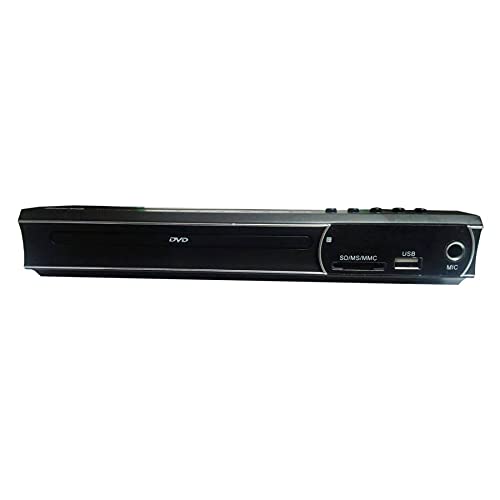
Figure 3: Remote Control for the DVD-2019 Player
The remote control allows you to operate all functions of the DVD player from a distance. It requires two AAA batteries (not included).
4. Setélan
4.1 Nyambungkeun ka Télévisi
Pilih salah sahiji metodeu sambungan ieu:
- HDMI Connection (Recommended for best quality):
Connect one end of an HDMI cable (not included) to the HDMI OUT port on the DVD player and the other end to an HDMI IN port on your television. Select the corresponding HDMI input on your TV. - Sambungan RCA:
Connect the yellow video cable to the VIDEO OUT port on the DVD player and the yellow video input on your TV. Connect the red and white audio cables to the AUDIO OUT (R/L) ports on the DVD player and the corresponding red and white audio input ports on your TV. Select the AV input on your TV.
4.2 Sambungan Daya
After connecting the video and audio cables, plug the power cable into the AC IN port on the rear of the DVD player and then into a wall outlet.
5. Parentah Operasi
5.1 Putereun DVD Dasar
- Turn on your TV and the DVD player.
- Select the correct input source on your TV (e.g., HDMI 1, AV).
- Pencét tombol OPEN/CLOSE dina panel hareup atanapi remote pikeun muka baki disk.
- Place a DVD disc gently into the tray with the label side facing up.
- Press the OPEN/CLOSE button again to close the tray. The disc will load automatically.
- Playback should begin automatically. If a menu appears, use the arrow keys and OK button on the remote to navigate.
5.2 USB / SD Card Playback
- Insert a USB flash drive into the USB port or an SD card into the SD card slot on the front panel.
- The player should automatically detect the device and display a media browser. If not, press the SOURCE or USB/CARD button on the remote.
- Use the arrow keys and OK button to navigate through your files (videos, music, photos).
- Pilih a file tur pencét OK pikeun ngamimitian playback.
5.3 Setélan Audio sareng Pidéo
Access the player's setup menu by pressing the SETUP button on the remote control. Here you can adjust settings such as:
- Setélan Pidéo: Aspect ratio (4:3, 16:9), video output resolution.
- Setélan Audio: Audio output mode (Stereo, Dolby Digital, DTS), dynamic range control.
- Setélan basa: OSD language, audio language, subtitle language.
6. Pangropéa
6.1 Ngabersihan Unit
- Ngusap exterior pamuter jeung lemes, lawon garing.
- Ulah make cleaners cair atawa sprays aerosol.
- For the disc tray, use a soft, lint-free cloth to gently remove dust.
6.2 Penanganan Cakram
- Always hold discs by their edges.
- Keep discs clean and free from scratches. Use a soft cloth to wipe from the center outwards.
- Nyimpen cakram dina kasusna nalika henteu dianggo.
7. Cara ngungkulan
| Masalah | Mungkin Cukang lantaranana | Solusi |
|---|---|---|
| Taya kakuatan | kabel kakuatan teu disambungkeun; stop kontak listrik lepat. | Pastikeun kabel kakuatan disambungkeun aman. Coba outlet béda. |
| Taya gambar | Incorrect TV input selected; video cable loose or faulty. | Select the correct HDMI/AV input on your TV. Check video cable connections. |
| Taya sora | Audio cables loose or faulty; TV volume muted. | Check audio cable connections. Increase TV volume and ensure it's not muted. |
| Disk teu diputer | Cakram téh formatna kotor, goresan, atawa teu cocog. | Clean the disc. Try a different disc. Ensure the disc format is supported (DVD). |
| Kadali jauh teu jalan | Batré paéh atanapi teu leres diselapkeun; halangan antara jauh jeung pamuter. | Ganti batré. Pastikeun polaritasna bener. Leupaskeun sagala halangan. |
8. Spésifikasi
| Fitur | Rincian |
|---|---|
| Nomer modél | DVD-2019 |
| merek | BenQ |
| Jenis Média | DVD |
| Tipe Panyambung | HDMI, RCA |
| Téhnologi konektipitas | HDMI, RCA, USB |
| Format Audio Dirojong | Dolby Digital, DTS, PCM |
| Alat nu cocog | Televisi |
9. Garansi jeung Rojongan
This BenQ DVD-2019 DVD Player comes with a standard manufacturer's warranty. Please refer to the warranty card included in your package for specific terms and conditions, including the warranty period and coverage details.
For technical support, service inquiries, or to obtain replacement parts, please contact BenQ customer service through their official website or the contact information provided on your warranty documentation. Keep your purchase receipt as proof of purchase for warranty claims.


