1. Bubuka
Hatur nuhun pikeun meuliasing the Kimwood Bluetooth Headset. This manual provides detailed instructions on how to set up, operate, and maintain your headset. Please read this manual carefully before use to ensure optimal performance and longevity of your device.

Figure 1.1: Kimwood Bluetooth Headset with its charging case.
2. Émbaran Kasalametan
- Ulah ngalaan headset kana suhu anu ekstrim, kalembaban, atanapi zat korosif.
- Ulah nepi ka headset murag atawa kakeunaan benturan anu kuat.
- Do not disassemble or modify the headset. This will void the warranty and may cause damage.
- Jauhkeun headset tina jangkauan barudak sareng piaraan.
- Paké ngan kabel ngecas disadiakeun jeung adaptor kakuatan cocog.
3. Eusi Paket
Mangga parios pakét kanggo barang-barang ieu:
- Kimwood Bluetooth Headset
- Ngecas Case
- Kabel Ngecas USB Tipe-C
- Manual pamaké

Angka 3.1: Item anu kalebet dina bungkusan.
4. Produk Langkungview
Familiarize yourself with the components of your Kimwood Bluetooth Headset:
| No. | komponén | Fungsi |
|---|---|---|
| 1 | Tombol kakuatan / Multi-fungsi | Power On/Off, Play/Pause, Answer/End Call, Voice Assistant |
| 2 | Volume Up / Lagu Salajengna | Increase volume, skip to next track (long press) |
| 3 | Volume Turun / Lagu Sebelumnya | Decrease volume, go to previous track (long press) |
| 4 | Mikropon | Picks up your voice for calls |
| 5 | Port Ngecas (Tipe-C) | Connects to charging cable |
| 6 | Indikator LED | Shows power, pairing, and charging status |
5. Setélan
5.1 Ngecas Headset sareng Casing
Before first use, fully charge the headset and its charging case.
- Connect the USB Type-C cable to the charging port on the case.
- Sambungkeun tungtung kabel anu sanés ka sumber daya USB (contona, komputer, adaptor témbok).
- Pintonan digital dina wadah ngecas bakal nunjukkeun persentase batrétage. When fully charged, it will display "100".
- Place the headset into the charging case. The headset will automatically begin charging.
The charging case has a 500mAh battery, and the earphone has a 100mAh battery. A full charge takes approximately 1.5 hours.

Figure 5.1: Charging the headset and case.
5.2 Nyapasangkeun sareng Alat Bluetooth
The headset supports Bluetooth 5.1 for stable and automatic connections.
- Take the headset out of the charging case. It will automatically power on and enter pairing mode (LED indicator will flash blue).
- Dina alat anjeun (smartphone, tablet, PC), aktipkeun Bluetooth.
- Milarian pikeun available Bluetooth devices and select "VYK-B26" from the list.
- Once connected, the LED indicator on the headset will stop flashing and remain solid blue. A voice prompt will confirm the connection.
After the initial pairing, the headset will automatically connect to the last paired device when taken out of the case.

Figure 5.2: Automatic pairing process.
5.3 Maké Headsét
The ear-hook design allows for comfortable wear on either the left or right ear. The microphone and ear hook can be rotated to fit your preference.
- Atur pangait ceuli supados pas di sabudeureun ceuli anjeun.
- Rotate the microphone arm up to 180 degrees and the ear hook up to 360 degrees to find the optimal position for comfort and clear voice pickup.

Figure 5.3: Adjusting the headset for left or right ear use.
6. Parentah Operasi
6.1 Daya Hurung/Pareuman
- Daya Hurung: Take the headset out of the charging case, or long-press the Multi-function Button for 3 seconds.
- Pareum listrik: Place the headset back into the charging case, or long-press the Multi-function Button for 5 seconds.
6.2 Fungsi Telepon
- Ngajawab / mungkas Telepon: Pencét pondok Tombol Multi-fungsi.
- Nolak Telepon: Pencét lila Tombol Multi-fungsi salami 2 detik.
- Ngajempékeun/Nyanyikeun Mikropon: During a call, long press the Volume Up or Volume Down button for approximately 3 seconds.

Figure 6.1: Mute function and unidirectional microphone for clear calls.
6.3 Puterkeun Musik
- Puter / Reureuh: Pencét pondok Tombol Multi-fungsi.
- Lagu salajengna: Pencét pondok tombol Volume Up.
- Lagu Sateuacanna: Pencét pondok tombol Volume Turun.
6.4 Volume Control
- Ningkatkeun Jilid: Pencét pondok tombol Volume Up.
- Turunkeun Jilid: Pencét pondok tombol Volume Turun.
6.5 Asistén Sora
Activate your device's voice assistant (Siri, Google Assistant, etc.) directly from the headset.
- Aktipkeun Asisten Sora: While the headset is connected and in standby mode, long press the Multi-function Button for 2 seconds.
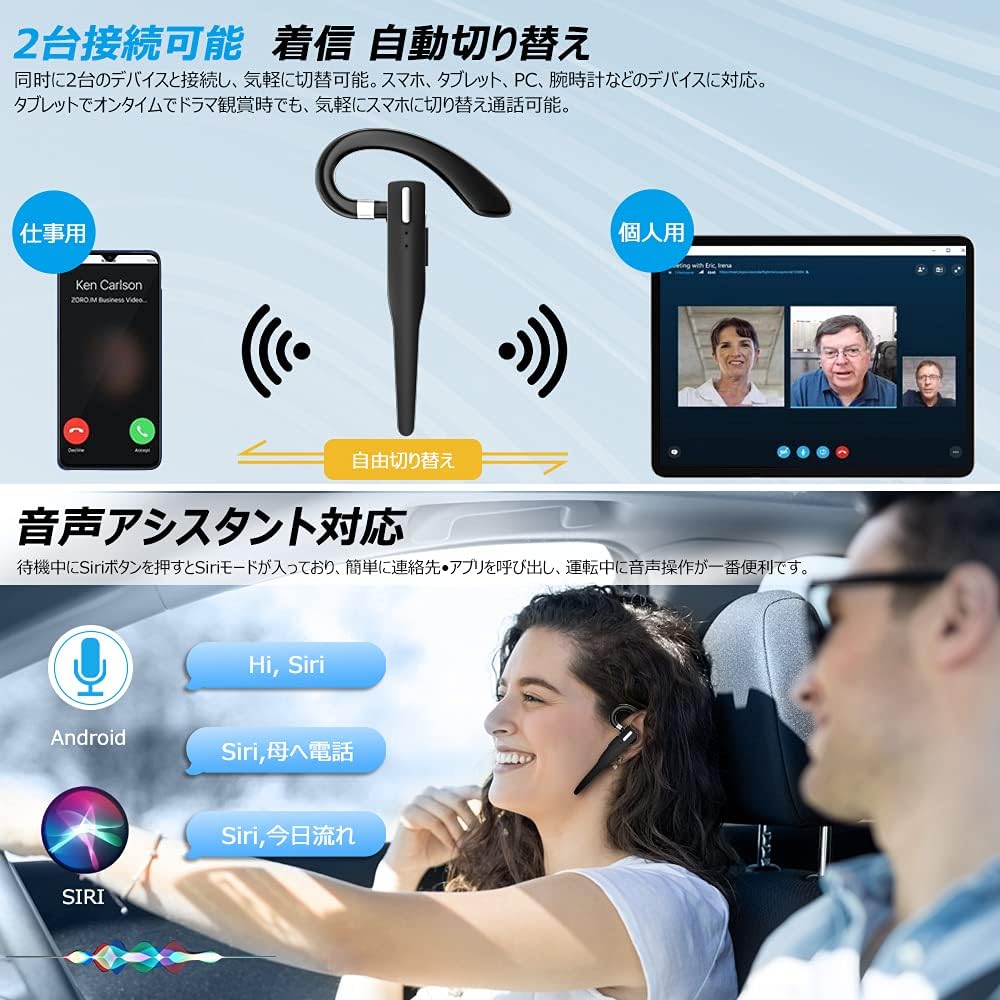
Figure 6.2: Multi-device connectivity and voice assistant features.
6.6 Sambungan Multi-Alat
Headset ieu tiasa nyambung ka dua alat Bluetooth sacara babarengan, ngamungkinkeun perpindahan anu lancar di antara dua alat éta.
- Pasangkeun headset sareng alat anu munggaran sapertos anu dijelaskeun dina Bagian 5.2.
- Turn off Bluetooth on the first device. The headset will re-enter pairing mode.
- Masangkeun headset sareng alat kadua.
- Turn on Bluetooth on the first device. The headset should now be connected to both devices.
- The headset will automatically switch audio output to the device that is actively playing media or receiving a call.
7. Pangropéa
7.1 beberesih
- Wipe the headset and charging case with a soft, dry, lint-free cloth.
- Ulah make bahan kimia kasar, pangleyur beberesih, atawa detergents kuat.
7.2 Panyimpenan
- Lamun teu dipake, nyimpen headset dina wadah ngecas na ngajaga eta tina lebu jeung karuksakan.
- Simpen alat dina tempat anu tiis, garing, jauh tina sinar panonpoé langsung sareng suhu anu ekstrim.

Figure 7.1: The compact charging case provides convenient storage.
8. Cara ngungkulan
Upami anjeun ngalaman masalah sareng headset anjeun, tingal masalah sareng solusi umum ieu:
| Masalah | Mungkin Cukang lantaranana | Solusi |
|---|---|---|
| Headset teu hurung. | batré lemah. | Charge the headset and charging case. |
| Teu tiasa dipasangkeun sareng alat. | Bluetooth dina alat pareum; headset teu dina modeu pairing; jauh teuing ti alat. | Ensure Bluetooth is on; take headset out of case to enter pairing mode; keep within 10 meters. |
| Taya sora atawa volume low. | Volume too low; headset not connected; sound output set to another device. | Increase volume on headset and device; re-pair headset; check device's audio output settings. |
| Mikropon teu jalan. | Microphone muted; incorrect audio input settings on device. | Unmute microphone (long press Volume Up/Down); check device's audio input settings. |
| Connection unstable or drops. | gangguan; jauh teuing tina alat; batré lemah. | Move closer to device; avoid strong electromagnetic interference; charge headset. |
9. Spésifikasi
| Fitur | Rincian |
|---|---|
| Modél | VYK-B26 |
| Vérsi Bluetooth | 5.1 |
| Noise Cancelling | CVC8.0 |
| Kapasitas Batré Headsét | 100 mah |
| Ngecas Kapasitas Batré Case | 500 mah |
| Waktu Ngobrol | Nepi ka 12 jam |
| Waktos Puterkeun Musik | Nepi ka 12 jam |
| Total Waktu Panggunaan (sareng wadahna) | Nepi ka 72 jam |
| Waktu sayaga | Nepi ka 400 jam |
| Waktu Ngecas | Kira-kira. 1.5 jam |
| Port ngecas | USB Tipe-C |
| Peunteun waterproof | IPX7 (Tahan Késang) |
| Kasaluyuan | iOS, Android, Windows (Bluetooth-enabled devices) |

Figure 9.1: Advanced Bluetooth 5.1 and CVC8.0 Noise Cancelling features.
10. Garansi jeung Rojongan
Kimwood products are designed for reliability and performance. For warranty information and technical support, please refer to the contact details provided on the product packaging or visit the official Kimwood websitus. Punten tahan bukti pameseran anjeun pikeun klaim garansi.


