1. Bubuka
The Kinhank Super Console X Cube is a compact retro gaming system designed to provide access to a vast library of classic games across multiple emulators. This device supports high-definition output, wireless controllers, and offers multiplayer capabilities for an engaging gaming experience. This manual provides essential information for setting up, operating, and maintaining your console.
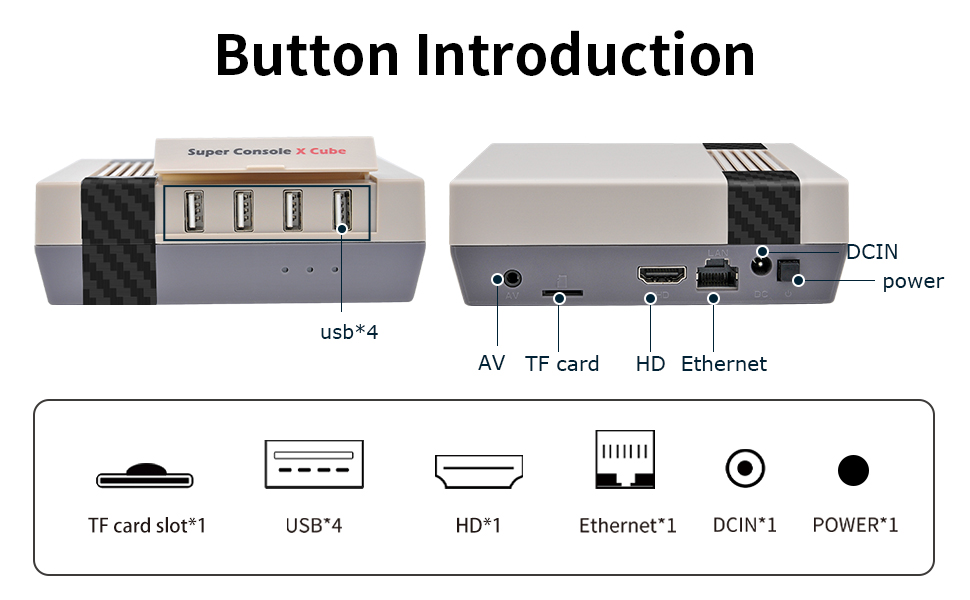
Image: The Super Console X Cube connected to a television, showcasing its dual function as a TV and game system.
The console comes pre-loaded with over 65,000 retro games and supports more than 50 emulators, allowing you to revisit many classic titles. It features an upgraded S905 chip for smooth performance and supports 4K TV output for clear visuals.

Image: The console connected to a TV, illustrating the vast library of over 65,000 built-in games and support for 50+ emulators.
2. Eusi Paket
Mangga parios heula sadaya barang anu didaptarkeun di handap ieu kalebet kana pakét anjeun. Upami aya barang anu leungit atanapi ruksak, mangga ngahubungi layanan palanggan.

Image: A visual representation of the items included in the package: Super Console X Cube, one controller, one HD cable, one 256GB card, one power adapter, and one user manual.
- Super Console X Cube Console x 1
- Wireless Controller x 1 (Note: Some packages may include two controllers. Check your specific product variant.)
- HD Cable x 1
- 256GB Micro SD Card (pre-installed) x 1
- Adaptor kakuatan x 1
- Buku Panduan x 1

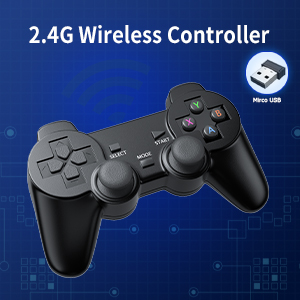
Image: A 2.4G wireless controller, typically included with the console, shown with its micro USB receiver.
3. Produk Langkungview
Familiarize yourself with the ports and buttons on your Super Console X Cube for proper connection and operation.

Gambar: Top view of the Super Console X Cube, highlighting the four USB ports for connecting controllers and other peripherals.
Gambar: Tukangeun view of the Super Console X Cube, detailing the AV port, TF card slot, HD (HDMI) port, Ethernet port, DCIN (power input), and power button.
Katerangan Port:
- Port USB (x4): For connecting wired controllers, wireless controller receivers, or other USB peripherals.
- Port AV: For connecting to older televisions using an AV cable (not included).
- Slot Kartu TF: Contains the pre-installed Micro SD card with games and system software. Do not remove during operation.
- Palabuhan HD (HDMI): For connecting to modern televisions or monitors via an HDMI cable for high-definition video and audio output.
- Port Ethernet: Pikeun sambungan internét kabel.
- Port DCIN: Pikeun nyambungkeun adaptor kakuatan.
- Tombol Daya: Pikeun ngaktipkeun atanapi mareuman konsol.
4. Setup Guide
Follow these steps to set up your Kinhank Super Console X Cube:
- Nyambung ka TV:
- For HD TVs: Connect one end of the included HDMI cable to the HD port on the console and the other end to an HDMI input on your television.
- For older TVs: Connect an AV cable (not included) to the AV port on the console and the corresponding inputs on your television.

Image: The console connected to a television, demonstrating HD output capability.
- Sambungkeun Kakuatan: Insert the power adapter into the DCIN port on the console, then plug the adapter into a wall outlet.
- Selapkeun Kartu Micro SD: Ensure the pre-installed Micro SD card is securely seated in the TF card slot. Do not remove it during operation.
- Sambungkeun Controllers:
- For wireless controllers: Insert the 2.4GHz USB receiver (usually found in the controller's battery compartment or included separately) into one of the USB ports on the console. Ensure batteries are installed in the controller(s).
- For wired controllers: Plug the USB cable of the wired controller directly into a USB port on the console.
- Daya Hurung: Press the power button on the console. The system will boot up and display the main menu on your TV.
- Sambungan Jaringan (Opsional):
- Wifi: Navigate to the system settings, select network options, and connect to your Wi-Fi network.
- LAN: Connect an Ethernet cable from your router to the Ethernet port on the console.

Image: Illustration of the console's WiFi and LAN connection capabilities.
5. Parentah Operasi
5.1 Ngatur Sistem
Use your controller's D-pad or analog stick to navigate through the main menu and select emulators or games. The 'A' button (or equivalent) typically confirms selections, and the 'B' button (or equivalent) usually goes back.
5.2 Launching Games
From the main menu, select an emulator (e.g., "NES", "SNES", "PS1"). A list of available games for that emulator will appear. Select a game from the list to launch it. The system will automatically load the necessary emulator.
5.3 Saving and Loading Game Progress
Most emulators support "save states" which allow you to save your exact progress at any point in a game. The method to access this feature varies by emulator, but commonly involves pressing a combination of buttons (e.g., both joysticks down simultaneously, or a 'Hot Key' + 'Start' button). Refer to the on-screen prompts or the system's internal settings for specific key combinations.
- Save State: Select an empty slot and save your current game progress.
- Kaayaan Beban: Select a previously saved slot to resume gameplay from that exact point.
5.4 Multiplayer Gaming
The Super Console X Cube supports up to four players simultaneously. Connect additional controllers to the available USB ports. The system should automatically recognize them. Many classic games support local multiplayer, allowing you to share the experience with friends and family.

Image: Four individuals enjoying a multiplayer gaming session on the Super Console X Cube, demonstrating its support for multiple players.

Image: A collage depicting different groups of people, including adults and children, engaging in multiplayer gaming, highlighting the social aspect of the console.
6. Pangropéa
- beberesih: Use a soft, dry cloth to clean the console. Do not use liquid cleaners or abrasive materials.
- Panyimpenan: Simpen konsol di tempat anu tiis sareng garing, jauh tina sinar panonpoé langsung sareng suhu anu ekstrim.
- Ventilasi: Ensure the console's ventilation openings are not blocked to prevent overheating.
- Kartu SD Mikro: Do not remove the Micro SD card while the console is powered on or operating, as this can corrupt data.
- Pareum listrik: Always power off the console properly before disconnecting power.
7. Cara ngungkulan
| Masalah | Mungkin Cukang lantaranana | Solusi |
|---|---|---|
| Taya pintonan dina TV |
|
|
| Controller teu ngabales |
|
|
| Games run slowly or freeze |
|
|
| Cannot save game progress |
|
|
8. Spésifikasi
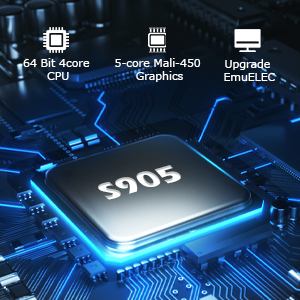
Image: Close-up of the S905 chip, highlighting its 64-bit 4-core CPU and 5-core Mali-450 Graphics for enhanced performance.
- Ngaran modél: Super Konsol X kubus
- Prosesor: Upgraded S905 Chip (64-bit 4-core CPU)
- Grafik: 5-core Mali-450 Graphics
- Sistem operasi: Linux-based (EmuELEC)
- Panyimpenan: 256GB Micro SD Card (pre-installed with 65,000+ games and 50+ emulators)
- Kaluaran Video: HD (HDMI) / AV (1080P/720P)
- Konektipitas: Wi-Fi, LAN (Ethernet)
- Port USB: 4 x USB 2.0
- Controllers: Supports 2.4GHz wireless controllers and wired USB controllers
- Multiplayer Support: Nepi ka 4 pamaén
- ukuran: Kira-kira 8.62 x 6.77 x 4.61 inci
- beurat: Kurang leuwih 1.65 pon
- Pabrikan: Kinhank
9. Garansi jeung Rojongan
Kinhank products are designed for reliability and performance. For warranty information, please refer to the documentation included with your purchase or contact your retailer. If you encounter any issues or have questions regarding your Super Console X Cube, please contact Kinhank customer support through the official websitus atanapi platform pameseran anjeun kanggo bantosan.
Palayanan palanggan: If you have any questions or require technical support, please reach out to our customer service team. We are committed to providing assistance.


