Bubuka
Hatur nuhun pikeun meuliasing the Kitchen 10L Desktop Electric Oven. This manual provides important information regarding the safe operation, maintenance, and troubleshooting of your new appliance. Please read this manual thoroughly before use and retain it for future reference.
Parentah Kasalametan penting
Nalika nganggo alat listrik, pancegahan kaamanan dasar kedah diturutan, kalebet ieu:
- Baca sagala parentah.
- Ulah noél surfaces panas. Paké handles atanapi knobs.
- Pikeun ngajaga tina shock listrik, ulah neuleumkeun kabel, colokan, atawa alat dina cai atawa cairan séjén.
- Pengawasan anu ketat diperyogikeun nalika alat naon waé dianggo ku atanapi caket barudak.
- Cabut colokan tina stop kontak nalika henteu dianggo sareng sateuacan beberesih. Ngidinan pikeun niiskeun sateuacan dipasang atanapi nyabut bagian.
- Entong ngoperasikeun alat naon waé nganggo kabel atanapi colokan anu rusak atanapi saatos alatna teu tiasa dianggo atanapi parantos ruksak dina cara naon waé.
- Pamakéan kantétan aksésori anu henteu disarankeun ku produsén alat tiasa nyababkeun tatu.
- Ulah make di luar.
- Entong ngantepkeun kabel ngagantung dina ujung méja atanapi konter, atanapi nyabak permukaan anu panas.
- Ulah nempatkeun dina atawa deukeut gas panas atawa burner listrik, atawa dina oven dipanaskeun.
- Awas pisan kedah dianggo nalika mindahkeun alat anu ngandung minyak panas atanapi cairan panas sanés.
- Sok pasangkeun heula colokan kana alat, teras colokkeun kabel kana stop kontak témbok. Pikeun megatkeun sambungan, balikkeun sagala kadali kana "off", teras cabut colokan tina stop kontak témbok.
- Ulah make alat pikeun lian ti pamakéan dimaksudkeun.
Produk Leuwihview
Familiarize yourself with the components of your electric oven.

Gambar 1: Hareupeun view of the 10L Desktop Electric Oven, showing the glass door, handle, and control knobs on the right side.
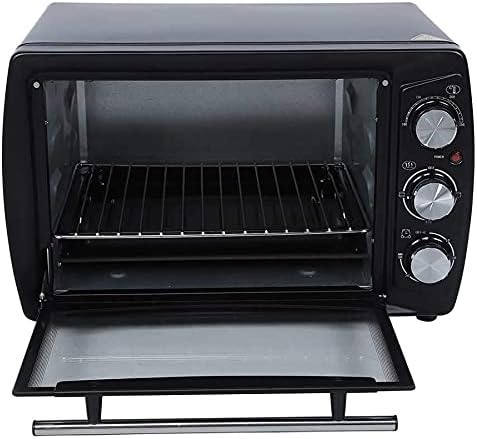
Gambar 2: Interior view of the oven with the door open, revealing the wire rack and the removable crumb tray at the bottom.
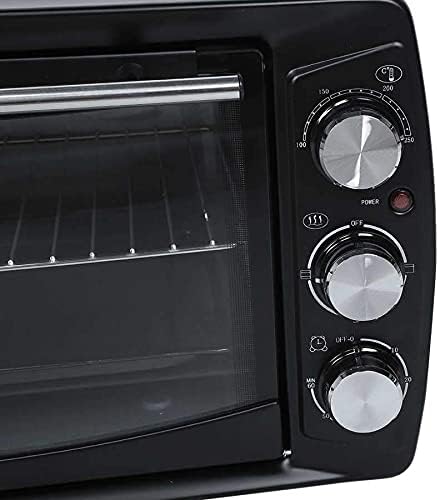
Figure 3: Close-up of the control panel, featuring three rotary knobs for temperature, function, and timer settings, along with a power indicator light.
komponén:
- Kenop Kontrol Suhu: Dianggo pikeun nyetel suhu masak anu dipikahoyong.
- Kenop Kontrol Fungsi: Selects heating elements (e.g., upper, lower, or both).
- Kenop Kontrol Timer: Nyetél durasi masak.
- Lampu Indikator Kakuatan: Caang nalika oven beroperasi.
- Panto Kaca: Nyanggakeun viewtuangeun tuangeun nalika masak.
- Rak Kawat: For placing food items.
- Dulang Crumb: Ngumpulkeun crumbs na drips pikeun gampang beberesih.
- Unsur pemanasan: Four heating elements for efficient cooking.
Disetél
- Ngabongkar bungkusan: Taliti miceun oven sareng sadaya asesoris tina bungkusan. Simpen bungkusan pikeun neundeun atanapi transportasi ka hareup.
- panempatan: Place the oven on a stable, heat-resistant, and flat surface. Ensure there is adequate ventilation around the oven (at least 4 inches of clearance on all sides). Do not place it near flammable materials or heat sources.
- Bersihan awal: Sateuacan nganggo heula, usap bagian jero sareng luar oven nganggo iklanamp cloth. Wash the wire rack and crumb tray with warm, soapy water, rinse thoroughly, and dry completely.
- Pamakéan munggaran Burn-Off: It is recommended to run the oven empty for about 10-15 minutes at maximum temperature (250°C) with the function set to both upper and lower heating. This will burn off any manufacturing residues and odors. A slight smoke or odor is normal during this process. Ensure the area is well-ventilated.
- Sambungan Daya: Colokkeun kabel listrik kana stop kontak listrik 220V grounded.
Parentah Operasi
Follow these steps to operate your electric oven:
- Nyiapkeun dahareun: Place your food item on the wire rack. Ensure proper cookware is used that is safe for oven use.
- Rak Sisipkeun: Slide the wire rack with food into the desired rack position inside the oven.
- Tutup panto: Tutup panto oven aman.
- Setel Suhu: Hurungkeun Kenop Kontrol Suhu to your desired cooking temperature (e.g., 100°C to 250°C).
- Pilih Fungsi: Hurungkeun Kenop Kontrol Fungsi to select the desired heating mode (e.g., upper heating, lower heating, or both).
- Atur Timer: Hurungkeun Kenop Kontrol Timer to the desired cooking time (up to 60 minutes). The power indicator light will illuminate, indicating the oven is heating. The oven will automatically turn off when the timer reaches zero, and a bell will sound. For continuous operation, turn the timer past the 60-minute mark to the "Stay On" position (if available).
- Ngawas masak: Anjeun tiasa niténan kamajuan masak ngalangkungan panto kaca.
- Ngaleungitkeun Dahareun: Once cooking is complete and the timer has sounded, carefully open the oven door. Use oven mitts to remove the hot food and rack.
- Tenang: Keun oven nepi ka tiis sagemblengna sateuacan dibersihkeun atanapi disimpen.
Pangropéa jeung beberesih
Bebersih sareng perawatan rutin bakal mastikeun umur panjang sareng kinerja optimal oven anjeun.
- Sok Cabut colokan: Before cleaning, always unplug the oven from the power outlet and allow it to cool down completely.
- Bersihan Luar: Ngusap permukaan luar kalayan lemes, damp lawon. Ulah make cleaners abrasive atawa scouring pad, sabab bisa ngaruksak finish.
- Beberesih interior: Pikeun interior, usap nganggo iklanamp cloth and mild detergent. For stubborn stains, a non-abrasive oven cleaner designed for small appliances can be used, following the product's instructions. Ensure all cleaner residue is wiped away.
- Dulang Crumb: The crumb tray should be emptied and cleaned regularly to prevent grease buildup and potential fire hazards. Wash with warm, soapy water, rinse, and dry thoroughly.
- Rak Kawat: The wire rack can be washed in warm, soapy water or placed in a dishwasher.
- Ulah Lebetkeun: Never immerse the main body of the oven, cord, or plug in water or any other liquid.
- Panyimpenan: When not in use, store the oven in a clean, dry place.
Pamérésan masalah
Upami anjeun mendakan masalah sareng oven anjeun, tingal masalah sareng solusi umum ieu:
| Masalah | Mungkin Cukang lantaranana | Solusi |
|---|---|---|
| Oven teu hurung. | Teu plugged di; masalah stop kontak listrik; timer teu disetel. | Ensure the oven is securely plugged into a working 220V outlet. Check if the timer knob is set to a cooking time or "Stay On". |
| Dahareun teu masak merata. | posisi rak salah; panempatan dahareun henteu rata; panto teu ditutup pinuh. | Adjust rack position for optimal heat distribution. Ensure food is placed centrally. Check that the oven door is fully closed during operation. |
| Haseup kaleuleuwihan atanapi bau nalika masak. | Food spills; crumb tray not cleaned; first use burn-off. | Clean any food spills immediately. Empty and clean the crumb tray regularly. If it's the first use, this is normal; ensure ventilation. |
| Timer teu jalan. | Timer knob malfunction. | Ensure the timer knob is turned past the initial resistance point to activate. If it still doesn't work, contact customer support. |
Lamun masalah persists sanggeus nyobian solusi ieu, mangga ngahubungan rojongan customer.
spésifikasi
| Fitur | Rincian |
|---|---|
| Modél | 10L Desktop Electric Oven |
| Kapasitas | 10 Liters (11-20L range specified in description, but product is 10L variant) |
| Daya (W) | 1201-1500W |
| Voltage (V) | 220V |
| Sertifikasi | CE |
| Sumber Daya | Éléktronik (Kabel Listrik) |
| Jumlah Unsur pemanasan | 4 |
| Gaya | Horizontal |
| Bahan | alumunium |
| Modeu Ngadalikeun | Kontrol Timer mékanis |
| Tipe Kontrol | Kenop |
| Gaya Panto | Lawang Turun |
| Komponén Kaasup | Dulang Crumb |
| Warna | Hideung |
| UPC | 808233200514 |
Garansi sareng Rojongan
For information regarding warranty coverage, product registration, or technical support, please refer to the warranty card included with your product packaging or visit the manufacturer's official website. Please have your model number (10L Desktop Electric Oven) and UPC (808233200514) ready when contacting support.
Pikeun pitulung salajengna, anjeun ogé tiasa ngahubungan pangecér tempat produk dibeuli.


