1. Bubuka
The ION Audio Boombox Deluxe Stereo is a versatile audio system designed to provide a range of listening experiences. It combines classic audio playback options with modern connectivity, featuring an AM/FM radio, a cassette player, Bluetooth streaming, and USB/Micro SD card playback. This manual provides detailed instructions for setting up, operating, and maintaining your device.

Gambar 1: Hareupeun view of the ION Audio Boombox Deluxe Stereo, showcasing its dual speakers, cassette deck, and radio tuner display.
2. Naon dina Box
- Boombox Deluxe Unit
- Kabel Daya
- Pitunjuk Gancang
3. Setélan
3.1 Powering Unit
The Boombox Deluxe can be powered using the included AC power cable or by batteries for portable use. Insert the AC power cable into the AC IN port on the back of the unit and plug it into a standard wall outlet. For battery operation, open the battery compartment (typically on the bottom or back) and insert the required D-cell batteries (not included), ensuring correct polarity.
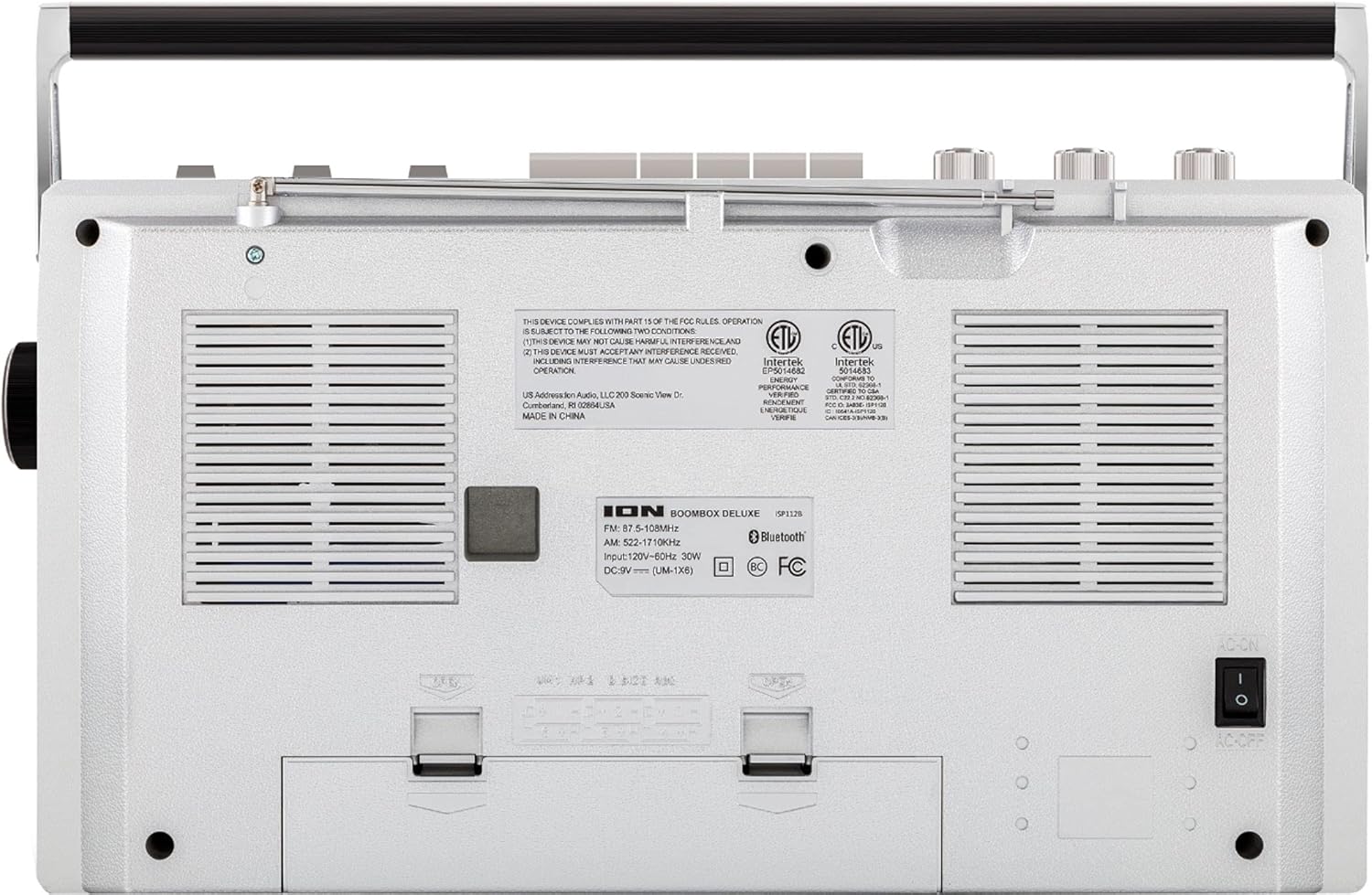
Figure 2: Rear panel of the Boombox Deluxe, highlighting the AC power input and battery compartment location.
3.2 Adjustment anteneu
For optimal AM/FM radio reception, extend the telescopic antenna located on the top of the unit. Adjust its position for the clearest signal.
4. Parentah Operasi
4.1 Kadali umum
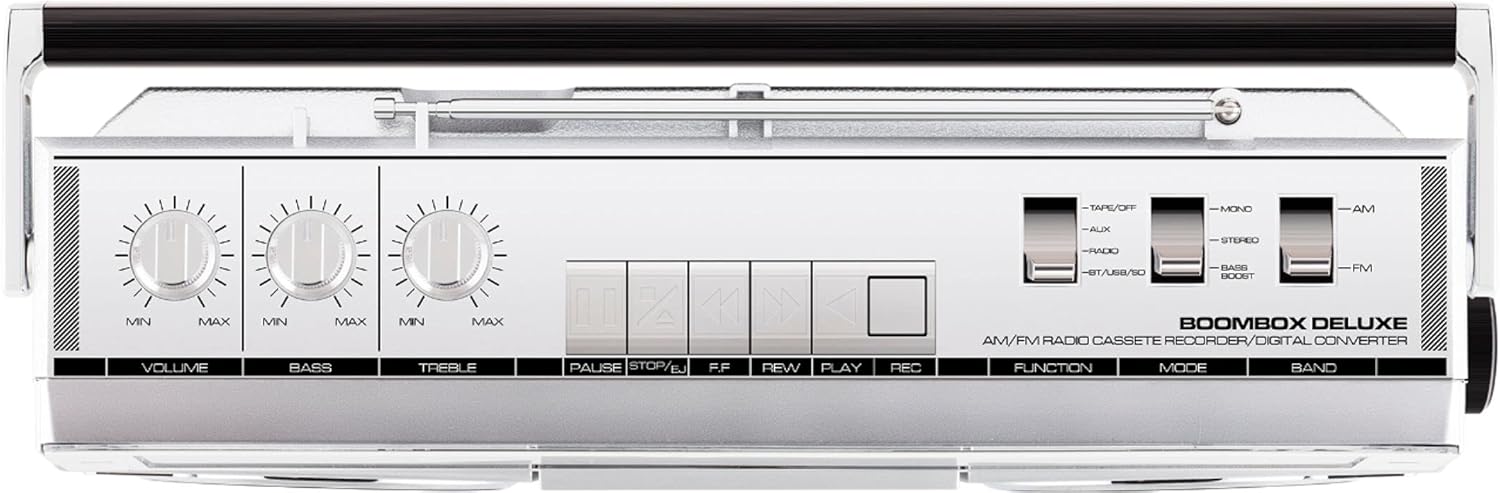
Figure 3: Top panel controls, including Volume, Bass, Treble knobs, and cassette playback buttons.
- Jilid Kenop: Nyaluyukeun tingkat kaluaran sora sacara umum.
- Tombol Bass: Saluyukeun kaluaran audio frekuensi rendah.
- Treble kenop: Saluyukeun kaluaran audio frekuensi luhur.
- Switch fungsi: Selects between Tape/Off, Aux, Radio, and BT/USB/SD modes.
- Pindah mode: Selects between Mono, Stereo, and Bass Boost audio modes.
- Band switch: Milih antara pita radio AM jeung FM.
4.2 Operasi Radio
- Nyetél Fungsi Pindah to 'Radio'.
- Nyetél Pindah pita ka 'AM' atawa 'FM'.
- Ngagunakeun éta Kenop Tuning to select your desired radio station. The frequency will be displayed on the tuner scale.
4.3 Operasi Pamuter Kaset
- Nyetél Fungsi Pindah to 'Tape/Off'.
- Pencét éta Eureun / Ngaluarkeun tombol pikeun muka kompartemen kaset.
- Insert a cassette tape with the open edge facing upwards. Close the compartment.
- Pencét éta Maén tombol pikeun ngamimitian playback.
- Paké Rewind (REW) jeung Maju gancang (FF) tombol pikeun nganapigasi tape.
- Pencét Reureuh to temporarily stop playback. Press again to resume.
- Pencét Eureun / Ngaluarkeun pikeun ngeureunkeun puteran sareng ngaluarkeun pita éta.
- To record, ensure the Fungsi Pindah is set to 'Tape/Off' and press the Record (REC) tombol sakaligus kalawan Maén kancing.
4.4 Konektipitas Bluetooth

Figure 4: Side panel with USB and Micro SD card slots, and playback controls for digital media.
- Nyetél Fungsi Pindah to 'BT/USB/SD'. The unit will enter Bluetooth pairing mode, indicated by a flashing LED.
- On your Bluetooth-enabled device (e.g., smartphone, tablet), search for 'ION Boombox Deluxe' in the Bluetooth settings.
- Select 'ION Boombox Deluxe' to pair. Once connected, a confirmation tone will sound, and the LED will stop flashing.
- You can now stream audio from your device to the Boombox Deluxe. Use your device's controls or the boombox's playback buttons (Play/Pause, Next/Previous Track) for media control.
4.5 USB/Micro SD Playback
- Nyetél Fungsi Pindah to 'BT/USB/SD'.
- Insert a USB flash drive or Micro SD card (with compatible audio files) into the respective slot on the side of the unit.
- The unit will automatically detect and begin playing audio files.
- Use the playback control buttons (Play/Pause, Next/Previous Track, Delete) on the side panel to manage your music.
4.6 Input Bantu

Figure 5: Side panel with headphone output and auxiliary input jacks.
- Nyetél Fungsi Pindah to 'Aux'.
- Sambungkeun alat audio éksternal (contona, pamuter MP3, pamuter CD) ka NGARÉMÉ DI jack maké kabel audio 3.5mm (teu kaasup).
- Audio from the connected device will play through the boombox speakers. Control playback from your external device.
5. Fitur
- Integrated Stereo System with Dual Speakers
- Streaming nirkabel Bluetooth
- AM/FM Radio Tuner
- Cassette Player/Recorder
- USB jeung Micro SD Card Playback
- Auxiliary Input for External Devices
- Adjustable Bass and Treble Controls
- Portable Design with Carry Handle
6. Spésifikasi
| Spésifikasi | Rincian |
|---|---|
| merek | Audio ION |
| Modél | Boombox Deluxe |
| Téhnologi konektipitas | Bluetooth, USB |
| Tipe Speaker | Stereo |
| Sumber Daya | Battery Powered (D-cell), AC Power |
| Warna | Hideung, Pérak |
| Item Beurat | 8.93 pon |
| Ukuran Paket | 18.1 x 11.1 x 7.6 inci |
7. Cara ngungkulan
- Henteu aya kakuatan:
Ensure the AC power cable is securely connected to both the unit and a working power outlet. If using batteries, check that they are inserted correctly and are not depleted. - Resepsi Radio goréng:
Fully extend the telescopic antenna and adjust its position. Try relocating the unit to an area with better signal reception, away from potential interference sources like other electronic devices. - Cassette Tape Not Playing/Recording:
Ensure the tape is inserted correctly and the cassette compartment is fully closed. Check that the tape is not tangled or damaged. For recording, ensure both Play and Record buttons are pressed simultaneously. - Bluetooth Teu Nyambung:
Make sure the Boombox Deluxe is in 'BT/USB/SD' mode and in pairing mode (flashing LED). Ensure Bluetooth is enabled on your external device and it is within range (typically 30 feet). Try unpairing and re-pairing the device. - No Sound from USB/Micro SD:
Verify that the USB drive or Micro SD card is inserted correctly and contains compatible audio files (e.g., MP3). Ensure the volume is turned up on the boombox.
8. Pangropéa
- beberesih: Anggo lawon anu lemes sareng garing pikeun ngabersihkeun bagian luar unit. Entong nganggo pembersih cair atanapi pelarut.
- Perawatan Dek Kaset: Periodically clean the tape heads and pinch rollers with a cotton swab lightly dampened with isopropyl alcohol to ensure optimal playback and recording quality.
- Panyimpenan batré: Upami unit ieu moal dianggo kanggo waktos anu lami, cabut batréna pikeun nyegah bocor sareng karusakan.
9. Garansi jeung Rojongan
This product is offered as an Amazon Renewed item. Amazon Renewed products are professionally inspected and tested to work and look like new. If you are not satisfied with your purchase, renewed products are eligible for replacement or refund under the Amazon Renewed Guarantee. For specific details regarding the Amazon Renewed Guarantee, please refer to the Amazon Renewed program terms and conditions on the Amazon websitus.
For further assistance or technical support, please contact ION Audio customer service or refer to their official websitus pikeun sumber rojongan.


