Bubuka
The Anova Precision Smart Oven is a versatile countertop appliance designed to bring professional-grade cooking capabilities to your home kitchen. It combines convection, steam, bake, broil, roast, and dehydrate functions, offering precise temperature control for a wide range of culinary tasks. This manual provides essential information for the safe and effective operation and maintenance of your Anova Precision Smart Oven.
For optimal performance and longevity, please read this manual thoroughly before first use and retain it for future reference.
Émbaran Kasalametan
Salawasna turutan pancegahan kaamanan dasar nalika nganggo alat-alat listrik pikeun ngirangan résiko kahuruan, kejutan listrik, sareng tatu pikeun jalma.
- Ulah noél surfaces panas. Paké handles atanapi knobs.
- Pikeun ngajaga tina shock listrik, ulah beuleum kabel, colokan, atawa alat dina cai atawa cairan séjén.
- Pengawasan anu ketat diperyogikeun nalika alat naon waé dianggo ku atanapi caket barudak.
- Cabut colokan tina stop kontak nalika henteu dianggo sareng sateuacan beberesih. Ngidinan pikeun niiskeun sateuacan dipasang atanapi nyabut bagian.
- Entong ngoperasikeun alat naon waé nganggo kabel atanapi colokan anu ruksak, atanapi saatos alatna teu tiasa dianggo atanapi parantos ruksak dina cara naon waé.
- Pamakéan kantétan aksésori anu henteu disarankeun ku produsén alat tiasa nyababkeun tatu.
- Ulah make di luar.
- Entong ngantepkeun kabel ngagantung dina ujung méja atanapi konter, atanapi nyabak permukaan anu panas.
- Ulah nempatkeun dina atawa deukeut gas panas atawa burner listrik, atawa dina oven dipanaskeun.
- Awas pisan kedah dianggo nalika mindahkeun alat anu ngandung minyak panas atanapi cairan panas sanés.
- Ulah make alat pikeun lian ti pamakéan dimaksudkeun.
Komponén Langkungview
Familiarize yourself with the main components of your Anova Precision Smart Oven:
- Rongga Oven: The main cooking chamber.
- Tangki cai: Removable tank for steam generation. Located on the side.
- Panél kontrol: Digital display and knobs for setting temperature, time, and cooking modes.
- Probe dahareun: Detachable probe for precise internal temperature monitoring.
- Removable Racks: Multiple racks for various cooking needs.
- Baking Pan: Included pan for general baking and roasting.

Gambar 1: Hareupeun view of the Anova Precision Smart Oven, showing the main oven cavity, control panel, and side-mounted water tank.

Gambar 2: Interior view of the Anova Precision Smart Oven, illustrating the two removable racks and the included baking pan.

Figure 3: A user demonstrating the removal of the clear water tank from the side of the Anova Precision Smart Oven for refilling or cleaning.
Disetél
Unpacking sarta panempatan
- Cabut oven sareng sadaya asesoris tina bungkusna kalayan ati-ati.
- Remove any protective film or packaging materials from the oven.
- Place the oven on a stable, level, heat-resistant surface with adequate clearance from walls and other appliances for ventilation. Ensure at least 4 inches of space on all sides and above the oven.
- Pastikeun stop kontakna gampang diakses.
Ngabersihan Awal
- Sateuacan nganggo heula, usap interior sareng luar oven nganggo iklanamp lawon.
- Wash the removable racks, baking pan, and water tank with warm, soapy water. Rinse thoroughly and dry completely.
Persiapan Tangki Cai
- Remove the water tank from its housing on the side of the oven.
- Fill the water tank with distilled water. Do not use tap water as it can lead to mineral buildup.
- Securely reinsert the water tank into its housing until it clicks into place.
Sambungan Daya
Plug the oven into a grounded electrical outlet. The display will illuminate, indicating the oven is ready for use.
Parentah Operasi
Kontrol Panel Langkungview
The Anova Precision Smart Oven features an intuitive control panel with a digital display and rotary knobs for setting cooking parameters. The display shows temperature, time, and current cooking mode.
Connecting to the Anova App
For enhanced control and access to a recipe library, download the Anova Oven app on your smartphone. Follow the in-app instructions to connect your oven via Wi-Fi.
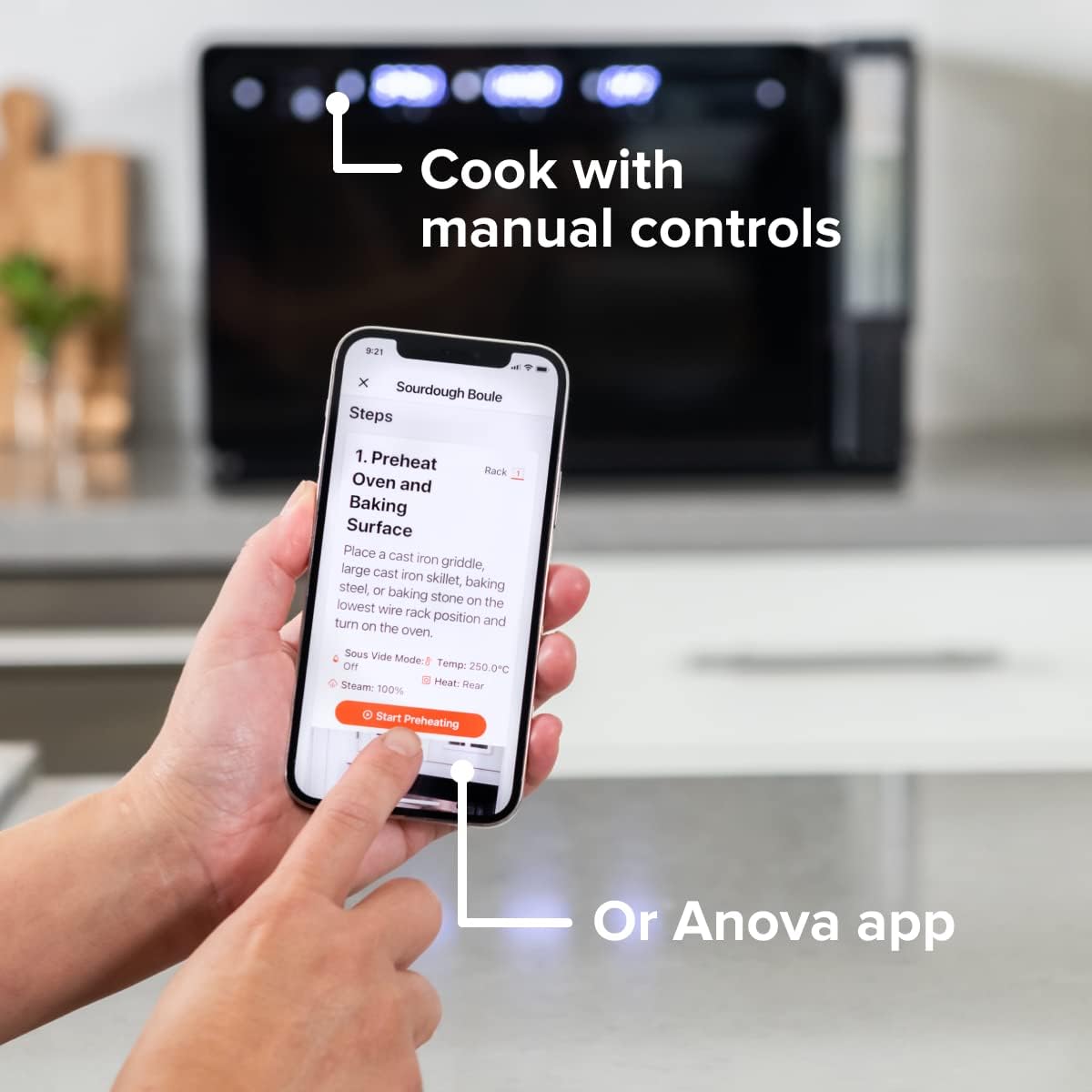
Figure 4: A user interacting with the Anova app on a smartphone, demonstrating remote control capabilities for the oven.
Basic Cooking Modes
The oven offers several cooking modes:
- Konveksi: Uses a fan to circulate hot air for even cooking and browning.
- uap: Injects steam into the oven cavity, ideal for baking bread, steaming vegetables, or sous vide style cooking.
- Combi (Convection + Steam): Combines hot air and steam for moist interiors and crispy exteriors.
- Panggang / Panggang: Standard oven functions for baking and roasting.
- Panggang: Panas anu luhur ti unsur luhur pikeun ngagoréng sareng ngagoréng.
- Dehidrasi: Low heat and fan circulation for drying foods.
Setting a Program (Manual Control)
- Turn the mode knob to select your desired cooking mode.
- Adjust the temperature using the temperature knob.
- Setel waktos masak nganggo kenop waktos.
- Pencét tombol Mimitian / Reureuh pikeun ngamimitian masak.
- To use the food probe, insert it into the thickest part of your food before starting. The oven will cook until the target internal temperature is reached.
Sous Vide Mode
The Anova Precision Oven can achieve sous vide style results without a water bath. Use the steam function and the food probe to cook food to a precise internal temperature, ensuring tenderness and juiciness.
Steam Injection for Baking
For perfect breads with crispy crusts and soft interiors, utilize the steam injection feature. Ensure the water tank is filled before starting a steam-assisted baking program.

Figure 5: Two loaves of freshly baked bread, showcasing the results of steam injection for a perfect crust and crumb. The Anova Precision Smart Oven is visible in the background.
Pangropéa jeung beberesih
Regular cleaning and maintenance will ensure the longevity and optimal performance of your Anova Precision Smart Oven.
beberesih poean
- After each use, allow the oven to cool completely.
- Ngusap permukaan interior sareng luar nganggo iklanamp lawon sareng deterjen hampang. Hindarkeun pembersih anu abrasif atanapi bantalan penggosok.
- Remove and clean the racks and baking pan with warm, soapy water.
- Empty and rinse the water tank after each use, especially if using steam functions. Allow it to air dry before reinserting.
Descaling (Steam Function Users)
If you frequently use the steam function, mineral buildup may occur. The oven may indicate when descaling is needed. Refer to the Anova app or online resources for detailed descaling instructions using a descaling solution.
Panyimpenan
When not in use for extended periods, ensure the oven is clean and dry. Store it in a cool, dry place.
Pamérésan masalah
This section addresses common issues you might encounter with your Anova Precision Smart Oven.
| Masalah | Mungkin Cukang lantaranana | Solusi |
|---|---|---|
| Oven teu hurung. | Teu plugged di; kakuatan outage; circuit breaker tripped. | Pastikeun oven geus aman plugged kana stop kontak gawé. Pariksa circuit breaker rumah tangga. |
| Taya uap dihasilkeun. | Water tank empty or not properly seated; mineral buildup. | Fill water tank with distilled water and ensure it is correctly inserted. Perform descaling if necessary. |
| Dahareun teu masak merata. | Improper rack placement; overcrowding; fan obstruction. | Refer to recipe for recommended rack position. Avoid overcrowding the oven. Ensure nothing obstructs the convection fan. |
| Masalah sambungan Wi-Fi. | Sandi Wi-Fi salah; router jauh teuing; gangguan jaringan. | Double-check Wi-Fi password. Move oven closer to router or use a Wi-Fi extender. Restart oven and router. |
If the problem persists after attempting these solutions, please contact Anova Customer Support.
spésifikasi
- merek: Kulawarga Anova
- Ngaran modél: Precision Oven
- Jumlah modél: AN900-10
- Ukuran produk: 18 "D x 22" W x 14" H
- Beurat barang: 59 pon
- warna: Hideung
- Tipe Kontrol: Kenop
- Sumber Daya: Listrik
- Komponén Kaasup: Water tank, pan, temp probe
- Fitur husus: Bisa diprogram
Garansi sareng Rojongan
The Anova Precision Smart Oven comes with a manufacturer's warranty. Please refer to the warranty card included with your product or visit the official Anova Culinary websitus pikeun istilah jeung kaayaan jaminan lengkep.
For technical support, troubleshooting assistance, or to inquire about replacement parts, please contact Anova Customer Support:
- Dukungan Online: Nganjang ka Anova Culinary Store on Amazon atawa resmi maranéhanana websitus.
- Pituduh Pamaké (PDF): Pituduh pangguna anu lengkep sayogi kanggo diunduh di link ieu.

Figure 6: The Anova Precision Smart Oven integrated with a smart home assistant (Alexa), demonstrating its connectivity features.


