Bubuka
The Studebaker Retro Edge Big Sound Bluetooth Boombox (Model SB2150B) is a versatile audio system designed for portable entertainment. It combines classic retro aesthetics with modern features, including a CD player, cassette player/recorder, AM/FM stereo radio, and Bluetooth connectivity. This manual provides detailed instructions for setup, operation, maintenance, and troubleshooting to ensure optimal performance and longevity of your device.
Émbaran Kasalametan penting
Please read all instructions carefully before operating this unit. Keep this manual for future reference.
- Ulah ngalaan unit ieu ka hujan atawa Uap.
- Ulah meungpeuk sagala bukaan ventilasi.
- Entong dipasang di deukeut sumber panas sapertos radiator, register panas, kompor, atanapi aparat sanésna (kalebet ampLiifiers) anu ngahasilkeun panas.
- Nangtayungan kabel kakuatan tina keur leumpang dina atawa pinched.
- Ngan anggo kantétan/aksésori anu ditunjuk ku produsén.
- Cabut unit ieu nalika badai kilat atanapi nalika henteu dianggo kanggo waktos anu lami.
- Rujuk sadayana jasa ka tanaga jasa anu mumpuni.
Eusi pakét
Pastikeun yén sadaya barang aya nalika ngabongkar:
- Studebaker Retro Edge Big Sound Bluetooth Boombox (SB2150B)
- Kabel Daya AC
- Instruksi Manual
Fitur produk jeung kontrol
Familiarize yourself with the various components and controls of your boombox.
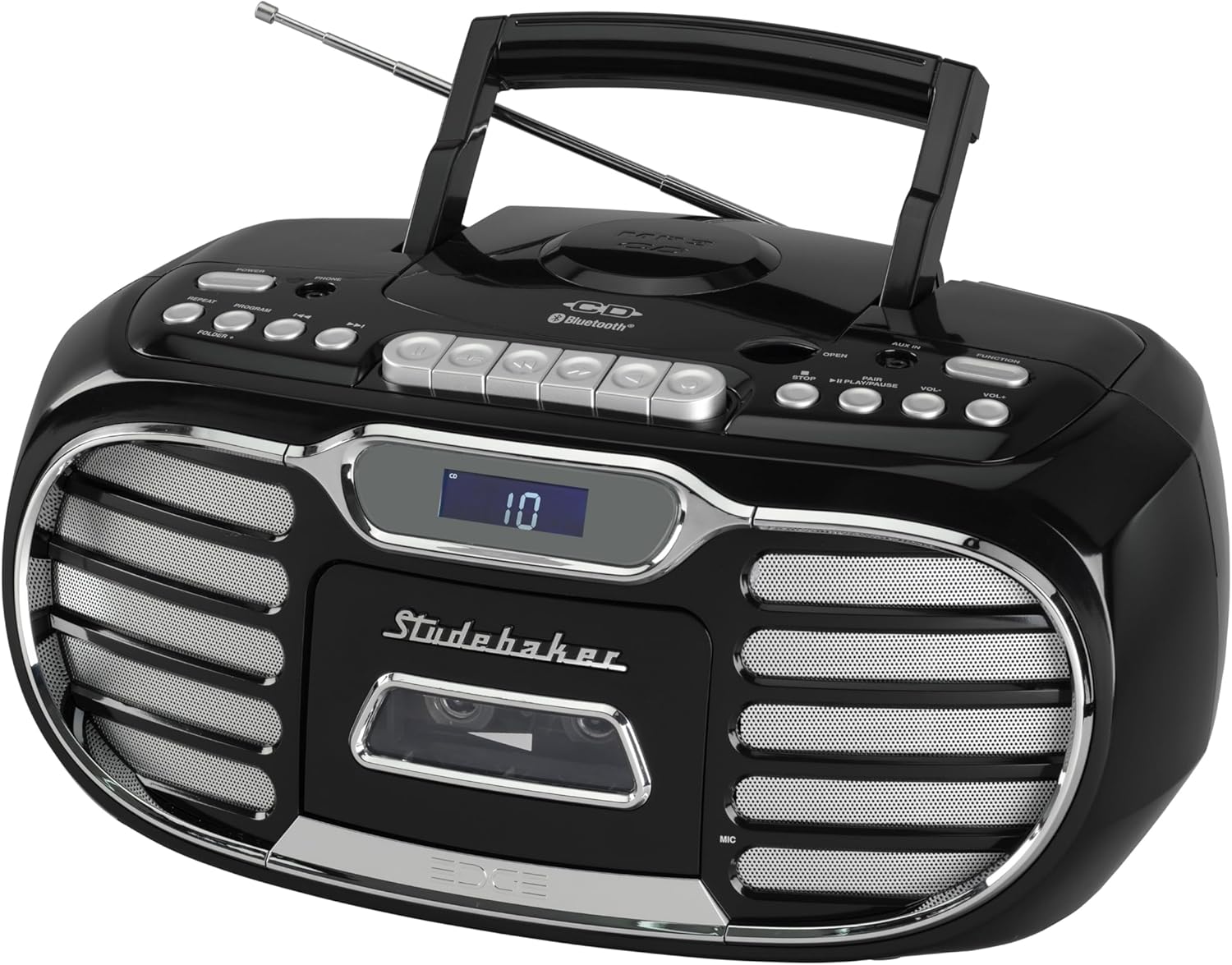
Gambar 1: Gemblengna view of the Studebaker Retro Edge Boombox, showcasing its classic design, integrated handle, and front-facing controls and speakers.

Gambar 2: Hareupeun view highlighting the central LCD display, cassette compartment, and speaker grilles on either side. Control buttons are visible above the display.

Gambar 3: Diwincik view of the cassette player compartment, showing the tape mechanism and the transparent cover for tape visibility.

Gambar 4: Close-up of the top-loading CD player with a disc inserted, illustrating the open compartment for disc placement.
Kontrol Panel Langkungview:
- Tombol Daya: Hurungkeun unit / pareum.
- Pamilih fungsi: Switches between CD, Cassette, AM, FM, Bluetooth, and AUX modes.
- Kontrol volume: Saluyukeun tingkat kaluaran audio.
- Kadali CD: Play/Pause, Stop, Skip/Search (Forward/Backward), Program, Repeat.
- Cassette Controls: Play, Record, Fast Forward, Rewind, Stop/Eject, Pause.
- Kadali Radio: Tuning knob/buttons, Band selector (AM/FM).
- Tombol Nyapasangkeun Bluetooth: Mimitian mode papasangan Bluetooth.
- Layar LCD: Shows current mode, track number, radio frequency, etc.
- AUX-in Jack: Pikeun nyambungkeun alat audio éksternal.
- Jack headphone: Pikeun déngékeun pribadi.
- Built-in Condenser Microphone: For recording audio to cassette.
- Antena Teleskopik: Pikeun panarimaan radio FM.
Disetél
Powering Unit:
The boombox can be powered by AC power or batteries (not included).
- Operasi AC: Connect the supplied AC power cord to the AC IN jack on the unit and then to a standard AC outlet (120V~60Hz).
- Operasi batré: Open the battery compartment, insert the required number of batteries (e.g., 8 x 'C' size, not supplied) ensuring correct polarity (+/-), and close the compartment.
Pamakéan awal:
Extend the telescopic antenna fully for optimal FM radio reception. For AM, rotate the unit for best reception.
Parentah Operasi
Operasi Pamuter CD:
- Pencét tombol Daya pikeun ngahurungkeun unit.
- Press the Function button repeatedly to select "CD" mode.
- Open the CD compartment door by pressing the "OPEN" button.
- Place a CD (CD-R/RW or MP3 CD) onto the spindle with the label side facing up.
- Close the CD compartment door. The LCD display will show the total number of tracks.
- Pencét tombol Play / Reureuh pikeun ngamimitian playback.
- Use the Skip/Search buttons to navigate tracks.
- Pencét tombol Stop pikeun ngeureunkeun playback.
- Use the Program button to program tracks for playback in a specific order.
- Use the Repeat button to repeat a single track or the entire CD.
Operasi Pamuter/Perekam Kaset:
- Pencét tombol Daya pikeun ngahurungkeun unit.
- Press the Function button repeatedly to select "TAPE" mode.
- Press the Stop/Eject button to open the cassette compartment.
- Insert a cassette tape with the open edge facing down.
- Tutup kompartemen kasét.
- Pencét tombol Play pikeun ngamimitian playback.
- Use Fast Forward and Rewind buttons to navigate the tape.
- Press the Stop/Eject button to stop playback or eject the tape.
- Ngarékam:
- From Built-in Microphone: Ensure the unit is in TAPE mode. Press the Record button. The unit will start recording from the built-in microphone.
- From Radio/CD/AUX/Bluetooth: Select the desired source (Radio, CD, AUX, or Bluetooth). Press the Record button on the cassette player. The unit will record the audio playing from the selected source.
- Press the Stop/Eject button to stop recording. The cassette player features auto-stop.
Operasi Radio AM/FM:
- Pencét tombol Daya pikeun ngahurungkeun unit.
- Press the Function button repeatedly to select "AM" or "FM" mode.
- Panjangkeun anteneu teleskopik pikeun panarimaan FM. Pikeun AM, puterkeun unit pikeun panarimaan anu pangsaéna.
- Use the Tuning control to select your desired radio station. The frequency will be displayed on the LCD.
Operasi Bluetooth:
- Pencét tombol Daya pikeun ngahurungkeun unit.
- Press the Function button repeatedly to select "BT" (Bluetooth) mode. The LCD display will show "BT" and flash, indicating it's in pairing mode.
- Aktipkeun Bluetooth dina alat sélulér anjeun (smartphone, tablet, jsb.) teras milarian alat anu sayogi.
- Select "SB2150B" from the list of devices.
- Once paired, the "BT" indicator on the LCD display will stop flashing and remain solid. You can now play audio from your device through the boombox.
- To disconnect, disable Bluetooth on your mobile device or select a different function mode on the boombox.
AUX-in Operation:
- Pencét tombol Daya pikeun ngahurungkeun unit.
- Press the Function button repeatedly to select "AUX" mode.
- Connect one end of a 3.5mm audio cable (not supplied) to the AUX-in jack on the boombox and the other end to the headphone jack or audio output of your external audio device (e.g., MP3 player, smartphone).
- Play audio from your external device. The sound will be output through the boombox speakers.
Operasi headphone:
For private listening, connect a pair of headphones (not supplied) to the Headphone Jack. The sound from the speakers will be muted automatically.
Pangropéa
- beberesih: Ngusap unit kalayan lemes, damp lawon. Ulah make cleaners abrasive atawa pangleyur.
- Pamuter CD: Keep the CD compartment clean. Do not touch the lens.
- Pamuter Kaset: Periodically clean the tape heads and pinch rollers with a cotton swab lightly moistened with isopropyl alcohol.
- Panyimpenan: If storing the unit for an extended period, remove batteries (if used) and disconnect from AC power.
Pamérésan masalah
| Masalah | Mungkin Cukang lantaranana | Solusi |
|---|---|---|
| Unit teu hurung. | ari kakuatan teu disambungkeun; Batré béak atanapi teu leres diselapkeun. | Ensure AC cord is securely plugged in. If using batteries, check polarity and replace if necessary. |
| Taya sora tina speaker. | Volume low teuing; Modeu fungsi salah dipilih; Headphone disambungkeun. | Increase volume. Select the correct function mode (CD, TAPE, AM/FM, BT, AUX). Disconnect headphones. |
| CD teu bisa diputer. | CD teu dipasang kalawan bener; CD kotor atanapi calar; Unit dina modeu salah. | Ensure CD is inserted label-side up. Clean or replace CD. Select "CD" function mode. |
| Cassette tape does not play/record. | Tape inserted incorrectly; Tape is damaged; Unit in wrong mode. | Ensure tape is inserted correctly. Try a different tape. Select "TAPE" function mode. |
| panarimaan radio goréng. | Antenna henteu dipanjangkeun / diposisikan leres; gangguan. | Fully extend and adjust the telescopic antenna for FM. Rotate the unit for best AM reception. Move away from other electronic devices. |
| Papasangan Bluetooth gagal. | Unit not in pairing mode; Device too far; Device already paired with another unit. | Ensure boombox is in "BT" mode and flashing. Move device closer. Disconnect from other Bluetooth devices. Try restarting both devices. |
spésifikasi
- model: SB2150B
- Ukuran produk (L x W x H): 9.41 x 14.57 x 7.03 inci
- Beurat barang: 6.78 pon
- Sumber Daya: AC 120V~60Hz or DC Battery Operation (Batteries not included)
- Tipe Speaker: Stereo
- Téknologi konektipitas: Bantu, Bluetooth
- Daya kaluaran: 2.2W x 2
- Kasaluyuan CD: CD, CD-R/RW, CD MP3
- Fitur Kaset: Player/Recorder, Auto Stop
- Pita Radio: AM/FM PLL Stereo
- Fitur tambahan: Headphone Jack, Built-in Condenser Microphone, LCD Display with Backlight, Built-in Carrying Handle
Garansi sareng Rojongan
For warranty information and technical support, please refer to the warranty card included with your product or contact Studebaker customer service directly. You may also visit the official Studebaker websitus pikeun sumber pangrojong paling up-to-date.
Pabrikan: Spectra Merchandising International, Nyarita.


