1. Bubuka
The DIGITNOW B600-US Record Player is a versatile audio system designed to bring the timeless sound of vinyl into your home. This unit features integrated speakers, Bluetooth connectivity for wireless streaming, and a high-quality Audio-Technica stylus for precise tracking. It supports both 33 and 45 RPM records and includes a switchable phono preamplifier for connecting to external speakers. Additionally, it offers a USB port for converting vinyl records to digital formats.

Figure 1: DIGITNOW B600-US Record Player with dust cover.
2. Émbaran Kasalametan
Please read all safety instructions carefully before using the record player. Keep this manual for future reference.
- Sumber Daya: Paké ngan adaptor kakuatan disadiakeun. Pastikeun voltage cocog catu daya lokal Anjeun.
- Cai sareng Uap: Ulah ngalaan unit ka hujan, beueus, atawa cairan netes/cipratan. Ulah nempatkeun objék dieusian ku cairan, kayaning vases, dina alat.
- Ventilasi: Ensure adequate ventilation. Do not block any ventilation openings. Maintain a minimum distance around the apparatus for sufficient ventilation.
- Panas: Ulah nempatkeun deukeut sumber panas kayaning radiators, registers panas, kompor, atawa alat sejenna (kaasup ampLiifiers) anu ngahasilkeun panas.
- beberesih: Cabut colokan unit tina stop kontak sateuacan dibersihkeun. Anggo lawon anu lemes sareng garing pikeun ngabersihkeun. Entong nganggo pembersih cair atanapi pembersih aerosol.
- Palayanan: Entong nyobian ngalayanan produk ieu nyalira. Rujuk sadayana ngalayanan ka tanaga jasa anu mumpuni.
- panempatan: Tempatkeun unit dina permukaan anu stabil sareng datar pikeun nyegah karusakan tina ragrag.
3. Eusi Paket
Carefully unpack the box and ensure all the following items are included:
- DIGITNOW Record Player Unit
- Mains adaptor
- Tutup Meja Putar (Penutup Kekebul)
- Slide Mat (Platter Mat)
- Plate with Belt (Platter with Drive Belt)
- counterweight
- Cartridge Alignment Meter
- 45 RPM Adaptor
- Manual Pitunjuk Operasi (dokumen ieu)
4. Produk Langkungview
Familiarize yourself with the various components of your DIGITNOW Record Player.
4.1 Hareup jeung Luhur View
Gambar 2: Utama view of the record player, showing the platter, tonearm, and dust cover.
- Piring: The rotating platform where records are placed. Made of solid aluminum alloy for stability.
- Tonearm: Nyimpen kartrid sareng stylus, anu tiasa maca alur rékaman.
- Stylus (jarum): Diamond-tipped Audio-Technica stylus for accurate playback.
- counterweight: Adjustable weight on the tonearm to balance tracking force.
- Anti-skating Control: Prevents the tonearm from drifting inward or outward.
- Panutup lebu: Protects the platter and tonearm from dust when not in use.
- Control Knobs/Buttons: For power, speed selection (33/45 RPM), mode selection (Phono/Bluetooth), and volume.
- Speaker terpadu: Spiker stereo internal pikeun muterkeun audio langsung.
4.2 Sistem Spiker Internal
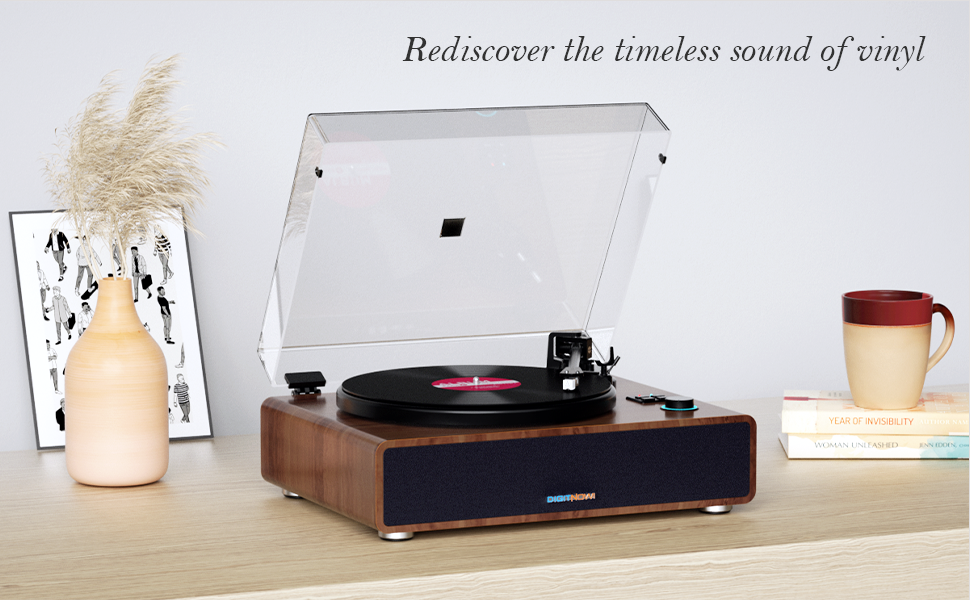
Figure 3: Diagram showing the internal speaker components and vibration absorption system.
The record player incorporates a vibration absorption system and high-performance speakers to deliver clear and dynamic sound directly from the unit.
4.3 Sambungan Panel Rear

Figure 4: Rear panel showing various input/output ports.
- Panyambung taneuh: Connects the ground wire to reduce sound interference.
- DC IN 15V: Input daya pikeun adaptor utama.
- USB-PC Port: For connecting to a computer to convert vinyl to digital audio.
- RCA Line-Out (R/L): Red (Right) and White (Left) outputs for connecting to external amplifiers atanapi spéker Powered.
- PHONO/LINE Switch: Selects between phono (for phono input) and line (for line-level output to external speakers/amppangangkat).
- Hurungkeun ON / OFF: Saklar kakuatan utama pikeun unit.
5. Setélan
Follow these steps to set up your record player for the first time.
- Buka bungkusan sareng Tempat: Carefully remove all components from the packaging. Place the record player on a stable, level surface away from direct sunlight, heat sources, and excessive dust or vibrations.
- Install Platter and Belt:
- Teundeun platter kana spindle nu.
- Locate the drive belt on the underside of the platter. Carefully stretch the belt around the motor pulley. Ensure the belt is not twisted.

Figure 5: Close-up of the solid aluminum alloy platter, indicating proper placement.
- Install and Adjust Counterweight:
- Geserkeun counterweight kana bagian tukang tonearm.
- Adjust the counterweight to achieve the recommended tracking force for the Audio-Technica AT3600 cartridge (typically 2.5 to 3.5 grams). Refer to the cartridge alignment meter for precise adjustment. The tonearm should float horizontally when properly balanced.
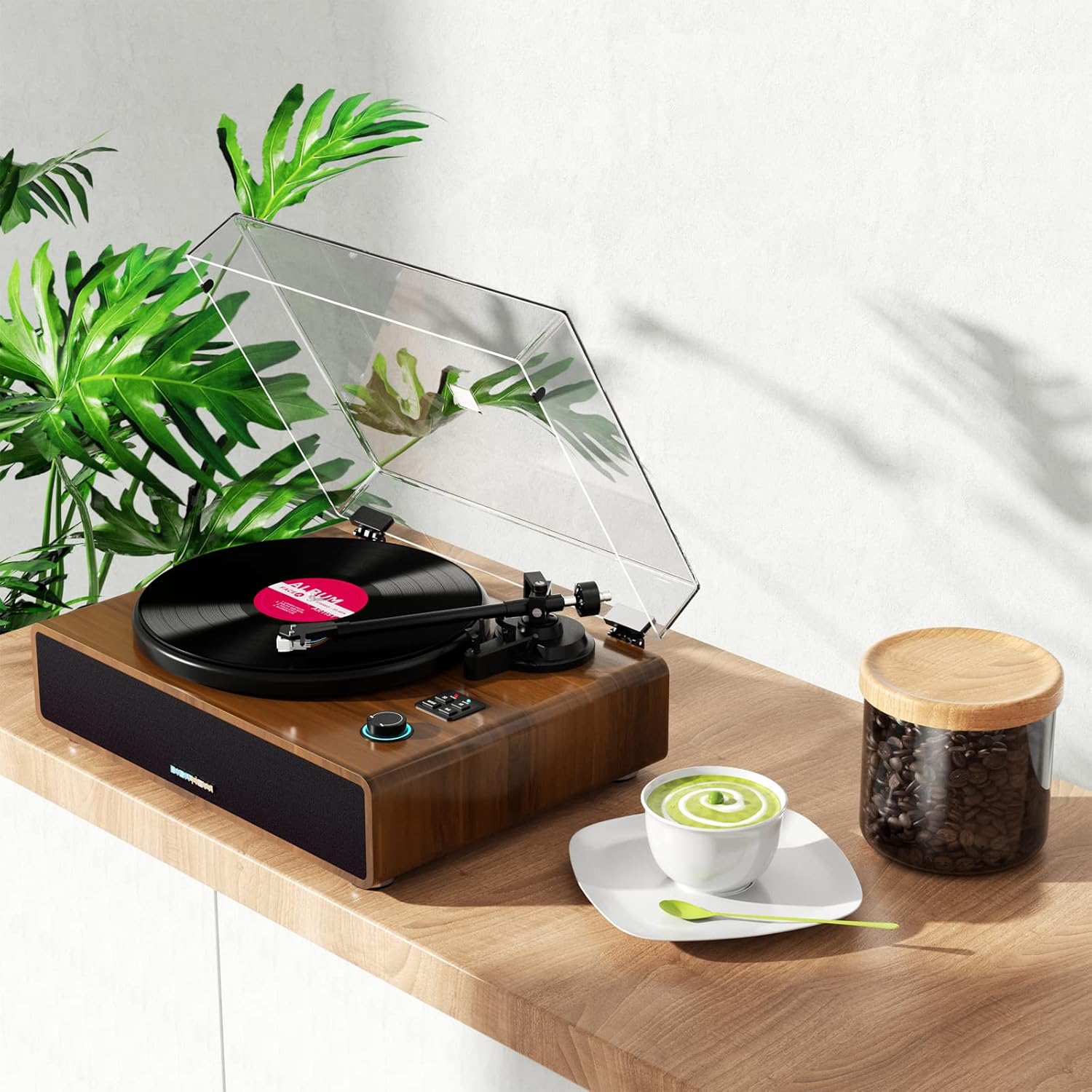
Figure 6: Adjustable counterweight on the tonearm for optimal tracking.
- Pasang Panutup Kekebul: Carefully place the dust cover onto the hinges at the back of the unit.
- Sambungkeun Kakuatan: Insert the DC IN 15V plug from the mains adapter into the corresponding port on the rear panel. Plug the mains adapter into a wall outlet.
6. Parentah Operasi
6.1 Maén Rékor
- Ensure the record player is powered on using the ON/OFF switch on the rear panel.
- Teundeun catetan dina piring. Lamun maén single 45 RPM, nempatkeun adaptor 45 RPM dina spindle munggaran.
- Select the appropriate speed (33 or 45 RPM) using the speed selector button.
- Gently angkat tonearm ngagunakeun uas cueing.
- Posisikeun tonearm di luhur alur awal rekaman anu dipikahoyong.
- Slowly lower the cueing lever to gently place the stylus onto the record. Playback will begin.
- Pikeun ngeureunkeun puteran, angkat tonearm nganggo tuas isyarat teras balikkeun deui ka sandaran tonearm.
6.2 Nyapasangkeun Bluetooth
The record player can receive audio wirelessly from your Bluetooth-enabled devices.
- Hurungkeun pamuter rékaman.
- Press the "MODE" button until the Bluetooth indicator light flashes, indicating it's in pairing mode.
- Dina smartphone Anjeun atawa alat Bluetooth sejen, aktipkeun Bluetooth tur neangan alat nu sadia.
- Select "B600" or similar from the list of devices. Once connected, the Bluetooth indicator light will become solid.
- You can now stream audio from your device through the record player's speakers.
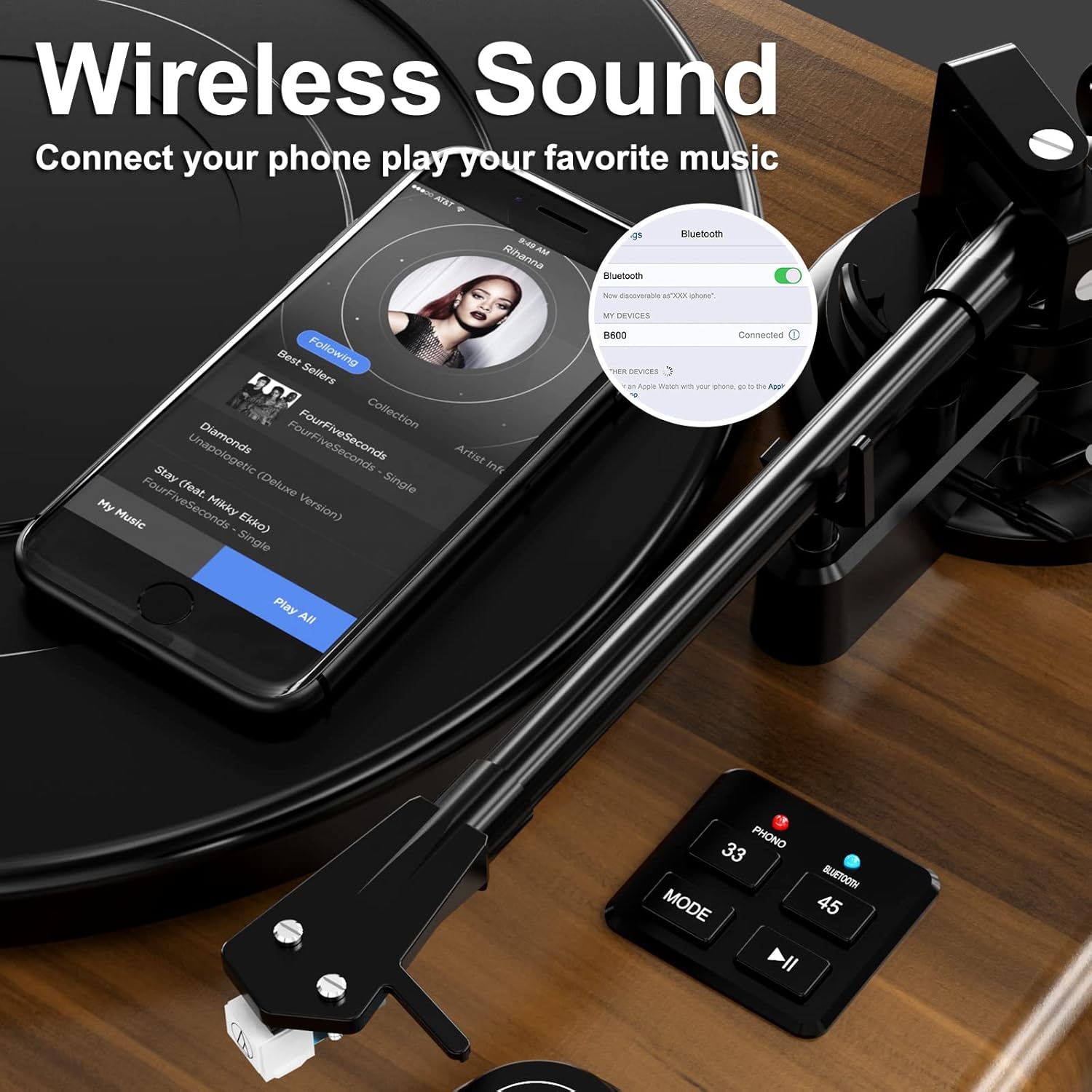
Gambar 7: Kelample of Bluetooth pairing with a smartphone.
6.3 Connecting to External Speakers/Amppangagung
To connect your record player to an external audio system:
- Ensure both the record player and the external audio system are turned off.
- Connect RCA cables (not included) from the R (Red) and L (White) RCA Line-Out ports on the rear of the record player to the corresponding audio input ports on your amplifier atanapi speaker Powered.
- Set the PHONO/LINE switch on the rear of the record player to "LINE" if connecting to a standard line-level input on your amplifier, or "PHONO" if connecting to a dedicated phono input.
- Turn on both devices and adjust volume levels as needed.
6.4 USB Connection for PC (Vinyl to Digital Conversion)
The USB-PC port allows you to convert your vinyl records into digital audio files (MP3/WAV) using computer software like Audacity.
- Connect a USB cable (not included) from the USB-PC port on the record player to an available USB port on your computer.
- Install and open audio recording software (e.g., Audacity) on your computer.
- In the software's audio input settings, select the record player as the input device.
- Start recording in the software, then begin playing your vinyl record on the record player.
- Once the record finishes, stop recording in the software and save your digital audio file.
7. Pangropéa
Proper care will extend the life of your record player and records.
- Ngabersihan Unit: Wipe the exterior of the record player with a soft, dry, lint-free cloth. Do not use abrasive cleaners, waxes, or solvents.
- Ngabersihan Stylus: Use a soft brush designed for stylus cleaning, brushing gently from back to front. Avoid touching the stylus with your fingers.
- Perawatan rékaman: Jaga rékaman anjeun beresih sareng bébas tina lebu. Nyimpen aranjeunna vertikal dina sleeves maranéhna pikeun nyegah warping.
- Ngagantian Stylus: The stylus has a limited lifespan. If you notice a decrease in sound quality or increased skipping, the stylus may need replacement. Contact customer support for information on compatible replacement styli.
8. Cara ngungkulan
Upami anjeun mendakan masalah, tingal tabel di handap pikeun masalah sareng solusi umum.
| Masalah | Mungkin Cukang lantaranana | Solusi |
|---|---|---|
| Taya kakuatan | Adaptor daya teu nyambung; stop kontak teu aktip. | Ensure power adapter is securely connected to the unit and a working outlet. Check the ON/OFF switch. |
| Teu aya sora ti panyatur | Volume too low; incorrect mode selected; external speakers not connected/powered. | Increase volume. Ensure "PHONO" mode is selected for vinyl playback. If using external speakers, check their connections and power. |
| Sora anu robah warna atawa ngaluncat | Stylus dirty or worn; tracking force incorrect; record dirty or damaged; unit not level. | Clean stylus. Re-adjust counterweight. Clean record. Ensure unit is on a stable, level surface. Replace stylus if worn. |
| Bluetooth teu nyambung | Record player not in pairing mode; device too far; device already connected to another Bluetooth unit. | Ensure record player is in Bluetooth pairing mode (flashing light). Move device closer. Disconnect device from other Bluetooth connections. |
| Kacepetan ngarékam salah | Laju salah dipilih. | Press the speed selector button to switch between 33 and 45 RPM. |
9. Spésifikasi
Technical specifications for the DIGITNOW B600-US Record Player.
| Fitur | Rincian |
|---|---|
| Nomer modél | B600-US |
| merek | DIGITNOW |
| Ukuran (L x W x H) | 20.39 x 16.34 x 11.57 inci |
| Item Beurat | 20.3 pon |
| Speeds Dirojong | 33 1/3, 45 RPM |
| Cartridge Tipe | Magnet-type (Audio-Technica AT3600) |
| Tipe Motor | Motor DC |
| Konektipitas | Bluetooth Input, RCA Line-Out, Headphone Jack, USB-PC |
| Diwangun-di Speaker | Yes, 4 integrated speakers with equalizer |
| Bahan | Plastic (with wooden look finish) |
| Warna | coklat |
10. Garansi jeung Rojongan
DIGITNOW products are manufactured to the highest quality standards. For specific warranty information, please refer to the warranty card included with your purchase or visit the official DIGITNOW websitus.
If you require technical assistance or have questions about your product, please contact DIGITNOW customer support. Have your model number (B600-US) and purchase details ready when contacting support.
Dukungan Online: Visit the official DIGITNOW websitus pikeun FAQ, pituduh ngungkulan, sareng inpormasi kontak.
Rojongan Email: Refer to your warranty card or the official websitus pikeun alamat surélék layanan palanggan.


