Bubuka
This manual provides detailed instructions for the proper use and care of your Loluka Blue Wireless Over Ear Headphones. These headphones feature Bluetooth 5.1 for stable connectivity, IPX6 waterproofing for durability during activities, and noise-cancelling microphones for clear calls. Please read this manual thoroughly before using your headphones to ensure optimal performance and longevity.
1. Setélan
1.1 Naon dina Box
Saatos unboxing, mangga pariksa yen sakabeh komponen aya:
- Loluka Wireless Earbuds
- Ngecas Case
- Kabel Ngecas USB-C
- Multiple Sizes of Silicone Ear Tips (S/M/L)
- Detachable Earhooks (2 pairs)
- Gancang Mimitian Guide

Katerangan Gambar: This image shows all items included in the product package: the Loluka headphones, charging case, USB-C charging cable, multiple sizes of silicone ear tips, detachable earhooks, and a quick start guide.
1.2 Ngecas Awal
Before first use, fully charge the headphones and charging case. Connect the provided USB-C cable to the charging case and a power source. The indicator lights on the case will show charging status.
- Charging Time for Case: Approximately 1-2 hours.
- Earbud Playtime: Up to 6-7 hours on a single charge.
- Total Playtime with Charging Case: Up to 28 hours.

Katerangan Gambar: This visual highlights the extended battery life, showing the headphones provide 7 hours of use per charge, with the charging case offering an additional 3 full charges for a total of 28 hours of playback. A USB-C charging cable is also visible.
1.3 Nyapasangkeun Bluetooth
- Pastikeun headphone dicas.
- Buka wadah ngecas. Earbuds bakal otomatis hurung tur asup kana mode papasangan.
- Dina alat anjeun (smartphone, tablet, jsb.), aktipkeun Bluetooth sareng milarian alat anu sayogi.
- Select "MS-T20" from the list to connect. Once connected, a voice prompt will confirm successful pairing.

Katerangan Gambar: The image displays the automatic pairing process, where the headphones (identified as 'MS-T20') connect to a mobile device via Bluetooth, simplifying initial setup.
1.4 Maké Headphone
The headphones are designed for comfort and stability, featuring detachable earhooks and various ear tip sizes.
- Tips ceuli: Choose the silicone ear tips (S/M/L) that provide the best seal and comfort for your ears. A good seal enhances sound quality and noise isolation.
- Detachable Earhooks: For secure fit during intense activities like sports or workouts, attach the earhooks. For casual listening, the earhooks can be removed.

Katerangan Gambar: This image illustrates the versatility of the headphones, demonstrating how the detachable earhooks can be used for secure fit during activities like fitness, cycling, and running, or removed for a more casual listening experience.

Katerangan Gambar: A person is shown wearing the Loluka headphones, illustrating their ergonomic design and comfortable fit around the ear, suitable for extended wear.
2. Parentah Operasi
2.1 Daya Hurung/Pareuman
- Daya Hurung: Open the charging case, and the earbuds will automatically power on. Alternatively, press and hold the touch control area on either earbud for 2 seconds.
- Pareum listrik: Place the earbuds back into the charging case and close the lid. Alternatively, press and hold the touch control area on either earbud for 5 seconds.
2.2 Kontrol Toél
The headphones feature intuitive touch controls on each earbud. Refer to the diagram below for specific functions:
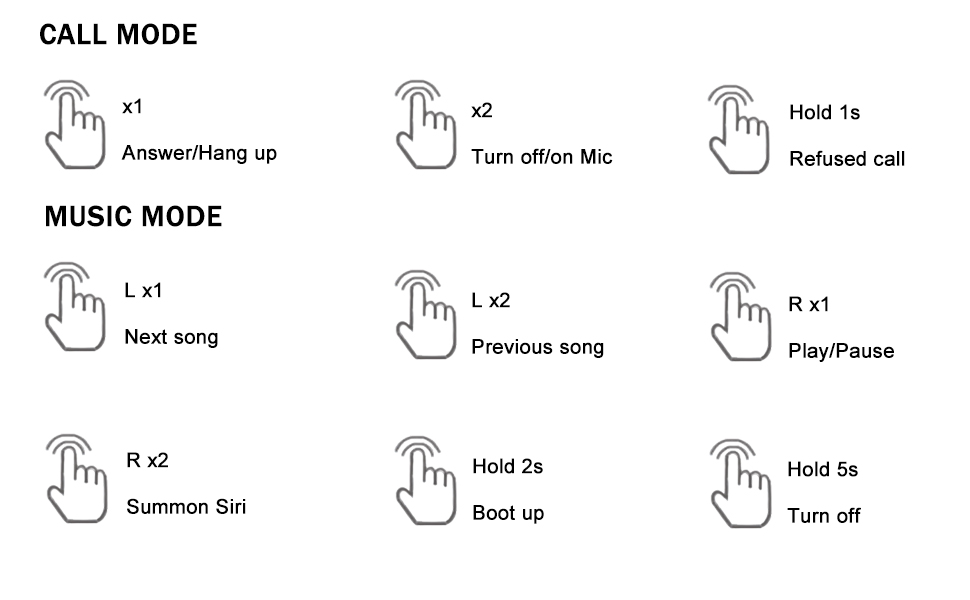
Katerangan Gambar: A detailed diagram outlining the touch control functions for the headphones, including single, double, and long presses for answering calls, controlling music playback, and activating voice assistants.
- Ngajawab / Tutup Telepon: Single tap (x1) on either earbud.
- Nolak Telepon: Press and hold (1s) on either earbud.
- Turn On/Off Mic: Double tap (x2) on either earbud during a call.
- Puter/Reureuh Musik: Single tap (R x1) on the right earbud.
- Lagu salajengna: Single tap (L x1) on the left earbud.
- Lagu saméméhna: Double tap (L x2) on the left earbud.
- Summon Voice Assistant (Siri, Google Assistant, etc.): Double tap (R x2) on the right earbud.
3. Pangropéa
3.1 beberesih
Pembersihan rutin ngabantosan ngajaga kualitas sora sareng kabersihan:
- Lembut usap earbuds sareng wadah ngecas ku lawon anu lemes, garing, teu aya serat.
- Cabut tip ceuli sareng bersihkeun ku sabun sareng cai anu hampang, teras garing sateuacana dipasang deui.
- Ulah make bahan abrasive, alkohol, atawa cleaners kimiawi.
3.2 Tahan Cai (IPX6)
The headphones are rated IPX6 waterproof, meaning they are protected against high-pressure water jets from any direction. This makes them suitable for workouts and use in rainy conditions.
- Ulah beuleum headphone dina cai.
- Pastikeun port ngecas garing sateuacan ngecas.
- Kasus ngecas henteu tahan cai.

Katerangan Gambar: The image depicts the headphones and case with water splashes, emphasizing their IPX6 waterproof rating, which protects them from sweat and rain.
3.3 Panyimpenan
When not in use, store the headphones in their charging case to protect them from dust, damage, and to keep them charged.
4. Cara ngungkulan
Upami anjeun ngalaman masalah sareng headphone anjeun, mangga tingali solusi umum ieu:
- Teu Aya Masalah Sora atanapi Koneksi:
1. Pastikeun duanana earbud parantos dicas.
2. Turn off and then turn on Bluetooth on your device.
3. Delete "MS-T20" from your device's Bluetooth list and re-pair.
4. Ensure the earbuds are within the 10-meter Bluetooth range of your device. - Masalah ngecas:
1. Verify the USB-C cable is securely connected to both the charging case and the power source.
2. Ensure the charging contacts on the earbuds and inside the case are clean and free of debris.
3. Make sure the charging case itself has power. - Kualitas Sora goréng:
1. Try different sizes of ear tips to ensure a proper seal in your ear canal.
2. Ensure the earbuds are correctly positioned in your ears.
3. Clean any earwax or debris from the ear tips and speaker mesh. - Tombol Teu Ngabales:
1. Ensure you are pressing the correct touch control area.
2. Apply firm but not excessive pressure for touch commands.
5. Spésifikasi
| Fitur | Spésifikasi |
|---|---|
| Ngaran modél | Loluka Earbuds with hook |
| Téhnologi konektipitas | Nirkabel (Bluetooth) |
| Vérsi Bluetooth | 5.1 |
| Rentang Bluetooth | 10 méter |
| Tingkat Résistansi Cai | IPX6 Waterproof |
| Kahirupan Batré (Earbuds) | 6-7 Jam |
| Total Kahirupan Batré (kalayan Case) | 28 Jam |
| Waktu Ngecas (Kasus) | 1-2 Hours (Type-C) |
| Tipe Supir Audio | Supir dinamis |
| Kontrol bising | Sound Isolation (Environmental Noise Reduction for calls) |
| Tipe Kontrol | Toél, Sora |
| Alat nu cocog | Bluetooth-enabled smartphones, tablets, etc. |
| Item Beurat | 2.71 ons |
| Dimensi produk | 3.9 x 2.44 x 1.2 inci |
6. Garansi jeung Rojongan
For warranty information and customer support, please refer to the documentation included with your purchase or contact Loluka customer service through the retailer where the product was purchased. Please retain your proof of purchase for warranty claims.


