1. Bubuka
The Sonel CMM 30 is an advanced industrial multimeter engineered for versatility, modern functionality, and exceptional durability. This device integrates 11 fundamental measurement functions along with additional features, providing a broad spectrum of applications for professionals. Its robust design includes drop protection and an IP67 rated casing, ensuring reliable performance even in challenging environments.
Key features include a smartphone application for remote reading and data saving via wireless communication, an automatically adjusting backlight for optimal screen visibility, and a built-in flashlight for illumination in dark conditions. This manual provides essential information for the safe and effective use of your CMM 30 multimeter.
2. Émbaran Kasalametan
Always adhere to the following safety precautions to prevent electric shock, injury, or damage to the meter or equipment under test.
- Baca sareng pahami sadaya pitunjuk sareng inpormasi kaamanan dina manual ieu sateuacan ngoperasikeun méteran.
- Ulah dianggo méteran upami katingalina ruksak atanapi upami insulasi dina kabel tés rusak.
- Salawasna pegatkeun daya ka sirkuit sareng kaluarkeun sadaya voltase tinggitage capacitors before making resistance, continuity, diode, or capacitance measurements.
- Paké caution nalika gawé bareng voltagnyaeta luhur 30V AC RMS, 42V puncak, atawa 60V DC. Ieu voltagÉta nyababkeun bahaya shock.
- Ulah ngaleuwihan wates input maksimum pikeun fungsi nanaon.
- Pastikeun saklar fungsi aya dina posisi anu leres pikeun pangukuran anu dipikahoyong sateuacan nyambungkeun kabel tés kana sirkuit.
- Replace batteries as soon as the low battery indicator appears to ensure accurate readings.
- Ulah ngoperasikeun méteran dina lingkungan gas, uap, atanapi lebu anu gampang ngabeledug.
3. Eusi Paket
Verify that all items listed below are present and undamaged upon opening the package:
- Sonel CMM 30 Industrial Multimeter
- Kabel Tés (Beureum sareng Hideung)
- Probe Suhu (termokopel tipe-K)
- 4 x Batré AAA (tos dipasang atanapi misah)
- Manual pangguna (dokumén ieu)
Lamun aya item nu leungit atawa ruksak, mangga ngahubungan supplier Anjeun langsung.
4. Produk Langkungview
Familiarize yourself with the components of your Sonel CMM 30 multimeter:
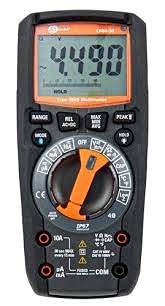
Gambar 4.1: Hareupeun view of the Sonel CMM 30 Industrial Multimeter. This image displays the device's main components, including the digital display, the central rotary function switch, and the various input terminals for test leads.
4.1. Témbongkeun
The large LCD shows measurement readings, units, function indicators, and battery status. It features an automatic backlight that adjusts to ambient light conditions for optimal visibility.
4.2. Rotary Fungsi Pindah
This central switch is used to select the desired measurement function (e.g., Voltage, Current, Resistance, Capacitance, Temperature, Frequency).
4.3. Tombol Fungsi
Various buttons provide additional controls and features:
- RANGEUT: Toggles between manual and automatic ranging.
- MODÉ: Selects sub-functions within a main rotary switch position (e.g., AC/DC voltage, Dioda/Kontinuitas).
- Tahan: Ngabekukeun bacaan tampilan ayeuna.
- MAKSIMUM/MIN/RATA-RATA: Records maximum, minimum, and average readings.
- REL: Relative mode, subtracts a stored value from subsequent measurements.
- Bluetooth/Light: Activates Bluetooth connectivity for the smartphone app and controls the built-in flashlight.
4.4. Jack Input
These are the connection points for the test leads:
- COM: Common terminal for the black test lead.
- VΩHzCAP°C: Input pikeun voltage, resistance, frequency, capacitance, and temperature measurements (red test lead).
- mAµA: Input pikeun miliampere sareng mikroamppangukuran arus (kabel tés beureum).
- 10A: Input for up to 10 Amppangukuran arus (kabel tés beureum).
5. Setélan
5.1. Pamasangan batré
The Sonel CMM 30 requires 4 AAA batteries. These may be pre-installed or included separately.
- Pastikeun multimeter dina kaayaan OFF.
- Panggihan kompartemen batréna di tukang méter.
- Use a screwdriver to loosen the screw(s) securing the battery cover.
- Cabut panutup batré.
- Insert the 4 AAA batteries, observing the correct polarity (+ and -) as indicated inside the compartment.
- Replace the battery cover and tighten the screw(s) securely.
Catetan: Always use fresh batteries of the same type. Remove batteries if the meter is not used for an extended period to prevent leakage.
6. Parentah Operasi
6.1. Powering on / Pareum
Turn the rotary function switch from the OFF position to any desired measurement function to power on the meter. To power off, turn the switch back to the OFF position.
6.2. Basic Measurement Procedures
Before any measurement, ensure the test leads are correctly inserted into the appropriate input jacks for the selected function.
6.2.1. JilidtagPangukuran (AC/DC)
- Insert the black test lead into the COM jack and the red test lead into the VΩHzCAP°C jack.
- Puterkeun saklar puteran ka V~ (AC Voltage) atanapi V- (DC Voltage) position. If both are combined, use the MODE button to select AC or DC.
- Sambungkeun kabel tés sacara paralel di sakuliah sirkuit atanapi komponén anu badé diukur.
- Baca voltage nilai dina tampilan.
6.2.2. Current Measurement (AC/DC)
Awas: Never connect the meter in parallel for current measurement. Always connect in series with the circuit.
- Insert the black test lead into the COM jack. For currents up to 10A, insert the red test lead into the 10A jack. For smaller currents (mA/µA), insert the red test lead into the mAµA jack.
- Turn the rotary switch to the A~ (AC Current) or A- (DC Current) position, or the mA/µA position as appropriate. Use the MODE button to select AC or DC if needed.
- Open the circuit where current is to be measured and connect the meter in series.
- Baca nilai ayeuna dina tampilan.
6.2.3. Pangukuran Résistansi
- Insert the black test lead into the COM jack and the red test lead into the VΩHzCAP°C jack.
- Puterkeun saklar puteran ka posisi Ω (Résistansi).
- Pastikeun sirkuit atanapi komponén parantos dipareuman énergina sateuacan nyambungkeun kabel tés.
- Maca nilai résistansi dina tampilan.
6.2.4. Pangukuran Kapasitansi
- Insert the black test lead into the COM jack and the red test lead into the VΩHzCAP°C jack.
- Turn the rotary switch to the CAP (Capacitance) position.
- Ensure the capacitor is fully discharged before connecting the test leads across it.
- Maca nilai kapasitansi dina tampilan.
6.2.5. Pangukuran Suhu
- Insert the temperature probe into the VΩHzCAP°C and COM jacks, observing polarity if applicable.
- Turn the rotary switch to the °C/°F (Temperature) position.
- Tempatkeun tungtung probe suhu kana atanapi caket objék anu suhuna badé diukur.
- Baca nilai suhu dina tampilan.
6.3. Fitur canggih
6.3.1. True RMS Measurement
The CMM 30 features True RMS for AC voltage and current measurements, providing accurate readings for non-sinusoidal waveforms.
6.3.2. Wireless Communication and Smartphone App
The CMM 30 can connect wirelessly to a smartphone application, allowing for remote reading and saving of measurements. This is particularly useful in hard-to-reach or hazardous locations.
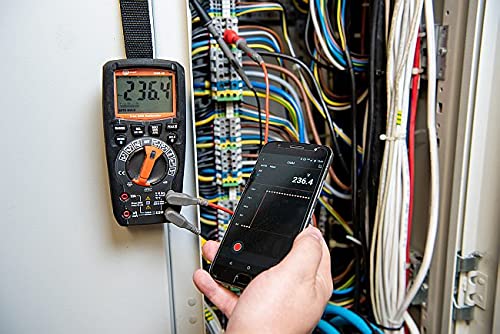
Figure 6.1: The Sonel CMM 30 Multimeter connected to an electrical panel, demonstrating its wireless communication feature. A smartphone displays the measurement reading remotely, highlighting the convenience for inaccessible areas.
Pikeun ngagunakeun fitur ieu:
- Download the official Sonel CMM app from your smartphone's app store.
- Aktipkeun Bluetooth dina smartphone Anjeun.
- Press the Bluetooth button on the multimeter to activate its wireless communication.
- Follow the app's instructions to pair with your CMM 30 and begin remote monitoring.
6.3.3. Diwangun-di Senter
The integrated flashlight assists in illuminating measurement areas, especially in low-light conditions. Activate it by pressing the dedicated light button.
6.4. Durability and IP67 Rating
The CMM 30 is designed with an IP67 rating, signifying its protection against dust ingress and immersion in water up to 1 meter for 30 minutes. This makes it suitable for demanding industrial environments.
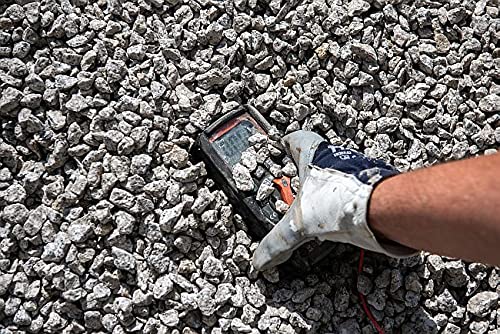
Figure 6.2: The Sonel CMM 30 Multimeter partially submerged in gravel, illustrating its robust construction and resistance to dust and debris, a testament to its IP67 rating.
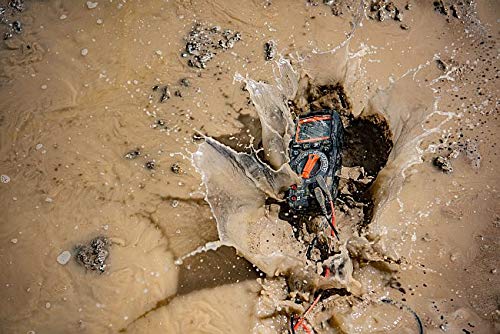
Figure 6.3: The Sonel CMM 30 Multimeter creating a splash as it impacts a muddy puddle, demonstrating its exceptional water resistance and ability to withstand harsh, wet conditions.
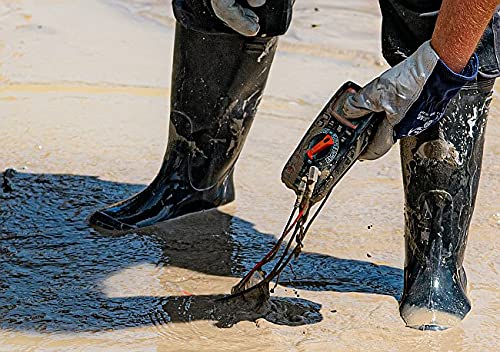
Figure 6.4: A person, wearing protective boots and gloves, retrieves the Sonel CMM 30 Multimeter from a muddy environment. This image emphasizes the device's resilience and ease of handling even after exposure to challenging conditions.
7. Pangropéa
7.1. beberesih
Lap c méternaasing jeung iklanamp lawon sareng deterjen anu hampang. Entong nganggo bahan abrasif atanapi pangleyur. Pastikeun méterna garing pisan sateuacan dianggo.
7.2. Ngagantian batré
Refer to Section 5.1 for battery replacement instructions. Replace batteries promptly when the low battery indicator appears on the display.
7.3. Panyimpenan
When not in use for extended periods, store the multimeter in a dry, cool place, away from direct sunlight and extreme temperatures. Remove the batteries to prevent leakage.
8. Cara ngungkulan
| Masalah | Mungkin Cukang lantaranana | Solusi |
|---|---|---|
| Méter teu hurung. | Batré paéh atawa salah dipasang. | Pariksa polaritasna batré atawa ngaganti accu. |
| Teu aya bacaan atanapi "OL" (Overload) ditampilkeun. | Fungsi anu dipilih salah; sirkuit kabuka; pangukuran ngaleuwihan rentang. | Select correct function; check circuit continuity; switch to a higher range or auto-range. |
| Bacaan teu akurat. | Batré lemah; kabel/jack tés kotor; gangguan éksternal. | Ganti batré; bersihan kabel/jack; jauhan tina medan éléktromagnétik anu kuat. |
| Masalah sambungan Bluetooth. | Bluetooth not enabled on meter/phone; app issues; distance. | Ensure Bluetooth is on; restart app/phone; reduce distance between devices. |
9. Spésifikasi
| Fitur | Spésifikasi |
|---|---|
| merek | Sonel |
| Nomer modél | SON001 |
| Warna | Hideung |
| Item Beurat | 418 g |
| Ukuran Paket | 30 x 15 x 10 cm |
| Batré | 4 batré AAA diperlukeun (kaasup) |
| Fungsi Pangukuran | AC / DC Voltage, AC/DC Current, Resistance, Capacity, Temperature, Duty Cycle, Frequency |
| Ngariung | Manual sareng Otomatis |
| RMS leres | Yes (for AC voltage sareng ayeuna) |
| Protéksi Ingress (IP) Peunteun | IP67 |
| Konektipitas | Wireless (Smartphone App) |
| Fitur tambahan | HOLD function, Built-in flashlight, Backlight auto-adjustment |
10. Garansi jeung Rojongan
10.1. Émbaran jaminan
Sonel products are manufactured to high standards and are warranted against defects in materials and workmanship for a period specified by your regional distributor from the date of purchase. This warranty does not cover damage caused by misuse, unauthorized modification, accident, or neglect. Please retain your proof of purchase for warranty claims.
10.2. Rojongan Téknis
For technical assistance, troubleshooting beyond this manual, or warranty inquiries, please contact your local Sonel distributor or the authorized service center. Contact information can typically be found on the Sonel official websitus atawa ngaliwatan titik pameseran Anjeun.
When contacting support, please have your product model number (SON001) and purchase date readily available.


