Bubuka
Welcome to the user manual for your Naztech NXT-700 Trucker Headset. This guide provides detailed instructions on how to set up, operate, maintain, and troubleshoot your new wireless headset. Please read this manual thoroughly to ensure optimal performance and longevity of your device.
Produk Leuwihview
Komponén Kaasup
- Naztech NXT-700 Headset
- Kabel Ngecas USB-C
- 2x Microphone Windscreen
- Headset Hanging Hook
Fitur konci
- Crystal-Clear Calls & Music: Features HD Sound and patented NoiseHush technology for 96% background noise cancellation.
- Kanyamanan nirkabel: Bluetooth 5.0 for untethered movement, ideal for hands-free communication.
- Kanyamanan Sapopoé: Designed with an extra-wide adjustable headband and ultra-soft memory foam ear cups.
- Manjangkeun Umur Batré: Up to 32 hours of talk time and 550 hours of standby time.
- Seamless Multi-Device Connectivity: Multipoint connectivity with an impressive 300 ft Bluetooth range.
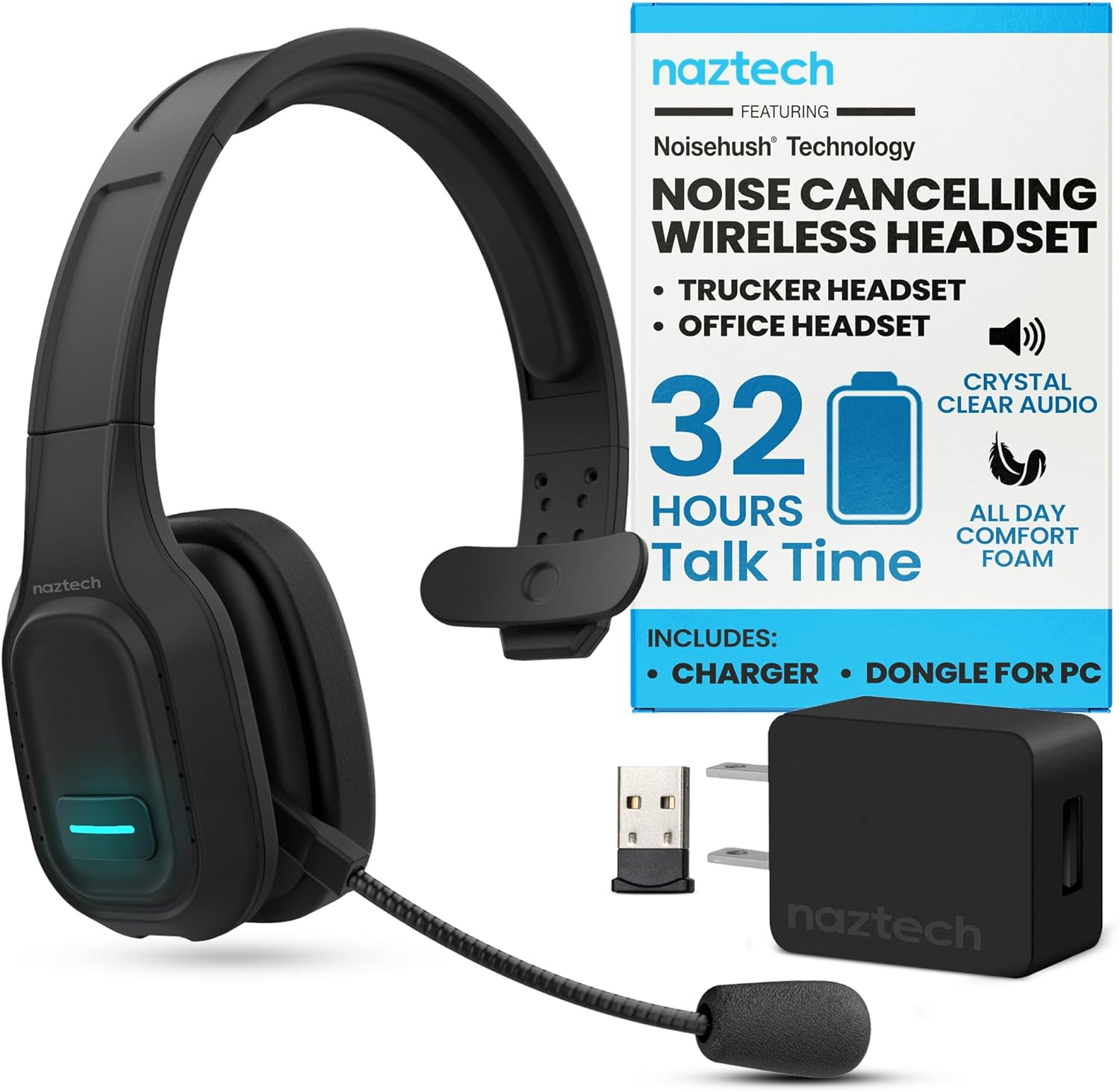
Image: The Naztech NXT-700 headset shown with its included accessories: a USB-C charging cable, a USB wall adapter, and a USB dongle for PC connectivity. This image highlights the complete package for the user.

Image: The Naztech NXT-700 headset displayed alongside icons representing its key features: HD Definition Audio, Voice Assistant, lightweight design (4.8 oz), GPS Navigation, Caller ID Announcement, and Extreme Comfort. This visual summary helps users quickly grasp the headset's capabilities.
Disetél
Ngecas Headsét
- Connect the USB-C charging cable to the charging port on the headset.
- Sambungkeun tungtung kabel anu sanésna kana sumber daya USB anu cocog (contona, adaptor témbok, port USB komputer).
- The LED indicator on the headset will show charging status. A full charge takes approximately 90 minutes.
- Once fully charged, the headset provides up to 32 hours of talk time and 550 hours of standby time.
Masangkeun sareng Alat
- Pastikeun headset pareum.
- Press and hold the Multi-function button until the LED indicator flashes blue and red alternately, indicating pairing mode.
- Dina alat anjeun (smartphone, tablet, laptop), aktipkeun Bluetooth sareng milarian alat anu sayogi.
- Select "NXT-700" from the list of found devices.
- Sakali disambungkeun, indikator LED bakal ngahurungkeun biru padet atawa flash biru lalaunan.
- For multipoint connectivity, repeat the pairing process with a second device. The headset can maintain a connection with two devices simultaneously.
Nyaluyukeun Headsét
- Adjust the headband for a comfortable and secure fit on your head.
- Position the flexible, rotatable microphone boom close to your mouth for optimal voice pickup.
- Attach one of the included microphone windscreens to reduce breath noise and environmental sounds.
Parentah Operasi
Daya Hurung/Pareuman
- Pikeun ngahurungkeun: Pencét jeung tahan kenop Daya nepi ka indikator LED hurung.
- Pikeun mareuman: Pencét jeung tahan tombol Daya nepi ka indikator LED pareum.
Manajemén Telepon
- Waleran/Tungtung Telepon: Pencét tombol Multi-fungsi sakali.
- Nolak Telepon: Pencét sareng tahan tombol Multi-fungsi salami 2 detik.
- Balik deui Nomer Panungtungan: Pencét dua kali tombol Multi-fungsi.
- Mute/Unmute Microphone: Press the Mute button on the microphone boom.
Playback Audio
- Play / Reureuh: Pencét tombol Multi-fungsi sakali.
- Lagu salajengna: Pencét jeung tahan tombol Volume Up.
- Lagu saméméhna: Pencét jeung tahan tombol Jilid Turun.
- Volume Up: Press the Volume Up button.
- Volume Down: Press the Volume Down button.
Asisten sora
- Activate Voice Assistant: Press the dedicated Voice Control button (if available) or double-press the Multi-function button (refer to specific model instructions).

Image: A woman wearing the Naztech NXT-700 headset while driving a truck, demonstrating its use for crystal-clear audio during extended journeys. The image emphasizes the headset's design for eliminating road noise.

Image: A woman wearing the Naztech NXT-700 headset while working on a laptop in an office environment, illustrating its suitability for clear calls and productive meetings.
Pangropéa
beberesih
- Ngusap headsét nganggo kaén anu lembut sareng garing.
- For the ear cups, use a slightly damp lawon upami diperyogikeun, teras antoskeun dugi ka garing sadayana sateuacan dianggo.
- Regularly replace the microphone windscreen to maintain optimal sound quality and hygiene.
- Ulah make bahan kimia kasar atawa bahan abrasive pikeun beberesih.
Panyimpenan
- Simpen headset di tempat anu tiis sareng garing jauh tina sinar panonpoé langsung sareng suhu anu ekstrim.
- Use the included headset hanging hook for convenient and safe storage when not in use.
Pamérésan masalah
| Masalah | Mungkin Cukang lantaranana | Solusi |
|---|---|---|
| Headset teu hurung. | batré lemah. | Cas headset sapinuhna nganggo kabel USB-C anu disayogikeun. |
| Teu tiasa dipasangkeun sareng alat. | Headset not in pairing mode; Bluetooth off on device; device too far. | Ensure headset is in pairing mode (flashing blue/red). Turn on Bluetooth on your device. Move headset closer to the device. |
| Kualitas audio goréng atanapi disconnections. | Out of Bluetooth range; interference; low battery. | Stay within the recommended 300 ft Bluetooth range. Avoid strong electromagnetic interference. Charge the headset. |
| Mikropon teu ngarékam sora kalawan jelas. | Microphone muted; improper positioning; worn windscreen. | Ensure microphone is unmuted. Adjust microphone boom closer to your mouth. Replace the microphone windscreen. |
| Taya sora tina headset. | Volume too low; headset not selected as audio output. | Increase headset volume. Check your device's audio settings to ensure NXT-700 is selected as the output device. |
If you continue to experience issues, please refer to the support section or visit the Naztech websitus pikeun bantuan salajengna.
spésifikasi
| Fitur | Rincian |
|---|---|
| Ngaran modél | NXT-700 |
| Nomer Modél Item | 15443 |
| Téhnologi konektipitas | Nirkabel (Bluetooth) |
| Vérsi Bluetooth | 5.0 |
| Rentang Bluetooth | Nepi ka 300 suku (100 méter) |
| Kahirupan Batré (Waktu Ngobrol) | Nepi ka 32 Jam |
| Kahirupan Batré (Waktu Sayaga) | Nepi ka 550 Jam |
| Waktu Ngecas | Kira-kira. 90 menit |
| Kontrol bising | Active Noise Cancellation (NoiseHush Technology) |
| Panempatan Ceuli | Leuwih Ceuli |
| Faktor Bentuk | Leuwih Ceuli |
| Warna | Hideung |
| Item Beurat | 14.4 ons |
| Dimensi produk | 8.08 x 9.45 x 2.76 inci |
| Produsén | NAZTECH |
| UPC | 633755154430, 633755155048 |
Garansi sareng Rojongan
Naztech products are backed by warranties, ensuring quality and performance. For specific warranty details regarding your NXT-700 headset, please refer to the warranty card included in your product packaging or visit the official Naztech websitus.
For technical support, troubleshooting assistance beyond this manual, or to inquire about replacement parts, please contact Naztech customer service through their official websitus atanapi inpormasi kontak anu disayogikeun sareng produk anjeun.
Official Naztech Websitus: www.naztech.com
Émbaran Kasalametan penting
- Ulah ngantepkeun headset ka suhu, kalembaban, atanapi cairan anu ekstrim.
- Ulah nepi ka headset murag atawa kakeunaan benturan anu kuat.
- Ulah nyobian ngabongkar atanapi ngarobih headset. Ieu bakal ngabatalkeun garansi.
- Jauhkeun tina jangkauan barudak.
- Dispose of the headset and its components responsibly according to local regulations.
Henteu aya Video Produk Resmi
Dumasar data produk anu disayogikeun, teu aya pidéo produk resmi ti anu ngajual anu sayogi pikeun disematkeun dina manual ieu.


