Bubuka
The Muse M-195 BT is a 1-DIN car radio featuring a front USB port and a multi-function MCD display. This car radio includes integrated Bluetooth and an SD/MMC card reader, allowing for audio streaming from compatible devices such as laptops, tablets, or smartphones. The integrated hands-free system enables easy call management. The output power is 4 x 40 W.
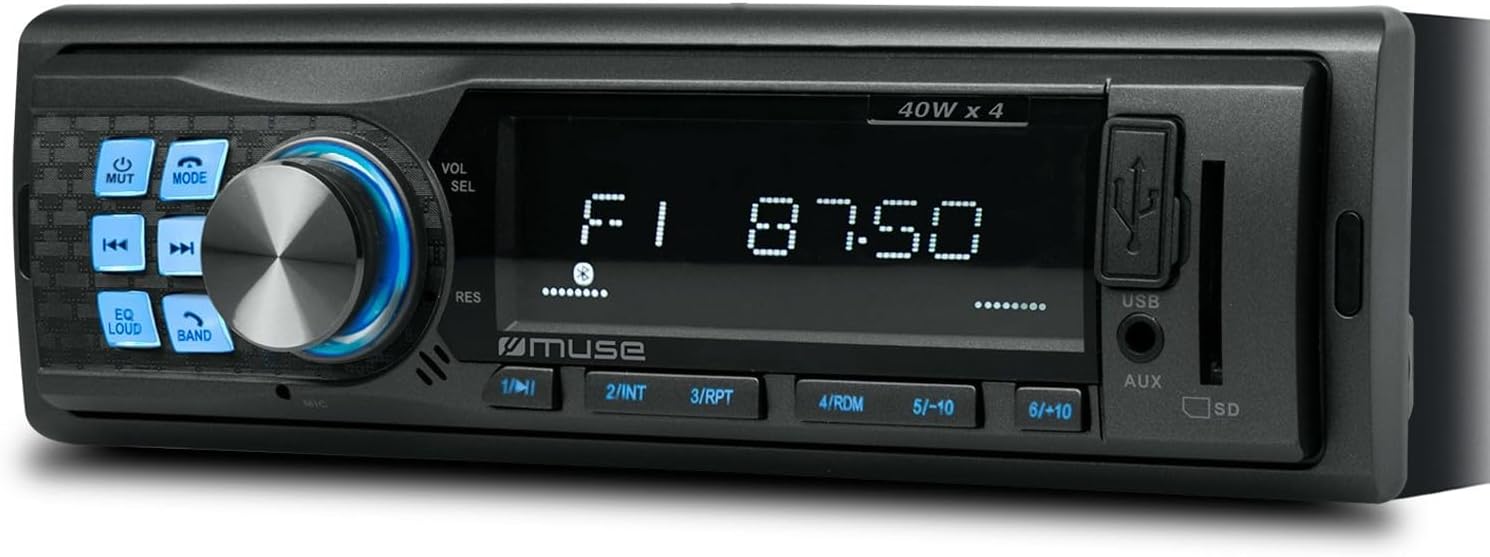
Gambar 1: Hareupeun view of the Muse M-195 BT car radio. This image displays the main unit with its central display, a large rotary knob for volume and selection, various function buttons (Mute, Mode, EQ, Loud, Band, Skip), and front-facing USB and AUX inputs, along with an SD card slot.
Émbaran Kasalametan
- Baca sagala parentah taliti saméméh instalasi tur operasi.
- Ensure proper wiring to prevent short circuits or damage. Consult a professional if unsure.
- Ulah ngajalankeun alat dina cara nu ngaganggu anjeun tina nyetir.
- Ulah ngalaan unit ka suhu ekstrim, sinar panonpoé langsung, atawa Uap.
- Ulah nyobian ngabongkar atanapi ngarobih unitna. Ieu tiasa ngabatalkeun garansi sareng nyababkeun karusakan.
- Jaga polumeu dina tingkat anu ngamungkinkeun anjeun ngadangu sora luar, sapertos kendaraan darurat.
Eusi pakét
Punten parios yén sadaya barang aya dina pakét:
- Muse M-195 BT Car Radio Unit
- Lengan Lengan
- Wiring Harness (ISO connector)
- Removal Keys (2x)
- Manual pangguna (dokumén ieu)
Setup sareng Instalasi
1. Pamasangan
The M-195 BT is designed for a standard 1-DIN dashboard opening (180x50mm). Ensure sufficient space behind the dashboard for wiring and ventilation.

Figure 2: Dimensions of the Muse M-195 BT car radio. The diagram illustrates the standard 1-DIN size, with a width of 185mm and a height of 58mm, crucial for proper fitment in a vehicle's dashboard.
- Prepare the Dashboard Opening: Cabut radio mobil anu aya atanapi pelat blanking tina slot 1-DIN.
- Install the Mounting Sleeve: Insert the supplied metal mounting sleeve into the dashboard opening. Bend the tabs on the sleeve outwards with a screwdriver to secure it firmly.
- Sambungkeun Wiring: Connect the car's wiring harness to the supplied ISO connector. Ensure correct connections for power (constant 12V, ignition 12V, ground), speaker outputs, and antenna.
- Kawat konéng: Konstan 12V (Batre)
- Kawat beureum: Ignition 12V (ACC)
- Kawat Hideung: taneuh
- Kawat Biru: Anteneu Kakuatan / Amplifier Remote (Output)
- Kabel Speaker: Connect to corresponding vehicle speakers (e.g., White/White-Black for Front Left, Grey/Grey-Black for Front Right, Green/Green-Black for Rear Left, Purple/Purple-Black for Rear Right).
- Slide in the Unit: Carefully slide the M-195 BT unit into the mounting sleeve until it clicks into place.
- Fungsi Uji: Turn on the car ignition and test all functions of the radio (power, radio, USB, Bluetooth, sound output).
2. Mimiti Power-On
After successful installation, press the Kakuatan / MODE button to turn on the unit. The display will illuminate. The unit will typically start in the last used mode (e.g., FM radio).
Parentah Operasi
1. Kadali dasar
- POWER/MODE Button: Press to turn the unit ON/OFF. Short press to cycle through modes (FM, USB, SD, AUX, Bluetooth).
- Volume Knob (VOL/SEL): Rotate to adjust volume. Press to enter menu settings (e.g., Bass, Treble, Balance, Fader, EQ).
- Tombol bisu: Ngabisukeun/ngabatalkeun kaluaran audio.
- Tombol EQ: Cycles through preset equalizer settings (e.g., Pop, Rock, Classic, Flat).
- Tombol RINGAS: Activates/deactivates loudness compensation for enhanced bass and treble at low volumes.
- Tombol BAND: In FM mode, cycles through FM bands (FM1, FM2, FM3).
- SKIP Buttons (◀◀ / ►►): In radio mode, short press to seek previous/next station. Long press for manual tuning. In USB/SD/BT mode, short press for previous/next track.
- Tombol Numerik (1-6): In radio mode, short press to recall preset stations. Long press to save current station to a preset.
2. Operasi Radio (FM)
- Pencét MODÉ until "FM" is displayed.
- Pencét BAND to select FM1, FM2, or FM3.
- Pencét pondok ◀◀ or ► ► pikeun otomatis néangan stasion kuat salajengna.
- Pencét lila ◀◀ or ► ► to manually tune the frequency.
- To save a station: Tune to the desired station, then long press one of the numeric buttons (1-6) until the display confirms saving.
3. USB / SD Card Playback
- Insert a USB flash drive into the front USB port or an SD/MMC card into the SD card slot.
- The unit will automatically switch to USB/SD mode and begin playing compatible audio files (MP3). If not, press MODÉ pikeun milih.
- Paké ◀◀ or ► ► pikeun skip lagu.
- Use numeric buttons for specific functions like 1/►►I (Play/Pause), 2/INT (Intro scan), 3/RPT (Repeat), 4/RDM (Random).
4. Operasi Bluetooth
The M-195 BT supports Bluetooth for audio streaming and hands-free calling.
- papasangan:
- Pastikeun Bluetooth diaktipkeun dina alat sélulér Anjeun.
- Pencét MODÉ on the car radio until "BT" or "Bluetooth" is displayed. The unit will enter pairing mode.
- On your mobile device, search for available Bluetooth devices. Select "M-195 BT" from the list.
- Upami dipenta pikeun PIN, lebetkeun "0000" (standar).
- Once paired, the display will show "CONNECTED" or similar confirmation.
- Streaming Audio (A2DP):
- After pairing, play music on your mobile device. Audio will stream through the car speakers.
- Paké ◀◀ or ► ► on the car radio to skip tracks.
- Telepon Tanpa Leungeun (HFP):
- When a call comes in, the radio display will show "CALL" or the caller ID.
- Pencét éta Waleran button (often the Play/Pause button or a dedicated call button if available) to answer.
- Pencét éta Tungtung Telepon tombol pikeun ngagantung up.
- The built-in microphone will be used for conversations.
5. AUX Input
Connect an external audio device (e.g., MP3 player, smartphone) to the front 3.5mm AUX input using an audio cable.
- Connect the audio cable from your device to the AUX port on the car radio.
- Pencét MODÉ until "AUX" is displayed.
- Kontrol playback tina alat éksternal anjeun.
Pangropéa
- beberesih: Anggo lawon anu garing sareng lemes pikeun ngabersihan permukaan unit. Pikeun kokotor bandel, dampen lawon rada ku cai. Ulah make cleaners abrasive atawa pangleyur.
- Hindarkeun Cairan: Do not allow liquids to enter the unit, as this can cause damage.
- Suhu: Ulah nepi ka kakeunaan unit kana suhu anu ekstrim, sinar panonpoé langsung, atanapi kalembaban anu luhur.
- USB/SD Slot Care: Jaga slot kartu USB sareng SD bébas tina lebu sareng kokotor.
Pamérésan masalah
| Masalah | Mungkin Cukang lantaranana | Solusi |
|---|---|---|
| Taya kakuatan | wiring salah; sekering ditiup; Sambungan leupas. | Check power (yellow, red) and ground (black) wire connections. Check vehicle's fuse box and the unit's fuse. Ensure connections are secure. |
| Taya sora | Volume too low; Mute activated; Incorrect speaker wiring; Damaged speakers. | Increase volume. Press MUTE button. Check speaker wire connections. Test with different speakers if possible. |
| panarimaan radio goréng | Antenna not connected; Weak signal; Damaged antenna. | Ensure antenna is properly connected. Try tuning to a stronger station. Check antenna for damage. |
| USB/SD teu tiasa diputer | Teu cocog file formatna; kartu USB/SD ruksak; Modeu anu dipilih salah. | Mastikeun files are MP3 format. Try a different USB/SD card. Press MODE to select USB/SD. |
| Nyapasangkeun Bluetooth gagal | Bluetooth not enabled on device; Device too far; Incorrect PIN; Previous connection interference. | Ensure Bluetooth is ON on your device. Bring device closer. Re-enter PIN "0000". Delete previous pairings on your device and try again. |
spésifikasi
- model: M-195 BT
- Kaluaran kakuatan: 4 x40 w
- tampilan: MCD Multi-function
- Konektipitas: Bluetooth, USB, SD/MMC, AUX (3.5mm Jack)
- Format Audio anu Dirojong: MP3
- Radio Tuner: FM (18 presets)
- Telepon Hand-Free: Mikropon terpadu
- Ukuran (L x W x H): 14 x 18.5 x 5.8 cm (approx. 1-DIN standard)
- beurat: 550 g
- pra-ampKaluaran anu dirobih: 1 pair (RCA audio rear or sub)
Garansi sareng Rojongan
This product comes with a standard manufacturer's warranty. For detailed warranty terms and conditions, please refer to the warranty card included with your purchase or visit the official Muse website. For technical support, troubleshooting assistance beyond this manual, or service inquiries, please contact your retailer or the Muse customer service department.
Punten tahan bukti pameseran anjeun pikeun klaim garansi.


