1. Bubuka
Hatur nuhun pikeun meuliasing the MONODEAL Portable CD Player. This device is designed for personal and portable audio playback, featuring built-in speakers, anti-skip protection, and dual headphone jacks. This manual provides detailed instructions for setup, operation, maintenance, and troubleshooting to ensure optimal performance and longevity of your CD player.

Image: The MONODEAL Portable CD Player, a compact black device with a clear top cover and control buttons on the front.
2. Naon dina Box
Mangga parios eusi pakét pikeun mastikeun yén sadaya barang aya:
- Pamuter CD
- Earphone
- Kabel Ngecas USB
- Aux Kabel
- Manual pamaké

Image: The MONODEAL CD Player, its packaging, and all included accessories: earphones, USB charging cable, and aux cable.
3. Produk Langkungview
Biasakeun diri anjeun sareng rupa-rupa bagian sareng kontrol pamuter CD anjeun:
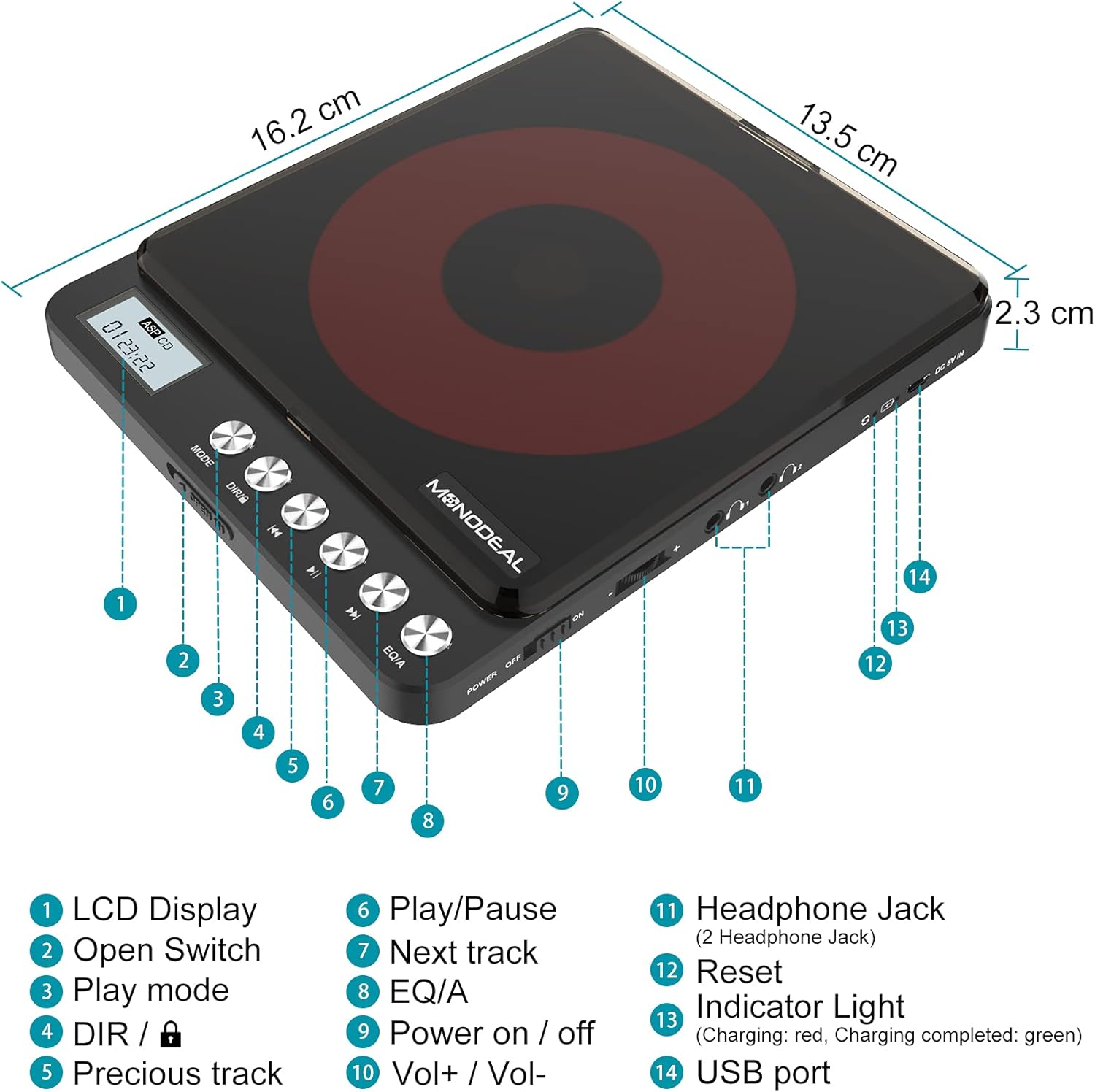
Image: A detailed diagram of the MONODEAL Portable CD Player, highlighting its various components with numbered labels.
- Layar LCD: Némbongkeun nomer trek, waktos, sareng status puteran.
- Open Switch: Used to open the CD compartment.
- Modeu maén: Cycles through playback modes (e.g., repeat, random).
- DIR / Lock: Directory navigation for MP3 CDs / Key lock function.
- Lagu Sateuacanna: Skips ka awal lagu ayeuna atawa lagu saméméhna.
- Puter / Reureuh: Ngamimitian atanapi ngareureuhkeun playback.
- Lagu salajengna: Loncat kana lagu salajengna.
- EQ/A: Equalizer settings / Anti-skip function indicator.
- Hurung/Pareuman: switch kakuatan utama.
- Vol+ / Vol-: Kontrol volume.
- Headphone Jack (2 Headphone Jacks): Audio output for headphones.
- Reset: Recessed button to reset the device (requires a thin object like a needle).
- Lampu Indikator: Shows charging status (red for charging, green for fully charged).
- Port USB: Pikeun ngecas alat.
4. Setélan
4.1 Ngecas Alat
The CD player has a built-in rechargeable battery. Before first use, fully charge the device. A full charge provides up to 15 hours of playback.
- Connect the supplied USB charging cable to the USB port (14) on the CD player.
- Connect the other end of the USB cable to a power adapter, car charger, laptop, or power bank.
- The indicator light (13) will show red during charging and turn green when fully charged.
- Ngecas biasana peryogi waktos sakitar 4 jam.

Image: The MONODEAL CD Player being charged via various methods including a power bank, power adapter, laptop, and car charger.
4.2 Connecting to External Audio Systems
You can connect the CD player to external speakers, car audio systems, or home stereos using the provided 3.5mm AUX cable.
- Insert one end of the 3.5mm AUX cable into one of the headphone jacks (11) on the CD player.
- Insert the other end of the AUX cable into the 3.5mm auxiliary input port of your car stereo or external sound system.
- Catetan: The CD player is not compatible with car's USB ports or Bluetooth connections for audio output. An AUX port is required.
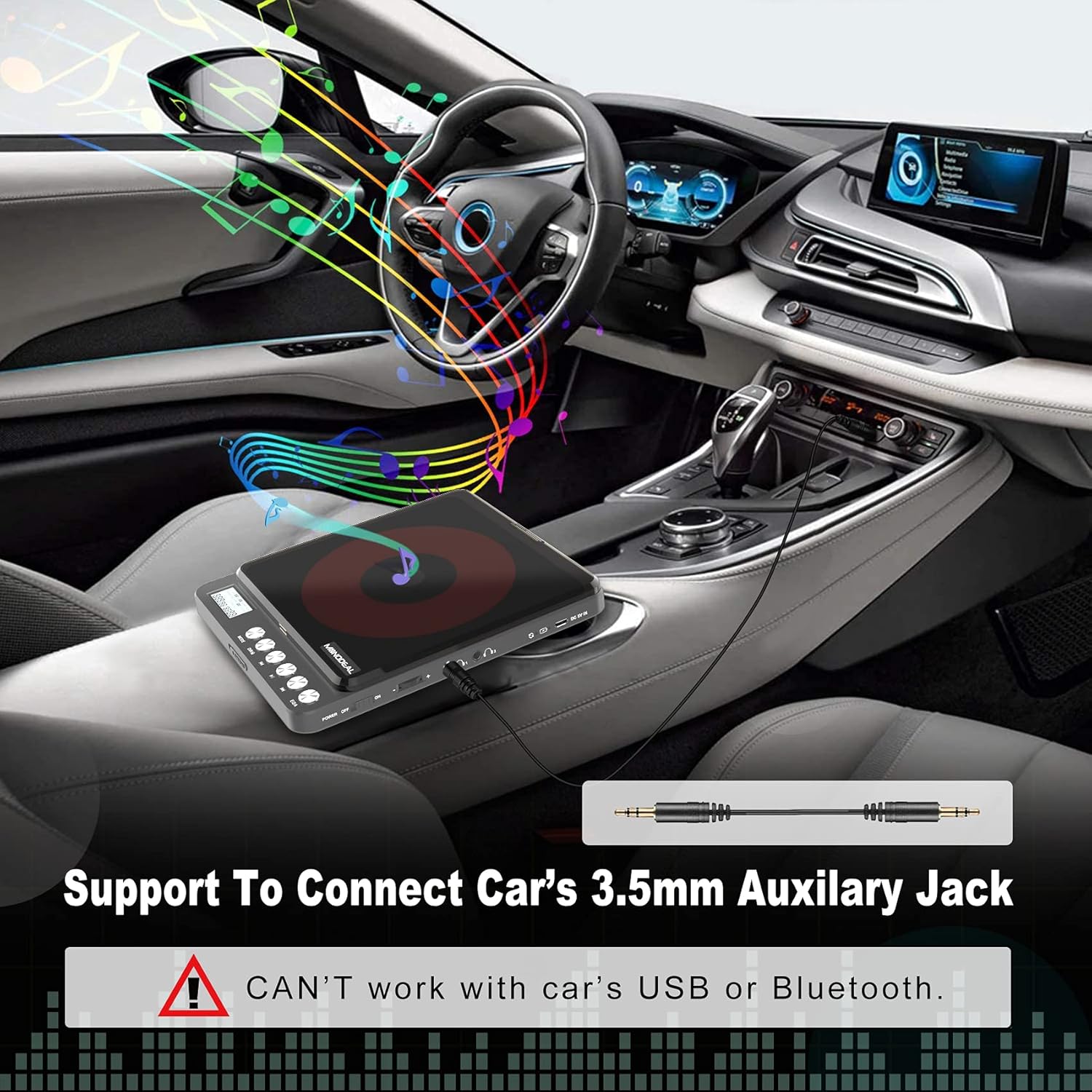
Image: The MONODEAL CD Player connected to a car's dashboard via a 3.5mm auxiliary cable, illustrating its use in a vehicle.
5. Parentah Operasi
5.1 Playback Dasar
- Slide the Power On/Off switch (9) to the "ON" position.
- Press the Open Switch (2) to open the CD compartment.
- Carefully place a compatible CD (CD, MP3, CD-R, CD-RW, HDCD) onto the spindle, ensuring it is seated correctly.
- Tutup kompartemen CD.
- The LCD display (1) will show "READ" and then the total number of tracks and total playback time.
- Press the Play/Pause button (6) to start playback.
- Adjust the volume using the Vol+ / Vol- controls (10).
- To pause, press the Play/Pause button (6) again. Press again to resume.
- To skip to the next track, press the Next Track button (7).
- To go back to the previous track or the beginning of the current track, press the Previous Track button (5).
- To turn off the player, slide the Power On/Off switch (9) to the "OFF" position. The player will remember the last played position if a disc remains inside.
5.2 Modeu Play
Press the Play Mode button (3) repeatedly to cycle through different playback modes:
- Maén dina urutan: Muterkeun lagu sacara berurutan.
- Repeat a track: Ngulang lagu ayeuna.
- Ulang sadayana: Ngulang sadaya lagu dina piringan.
- Intro: Muterkeun 10 detik mimiti unggal lagu.
- Shuf (Shuffle): Maén lagu dina urutan acak.

Image: A visual representation of the five play modes available on the MONODEAL CD Player, including play in order, repeat track, repeat all, intro, and shuffle.
5.3 Dual Headphone Jacks
The MONODEAL CD Player is equipped with two headphone jacks (11), allowing two users to listen simultaneously. Simply plug two sets of headphones into the available jacks.

Image: Two individuals sharing the MONODEAL CD Player using both headphone jacks, emphasizing the dual listening feature.
5.4 Spiker Terpasang
For listening without headphones, the CD player features built-in stereo speakers. The sound quality is suitable for personal listening in quiet environments. The maximum volume of the internal speakers is designed for portability and may not be as loud as larger audio systems.

Image: The MONODEAL CD Player with an overlay indicating the location of its built-in dual speakers, shown in a setting with people dancing to music.
6. Pangropéa
- Jaga pamuter CD tetep bersih ku cara ngusapna nganggo lawon anu lemes sareng garing.
- Ulah make cleaners abrasive atawa pangleyur.
- Regularly clean the disc and the optical pickup lens of the CD player with a dry, lint-free cloth.
- Hindarkeun alat ka suhu ekstrim, kalembaban, atanapi sinar panonpoé langsung.
- Nyimpen pamuter dina tiis, tempat garing lamun teu dipaké.
7. Cara ngungkulan
| Masalah | Mungkin Cukang lantaranana | Solusi |
|---|---|---|
| CD ngaluncat atanapi henteu diputer. | Disc is dirty, scratched, or incompatible format. Low battery. |
|
| No sound from internal speakers. | Volume too low. Headphones plugged in. |
|
| No sound when connected to car/external speakers. | Incorrect connection. Car/external system not set to AUX input. |
|
| Pamuter henteu hurung. | Low battery. Power switch off. |
|
8. Spésifikasi
| Fitur | Rincian |
|---|---|
| Ngaran modél | CW705 |
| Dimensi produk | 6.1 x 5.1 x 1.1 inci |
| Item Beurat | 1.3 pon |
| Warna | Hideung |
| Téhnologi konektipitas | Pambantu |
| Fitur husus | Portable, Built-in Speakers, Anti-Skip, Dual Headphone Jacks, Rechargeable |
| Format Cakram anu Dirojong | CD, MP3, CD-R, CD-RW, HDCD |
| Format Musik anu Dirojong | CD-DA, MP3, WMA |
| Kahirupan batré | Up to 15 hours playback (after full charge) |

Image: The MONODEAL CD Player highlighting its 2000mAh built-in rechargeable battery for up to 15 hours of playback, and listing supported disc and music formats.
9. Garansi jeung Rojongan
For warranty information or further assistance, please refer to the official MONODEAL website or contact customer support through your purchase platform. A digital version of this user manual is also available for download at: MONODEAL User Manual PDF.


