Produk Leuwihview
The Hugolog Keyless Entry Door Lock provides convenient and secure access to your home or office. This manual outlines the installation, operation, maintenance, and troubleshooting for your device.

Gambar: Hareup jeung tukang view of the Hugolog Keyless Entry Door Lock, showcasing the keypad on one side and the interior assembly on the other.
Eusi pakét
Sateuacan ngamimitian pamasangan, mangga pariksa yén sadaya komponén aya dina pakét:

Image: All components included in the Hugolog Keyless Entry Door Lock package, laid out on a white surface. This includes the exterior keypad assembly, interior assembly, latch, strike plate, mounting plate, screws, backup keys, and installation guide.
- Majelis Keypad Exterior
- Majelis interior
- Kancing
- Lempeng Pamasangan
- Nanganan
- Silinder konci
- Backup Key(s)
- Reset Alat
- Piring neunggeul
- Various Screws (Latch Screws, Mounting Screws, Interior Assembly Screws)
- Installation Guide / Programming Instruction
- Drilling Drawing (if needed for new installations)
Setup sareng Instalasi
Follow these steps carefully to install your Hugolog Keyless Entry Door Lock. For visual guidance, please refer to the installation video provided below.
Cék Pra-Pasang
- Ensure your door thickness is between 35-50mm.
- Verify the backset of your door (distance from door edge to center of bore hole) is compatible. The latch is self-adjusting for bolt side distance.
- If drilling is required for a new door, refer to the drilling drawing provided in the package.

Image: Diagram showing door dimensions and lock measurements, including backset and bore hole diameter, to ensure compatibility.
Léngkah-léngkah Instalasi
- Pasang Latch: Insert the latch into the door edge. Ensure the angle of the latch faces the door jamb. Adjust the backset if necessary, making sure the hole is in the horizontal position.
- Pasang Strike Plate: Secure the strike plate onto the door jamb using the provided screws. Ensure the latch angle faces the door jamb.
- Pasang Majelis Luar: Slide the shaft of the exterior assembly smoothly through the hole in the latch. Ensure the notch of the lock cylinder is facing away from the door frame. The cable must go through the door hole above the latch.
- Posisikeun Pelat Pemasangan: Route the cable and connector through the hole in the mounting plate. Position the mounting plate against the door.
- Secure Assemblies: Secure both the exterior assembly and the mounting plate using the mounting screws.
- Pasang Majelis Interior: Route the cable and connector through the cable hole on the interior assembly. Connect the cable. It is recommended to insert the PCB wire into the door hole after connection. Install the interior assembly and secure it using flat head screws.
- Pasang Handle: Push the lever into the base until the catch pin is engaged. Ensure the tip of the handle points down.
- Load Batteries and Reset: Install 4x AA batteries into the interior assembly.
- Pasang Panutup Batré: Put back the lid of the battery pack.
Pituduh Pidéo Instalasi
Video: A detailed step-by-step guide on how to install the Hugolog Keyless Entry Door Lock. This video covers all physical installation aspects from preparing the door to securing the lock components.
Initial Programming - Change Master Code
The default master code is 12345678. It is required that you change it to a code of your own before programming other features.
- Pencét Hugolog button twice, then enter the default master code (12345678), and press Hugolog button again. Wait for a long green light flash.
- Pencét 1. Wait for a green light flash.
- Enter your new master code, then press Hugolog button. Succeed green light flash.
- Enter the new master code again, then press Hugolog button. Succeed green light flash.
Parentah Operasi
Muka konci jeung ngonci
Your Hugolog lock offers multiple ways to unlock and lock for your convenience:
- Papan tombol: Enter your user code on the keypad.
- Konci fisik: Anggo konci cadangan anu disayogikeun pikeun muka konci sacara manual.
- Puteran jempol: Rotate the interior thumb turn to manually lock or unlock the door from the inside.
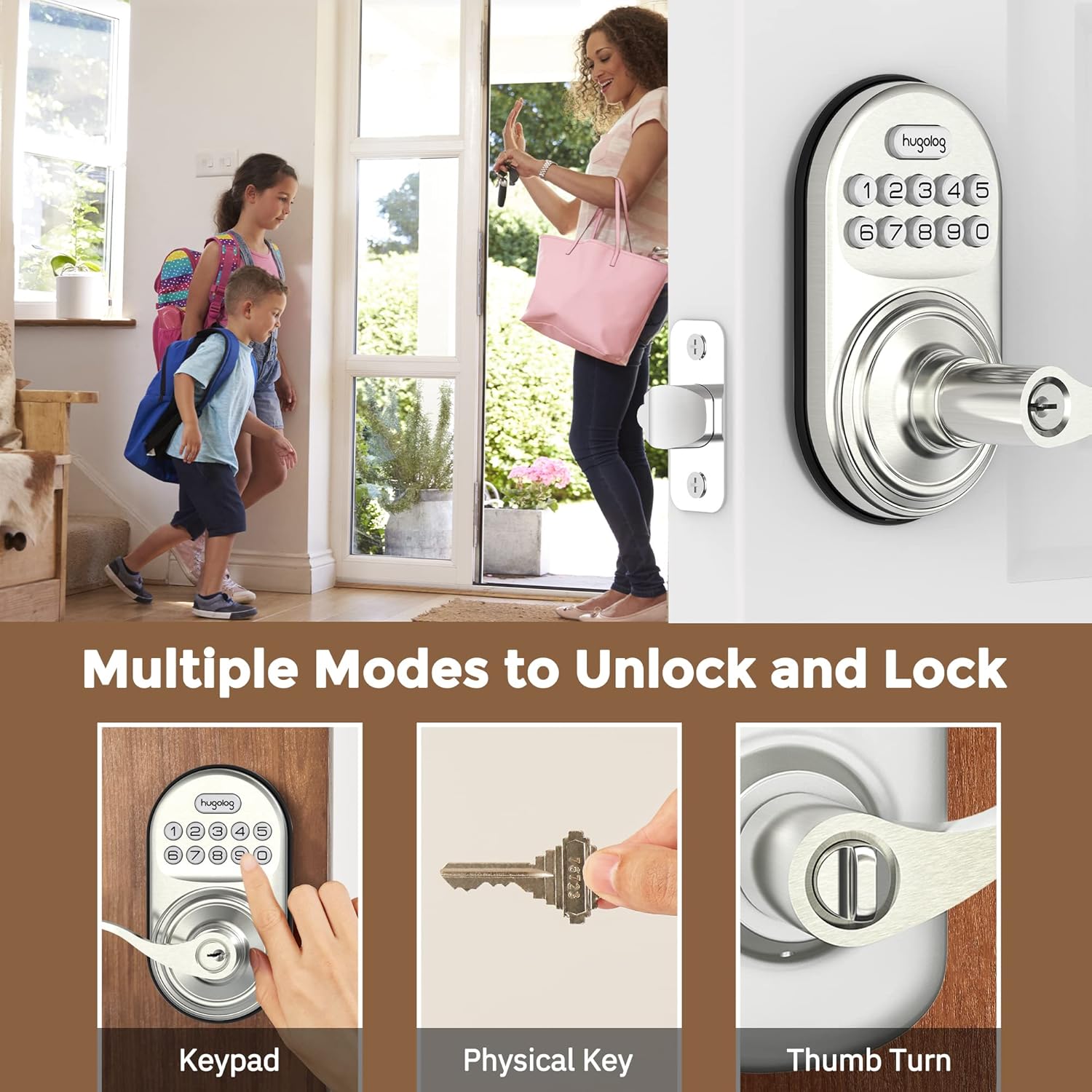
Image: Illustrates three methods of unlocking the door: using the keypad, a physical key, and the interior thumb turn.

Image: Diagram showing how to rotate the interior knob to manually lock or unlock the door, indicating ON and OFF positions.
Nambahkeun Kodeu Pamaké
You can add up to 20 user codes for family members or guests.
- Pencét Hugolog button twice, then enter your master code, and press Hugolog button again. Wait for a green light flash.
- Pencét 2. Wait for a green light flash.
- Enter the new user code, then press Hugolog button. Succeed green light flash.
- Enter the new user code again, then press Hugolog button. Succeed green light flash.

Image: Depicts two individuals communicating about setting one-time codes for friend visits, highlighting the ability to set up to 20 temporary codes.
Ngahapus Konci Anggota
Pikeun ngahapus kodeu pangguna anu teu dihoyongkeun:
- Pencét Hugolog button twice, then enter your master code, and press Hugolog button again. Wait for a green light flash.
- Pencét 3. Wait for a green light flash.
- Enter the unwanted user code, then press Hugolog button. Succeed green light flash.
Fitur Otomatis-Konci
The auto-lock feature automatically locks the door after a set period (10-99 seconds) for added peace of mind.

Image: Shows the auto-lock feature, indicating it allows for a delay from 10 to 99 seconds before automatically locking the door.
Aktipkeun Auto-Lock
- Pencét Hugolog button twice, then enter your master code, and press Hugolog button again. Wait for a green light flash.
- Pencét 5. Wait for a green light flash.
- Pencét 1, teras pencét Hugolog button. Succeed green light flash.
Nonaktipkeun Otomatis-Konci
- Pencét Hugolog button twice, then enter your master code, and press Hugolog button again. Wait for a green light flash.
- Pencét 5. Wait for a green light flash.
- Pencét 2, teras pencét Hugolog button. Succeed green light flash.
Atur Reureuh Waktu-otomatis
- Pencét Hugolog button twice, then enter your master code, and press Hugolog button again. Wait for a green light flash.
- Pencét 8. Wait for a green light flash.
- Enter the new duration time (10-99 seconds), then press Hugolog button. Succeed green light flash.
Anti-Peep Password
The anti-peep feature allows you to enter random digits before or after your actual code to prevent others from guessing your code by observing your hand movements.

Image: Illustrates the Anti-Peep Password feature, showing how random digits can be entered before or after the correct code to safeguard against prying eyes.
Modeu jempé
Enable silent mode to disable keypad beeps for quiet operation.
Aktipkeun Modeu Jempe
- Pencét Hugolog button twice, then enter your master code, and press Hugolog button again. Wait for a green light flash.
- Pencét 4. Wait for a green light flash.
- Pencét 2, teras pencét Hugolog button. Succeed green light flash.
Pareuman Modeu Jempe
- Pencét Hugolog button twice, then enter your master code, and press Hugolog button again. Wait for a green light flash.
- Pencét 4. Wait for a green light flash.
- Pencét 1, teras pencét Hugolog button. Succeed green light flash.
Mode Pakansi
Vacation mode disables all user codes, allowing entry only with the master code or physical key. This is useful for extended absences.
Aktipkeun Mode Pakansi
- Pencét Hugolog button twice, then enter your master code, and press Hugolog button again. Wait for a green light flash.
- Pencét 6. Wait for a green light flash.
- Pencét 1, teras pencét Hugolog button. Succeed green light flash.
Nonaktipkeun Mode Pakansi
- Pencét Hugolog button twice, then enter your master code, and press Hugolog button again. Wait for a green light flash.
- Pencét 6. Wait for a green light flash.
- Pencét 2, teras pencét Hugolog button. Succeed green light flash.
Tambahkeun Hiji-Time Code
Create a temporary code that can be used only once.
- Pencét Hugolog button twice, then enter your master code, and press Hugolog button again. Wait for a green light flash.
- Pencét 7. Wait for a green light flash.
- Enter the new user code, then press Hugolog button. Succeed green light flash.
- Enter the new user code again, then press Hugolog button. Succeed green light flash.
Pangropéa
Ngagantian batré
The lock requires 4x AA batteries. When the battery level is low, the lock will indicate this with a visual or audible alert. Replace all four batteries simultaneously to ensure optimal performance.
Image: Close-up of the lock's keypad showing a low battery indicator, reminding users to replace the 4x AA batteries for a 1-year battery life.
Pikeun ngaganti batréna:
- Cabut panutup batré dina assembly interior.
- Leupaskeun batré heubeul.
- Insert new 4x AA batteries, ensuring correct polarity (+/-).
- Ganti panutup batré.
Catetan: Always use new, high-quality alkaline batteries for best performance and longevity.
Pamérésan masalah
If you encounter issues with your Hugolog Keyless Entry Door Lock, please refer to the common problems and solutions below:
| Masalah | Mungkin Cukang lantaranana | Solusi |
|---|---|---|
| Konci henteu ngaréspon kana éntri keypad. | Low batteries or incorrect code entry. | Replace batteries. Ensure correct master code or user code is entered. Check for silent mode if no sound. |
| Fitur konci otomatis teu jalan. | Auto-lock is disabled or time delay is set too long. | Enable auto-lock via programming. Adjust auto-lock time delay. |
| Lock is stuck or not engaging properly. | Improper installation or door alignment issues. | Re-check installation steps, especially latch and strike plate alignment. Ensure door frame is not warped. |
| Keypad lights up but lock doesn't operate. | Internal mechanism issue or cable connection problem. | Verify internal cable connection. If issue persists, contact customer support. |
| Cannot change master code or add user codes. | Incorrect master code entered or incorrect programming sequence. | Ensure you are using the correct master code. Follow programming steps precisely. |
spésifikasi
| Fitur | Rincian |
|---|---|
| merek | Hugolog |
| Nomer modél | 192728012011 |
| Tipe Konci | Papan tombol |
| Bahan | logam |
| Fitur husus | Anti-Peeping Password |
| Dianjurkeun Mangpaat | Panto |
| Kodeu Pamaké | Up to 20 user codes, plus one-time temporary codes. |
| Otomatis-Konci Timer | Programmable from 10-99 seconds. |
| Sumber Daya | 4 x Batré AA (teu kalebet) |
| Kasaluyuan ketebalan panto | 35-50mm |
| Protokol konektipitas | Wi-Fi (for potential future smart home integration, based on product data) |
Garansi sareng Rojongan
Hugolog provides technical support for hassle-free ownership. For any questions, issues, or warranty claims, please contact Hugolog customer service through their official channels. Please refer to the product packaging or the official Hugolog websitus pikeun inpormasi kontak sareng detil jaminan anu paling anyar.


