1. Bubuka
This manual provides essential information for the safe and efficient operation of your SHINCO WIFI Portable Dehumidifier, model SDZ1-50D. Please read it thoroughly before using the appliance and retain it for future reference. This dehumidifier is designed to remove excess moisture from the air, helping to create a healthier and more comfortable indoor environment. It features a powerful compressor, multiple drainage options, and smart control capabilities.

Gambar 1.1: Hareupeun view of the SHINCO WIFI Portable Dehumidifier SDZ1-50D. This image displays the unit's compact design, control panel, and visible water tank level indicator.

Gambar 1.2: Leuwihview of key features including 50L/day dehumidification, 24-hour timer, automatic humidity capture, and quiet operation.
2. Parentah Kasalametan
Mangga perhatoskeun tindakan pencegahan kaamanan ieu pikeun nyegah cilaka atanapi karusakan kana alat:
- Salawasna sambungkeun unit ka outlet kakuatan grounded kalawan vol benertage (220V).
- Ulah ngajalankeun dehumidifier ku kabel kakuatan ruksak atawa colokan.
- Keep the appliance away from water and other liquids. Do not immerse it.
- Ensure adequate ventilation around the unit. Do not block air inlets or outlets.
- Ulah nyelapkeun objék kana liang hawa.
- Cabut colokan unit sateuacan ngabersihkeun atanapi ngalakukeun perawatan naon waé.
- Perkakas ieu henteu dimaksudkeun pikeun dianggo ku jalma anu kakurangan kamampuan fisik, indrawi, atanapi mental kecuali diawasi.
- Entong nganggo dehumidifier di daérah dimana gas atanapi cairan anu gampang kaduruk disimpen.
3. Komponén produk
Biasakeun diri anjeun sareng bagian utama dehumidifier anjeun:
- Panel kontrol sareng Tampilan Digital
- Émbaran hawa
- Inlet hawa kalawan Filter
- Tangki Cai (kapasitas 7L)
- Outlet Saluran Kontinyu
- Lift Pump Drainage Outlet
- Kabel listrik
- Roda pikeun mobilitas

Gambar 3.1: Tukangeun view showing the continuous drainage port and a top view with the water tank removed, illustrating internal components.
3.1 Panel kontrol
Panel kontrol ngamungkinkeun anjeun pikeun ngatur sadaya fungsi dehumidifier.

Gambar 3.2: Close-up of the control panel, displaying buttons for power, mode selection, humidity adjustment, fan speed, internal cleaning, and timer.

Gambar 3.3: Detail of the power button and digital display, which shows current humidity levels or timer settings.
4. Setélan
4.1 Ngabongkar bungkusan
- Sacara saksama piceun dehumidifier tina bungkusanna.
- Remove all packing materials and ensure no components are missing.
- Inspect the unit for any damage incurred during shipping. If damaged, do not operate and contact customer support.
4.2 Nempatkeun
- Teundeun dehumidifier dina datar, permukaan stabil.
- Pastikeun aya sahenteuna 20 cm (8 inci) rohangan sabudeureun unit pikeun aliran hawa ditangtoskeun.
- Avoid placing the unit near heat sources, in direct sunlight, or in areas exposed to splashing water.
- The unit is equipped with casters for easy movement.
4.3 Sambungan Daya
- Colokkeun kabel listrik kana outlet listrik grounded 220V anu cocog.
- Ulah nganggo kabel ekstensi atanapi colokan multi-colokan.
5. Parentah Operasi
5.1 Daya Hurung/Pareuman
- Pencét éta Kakuatan tombol (
 ) dina panel kontrol pikeun ngahurungkeun atawa mareuman unit.
5.2 Pamilihan Mode
Pencét éta Modus tombol () pikeun ngaliwat modeu anu sayogi:
- Modeu Otomatis: The unit will automatically operate to maintain the set humidity level (30% to 80% RH). It will turn off when the target humidity is reached and restart if humidity rises.
- Mode cucian: Designed to absorb excess moisture from clothes, reducing drying time.
- Mode Defrost: The unit features an automatic defrost mode for efficient operation even at low temperatures (down to 5°C).
5.3 Setélan asor
- In Auto Mode, press the Kalembaban tombol () to adjust the desired humidity level between 30% and 80% in 5% increments.
5.4 Laju kipas
- Pencét éta Laju kipas tombol () to select between High and Low fan speeds.
5.5 Fungsi Timer
- Pencét éta Timer tombol () to set the operating time from 1 to 24 hours. The unit will automatically turn off after the set time.

Gambar 5.1: Illustration of the timer function, allowing scheduled operation for convenience.
5.6 Internal Cleaning Function
- Pencét éta Beresih tombol () to activate the internal drying function, which helps prevent mold and odors inside the unit.
5.7 WIFI Control (Smart Home App)
Control your dehumidifier remotely using the Smart Home application on your smartphone.
- Download the "Smart Home" app from your device's app store.
- Follow the in-app instructions to pair your dehumidifier with your Wi-Fi network.
- Once connected, you can power on/off, change modes, set humidity, and manage the timer from your phone.

Gambar 5.2: Screenshot of the Smart Home app interface, demonstrating remote control capabilities for the dehumidifier.
6. Pilihan Drainase
Your dehumidifier offers three methods for water removal:
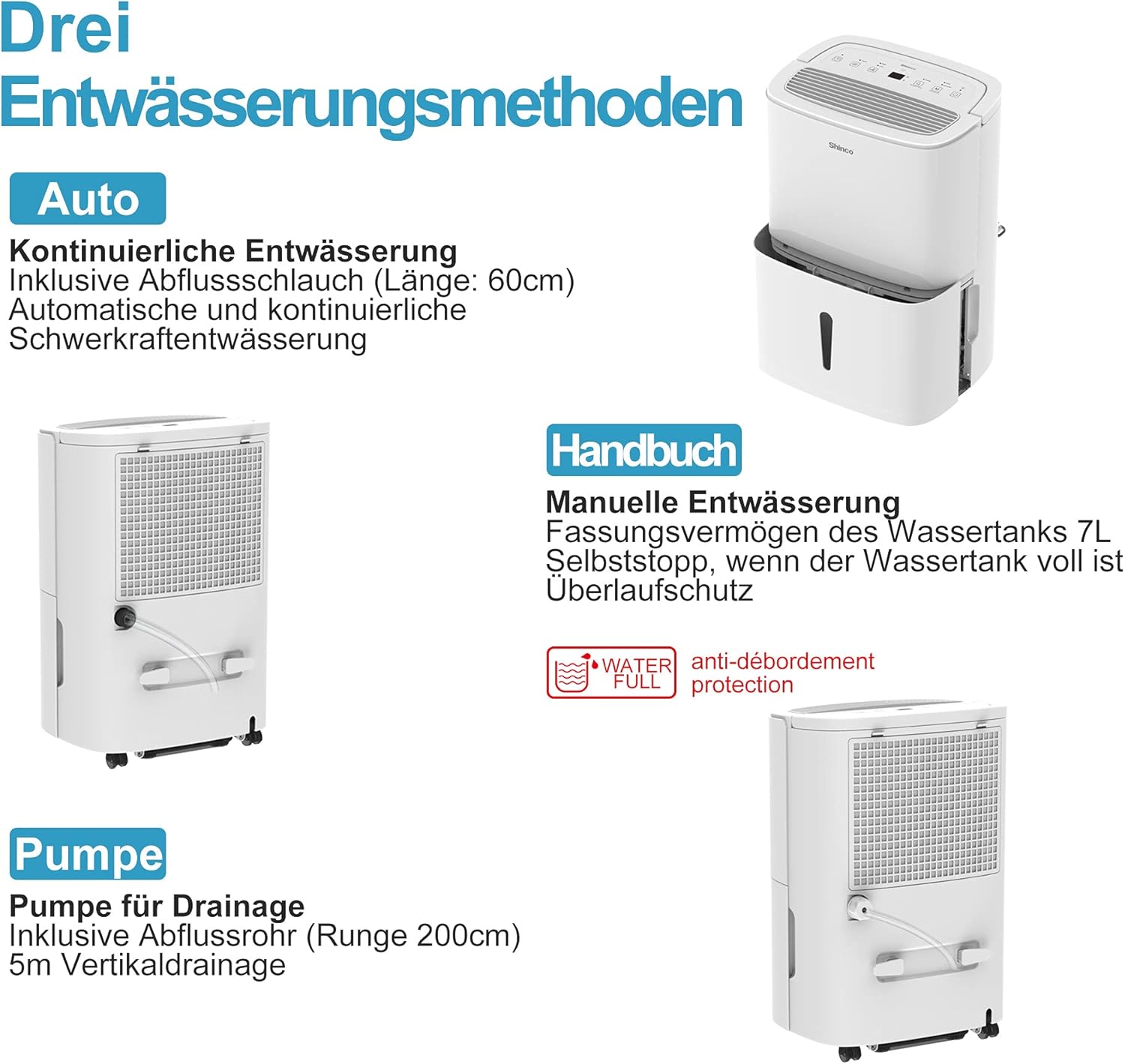
Gambar 6.1: Visual representation of the three drainage options: manual tank, continuous gravity drainage, and lift pump drainage.
6.1 Drainase Manual (Tangki Cai)
- The dehumidifier collects water in its removable 7-liter tank.
- When the tank is full, the unit will automatically stop operating, and an indicator light will illuminate.
- Carefully remove the tank, empty the collected water, and reinsert it securely.

Gambar 6.2: The display showing a 'Full' indicator, signaling that the water tank needs to be emptied.
6.2 Continuous Gravity Drainage
- For continuous operation without emptying the tank, attach the provided 60 cm drainage hose to the continuous drainage outlet on the back of the unit.
- Ensure the hose is sloped downwards to allow water to drain by gravity into a floor drain or suitable container.
6.3 Lift Pump Drainage
- The unit includes a lift pump and a 2-meter drainage hose for situations where gravity drainage is not possible.
- Connect the 2-meter hose to the lift pump drainage outlet. The pump can discharge water vertically up to 5 meters.
7. Pangropéa
Pangropéa rutin ngajamin kinerja optimal sareng umur panjang dehumidifier anjeun.
7.1 Ngabersihan Saringan Udara
The dehumidifier is equipped with an active carbon filter to purify the air. Clean the filter regularly.
- Pareuman jeung cabut colokan unit.
- Cabut saringan hawa tina bagian tukang unit.
- Clean the filter with a vacuum cleaner or wash it with warm, soapy water. Rinse thoroughly and allow it to air dry completely before reinserting.
- Ganti saringan.

Gambar 7.1: Illustration of how to remove and clean the air filter, showing both the pre-filter and the active carbon filter.
7.2 Ngabersihan Unit Exterior
- Ngusap bagian luar unit kalayan lemes, damp lawon.
- Ulah make bahan kimia kasar, cleaners abrasive, atawa pangleyur.
8. Cara ngungkulan
If you encounter issues, refer to the following table before contacting customer support:
| Masalah | Mungkin Cukang lantaranana | Solusi |
|---|---|---|
| Unit teu hurung | Taya catu daya Kabel listrik teu nyambung leres | Pariksa stop kontak sareng sambungan colokan listrik Ensure the outlet is functional |
| Taya dehumidification | Tangki cai pinuh Saringan hawa mampet Suhu kamar rendah teuing | Tangki cai kosong Saringan hawa beresih Ensure room temperature is above 5°C |
| Unit ribut | Unit henteu dina permukaan anu rata Saringan hawa mampet | Pasang unit dina permukaan anu datar sareng stabil Saringan hawa beresih |
| Cai bocor | Water tank not properly inserted Selang solokan anu terus-terusan leupas atanapi tersumbat | Reinsert water tank correctly Pariksa sambungan selang sareng bersihan sagala sumbatan |
| Sambungan WiFi gagal | Kecap akses Wi-Fi lepat Router jauh teuing App teu diropéa | Verify Wi-Fi password Move unit closer to router or use a Wi-Fi extender Update Smart Home app |
9. Spésifikasi
Technical details for the SHINCO WIFI Portable Dehumidifier SDZ1-50D:
| Fitur | Spésifikasi |
|---|---|
| Nomer modél | SDZ1-50D |
| Kapasitas Dehumidification | 50 Liter / Poé |
| Dipeunteun Power | 750 Watt |
| Voltage | 220 volt |
| Kapasitas Tangki Cai | 7 liter |
| Tingkat Noise | 49 dB |
| Ukuran (L x W x H) | 29 x 39.5 x 52 cm |
| Beurat | 19 kg |
| Refrigerant | R290 |
| Disarankeun Ukuran Kamar | Nepi ka 55 m² (kira-kira 592 kaki pasagi) |
| Komponén Kaasup | Dehumidifier, Drain Hose, Instruction Manual |

Gambar 9.1: Diagram illustrating the physical dimensions of the dehumidifier and a summary of its technical specifications.
10. Garansi jeung Rojongan
For warranty information or technical support, please refer to the warranty card included with your product or contact SHINCO customer service through their official website or the contact details provided in your purchase documentation. Please have your model number (SDZ1-50D) and purchase date ready when contacting support.


