1. Bubuka
This user manual provides essential information for the safe and effective operation, maintenance, and troubleshooting of the Mindray DP-50 Expert Ultrasound System. Please read this manual thoroughly before operating the device to ensure proper usage and to prevent injury or damage.
2. Émbaran Kasalametan
Adherence to the following safety guidelines is crucial for the safe operation of the Mindray DP-50 Expert Ultrasound System.
- Personil anu mumpuni: Only trained and qualified medical professionals should operate this device.
- Sasayogian tanaga: Connect the system only to a grounded power outlet with the correct voltage as specified on the device label.
- Kaayaan Lingkungan: Operate the system within the specified temperature and humidity ranges to ensure optimal performance and longevity. Avoid direct sunlight and excessive dust.
- Penanganan Probe: Handle ultrasound probes with care. Avoid dropping or subjecting them to mechanical shock. Disinfect probes according to manufacturer guidelines.
- Pareum darurat: Familiarize yourself with the location of the power button for immediate shutdown in case of an emergency.
- Pangropéa: Do not attempt to service the device yourself. Refer all servicing to authorized Mindray service personnel.
3. Setélan
Follow these steps for the initial setup of your Mindray DP-50 Expert Ultrasound System.
- Ngabongkar bungkusan: Carefully remove the ultrasound system and all accessories from the packaging. Retain the original packaging for future transport or storage.
- panempatan: Place the system on a stable, flat surface, ensuring adequate ventilation around the unit.
- Sambungan Daya: Connect the power cable to the system's power inlet and then to a grounded electrical outlet.
- Sambungan Probe: Connect the desired ultrasound probe(s) to the designated probe ports on the system. Ensure a secure connection.
- périferal: Connect any necessary peripherals such as printers or external monitors.
- Daya mimiti Hurung: Press the power button to turn on the system. Allow the system to complete its self-test and boot-up sequence.

Gambar 3.1: Hareupeun view of the Mindray DP-50 Expert Ultrasound System, showing the main unit with the Mindray logo and integrated handle. This image illustrates the compact design of the device.
4. Parentah Operasi
This section outlines the basic steps for operating the Mindray DP-50 Expert Ultrasound System for diagnostic imaging.
4.1. Sistim Leuwihview
The DP-50 Expert features an intuitive user interface with a high-resolution display and a user-friendly control panel. The display can be adjusted for optimal viewdina sudut.
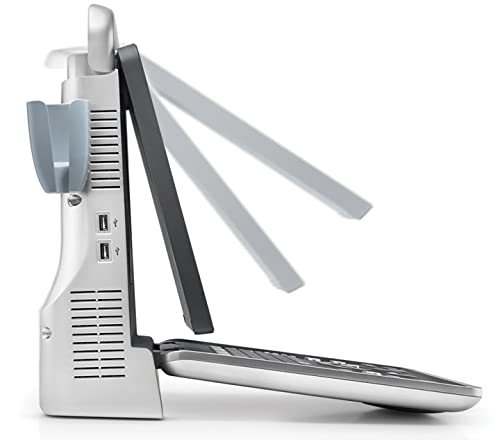
Gambar 4.1: Sisi view of the Mindray DP-50 Expert Ultrasound System, demonstrating the adjustable display screen. The screen can be tilted to various angles for ergonomic use.
4.2. Léngkah-léngkah Operasi Dasar
- Patient Registration: Enter patient information using the on-screen keyboard or integrated patient management system.
- Pilihan Probe: Select the appropriate probe for the examination type from the system's menu.
- Application Preset: Choose the relevant application preset (e.g., Abdominal, Cardiac, OB/GYN) to optimize imaging parameters.
- Image Acquisition: Apply ultrasound gel to the patient's skin and position the probe. Adjust gain, depth, and focus as needed using the control panel.
- Panyimpenan Gambar: Save images or cine loops to the system's internal storage or an external USB drive.
- Measurements and Reports: Utilize the system's measurement tools and generate reports as required.
- Pareum sistem: After use, properly shut down the system via the software menu before pressing the power button.
5. Pangropéa
Regular maintenance ensures the longevity and optimal performance of your Mindray DP-50 Expert Ultrasound System.
- beberesih poean: Clean the system's exterior, display, and control panel with a soft, damp cloth and a mild, non-abrasive cleaner. Avoid excessive moisture.
- Probe Disinfection: Follow the probe manufacturer's instructions for cleaning and high-level disinfection after each use.
- Pembersih Saringan Udara: Periodically check and clean the air filters located on the system's vents to prevent overheating. Refer to the service manual for specific instructions.
- Apdet parangkat lunak: Ensure the system software is kept up-to-date. Contact Mindray service for information on available updates.
- Palayanan profésional: Schedule regular preventive maintenance checks with authorized Mindray service technicians.
6. Cara ngungkulan
This section provides solutions to common issues you may encounter with the Mindray DP-50 Expert Ultrasound System. For problems not listed here, contact technical support.
| Masalah | Mungkin Cukang lantaranana | Solusi |
|---|---|---|
| Sistem henteu hurung. | Power cable disconnected; power outlet issue; system fault. | Check power cable connection. Verify power outlet functionality. If problem persists, contact service. |
| Taya gambar ditémbongkeun. | Probe not connected properly; incorrect probe selected; system error. | Ensure probe is securely connected. Verify correct probe selection in software. Restart system. |
| Kualitas gambar henteu saé. | Insufficient gel; incorrect settings (gain, depth, focus); damaged probe. | Apply sufficient ultrasound gel. Adjust imaging parameters. Inspect probe for damage. |
| System freezes or crashes. | Software issue; overheating; hardware malfunction. | Restart the system. Ensure adequate ventilation. If frequent, contact service. |
7. Spésifikasi
Key technical specifications for the Mindray DP-50 Expert Ultrasound System.
- Jumlah modél: 33992
- Pabrikan: Mindray
- Ukuran produk: 12.5 x 18 x 7.5 cm (kira-kira 4.9 x 7.1 x 3.0 inci)
- Beurat barang: 100 g (kira-kira 0.22 lbs)
- Bahan: Rupa-rupa bahan
- Sumber Daya: AC power (specific voltage and frequency details typically on device label)
- tampilan: High-resolution LCD (specific size and resolution not provided in input, so keep general)
- Konektipitas: USB ports (visible in image), network (assumed for medical devices)
8. Garansi jeung Rojongan
For warranty information and technical support, please refer to the documentation provided with your purchase or contact Mindray customer service directly.
- Garansi: Standard manufacturer's warranty applies. Details are typically found on the warranty card or Mindray's official websitus.
- Bantosan Téknis: Contact Mindray authorized service centers or your local distributor for technical assistance, repairs, and spare parts.
- Sumberdaya Online: Visit the official Mindray website for additional resources, FAQs, and software downloads.


