1. Bubuka
The ASUS Notebook E210 is a compact and lightweight 11.6-inch laptop designed for productivity and portability. It features an Intel Celeron N4020 Processor, 4GB RAM, and 64GB eMMC storage, running Windows 10 in S mode. This manual provides essential information for setting up, operating, and maintaining your device.

Figure 1: ASUS Notebook E210, showcasing its compact design with the screen displaying a colorful desktop background.
2. Setélan
2.1 Unboxing sareng Inspeksi Awal
Cabut sadaya komponén tina bungkusna kalayan ati-ati. Pariksa yén barang-barang ieu kalebet:
- ASUS Notebook E210 (Model: E210MA-DB02)
- Adaptor Daya & Kabel
- Guide pamaké
- Kartu Garansi
Inspect the laptop for any physical damage. If any components are missing or damaged, contact your retailer or ASUS support.
2.2 Ngahurungkeun sareng Konfigurasi Awal
- Sambungkeun adaptor daya kana port ngecas laptop teras kana stop kontak.
- Buka tutup léptop. Laptop tiasa hurung sacara otomatis, atanapi anjeun kedah mencét tombol daya.
- Follow the on-screen instructions to complete the Windows 10 Home in S Mode setup, including language selection, network connection, and user account creation.
- Ensure the laptop is fully charged before its first use.
3. Parentah Operasi
3.1 Pamakéan Dasar
- Hurungkeun/Pareuman: Pencét tombol daya pikeun ngahurungkeun. Pikeun mareuman, klik tombol Mimitian, teras Daya > Pareuman.
- Modeu Bobo: Tutupkeun panutupna atanapi klik tombol Mimitian, teras Daya > Sare.
- kibor: The full-size keyboard offers comfortable typing with 1.4mm key travel.
- Touchpad: The touchpad supports multi-gesture input for navigation and control.
3.2 Windows 10 in S Mode
Windows 10 in S mode is a version of Windows 10 that is streamlined for security and performance, exclusively using apps from the Microsoft Store. If you require apps outside the Microsoft Store, you can switch out of S mode. This is a one-way switch and cannot be undone.
- Buka na Mimitian Menu tur pilih Setélan.
- Pindah ka Update & Kaamanan > Aktipkeun.
- In the "Switch to Windows 10 Home" or "Switch to Windows 10 Pro" section, select Angkat ka Toko.
- Dina kaca "Kaluar tina modeu S" (atanapi anu sami) anu muncul di Microsoft Store, klik Meunang kancing.
- After confirming, you will be switched out of S mode.
4. Fitur Leuwihview
- Kinerja Éfisién: Powered by the Intel Celeron N4020 Processor for daily computing tasks.
- Kompak sareng Ringan: Designed for portability, measuring 0.7 inches thin and weighing 2.31 lbs.
- 11.6" tampilan HD: A clear 1366 x 768 resolution display suitable for productivity and media consumption.
- Integrated NumberPad: The touchpad features an illuminated NumberPad for efficient data entry.
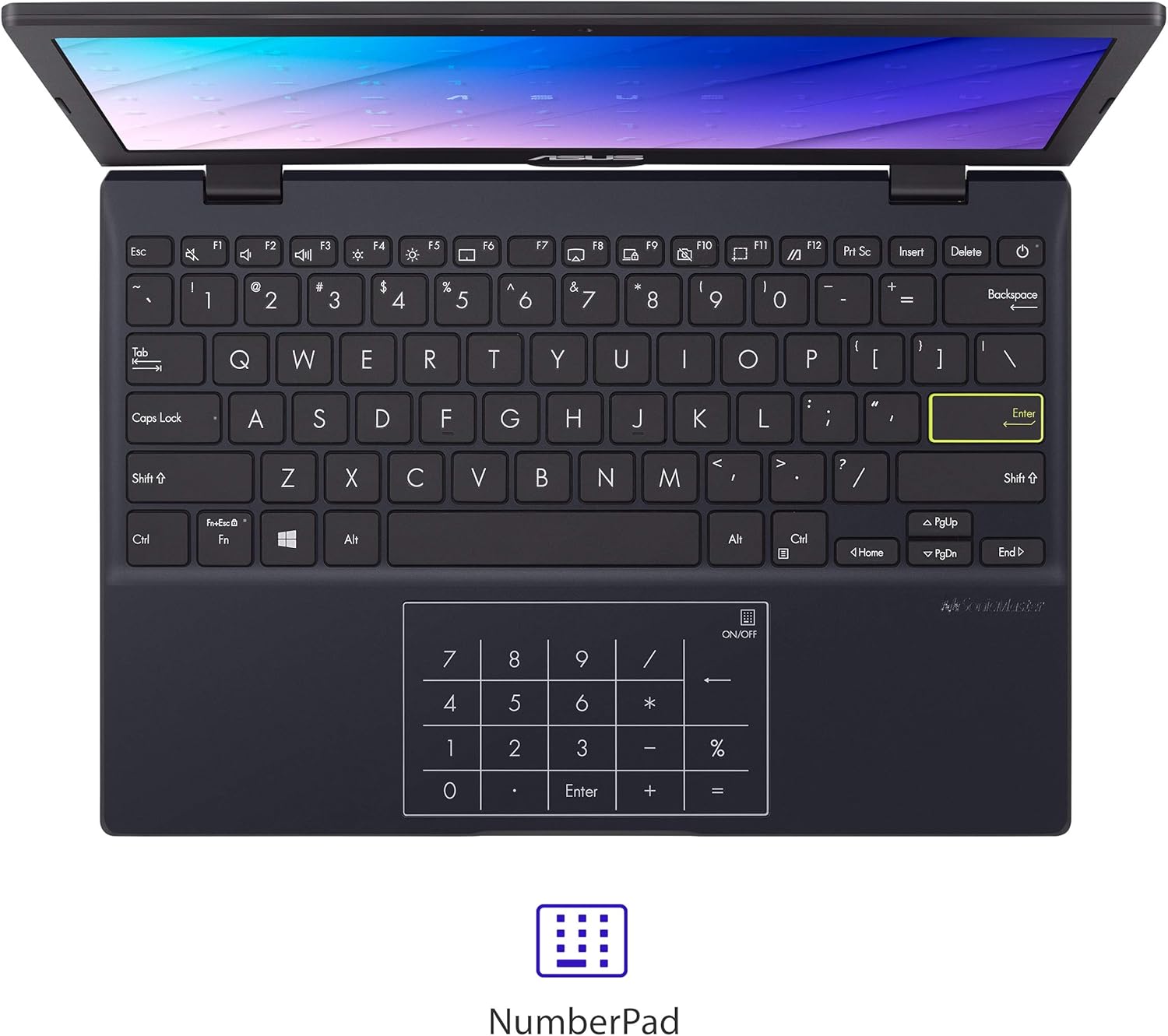
Figure 2: The touchpad with integrated NumberPad for quick numerical input.
- 180° Lay-Flat Hinge: Allows the laptop to open completely flat for easy sharing and collaboration.

Figure 3: The laptop's 180-degree lay-flat hinge allows for versatile viewdina jeung babagi.
- Hirup batré anu panjang: Provides up to 12 hours of battery life for extended use on the go.
5. Palabuhan jeung Konéktipitas
The ASUS Notebook E210 offers a variety of ports for connecting peripherals and external displays:
- 1x USB 2.0 Tipe-A
- 1x USB 3.2 Gen 1 Tipe-A
- 1x USB 3.2 Gen 1 Tipe-C
- 1x HDMI 1.4
- 1x 3.5mm Combo Audio Jack
- Wi-Fi 802.11ac
- Bluetooth
6. Pangropéa
- beberesih: Use a soft, lint-free cloth to clean the screen and chassis. Avoid harsh chemicals.
- Perawatan batré: Pikeun manjangkeun umur batré, ulah sering-sering ngosongkeun batréna. Simpen laptop di tempat anu tiis sareng garing.
- Apdet parangkat lunak: Regularly update Windows and drivers to ensure optimal performance and security.
- Manajemén Panyimpenan: Périodik mupus teu perlu files and applications to maintain adequate storage space.
7. Cara ngungkulan
- Laptop teu hurung: Pastikeun adaptor kakuatan disambungkeun aman tur batréna boga muatan cukup. Coba colokan listrik anu béda.
- kinerja slow: Close unnecessary applications, check for background updates, and ensure sufficient free storage space.
- Masalah konektipitas Wi-Fi: Restart the laptop and your Wi-Fi router. Check network settings and ensure Wi-Fi is enabled.
- Masalah layar: If the screen is blank or flickering, try restarting the laptop. Connect to an external monitor to check if the issue is with the laptop's display or graphics.
8. Spésifikasi
| Fitur | Rincian |
|---|---|
| merek | ASUS |
| Ngaran modél | L210 |
| Nomer Modél Item | E210MA-DB02 |
| Ukuran layar | 11.6 inci |
| Resolusi layar | 1366 x 768 piksel |
| Prosesor | Intel Celeron N4020 (1.1 GHz, nepi ka 2.8 GHz) |
| Ram | 4 GB LPDDR4 |
| Hard Drive | 64 GB eMMC Flash Storage |
| Grafik Coprocessor | Intel UHD Grafika 600 |
| Sistem operasi | Windows 10 Imah dina S Mode |
| Tipe Wireless | 802.11ac, Bluetooth |
| USB 2.0 palabuhan | 1 |
| USB 3.0 palabuhan | 2 |
| Item Beurat | 2.31 pon |
| Dimensi produk | 10.98 x 7.52 x 0.67 inci |
| Warna | Bentang Hideung |
| Batré | 1 batré Litium Ion (kaasup) |
9. Garansi jeung Rojongan
9.1 Émbaran jaminan
This ASUS Notebook E210 is covered by a manufacturer's warranty. Please refer to the included Warranty Card for specific terms, conditions, and duration of coverage. Keep your proof of purchase for warranty claims.
9.2 Rojongan Palanggan
For technical assistance, troubleshooting, or service inquiries, please visit the official ASUS support website or contact their customer service. Details can be found on the ASUS websitus atanapi dina dokuméntasi produk Anjeun.


