Produk Leuwihview
The Cosmic Byte CB-GK-22 Veritas is a Tenkeyless (TKL) membrane keyboard designed for various computing tasks, including gaming. It features RGB LED backlighting with multiple effects, double injection keycaps for durability, and 25-key anti-ghosting capabilities.

Gambar 1: Top-handap view of the Cosmic Byte CB-GK-22 Veritas TKL Membrane Keyboard with RGB lighting activated.
Parentah Setup
Follow these steps to set up your Cosmic Byte CB-GK-22 Veritas keyboard:
- Buka bungkus kibor: Cabut kibor sareng asesoris anu kalebet tina bungkusna kalayan ati-ati.
- Nyambung ka Komputer: Locate an available USB port on your computer. Insert the USB connector of the keyboard into the USB port.
- Pamasangan supir: The keyboard is plug-and-play. Your operating system (Windows, Linux, macOS) should automatically detect and install the necessary drivers. No additional software installation is typically required.
- Verifikasi Fungsionalitas: Once connected, the keyboard's RGB lighting should illuminate. Test typing in a text editor to ensure all keys are responsive.
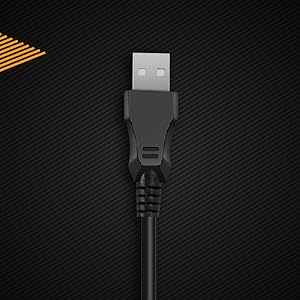
angka 2: Tutup-up view of the keyboard's USB connector, ready for connection to a computer.

Figure 3: The keyboard is compatible with various operating systems, including Windows, Linux, and macOS.
Parentah Operasi
Fungsi Keyboard Dasar
The CB-GK-22 Veritas functions as a standard TKL keyboard. All keys perform their labeled functions. The keyboard features 25-key anti-ghosting, allowing multiple key presses to be registered simultaneously, which is beneficial for fast-paced typing and gaming.
Kontrol Lampu Latar RGB
The keyboard features 7-color RGB backlighting with various effects. Use the following key combinations to control the lighting:
- Penyesuaian Caang: Pencét Fn + Halaman Up to increase brightness (5 levels). Press Fn + Halaman Turun to decrease brightness (5 levels).
- Pangaruh lampu tukang: The keyboard supports 9 backlight effects, including 6 dazzling effects. Specific key combinations for cycling through effects are typically indicated on the keyboard itself or in a quick start guide. Common combinations include Fn + Gulung Konci or Fn + Lebetkeun.
- Sonic Spectrum Mode: This mode allows the RGB lighting to react to ambient sound. Activate this mode using the designated key combination, often Fn + Bumi or Fn + Akhir.

Figure 4: The keyboard features a Tenkeyless layout and includes Sonic Spectrum and sound-reactive LED lighting modes.
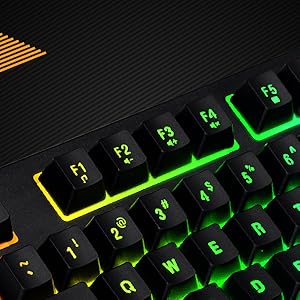
Figure 5: Detail of the function keys (F1-F12) with active RGB backlighting.
Double Injection Keycaps
The keycaps are manufactured using a double injection process, which ensures that the legends (characters on the keys) are scratch-resistant and will not fade over time. This design also makes the keys easier to clean.
Pangropéa
Proper maintenance helps extend the lifespan of your keyboard:
- Ngabersihan rutin: Use a soft, dry cloth to wipe down the keycaps and keyboard surface. For dust and debris between keys, use compressed air.
- Jero beberesih: Keur kokotor bandel, rada dampen a cloth with water or a mild, non-abrasive cleaning solution. Ensure no liquid enters the keyboard.
- Hindarkeun Tumpahan: Keep liquids away from the keyboard to prevent damage to internal components. If a spill occurs, immediately disconnect the keyboard and allow it to dry completely before reconnecting.
- Panyimpenan: When not in use for extended periods, store the keyboard in a clean, dry environment away from direct sunlight or extreme temperatures.
Pamérésan masalah
Upami anjeun ngalaman masalah sareng kibor anjeun, tingali solusi umum ieu:
- Keyboard Teu Ngabales:
- Pastikeun kabel USB disambungkeun sacara aman ka kibor sareng komputer.
- Coba sambungkeun kibor ka port USB anu béda dina komputer anjeun.
- Tés kibor dina komputer séjén pikeun nangtukeun naha masalahna aya dina kibor atawa komputer aslina.
- Balikan deui komputer anjeun.
- Lampu tukang Teu Gawé atawa Lepat:
- Check if the brightness is set to the lowest level. Use Fn + Halaman Up pikeun ngaronjatkeun kacaangan.
- Cycle through backlight effects using the designated key combinations (e.g., Fn + Gulung Konci or Fn + Lebetkeun).
- Ensure no software is overriding the keyboard's lighting settings (though this keyboard typically does not require software).
- Konci Henteu Ngadaptar atanapi Ghosting:
- Clean around the affected keys to remove any debris that might be obstructing the key mechanism.
- The keyboard supports 25-key anti-ghosting. If more than 25 keys are pressed simultaneously, some inputs may not register.
spésifikasi
| Fitur | Rincian |
|---|---|
| Ngaran modél | CB-GK-22 Veritas |
| merek | Bait kosmis |
| Tipe kibor | TKL Membrane Keyboard |
| Lampu tukang | 7-Color RGB Backlit, 9 Effects, Sonic Spectrum Mode |
| Tingkat Caang | 5 tingkatan |
| Anti Ghosting | 25 Konci |
| Kancing konci | Suntikan ganda |
| Konektipitas | USB |
| Dimensi produk | 37.2 x 15.1 x 3.7 cm |
| Item Beurat | 629 g |
| Komponén Kaasup | Kabel USB |
| Basa | Inggris |
| ASIN | B09K5GYWBH |
Garansi & Rojongan
Émbaran jaminan
The Cosmic Byte CB-GK-22 Veritas TKL Membrane Keyboard comes with a 1-taun jaminan kawates ti tanggal pameseran. Garansi ieu ngawengku cacad manufaktur dina panggunaan normal. Éta henteu ngawengku karusakan anu disababkeun ku salah guna, kacilakaan, modifikasi anu teu sah, atanapi karusakan normal.
Punten tahan bukti pameseran anjeun pikeun klaim garansi.
Rojongan Palanggan
For technical assistance, warranty claims, or any product-related inquiries, please contact Cosmic Byte customer support:
- Kontak Pabrikan: 1800 31300 7700
- merek Websitus: Visit the official Cosmic Byte websitus pikeun sumberdaya tambahan sarta rojongan.


