1. Produk Langkungview
The AWOW AiBook 10 is a versatile 10.1-inch 2-in-1 device designed to function as both a tablet and a laptop. It features a detachable keyboard, a responsive touchscreen, and an integrated kickstand for multiple viewing modes. Powered by an Intel Celeron N4120 processor, it includes 8GB RAM and 128GB SSD storage, making it suitable for everyday computing tasks, web browsing, and media consumption.

Image: The AWOW AiBook 10 tablet shown with its detachable keyboard, illustrating its 2-in-1 functionality.
Fitur konci:
- tampilan: 10.1-inch IPS HD (1280x800) Touchscreen
- Prosesor: Intel Celeron N4120 (dugi ka 2.6GHz)
- Mémori: 8GB LPDDR4 RAM
- Panyimpenan: 128GB eMMC SSD, expandable via TF card slot (up to 512GB)
- Sistem operasi: Windows 10 Imah
- Konektipitas: 2.4G+5G WiFi, Bluetooth 4.2
- Palabuhan: USB 3.0, Micro HDMI, DC-in, 3.5mm Earphone Jack, TF Card Slot
- Kaméra: 2MP Hareup, 5MP Rear
- Batré: 6500 mah
2. Komponén jeung palabuhan
Familiarize yourself with the physical components and available ports on your AWOW AiBook 10 tablet.
Eusi pakét:
- AWOW AiBook 10 Tablet
- Keyboard anu tiasa dicabut
- Adaptor kakuatan
- Manual pamaké
- Stylus Pen (may be included with some models)
Device Layout and Ports:

Image: A detailed diagram highlighting the various ports and features of the AWOW AiBook 10, including the kickstand and removable keyboard.
- 3.5mm Earphone Jack: Pikeun nyambungkeun headphone atanapi speaker éksternal.
- Slot Kartu TF: Insert a microSD card for expanded storage (up to 512GB).
- Kaméra hareup (2.0MP): Located above the screen for video calls and selfies.
- Kaméra pungkur (5.0MP): Located on the back of the tablet for taking photos and videos.
- DC-in (12V/3A): Port input daya pikeun ngecas alat.
- Mikro HDMI: Connect to an external display or TV.
- USB 3.0: Connect USB devices such as flash drives, mice, or external hard drives.
- Removable Keyboard Connector: Magnetic connector for attaching the keyboard.
- Stand 150°: Integrated stand for adjustable viewdina sudut.
3. Setélan
3.1 Ngecas Awal
Before first use, fully charge your AWOW AiBook 10. Connect the provided power adapter to the DC-in port on the tablet and plug it into a power outlet. The charging indicator light will illuminate. Allow several hours for a full charge.
3.2 Daya Hurung/Pareuman
- Pikeun Ngahurungkeun: Pencét terus tahan tombol Daya anu aya di sisi tablet dugi ka layar hurung.
- Pikeun mareuman: Press the Power button briefly to put the device to sleep. To fully shut down, navigate to the Start Menu in Windows, select the Power icon, and choose 'Shut down'.
3.3 Attaching and Detaching the Keyboard
The keyboard connects magnetically to the bottom edge of the tablet. Align the magnetic connector on the keyboard with the corresponding port on the tablet until it snaps into place. To detach, gently pull the tablet away from the keyboard.
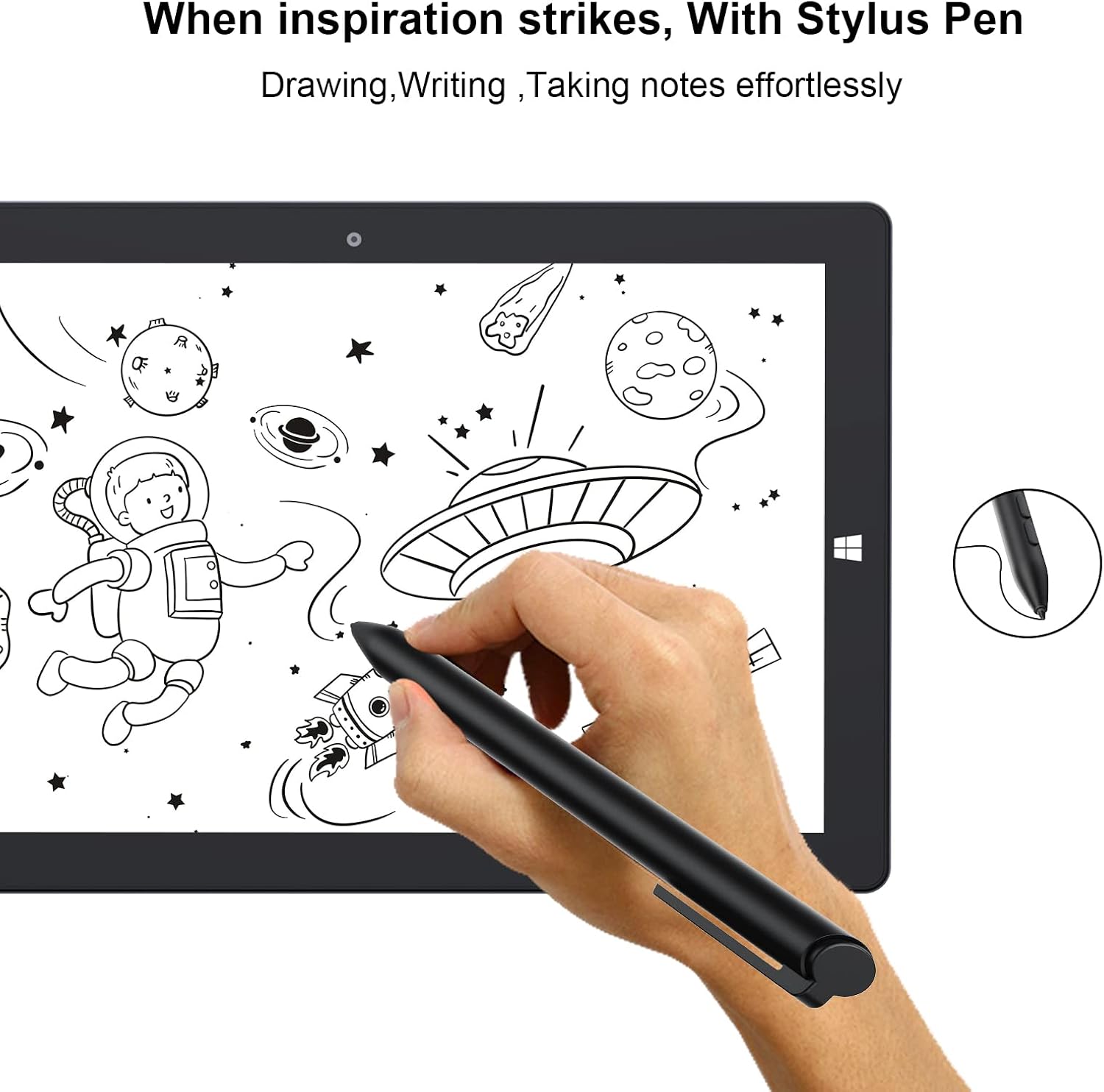
Image: The AWOW AiBook 10 tablet with its detachable keyboard securely attached, ready for use in laptop mode.
3.4 Setup Windows Awal
Upon first power-on, you will be guided through the Windows 10 Home setup process. Follow the on-screen prompts to select your region, language, connect to a Wi-Fi network, create a user account, and configure privacy settings.
4. Parentah Operasi
4.1 Ngaganti Modeu Tablet sareng Laptop
The AiBook 10 automatically detects when the keyboard is attached or detached and prompts you to switch between tablet and desktop modes in Windows. You can also manually switch via the Action Center (swipe in from the right edge of the screen or click the icon in the taskbar).

Image: The AWOW AiBook 10 configured in laptop mode, demonstrating its functionality with the keyboard and kickstand.
4.2 Layar rampa sareng Pamakéan Stylus
The 10.1-inch IPS display supports multi-touch gestures. Use your fingers for navigation, tapping, pinching to zoom, and swiping. If your model includes a stylus, it can be used for precise input, drawing, and note-taking.

Image: A hand using the stylus pen on the AWOW AiBook 10 tablet screen for drawing or writing.
4.3 Nyambungkeun ka Wi-Fi sareng Bluetooth
- Wifi: Pindah ka Setelan > Jaringan & Internét > Wi-Fi. Turn Wi-Fi on and select your desired network, then enter the password if required.
- Bluetooth: Pindah ka Setelan > Alat > Bluetooth & alat sejenna. Turn Bluetooth on and select 'Add Bluetooth or other device' to pair with compatible accessories.
4.4 Ngagunakeun Kickstand
The integrated kickstand allows you to prop up the tablet at various angles (up to 150 degrees) for comfortable viewing, typing, or drawing. Gently pull out the kickstand from the back of the tablet to adjust its position.
Video: This video demonstrates the AWOW AiBook 10's versatility, showcasing its tablet, studio, stand, and laptop modes, along with its adjustable kickstand, internal components, and various ports.
5. Pangropéa
5.1 Ngabersihan Alat Anjeun
- layar: Use a soft, lint-free cloth specifically designed for electronics. For stubborn smudges, slightly dampen lawon jeung cai atawa cleaner layar. Hindarkeun bahan kimia anu kasar.
- awak: Wipe the tablet and keyboard surfaces with a soft, dry cloth. Keep liquids away from ports and openings.
5.2 Perawatan Batré
- Hindarkeun suhu anu ekstrim, sabab tiasa ngirangan umur batre.
- Pikeun umur panjang batré optimal, coba tetep tingkat muatan antara 20% jeung 80%.
- Upami nyimpen alat kanggo waktos anu lami, eusian heula dugi ka sakitar 50% sateuacan dipareuman.
5.3 Apdet parangkat lunak
Rutin pariksa sareng pasang apdet Windows pikeun mastikeun yén alat anjeun gaduh patch kaamanan panganyarna sareng perbaikan kinerja. Pindah ka Setélan> Update & Kaamanan> Windows Update.
5.4 Manajemén Panyimpenan
The AiBook 10 comes with 128GB of eMMC storage. To manage space, regularly delete unnecessary files, uninstall unused applications, and utilize the TF card slot for additional storage of documents, photos, and videos.
6. Cara ngungkulan
This section addresses common issues you might encounter with your AWOW AiBook 10.
6.1 Alat Teu Dihurungkeun
- Ensure the device is fully charged. Connect the power adapter and wait a few minutes before attempting to power on again.
- Try holding the Power button for 10-15 seconds to perform a hard reset.
6.2 Masalah Konéktivitas Wi-Fi atanapi Bluetooth
- Pareuman sareng hurungkeun Wi-Fi/Bluetooth dina setélan Windows.
- Balikan deui tablet.
- Ensure your router or Bluetooth device is functioning correctly and within range.
- Apdet panggerak adaptor jaringan via Manajer Alat.
6.3 Layar rampa teu ngarespon
- Balikan deui tablet.
- Pastikeun layar beresih jeung bebas tina lebu.
- Check for Windows updates that might include touchscreen driver fixes.
6.4 Kibor Teu Ngabales
- Ensure the keyboard is securely attached to the tablet's magnetic connector.
- Detach and reattach the keyboard.
- Balikan deui tablet.
6.5 Performance slow
- Tutup aplikasi anu teu perlu jalan di latar tukang.
- Pariksa sareng pasang apdet Windows.
- Jalankeun beberesih sareng defragmentasi disk (kanggo HDD, sanés SSD).
- Mastikeun spasi gudang bébas cukup.
6.6 Reset pabrik
If persistent issues occur, you may consider a factory reset. This will erase all data and reinstall Windows. Back up all important files before proceeding. Go to Settings > Update & Security > Recovery > Reset this PC.
7. Spésifikasi
Detailed technical specifications for the AWOW AiBook 10.

Image: A graphic detailing the core specifications of the AWOW AiBook 10, including CPU, GPU, RAM, SSD, battery life, and camera resolution.
| Fitur | Spésifikasi |
|---|---|
| Ukuran layar | 10.1 inci |
| Resolusi layar | 1280 x 800 Piksel (IPS HD) |
| Prosesor | Intel Celeron N4120 (1.1 GHz, 4 Cores, up to 2.6 GHz Boost) |
| Grafika | Intel UHD Graphics 600 (Terpadu) |
| Ram | 8GB LPDDR4 |
| Panyimpenan | 128GB eMMC SSD |
| Panyimpenan Expandable | TF Card Slot (up to 512GB) |
| Sistem operasi | Windows 10 Imah |
| Konéktipitas Wireless | 2.4G+5G WiFi, Bluetooth 4.2 |
| Palabuhan | 1x USB 3.0, 1x Micro HDMI, 1x DC-in (12V/3A), 1x 3.5mm Earphone Jack, 1x TF Card Slot |
| Kaméra | Hareup 2MP, Rear 5MP |
| Batré | 6500mAh (Approx. 7-8 hours average use) |
| Ukuran (L x W x H) | 10.1 x 6.8 x 0.38 inci |
| Item Beurat | 2.97 pounds (with keyboard) |
8. Garansi jeung Rojongan
8.1 Garansi Produk
The AWOW AiBook 10 typically comes with a 1-year limited warranty from the date of purchase. This warranty covers manufacturing defects and hardware malfunctions under normal use. Please retain your proof of purchase for warranty claims.

Image: A feature overview highlighting key aspects of the AiBook 10, including the 1-year support period, expandable storage, and battery capacity.
8.2 Rojongan Palanggan
For technical assistance, warranty inquiries, or any questions regarding your AWOW AiBook 10, please contact AWOW customer support. Refer to the contact information provided in your product packaging or visit the official AWOW websitus pikeun sumber rojongan.
Anjeun oge bisa nganjang ka AWOW Store on Amazon pikeun émbaran leuwih produk jeung pilihan rojongan.


