1. Bubuka
Hatur nuhun pikeun meuliasing the RCA RPJ264 Portable Home Theater Projector. This manual provides essential information for the safe and efficient operation of your device. Please read it thoroughly before use and retain it for future reference.
2. Eusi Paket
Pastikeun yén sadaya item anu didaptarkeun di handap kalebet kana pakét anjeun:
- RCA RPJ264 Portabel Imah Teater Projector
- Kadali jauh
- Adaptor kakuatan
- Manual pangguna (dokumén ieu)
3. Produk Langkungview
Biasakeun diri anjeun sareng komponén sareng kontrol proyéktor.
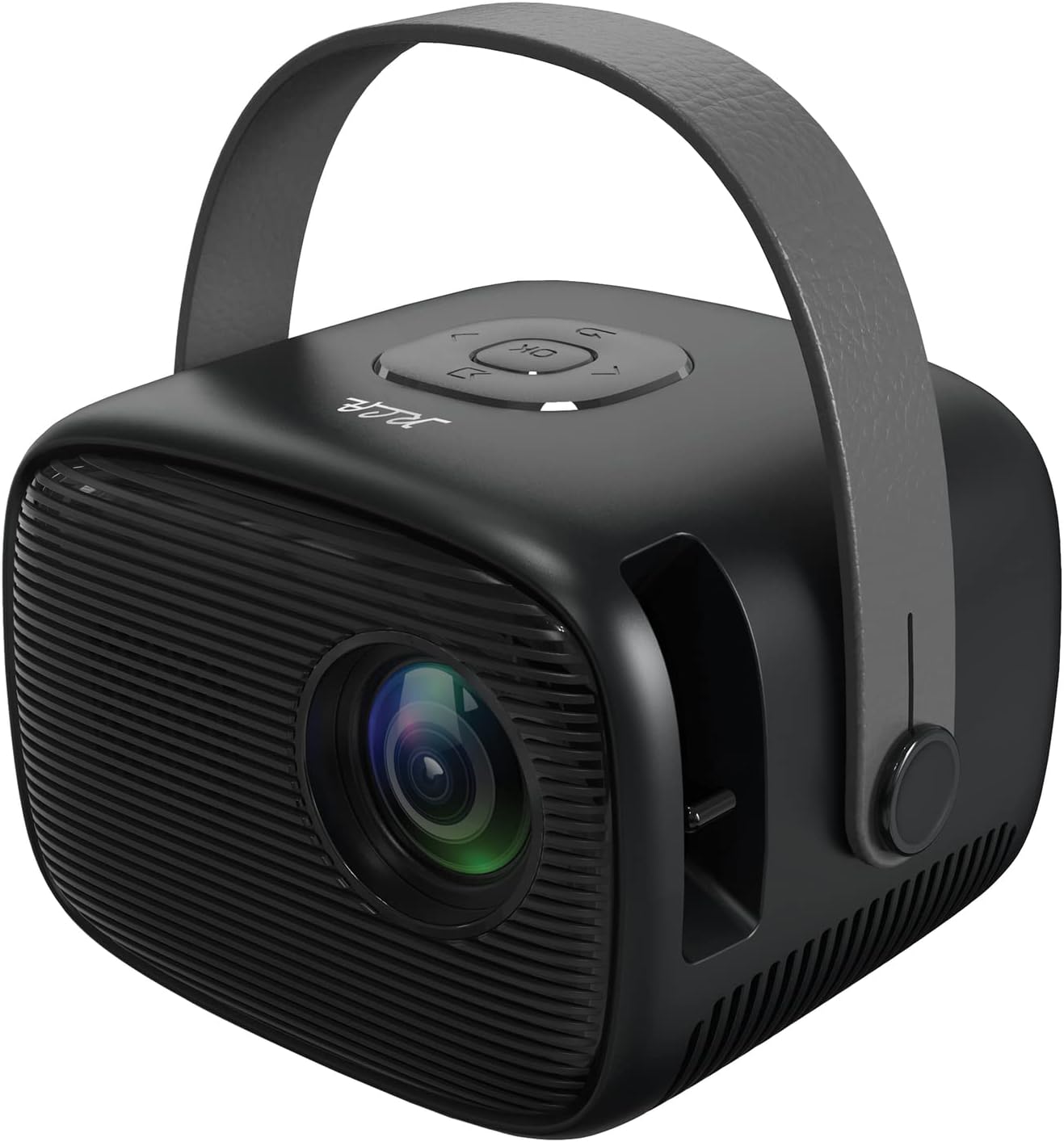
Gambar 3.1: Hareup-katuhu view of the RCA RPJ264 Portable Home Theater Projector, showcasing the lens, speaker grille, and carrying handle.

Image 3.2: Close-up of the top control panel, featuring navigation buttons and an 'OK' button.

Image 3.3: Detail of the built-in focusing wheel, used for adjusting image clarity.

Image 3.4: Diagram illustrating the projector's features including 480p resolution, LED display, 100-inch maximum picture size, HDMI port, USB/Micro SD port, two built-in speakers, leather handle, remote control, AV port, and headphone port.
4. Setélan
4.1 Nempatkeun
Position the projector on a stable, flat surface. Ensure there is adequate ventilation around the unit. For optimal viewing, place the projector at a distance that achieves your desired screen size. The recommended viewing distance for best results is 6.5 feet (approximately 2 meters).
4.2 Sambungan Daya
- Sambungkeun adaptor kakuatan ka port DC IN dina projector nu.
- Colokkeun adaptor kakuatan kana stop kontak listrik standar.
4.3 Sambungan Input
Proyektor ngadukung sababaraha sumber input:
- HDMI: Connect to devices such as TV boxes, TV sticks, PCs, laptops, gaming consoles (PS3, PS4, Xbox One, Wii), or Blu-ray players.
- USB: Selapkeun drive USB pikeun muterkeun média.
- VGA: Connect to computers or other VGA-compatible devices.
- OF: Use the AV port for older devices with composite video and stereo audio output.
- Micro SD: Insert a Micro SD card for media playback.

Image 4.1: The projector connected to various multimedia devices, illustrating its HDMI, USB, and other connectivity options for streaming, gaming, and media playback.

Image 4.2: Visual representation of the projector's capability to support 1080p HD playback through its HDMI input, along with other resolutions like 480p, 720p, and 576i.
5. Parentah Operasi
5.1 Daya Hurung/Pareuman
Pencét tombol daya dina proyektor atawa kadali jauh pikeun ngahurungkeun atawa mareuman unit.
5.2 adjustment fokus
Rotate the focusing wheel located near the lens to achieve a clear and sharp image on your projection surface.
5.3 Pilihan Sumber Input
Use the 'Source' button on the remote control or the projector's control panel to cycle through available input sources (HDMI, USB, VGA, AV, Micro SD).
5.4 Navigasi Menu
Use the navigation buttons (up, down, left, right) and the 'OK' button on the projector or remote control to navigate the on-screen menu for settings adjustments.
5.5 Kaluaran Audio
The projector features two built-in speakers. For external audio, connect headphones or external speakers to the 3.5mm headphone jack.

Image 5.1: The projector displaying a large image, demonstrating its capability to project up to a 100-inch picture size for an immersive viewpangalaman.
6. Cara ngungkulan
Upami anjeun mendakan masalah sareng proyektor anjeun, tingal masalah sareng solusi umum ieu:
| Masalah | Mungkin Cukang lantaranana | Solusi |
|---|---|---|
| Taya gambar ditémbongkeun | Power not connected, incorrect input source, loose cable connection | Check power cable, select correct input source, ensure cables are securely connected. |
| Gambar kabur | Fokus teu disaluyukeun | Adjust the focusing wheel until the image is clear. |
| Taya sora | Volume too low, external audio device not connected, audio settings incorrect | Increase volume, check external audio connections, verify audio settings in the menu. |
| Kadali jauh teu jalan | Batteries depleted, obstruction between remote and projector | Replace batteries, remove any obstructions, ensure direct line of sight. |
7. Spésifikasi
- model: RPJ264
- Ukuran produk: 7 x 8 x 6 inci
- Beurat barang: 1.5 pon
- Resolusi tampilan: 800 x 480 (supports 1080p HD playback via HDMI)
- Téknologi konektipitas: HDMI, USB, VGA, AV, Micro SD
- Fitur husus: Built-in Speakers, Portable with Carrying Handle
- Pamakéan anu disarankeun: Indoor/Outdoor Home Entertainment
- Ukuran proyéksi: 32" nepi ka 170"
- Jarak proyéksi: 4.9ft to 16.4ft (Recommended: 6.5ft)
8. Pangropéa
8.1 Ngabersihan Lensa
Anggo lawon lemes anu henteu ngaganggu anu khusus dirancang pikeun lensa optik pikeun ngusap lensa proyéktor sacara lembut. Hindarkeun nganggo pembersih anu kasar atanapi lawon anu tiasa ngagores permukaan lensa.
8.2 Ngabersihan Awak Projector
Lap bagian luar proyéktor ku lawon anu lemes sareng garing. Ulah nganggo pembersih cair atanapi pelarut.
8.3 Panyimpenan
When not in use, store the projector in a cool, dry place, away from direct sunlight and extreme temperatures. If possible, use the original packaging or a protective case to prevent dust accumulation and damage.
9. Émbaran Kasalametan penting
PERHATOSAN: Produk ieu ngandung bahan kimia anu dipikaterang ku Nagara California pikeun nyababkeun kanker sareng cacat lahir atanapi cilaka réproduktif sanés.
Always operate the projector in a well-ventilated area. Do not block ventilation openings. Avoid direct eye exposure to the projector lens when the lamp is on. Keep the projector away from water or other liquids. Do not attempt to disassemble or repair the projector yourself; refer all servicing to qualified personnel.
10. Garansi jeung Rojongan
For warranty information or technical support, please refer to the documentation provided at the time of purchase or visit the official RCA websitus. Simpen resi pameseran anjeun salaku bukti pameseran pikeun klaim garansi.


