1. Bubuka
Thank you for choosing the AZDOME M01 Pro Dual Dash Cam. This device is designed to provide reliable video recording of your journeys, enhancing driving safety and providing evidence in case of incidents. It features a front camera for road ahead recording and a rear camera for simultaneous rear view coverage. This manual provides detailed instructions for installation, operation, and maintenance of your dash cam.
2. Eusi Paket
Mangga parios pakét kanggo barang-barang ieu:
- AZDOME M01 Pro Dash Cam (Main Unit)
- Rear Camera (6m/20ft cable)
- Kartu SD 32GB
- Dual USB Car Charger (5V/2.4A)
- Power Cable (3.5m/12ft)
- 360° Suction Mount
- 360° 3M Spare Sticky Mount
- Mirror Mount Holder (Optional, if included in your bundle)

Image: Contents of the AZDOME M01 Pro Dash Cam package.
3. Produk Langkungview
3.1 Main Unit (Front Dash Cam)
The main unit features a 3-inch 2.5D curved IPS screen, a 150° wide-angle lens with F2.0 large aperture, and various control buttons for navigation and settings. It supports 1080P Full HD recording.

Image: AZDOME M01 Pro Dash Cam main unit with key features.
3.2 Kaméra tukang
The compact rear camera provides VGA resolution recording and is designed to be mounted at the rear of your vehicle for comprehensive coverage.
3.3 Pilihan pamasangan
The dash cam comes with a 360° suction mount for windshield attachment and a 360° 3M sticky mount for alternative placements. A mirror mount holder is also included for integration with your vehicle's rearview eunteung.

Image: Mirror mount holder for the dash cam.
4. Setélan
4.1 Nyelapkeun Kartu SD
- Pastikeun dashcam dipareuman.
- Locate the SD card slot on the side of the dash cam.
- Insert the provided 32GB SD card with the gold contacts facing the back of the camera until it clicks into place.
- Pikeun nyabut, dorong kartu ka jero dugi ka kaluar.
Catetan: It is recommended to format the SD card within the dash cam's settings before first use and periodically thereafter to ensure optimal performance.
4.2 Pasang Dash Cam
Choose between the suction mount or the mirror mount holder.
Using the Suction Mount:
- Bersihkeun wewengkon kaca kaca dimana anjeun badé masang kaméra.
- Pasangkeun dudukan sedot kana dasbor kaméra.
- Pencét cangkir nyeuseup pageuh kana kipas kaca sareng flip tuas pikeun ngamankeunana.
- Saluyukeun sudut kaméra sakumaha diperlukeun.
Using the Mirror Mount Holder:
- Attach the mirror mount holder to the dash cam.
- Aman clamp the mirror mount holder onto your vehicle's rearview mirror stem.
- Tighten sadayana screws pikeun mastikeun stabilitas.
- Adjust the camera angle for an optimal view.
4.3 Nyambungkeun Daya
- Plug the small end of the power cable into the dash cam's power port.
- Plug the other end of the power cable into the dual USB car charger.
- Colokkeun carjer mobil kana stop kontak 12V kandaraan anjeun (soket korek api).
- Route the cable neatly along the windshield trim to avoid obstructing your view.
4.4 Masang kaméra Rear
- Sambungkeun kabel kaméra pungkur ka port ditunjuk dina Unit dash cam utama.
- Route the rear camera cable from the front unit to the rear of your vehicle, typically along the headliner and side panels.
- Mount the rear camera on the rear windshield using its adhesive pad, ensuring a clear view.
- Adjust the angle of the rear camera for optimal coverage.
5. Parentah Operasi
5.1 Daya Hurung/Pareuman
- otomatis: The dash cam will power on and begin recording automatically when your vehicle's ignition is turned on (and power is supplied to the 12V outlet).
- Manual: Pencét terus tahan tombol Daya pikeun ngahurungkeun atanapi mareuman alat sacara manual.
5.2 Rekaman Dasar
Once powered on, the dash cam will automatically start continuous loop recording. The front camera records in 1080P FHD, and the rear camera records in VGA resolution simultaneously.

Image: High-resolution 1080P FHD recording display.
5.3 Ngarekam loop
The dash cam records video in segments (e.g., 1, 3, or 5 minutes). When the SD card is full, the oldest unlocked video files bakal ditimpa ku rékaman anyar. Ieu mastikeun rékaman kontinyu tanpa campur tangan manual.
5.4 G-Sensor (Rekaman Darurat)
The built-in G-sensor detects sudden impacts or collisions. When triggered, it automatically locks the current video segment, preventing it from being overwritten by loop recording. The sensitivity of the G-sensor can be adjusted in the settings menu.
5.5 Modeu Parkir
With Parking Mode enabled, the dash cam will automatically start recording if it detects a collision or vibration while your vehicle is parked. This feature requires a continuous power supply (e.g., a hardwire kit, sold separately) to function when the vehicle is off.
5.6 Screen Saver
To avoid distraction while driving, you can set the screen to turn off automatically after a set period (e.g., 1, 3, or 5 minutes) while recording continues in the background. The screen can be reactivated by pressing any button.
5.7 ADAS (Advanced Driver-Assistance Systems)
The ADAS feature provides alerts for potential road hazards, such as Lane Departure Warning (LDW) or Forward Collision Warning (FCW). Refer to the dash cam's settings to enable and configure these features.
5.8 Fatigue Driving Alert
This feature reminds drivers to take a break after a preset duration of continuous driving, promoting safer driving habits.
5.9 Dual Recording and Reverse View
The AZDOME M01 Pro records simultaneously from both the front and rear cameras. When the vehicle is in reverse gear (if properly wired), the screen can display the rear camera feed with parking guidelines, assisting with parking maneuvers.
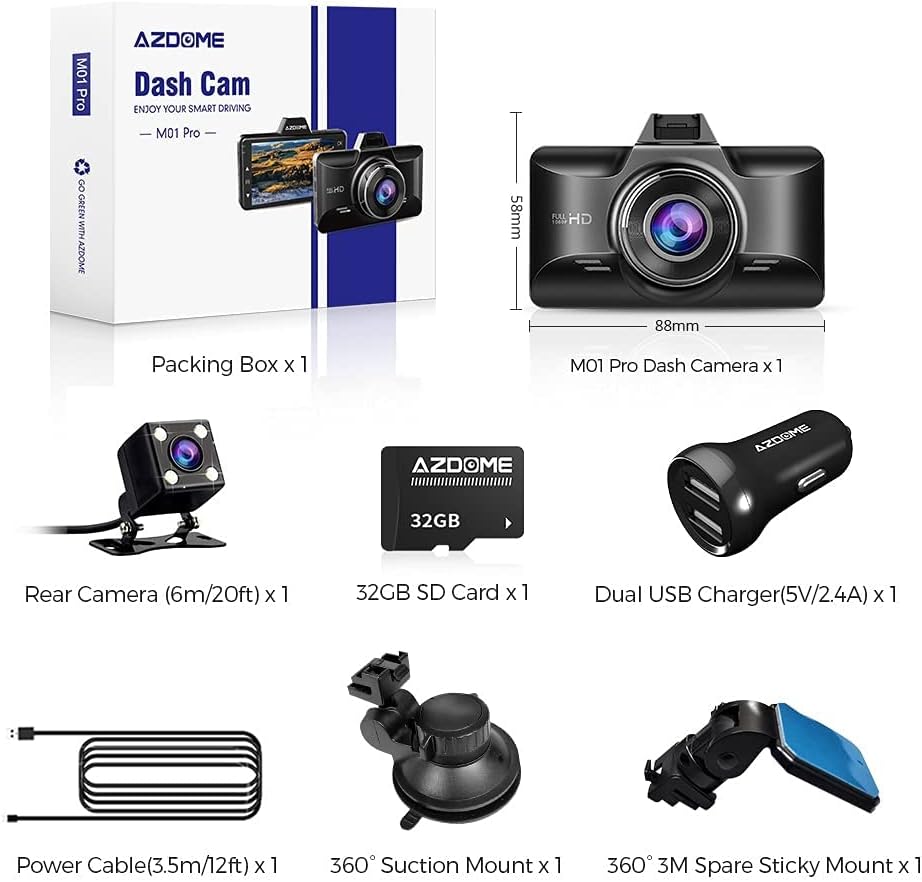
Image: Dual recording display with reverse view parking assistance.
5.10 Playback
Ka view recorded videos, stop recording (if active) and enter the playback mode via the menu. You can browse through video files and play them directly on the dash cam screen or transfer the SD card to a computer for viewing.
6. Pangropéa
- beberesih: Use a soft, dry cloth to clean the camera lenses and screen. Avoid using abrasive cleaners.
- Format kartu SD: Format the SD card regularly (e.g., once a month) within the dash cam's settings to maintain optimal recording performance and prevent data corruption.
- Suhu: Avoid exposing the dash cam to extreme temperatures for extended periods.
7. Cara ngungkulan
| Masalah | Solusi |
|---|---|
| Dash cam teu hurung. | Check if the power cable is securely connected to both the dash cam and the car charger. Ensure the car charger is properly inserted into the 12V outlet and the vehicle's ignition is on. Test the 12V outlet with another device. |
| Dash cam stops recording. | Ensure the SD card is inserted correctly and has sufficient free space. Format the SD card. Check if loop recording is enabled. If the G-sensor is too sensitive, it might lock too many files, filling the card. Adjust G-sensor sensitivity. |
| Video fotage téh burem. | Clean the camera lenses with a soft cloth. Ensure the protective film has been removed from the lenses. Check if the windshield area is clean. |
| pesen kasalahan kartu SD. | Format the SD card within the dash cam settings. If the issue persists, try a different high-speed (Class 10 or U3) SD card from a reputable brand. |
| kaméra pungkur teu némbongkeun. | Pariksa sambungan kabel kaméra tukang ka unit utama. Pastikeun kabelna teu ruksak. |
8. Spésifikasi
| Fitur | Rincian |
|---|---|
| Ngaran modél | M01 Pro |
| merek | AZDOME |
| Resolusi Capture Video | Front: 1080p FHD; Rear: VGA |
| Ukuran layar | 3 Inches (2.5D Curved IPS) |
| Fitur husus | 360 Degree (Mount), Loop Recording, G-Sensor, Parking Mode, Screen Saver, ADAS, Fatigue Driving Alert, Super Night Vision |
| Téhnologi konektipitas | USB |
| Tipe Pamasangan | Suction Mount, Mirror Mount |
| Tipe Mémori Flash | SD (Supports up to 64GB, 32GB included) |
9. Garansi jeung Rojongan
AZDOME products are designed for reliability and performance. For warranty information, technical support, or any inquiries regarding your AZDOME M01 Pro Dash Cam, please refer to the contact information provided on the official AZDOME website or your purchase documentation. Please retain your proof of purchase for warranty claims.
Dukungan Online: www.azdome.com/support


