1. Bubuka
Hatur nuhun pikeun meuliasing the Mesqool Vibrating Alarm Clock, Model CR1018i. This device is designed to provide a reliable wake-up experience through powerful vibration, loud alarm sound, or a combination of both. It features a large 8.7-inch LED mirror display, dual alarm settings, adjustable brightness and volume, a snooze function, and a convenient USB charging port. This manual provides detailed instructions for setup, operation, maintenance, and troubleshooting to ensure optimal performance.
2. Fitur Produk
- Powerful Vibration & Loud Alarm: The Mesqool vibrating alarm clock features a powerful vibrator, significantly stronger than a smartphone's vibration. It is typically placed under a pillow. For those who find the vibration too intense, placing it under a blanket can reduce its strength. This alarm clock supports two independent alarm settings, making it ideal for users who need two alarms daily, or for setting separate weekday and weekend alarms. For deep sleepers, consider using the BUZZ/VIB mode, which combines vibration and speaker alarm.
- Three Alarm Modes: This vibrating alarm clock offers three alarm modes:
- VIB (Vibration Only): When the vibrator is connected and the switch is set to VIB, the alarm will only vibrate without sound, ensuring you wake up without disturbing others. This silent vibration provides a gentle wake-up experience.
- BUZZ (Sound Only): The alarm will sound through the built-in speaker.
- BUZZ/VIB (Sound & Vibration): Both the speaker and vibrator will activate simultaneously for a powerful wake-up.
- 8.7-inch Mirror LED Display, Brightness & Volume Adjustment: The 8.7-inch mirror LED display provides clear, large time digits, making it easy to read. The mirror surface also serves as a functional vanity mirror. Display brightness is adjustable across 7 levels, offering energy efficiency and eye comfort, preventing sleep disturbance. Note that at the lowest brightness setting, the display may appear completely off. The alarm volume is adjustable across 7 levels (90dB to 110dB).
- Multi-functional & Easy Operation: In addition to the vibrating alarm, this clock includes a USB charging port, snooze function (9 minutes), 12/24H display, and Daylight Saving Time (DST) feature. A CR2030 button battery (included) provides memory backup, so time and alarm settings are retained during power outages, eliminating the need for re-setting. Designed for practicality, this digital alarm clock simplifies operation, making it easy for children and seniors to use.
- AC Powered kalawan Cadangan Batré: This electric digital alarm clock operates on AC power, eliminating concerns about battery depletion preventing you from waking up. The included CR2030 battery serves as a backup for memory retention only, not for powering the display or alarm functions.
3. Eusi Paket
- Mesqool Vibrating Alarm Clock (Model CR1018i)
- Vibrator Unit
- Adaptor kakuatan
- CR2030 Button Battery (pre-installed or separate)
- Manual pangguna (dokumén ieu)
4. Setélan
- Sambungkeun Kakuatan: Plug the power adapter into the DC IN 5V port on the back of the alarm clock, then plug the adapter into a standard electrical outlet. The display will light up.
- Install Backup Battery: If the CR2030 button battery is not pre-installed, open the battery compartment on the back of the clock and insert the battery, ensuring correct polarity. This battery maintains time and alarm settings during power interruptions.
- Connect Vibrator: Plug the vibrator unit into the VIBRATOR port on the back of the alarm clock.
- Setélan waktos mimiti: The clock may display a default time. Proceed to Section 5.1 to set the correct time.
- Vibrator Placement: For effective vibration, place the vibrator unit under your pillow or mattress. For reduced intensity, place it under a blanket.

Image: Illustration of connecting the power adapter and vibrator, and placing the vibrator under a pillow.

Image: A note indicating that the alarm clock operates on AC power and is not battery-powered for primary function.
5. Parentah Operasi
5.1. Time Setting (12H/24H)
- Press and hold the 'TIME SET' button. The hour digits will flash.
- Use the '+' or '-' buttons to adjust the hour.
- Press 'TIME SET' again. The minute digits will flash.
- Use the '+' or '-' buttons to adjust the minutes.
- Press 'TIME SET' to confirm.
- To switch between 12-hour and 24-hour format, press the '12/24H' button. An 'AM' or 'PM' indicator will appear for 12-hour format.
5.2. Alarm Setting (AL1 / AL2)
This clock allows setting two independent alarms (AL1 and AL2).
- Press and hold the 'AL1' or 'AL2' button. The hour digits for that alarm will flash.
- Use the '+' or '-' buttons to adjust the alarm hour.
- Press 'AL1' or 'AL2' again. The minute digits will flash.
- Use the '+' or '-' buttons to adjust the alarm minutes.
- Press 'AL1' or 'AL2' to confirm the alarm time.
- After setting, press 'AL1' or 'AL2' briefly to activate/deactivate the alarm. An alarm icon will appear on the display when active.

Image: Illustration showing two separate alarm times set on the clock display.
5.3. Alarm Modes (VIB, BUZZ, BUZZ/VIB)
On the back of the clock, locate the 'BUZZ/VIB' switch. Slide it to select your preferred alarm mode:
- BUZZ: Alarm sound only (speaker).
- VIB: Vibration only (vibrator unit).
- BUZZ/VIB: Both alarm sound and vibration.

Image: Visual representation of the three alarm modes: BUZZ (speaker icon), VIB (vibration icon), and BUZZ/VIB (both icons).
5.4. Fungsi Snooze
When the alarm sounds, press the large 'SNOOZE' button on top of the clock. The alarm will pause for 9 minutes and then sound again. You can repeat this process.
5.5. Adjustment Caang tampilan
Press the 'DIMMER' button on the back of the clock to cycle through 7 levels of display brightness. The lowest setting may appear completely off in bright environments.

Image: Depicts the clock display at different brightness levels, from bright to dim, illustrating the 7-level adjustment.
5.6. Volume adjustment
Press the 'VOLUME' button on the back of the clock to adjust the alarm sound volume across 7 levels (90dB to 110dB).
5.7. Daylight Saving Time (DST)
Press the 'DST' button on the back of the clock to activate or deactivate Daylight Saving Time. When activated, the time will adjust by one hour.
5.8. Palabuhan Ngecas USB
The USB port (5V/1A) on the back of the clock can be used to charge your smartphone or other small electronic devices.
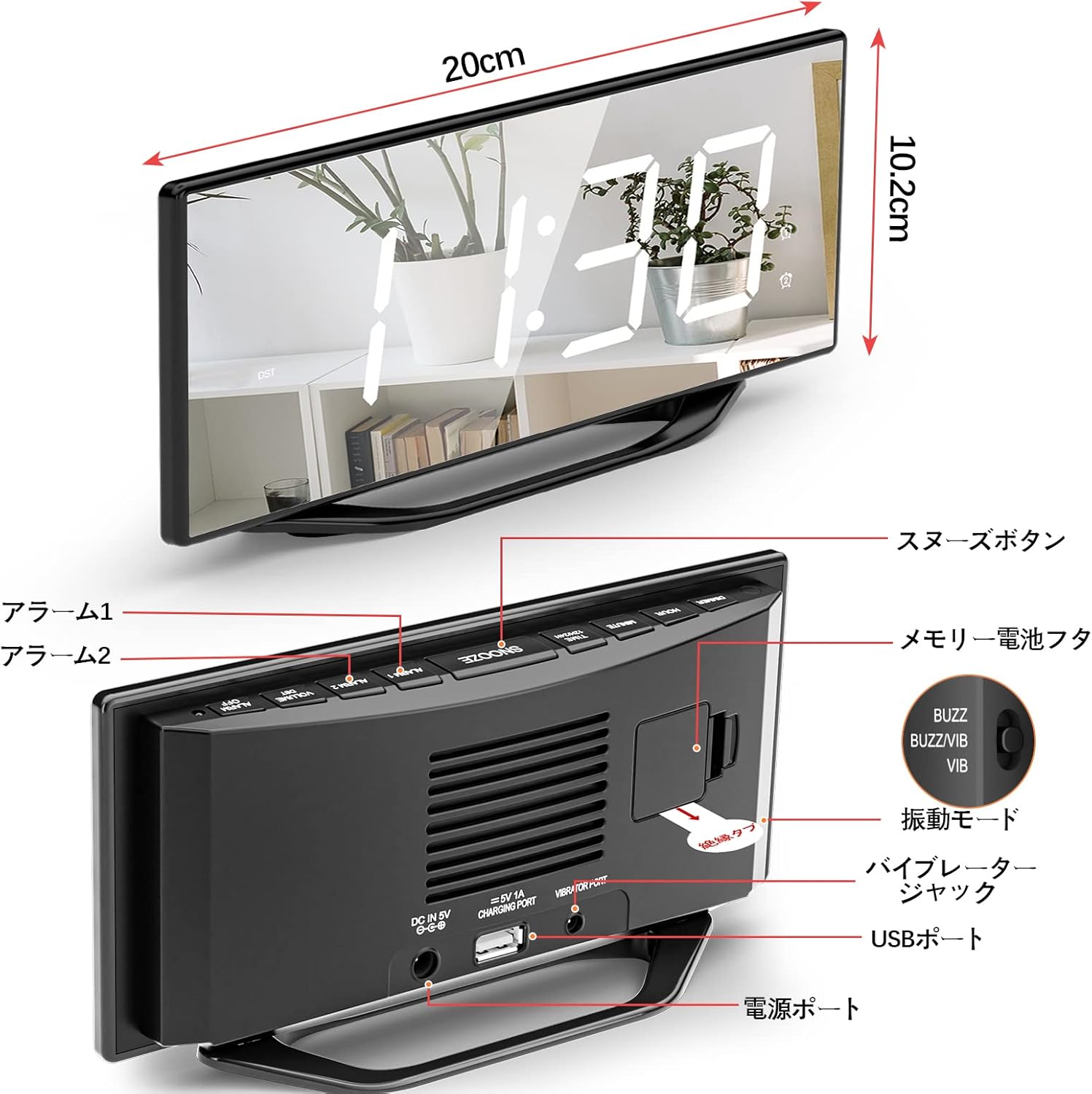
Image: Close-up of the back panel of the alarm clock, showing the various buttons, ports (DC IN, VIBRATOR, USB), and the BUZZ/VIB switch.
6. Pangropéa
6.1. beberesih
Wipe the clock and vibrator with a soft, dry cloth. Do not use abrasive cleaners or solvents. Avoid getting moisture into any openings.
6.2. Battery Replacement (Memory Backup)
The CR2030 button battery is for memory backup only. If you notice that time and alarm settings are lost after a power outage, the battery may need replacement. Open the battery compartment on the back of the clock, remove the old battery, and insert a new CR2030 battery with the correct polarity.
7. Cara ngungkulan
- Display not showing even with battery inserted: This digital clock operates on AC power. It will not function solely on battery power. The battery is for memory backup only. Ensure the power adapter is securely connected to both the clock and a working electrical outlet.
- Display is completely dark when powered on: The display may appear completely dark at its lowest brightness setting. Please adjust the display brightness using the 'DIMMER' button on the back of the clock.
- Alarm is not sounding/vibrating: Ensure the alarm is activated (alarm icon visible on display). Check the 'BUZZ/VIB' switch on the back to ensure the desired mode is selected. If using vibration, ensure the vibrator unit is securely plugged into the VIBRATOR port. If using sound, ensure the volume is not set to minimum.
- Vibration is too strong/weak: Adjust the placement of the vibrator. Placing it under a thicker blanket or further away from your body can reduce its perceived strength. Placing it directly under a pillow will maximize its effect.
8. Spésifikasi
| Fitur | Spésifikasi |
|---|---|
| merek | Mesqool |
| Nomer modél | Cr1018i |
| Tipe tampilan | Digital LED Mirror Display |
| Ukuran tampilan | 8.7 inci |
| Tingkat Caang | 7 tingkat |
| Tingkat Jilid Alarm | 7 tingkat (90dB - 110dB) |
| Modeu alarem | Vibration, Buzzer, Vibration + Buzzer |
| Number of Alarms | 2 (mandiri) |
| Lilana Snooze | 9 menit |
| Format waktos | 12H/24H bisa dipilih |
| Sumber Daya | Kabel Daya AC |
| Memory Backup Battery | Batré Kancing CR2030 (kaasup) |
| Port Ngecas USB | 5V / 1A |
| Diménsi | 10.2cm (width) x 4.4cm (height) (approximate display area) |
| Beurat pakét | 0.41 kg |
9. Garansi jeung Rojongan
Mesqool products are designed for reliability and performance. If you encounter any issues with your Mesqool Vibrating Alarm Clock, please refer to the troubleshooting section of this manual. For further assistance or warranty inquiries, please contact our customer support team.
Kumaha Ngahubungan Rojongan: If you purchased this product through an online retailer, please navigate to your order history, locate your purchase, and select the 'Contact Seller' option. Provide your order number and a detailed description of the issue for prompt assistance.


