1. Bubuka jeung Leuwihview
This manual provides essential information for setting up, operating, and maintaining your Apple Watch Series 7 GPS 41mm. The Apple Watch Series 7 features an advanced display, comprehensive health monitoring capabilities, and robust fitness tracking, designed to integrate seamlessly into your daily life.

Figure 1: Apple Watch Series 7 GPS 41mm in Starlight Aluminum with Starlight Sport Band.
2. Naon dina Box
Saatos muka kotak Apple Watch Series 7 anjeun, pariksa yén sadaya komponén aya:
- Apple Watch Series 7 Case (Starlight Aluminum)
- Sport Band (Starlight)
- 1m Kabel Ngecas Magnét
3. Setélan
3.1 Muatan Awal
Before first use, fully charge your Apple Watch. Connect the 1m Magnetic Charging Cable to a USB power adapter (sold separately) and plug it into a power outlet. Place the back of your Apple Watch on the magnetic charger. The watch will display a charging indicator.
3.2 Ngapasangkeun sareng iPhone
- Ensure your iPhone is updated to the latest iOS version and Bluetooth is enabled.
- Hurungkeun Apple Watch anjeun ku mencét sareng nahan tombol samping dugi ka logo Apple muncul.
- Bring your iPhone near your Apple Watch. A pairing screen will appear on your iPhone. Tap 'Continue'.
- Posisikeun iPhone anjeun supados Apple Watch anjeun némbongan dina viewfinder in the Apple Watch app.
- Follow the on-screen instructions to complete the pairing process, including setting up a passcode and choosing your preferred settings.
3.3 Napigasi Dasar
- Mahkota Digital: Rotate to scroll, zoom, or adjust values. Press to go to the watch face or open the App View. Double-press to switch between recently used apps.
- Tombol samping: Press to open the Dock (recently used apps) or access Apple Pay. Press and hold for emergency services or to power off.
- Témpél Toél: Tap to select, swipe to navigate, and force touch for additional options.
4. Operating and Key Features
4.1 Pintonan
The Apple Watch Series 7 features an Always-on Retina display, offering nearly 20% more screen area than Series 6 for enhanced visibility. The front crystal is designed to be highly crack-resistant, providing increased durability.

Figure 2: The larger, more durable display of the Apple Watch Series 7.
4.2 Pangimeutan Kaséhatan
The device includes advanced sensors for comprehensive health insights:
- Aplikasi ECG: Take an electrocardiogram anytime, anywhere to check for signs of atrial fibrillation.
- Bewara Detak Jantung: Receive alerts for high, low, and irregular heart rhythms.
- Aplikasi Oksigén Getih: Measure your blood oxygen levels with a powerful sensor.
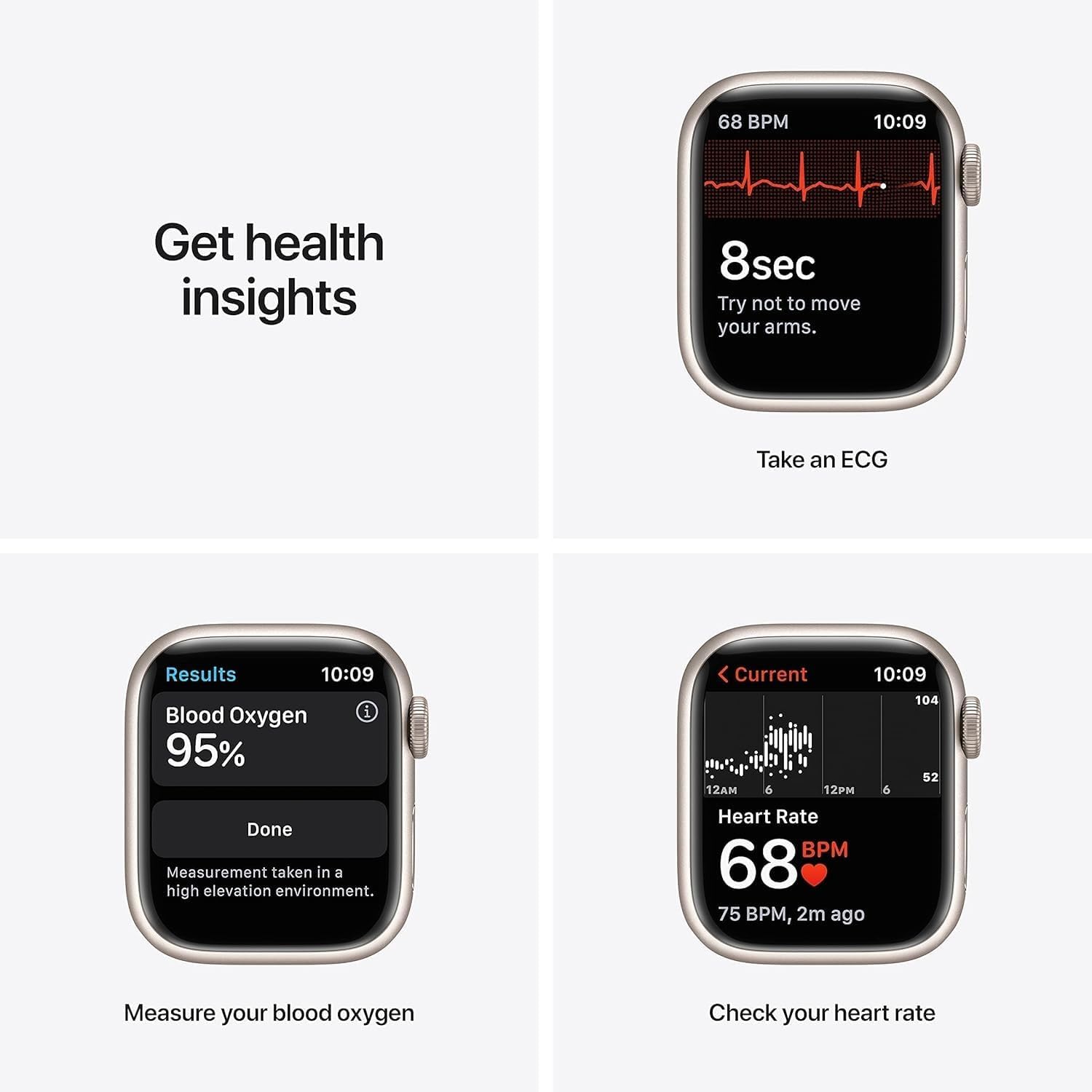
Figure 3: Health monitoring features including ECG, Blood Oxygen, and Heart Rate.
4.3 Kabugaran nyukcruk
Track your daily activity and workouts with precision:
- Nyukcruk kagiatan: Monitor your daily movement, exercise, and stand goals in the Fitness app.
- Modeu latihan: Track various workouts including running, yoga, swimming, dance, Tai Chi, and Pilates.
- Sleep App: Set sleep goals and track your sleep patterns.
- Mindfulness App: Stay present and reduce stress with guided meditations and reflections.
4.4 Connectivity & Payments
The GPS model provides location tracking for workouts and navigation. Utilize Apple Pay for secure and convenient payments directly from your wrist.
Video 1: Hiji leuwihview of the Apple Watch Series 7 GPS 41mm, demonstrating its features and design.
4.5 Fungsi séjén
Beyond health and fitness, the Apple Watch Series 7 offers additional functionalities:
- Sinkronisasi Média: Sync your favorite music, podcasts, and audiobooks for on-the-go listening.
- Bewara: Receive notifications from your iPhone directly on your wrist.
- Beungeut arloji anu tiasa disaluyukeun: Personalize your watch face with various complications and styles.
Video 2: A brief 7-second preview mintonkeuncasing the Apple Watch Series 7, highlighting its display and physical appearance.
5. Pangropéa
To ensure the longevity and optimal performance of your Apple Watch, follow these maintenance guidelines:
- beberesih: Regularly clean your Apple Watch and band with a soft, lint-free cloth. For stubborn dirt, slightly dampBilas lawon ku cai bersih. Hindarkeun nganggo bahan kimia anu kasar atanapi bahan anu abrasif.
- Paparan cai: The Apple Watch Series 7 is swimproof. After swimming, rinse the watch with fresh water and dry it thoroughly.
- Apdet parangkat lunak: Keep your Apple Watch software (watchOS) updated to ensure access to the latest features, security enhancements, and performance improvements. Updates can be managed through the Apple Watch app on your iPhone.
- Perawatan batré: To maximize battery lifespan, avoid exposing the watch to extreme temperatures. Charge the device regularly, but avoid leaving it fully charged or fully discharged for extended periods.
6. Cara ngungkulan
If you encounter issues with your Apple Watch, consider the following common troubleshooting steps:
- Lalajo Teu Dihurungkeun: Ensure the watch is sufficiently charged. Connect it to the magnetic charging cable and allow it to charge for at least 30 minutes.
- Masalah pasangan: Verify that Bluetooth is enabled on your iPhone and both devices are within range. Restart both your iPhone and Apple Watch, then attempt pairing again.
- Apps Not Responding: Force quit the app by pressing the side button, then swipe the app to the left and tap the 'X' button. Reopen the app. If the issue persists, restart your Apple Watch.
- Inaccurate Readings (Heart Rate/Activity): Ensure the watch is worn snugly on your wrist, not too tight or too loose. Clean the back of the watch to ensure sensors are unobstructed.
- Batré gancang ngucur: Check for background app refresh settings and disable unnecessary notifications. Ensure watchOS is updated. If the issue persists, contact Apple Support.
7. Spésifikasi
| Fitur | Rincian |
|---|---|
| Dimensi produk | 1.61 x 1.97 x 0.42 inci |
| Item Beurat | 1.13 ons (32 gram) |
| Nomer Modél Item | Lalajo Series 7 |
| Batré | 1 batré Litium Ion diperlukeun |
| Ukuran Layar Ngadeg | 1.8 inci |
| Kapasitas Panyimpenan Mémori | 32 GB |
| Sistem operasi | WatchOS |
| Fitur husus | Pelacak Aktivitas, Monitor Detak Jantung, Monitor Sare, Oksigén Getih |
| Kapasitas batré | 284 Miliamp Jam-jaman |
| Téhnologi konektipitas | Nirkabel |
| Standar Komunikasi Nirkabel | Bluetooth |
| GPS | Diwangun-di GPS |
| Produsén | Komputer Apple |
| Tanggal Kahiji Sadia | 20 Désémber 2021 |
8. Garansi jeung Rojongan
For information regarding warranty coverage, technical support, and service options for your Apple Watch Series 7, please refer to the official Apple support website or contact Apple customer service directly. Details about the Amazon Renewed Guarantee for this product can be found on the product's purchase page.


