1. Bubuka
The VOLTCRAFT DSO-2072H is a versatile 3-in-1 digital instrument, combining the functionalities of a digital oscilloscope, a multimeter, and a waveform generator. Designed for precision and ease of use, this device is ideal for various electrical measurement and testing applications.

Figure 1.1: VOLTCRAFT DSO-2072H Handheld Oscilloscope
2. Émbaran Kasalametan
Mangga baca sareng pahami sadaya peringatan kaamanan sareng pitunjuk operasi sateuacan nganggo alat ieu. Upami henteu dilakukeun, tiasa nyababkeun cilaka atanapi karusakan kana alat.
- This device is rated for CATII 1000 V measurements. Always adhere to safety standards for the measurement category.
- PERHATOSAN: To avoid electrical shock, do not open the case. There are no user-serviceable parts inside.
- To avoid personal injury or damage to the instrument, install quick-acting fuses with amp/voltage ratings shown on the device.
- Ulah dianggo alat ieu upami katingalina ruksak atanapi nuju beroperasi sacara teu normal.
- Pastikeun ventilasi ditangtoskeun salila operasi.
3. Eusi Paket
Pastikeun yén sadaya item anu didaptarkeun di handap kalebet kana pakét anjeun:
- VOLTCRAFT DSO-2072H Handheld Oscilloscope
- Oscilloscope Probe and Adjustment Tool
- Kabel BNC ka Klip Buaya
- Multimeter Test Leads (one black, one red)
- Kabel USB
- Gancang Mimitian Guide
- Soft Protective Case
- CD with Software and English User Manual
4. Produk Langkungview
4.1 Panel Hareup sareng Tampilan
The device features a 3.5-inch (8.89 cm) LCD color display with a resolution of 320 x 240 pixels. The front panel includes various function buttons and input terminals for operation.
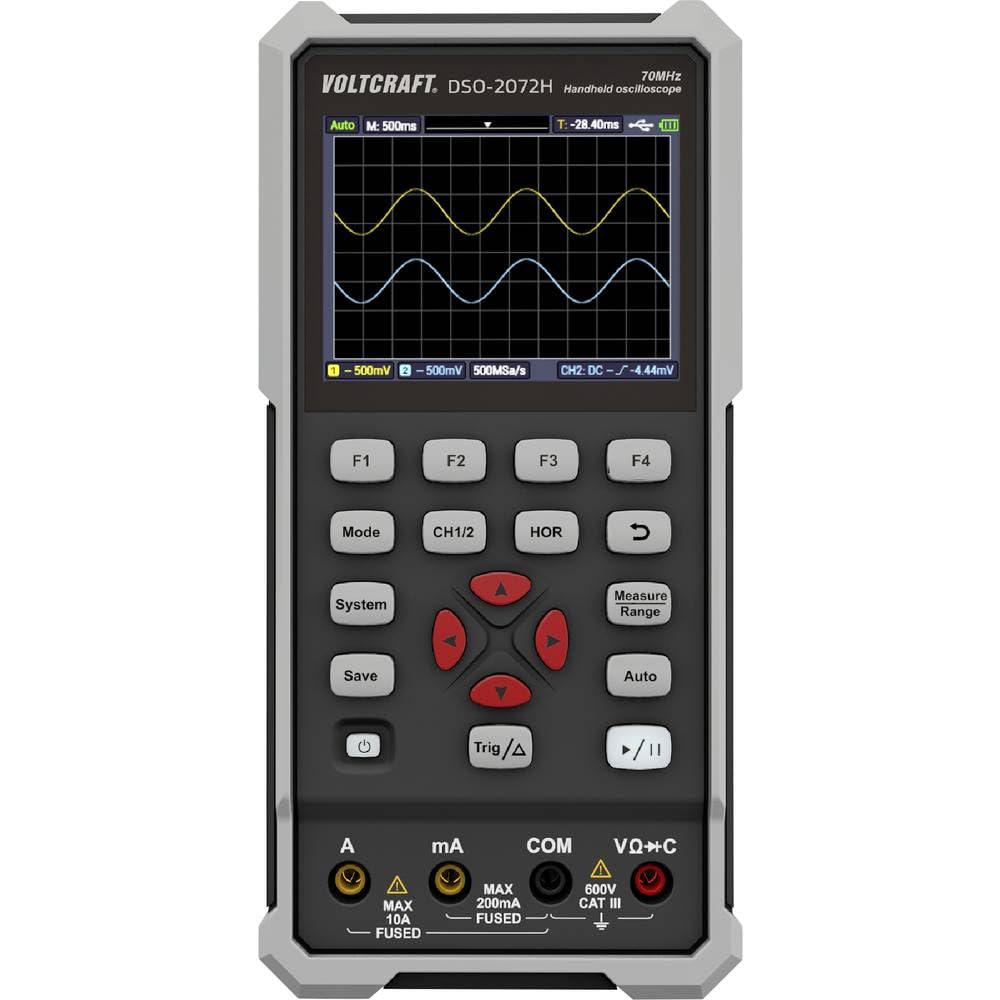
angka 4.1: Layout Panel hareup
- tampilan: Shows waveform, measurement readings, and menu options.
- Tombol Fungsi (F1-F4): Context-sensitive buttons for menu navigation.
- Mode: Switches between Oscilloscope, Multimeter, and Waveform Generator modes.
- CH1/2: Selects or controls oscilloscope channels.
- HOR: Adjusts horizontal scale/time base.
- Simpen: Saves waveform data or settings.
- Sistim: Accesses system settings and configurations.
- Trig/Δ: Controls trigger settings or delta measurements.
- Otomatis: Auto-sets oscilloscope or multimeter parameters for quick measurements.
- Ukuran Range: Adjusts measurement range in multimeter mode.
- Navigation Keys (Up/Down/Left/Right/Enter): Pikeun navigasi menu sareng pangaturan parameter.
- Tombol Daya: Ngahurungkeun atanapi mareuman alat.
- Puter / Reureuh: Starts or stops waveform acquisition.
4.2 Input Terminal
- A (Amperes): Input for high current measurements (Max 10A, Fused).
- mA (Milliamperes): Input for low current measurements (Max 200mA, Fused).
- COM (Umum): Common return terminal for all measurements.
- VΩ+C (Volts, Ohms, Capacitance): Input pikeun voltage, resistance, capacitance, continuity, and diode measurements (600V CAT III).
4.3 Panel tukang
The rear panel provides information about the device model, battery specifications, and important warnings.

Gambar 4.2: Panel Rear
- Model No.: DSO-2072H
- Li-ion cell: 3.7V, 2200 mAh, 8.14 Wh
- Port USB Tipe-C: Pikeun ngecas sareng mindahkeun data.
5. Setélan
5.1 Powering on / Pareum
Pikeun ngahurungkeun alat, pencét terus tahan tombol Kakuatan tombol nepi ka layar hurung. Pikeun mareuman, pencét terus tahan Kakuatan pencét tombol deui dugi ka tampilan pareum.
5.2 Ngeusi batre
Connect the device to a USB power source using the provided USB Type-C cable. The battery indicator on the display will show charging status. Ensure the device is fully charged before initial use for optimal battery life.
5.3 Connecting Probes/Leads
For oscilloscope measurements, connect the oscilloscope probe to the BNC input. For multimeter measurements, insert the red test lead into the VΩ+C terminal and the black test lead into the COM terminal. For current measurements, use the A or mA terminals as appropriate.
6. Parentah Operasi
6.1 Digital Oscilloscope Function
The DSO-2072H operates as a 2-channel digital oscilloscope with a maximum bandwidth of 70 MHz and a sampling rate of 250 MS/s. It features an 8K record length and 8-bit vertical resolution.
- Pencét Modus to select Oscilloscope mode.
- Paké CH1/2 to select the active channel or adjust channel settings.
- Adjust the horizontal time base using the HOR button and navigation keys.
- Configure trigger settings with the Trig/Δ kancing.
- Pencét Otomatis for automatic waveform scaling and triggering.
6.2 Fungsi Multimeter
The integrated multimeter supports measurements for voltage, current, resistance, capacitance, continuity, and diode testing, with a 20,000-count display and TRMS capability.
- Pencét Modus to select Multimeter mode.
- Ngagunakeun éta Ukur Range button or navigation keys to select the desired measurement type (V, A, Ω, F, continuity, diode).
- The Otomatis function can simplify the measurement process by automatically selecting the appropriate range.
6.3 Waveform Generator Function
The device includes a single-channel waveform generator with a maximum frequency output of 25 MHz, a sampling rate of 125 MS/s, 0.1 Hz frequency resolution, 14-bit vertical resolution, and 8K waveform length.
- Pencét Modus to select Waveform Generator mode.
- Use the function buttons and navigation keys to configure waveform type, frequency, amplitude, and offset.
6.4 Saving Data and System Settings
- Pencét Simpen to store current waveform data or measurement results.
- Pencét Sistim to access and adjust general device settings, display options, and calibration.
7. Pangropéa
Proper maintenance ensures the longevity and accuracy of your VOLTCRAFT DSO-2072H.
- beberesih: Anggo kaén anu lemes sareng garing pikeun ngabersihan alat. Ulah make cleaners abrasive atawa pangleyur.
- Panyimpenan: Simpen alat dina tempat anu tiis sareng garing jauh tina sinar panonpoé langsung sareng suhu anu ekstrim.
- Ngagantian sekering: If a fuse blows, replace it only with a quick-acting fuse of the specified amp/voltage rating as indicated on the device's rear panel or in the full manual.
8. Cara ngungkulan
Upami anjeun ngalaman masalah sareng alat anjeun, tingal solusi umum ieu:
- Alat teu hurung: Ensure the battery is charged. Connect the USB cable to a power source and allow it to charge for some time.
- Teu aya bentuk gelombang anu ditampilkeun: Check probe connections. Ensure the input signal is within the device's measurement range. Try using the Otomatis fungsi.
- Pembacaan multimeter anu salah: Verify that the test leads are correctly inserted into the appropriate terminals (VΩ+C, A, mA, COM) for the measurement type. Ensure the correct measurement range is selected.
- Alat macet atanapi teu ngaréspon: Try restarting the device by holding the Kakuatan button. If the issue persists, refer to the full user manual on the provided CD for advanced troubleshooting.
9. Spésifikasi
| Fitur | Spésifikasi |
|---|---|
| Nomer modél | VC-11901280 |
| Ukuran (L x W x H) | 19.8 x 3.8 x 9.6 cm (7.8 x 1.5 x 3.8 inci) |
| Beurat | 600 Gram (1.32 lbs) |
| tampilan | 3.5-inch (8.89 cm) LCD Color Display (320 x 240 pixels) |
| Sumber Daya | Electric Cable (USB Type-C), Li-ion Battery (3.7V, 2200 mAh) |
| Oscilloscope Bandwidth | 70 MHz |
| Oscilloscope Channels | 2 |
| Osiloskop Sampling Laju | 250 MS/s |
| Oscilloscope Record Length | 8K |
| Oscilloscope Vertical Resolution | 8 bitu |
| Multimeter Display Counts | 20,000 |
| Multimeter Measurement Category | CATII 1000 V |
| Waveform Generator Channels | 1 |
| Waveform Generator Max Frequency | 25 MHz |
| Waveform Generator Sampling Laju | 125 MS/s |
| Waveform Generator Vertical Resolution | 14 bitu |
| minuhan | EN 61010-1 |
10. Garansi jeung Rojongan
For detailed warranty information and technical support, please refer to the full user manual and software provided on the included CD. You can also visit the official VOLTCRAFT websitus pikeun bantuan salajengna.
Pabrikan: VOLTCRAFT


