1. Bubuka
Thank you for choosing the TELLUR FCC10 Car Charger. This manual provides essential information for the safe and efficient operation of your device. Please read it thoroughly before use and retain it for future reference.
The TELLUR FCC10 is a high-performance car charger designed to provide rapid charging for your cellular phones and other compatible devices. Featuring both Power Delivery (PD20W) and Quick Charge 3.0 (QC3.0) ports, it allows for simultaneous fast charging of two devices. Its intelligent design includes multiple protection mechanisms to ensure the safety of your devices.
2. Produk Langkungview
The TELLUR FCC10 Car Charger is compact and designed for convenience. It features two distinct charging ports for versatile compatibility.

Gambar 2.1: Hareupeun view of the TELLUR FCC10 Car Charger, showing the USB-C (PD) and USB-A (QC3.0) ports.

Gambar 2.2: Angled view of the TELLUR FCC10 Car Charger, highlighting its compact design and textured finish.
Fitur konci:
- Port ngecas Dual: Equipped with one USB-C Power Delivery (PD20W) port and one USB-A Quick Charge 3.0 (QC3.0) port.
- Ngecas gancang: Delivers up to 38W total output, enabling 4x faster charging than standard chargers.
- Intelligent Adaptation: Automatically adjusts input current to optimize charging for connected devices.
- Sistem Multi-Panyalindungan: Built-in safeguards against overcurrent, short circuit, overvoltage, sarta overheating.
- Kasaluyuan Universal: Compatible with a wide range of cellular phones and other USB-powered devices.

Gambar 2.3: Diagram illustrating the internal protection features of the TELLUR FCC10 Car Charger, including over-current, over-voltage, over-temp, and over-charge protection, along with a Smart-IC chip.
3. Setélan
Setting up your TELLUR FCC10 Car Charger is straightforward. Follow these steps to begin charging your devices.
- Locate Your Vehicle's Cigarette Lighter Socket: This is typically found in the dashboard or center console of your car.
- Selapkeun carjer: Firmly insert the TELLUR FCC10 Car Charger into the cigarette lighter socket. Ensure it is fully seated for a stable connection.
- Verifikasi kakuatan: Once inserted, the charger may have a small LED indicator that illuminates, signifying it is powered on and ready for use.
Catetan: Ensure your vehicle's engine is running or the ignition is in the accessory position for the cigarette lighter socket to provide power.
4. Parentah Operasi
Using the TELLUR FCC10 Car Charger to charge your devices is simple.
- Sambungkeun Alat Anjeun:
- For devices supporting Power Delivery (PD), use a USB-C to USB-C cable or USB-C to Lightning cable and connect it to the USB-C port on the charger.
- For devices supporting Quick Charge (QC3.0) or standard USB charging, use a USB-A cable and connect it to the USB-A port on the charger.
- Mimitian Ngecas: Once connected, your device should automatically begin charging. The charger's intelligent technology will adapt the output to suit your device's charging requirements.
- Ngeusi batre sakaligus: You can charge two devices simultaneously using both the USB-C and USB-A ports.
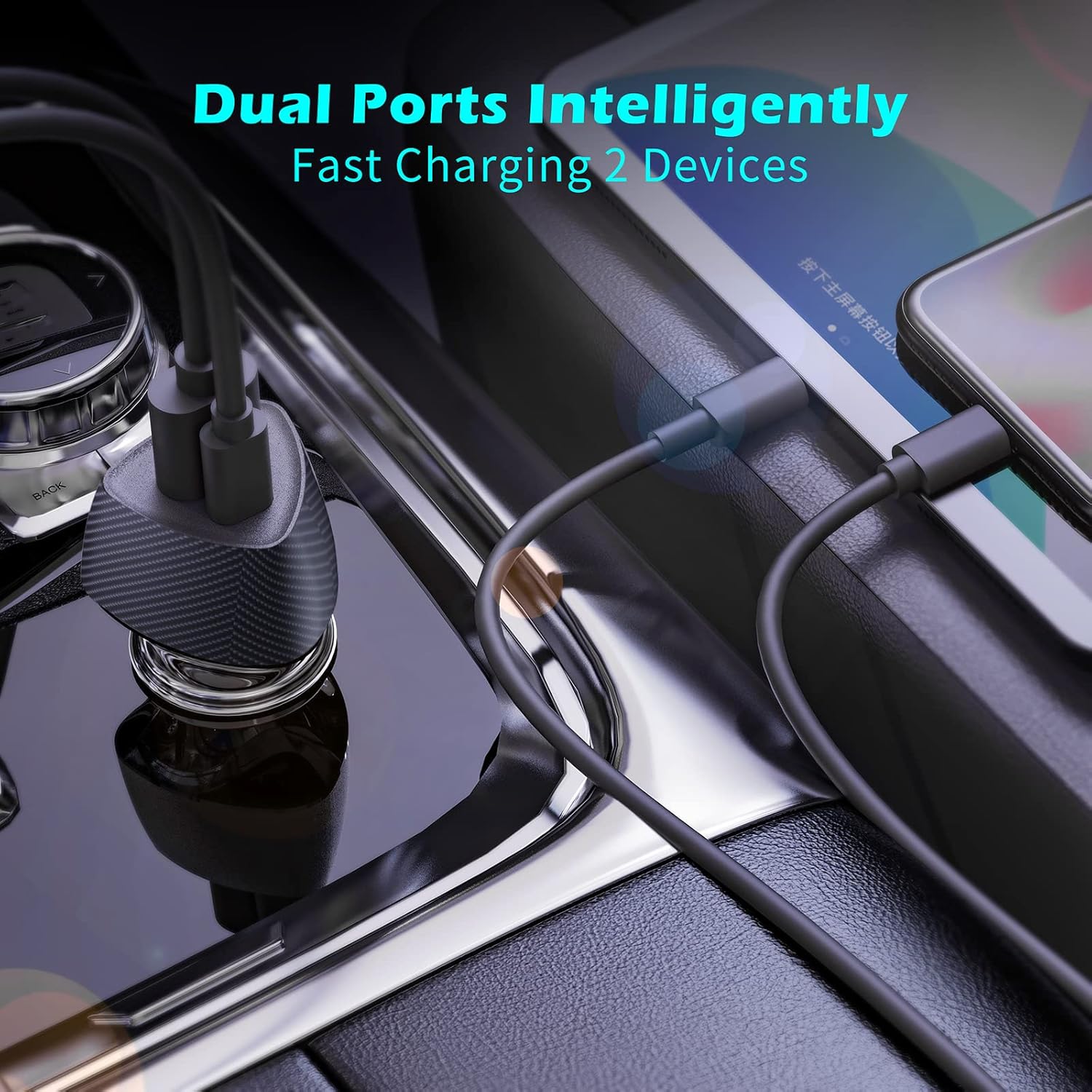
Gambar 4.1: The TELLUR FCC10 Car Charger simultaneously charging two devices, demonstrating its dual-port capability.

Gambar 4.2: Pahareup-hareup view of the TELLUR FCC10 Car Charger ports, labeling the PD 20W Output (USB-C) and QC 3.0 Output (USB-A).
Pertimbangan penting:
- Use high-quality charging cables compatible with your devices and the charger's fast charging standards (PD/QC3.0) for optimal performance.
- The charging speed may vary depending on your device's battery level, cable quality, and environmental factors.
- Unplug the charger from the car's socket when not in use for extended periods.
5. Pangropéa
Proper maintenance will ensure the longevity and optimal performance of your TELLUR FCC10 Car Charger.
- beberesih: Use a soft, dry cloth to wipe the exterior of the charger. Do not use liquid cleaners or abrasive materials.
- Panyimpenan: Simpen carjer di tempat anu tiis sareng garing, jauh tina sinar panonpoé langsung sareng suhu anu ekstrim nalika henteu dianggo.
- Hindarkeun Karusakan Fisik: Do not drop, disassemble, or expose the charger to excessive force or moisture.
- Pariksa sambungan: Periodically check the charger's contacts and your car's cigarette lighter socket for any debris or corrosion that might affect connectivity.
6. Cara ngungkulan
If you encounter issues with your TELLUR FCC10 Car Charger, refer to the following common problems and solutions:
| Masalah | Mungkin Cukang lantaranana | Solusi |
|---|---|---|
| Charger not powering on/no indicator light. |
|
|
| Alat teu ngecas atanapi ngecasna laun. |
|
|
| Charger jadi panas teuing. |
|
|
If the problem persists after trying these solutions, please contact TELLUR customer support.
7. Spésifikasi
| Fitur | Rincian |
|---|---|
| merek | TELLUR |
| Ngaran modél | FCC10 |
| Nomer modél | TLL151291 |
| Masukan Voltage | 12 volt |
| Total Kaluaran Wattage | 38W (Maks) |
| USB-C (PD) Output | Pangiriman Daya 20W |
| USB-A (QC) Output | Ngecas Gancang 3.0 |
| Ampumur | 6 Amps |
| Jumlah Palabuhan | 2 (1x USB-C, 1x USB-A) |
| Alat nu cocog | Cellular Phones (supports major manufacturers' fast charging standards: Samsung, Apple, Huawei) |
| Fitur husus | Fast Charging, Integrated Smart Technology, Multi-Protection (Overcurrent, Short Circuit, Overvoltage, Overheating) |
| Item Beurat | 23 g |
| Ukuran Paket | 17.7 x 8.5 x 3.4 cm |
8. Garansi jeung Rojongan
TELLUR products are manufactured to the highest quality standards. For information regarding warranty coverage, technical support, or service inquiries, please refer to the warranty card included with your product or visit the official TELLUR websitus.
Komponén Kaasup: 1 x Fast car charger FCC10, 1 x Manual
For further assistance, please contact TELLUR customer service through their official channels.


