1. Bubuka
This manual provides instructions for the YAOHUIMI Replacement Remote Control, designed for use with various Fujitsu AC Air Conditioner models. This remote control offers essential functions for managing your air conditioning unit.
Catetan penting:
This is a replacement remote control and is not a universal remote. Please verify compatibility with your specific Fujitsu air conditioner model or original remote control model before use. Refer to the compatibility list below.
1.1 Kasaluyuan
This remote control is compatible with a wide range of Fujitsu AC Air Conditioner models and remote control models, including but not limited to:
- Fujitsu AC Models: ASYG07KETA, ASYG07KETA-B, ASYG09KETA, ASYG09KETA-B, ASYG12KETA, ASYG12KETA-B, ASYG14KETA, ASYG14KETA-B, ASHG14KGTA, ASYG12KMTA, and many others listed in the product description.
- Original Remote Control Models: AR-RED1U, AR-REF1U, AR-REG1U, AR-REM1U, AR-REY1U, AR-REA1E, AR-REA2E, AR-REB1E, AR-REB2E, AR-REF1E, AR-REF2E, AR-REF3E, AR-REF4E, AR-REJ1E, AR-REM1E, AR-REM2E, AR-REM3E, AR-REM4E, AR-REM5E, AR-REM6E, AR-REM7E, AR-REW1E, AR-REW2E, AR-REW3E, AR-REW4E.
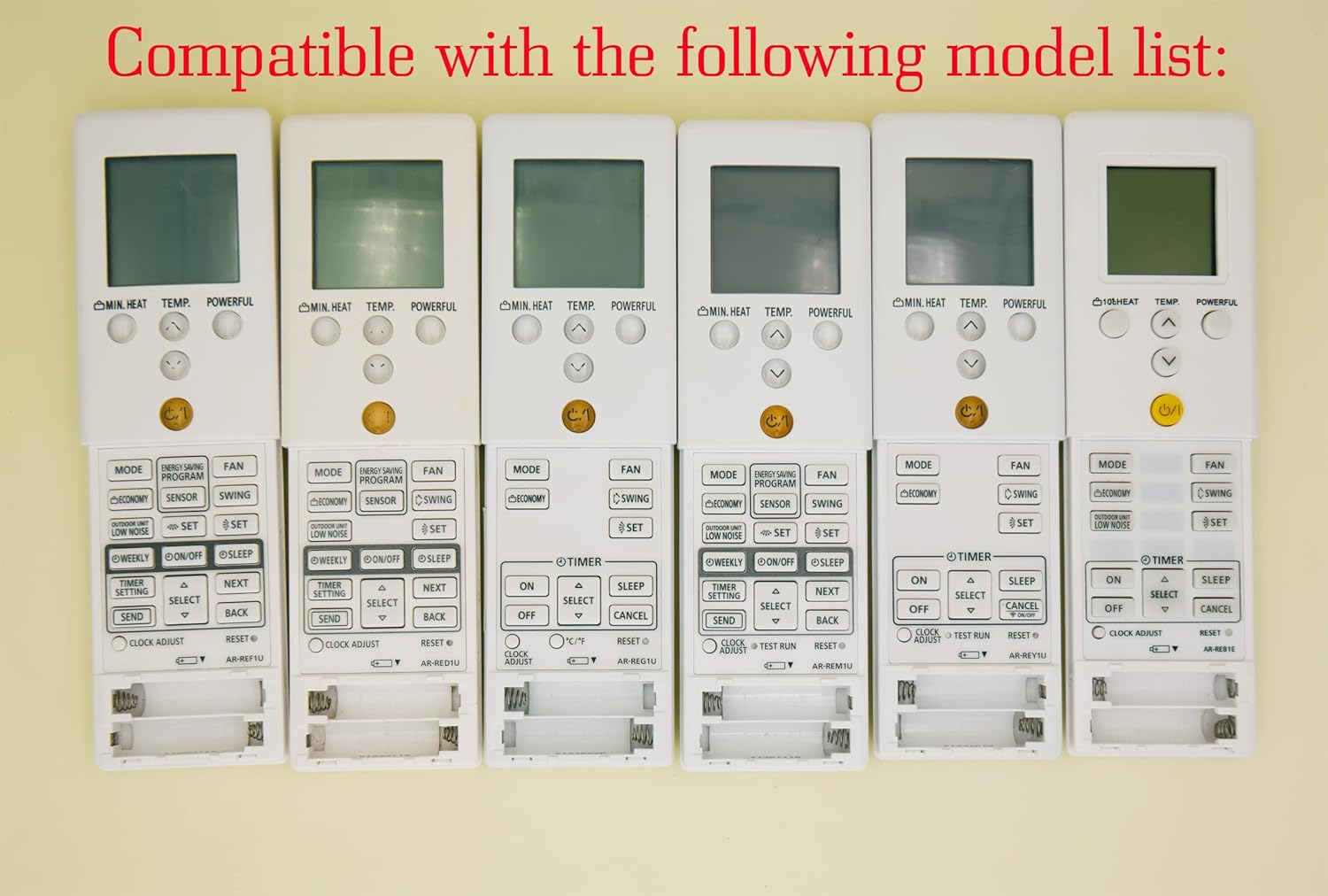
Image 1.1: Various compatible remote control models.
2. Setélan
2.1 Pamasangan batré
To begin using your remote control, you must install batteries. The remote requires two AAA batteries (not included).
- Teangan tempat panutup kompartemen batré dina tonggong kadali jauh.
- Geser panutup ka handap atawa pencét kancing (upami aya) pikeun muka kompartemen.
- Selapkeun dua batré AAA, mastikeun terminal positif (+) jeung négatip (-) align bener jeung markings jero kompartemen nu.
- Geser panutup kompartemen batré deui kana tempatna nepi ka klik aman.
Awas:
- Ulah campur accu heubeul jeung anyar.
- Ulah gaul batré basa, standar (karbon-séng), atawa rechargeable (nikel-kadmium).
- Cabut batré upami kadali jauh henteu dianggo kanggo waktos anu panjang pikeun nyegah bocor.

Gambar 2.1: Tukangeun view tina kadali jauh sareng kompartemen batré.
3. Parentah Operasi
Bagian ieu ngajelaskeun fungsi tombol-tombol dina remot kontrol pangganti anjeun.

Gambar 3.1: Leuwihview tina tombol kadali jauh.
3.1 Fungsi Dasar
- Power Button (⑁/⑀): Press to turn the air conditioner ON or OFF. This button is typically yellow and located centrally.
- Tombol MODE: Cycles through operating modes such as AUTO, COOL, DRY, FAN, and HEAT.
- TEMP. Buttons (▲/▼): Adjusts the desired temperature setting. Press ▲ to increase and ▼ to decrease the temperature.
- Tombol kipas: Nyaluyukeun kecepatan kipas (contona, Otomatis, Handap, Sedeng, Luhur).
- Tombol Ayun: Activates or deactivates the air swing function, which moves the air outlet louvers.

Gambar 3.2: Detil view tina tombol kadali jauh.
3.2 Fungsi Maju
- MIN. HEAT Button: Activates a minimum heat setting, often used to prevent freezing in unoccupied rooms.
- Tombol anu KUAT: Engages a powerful operation mode for rapid cooling or heating.
- ENERGY SAVING PROGRAM Button: Activates a pre-set energy-saving mode.
- Tombol SENSOR: May activate a temperature sensor function within the remote itself.
- ECONOMY Button: Engages an economic operation mode to reduce power consumption.
- OUTDOOR UNIT LOW NOISE Button: Ngurangan tingkat bising unit luar ruangan.
- WEEKLY Button: Accesses weekly timer settings.
- ON/OFF Button (Timer): Nyetél timer ON/OFF pikeun operasi dijadwalkeun.
- Tombol SLEEP: Ngaktipkeun modeu sare, anu nyaluyukeun suhu laun-laun pikeun sare anu nyaman.
- TIMER SETTING Button: Used to configure various timer functions.
- SELECT (▲/▼) Button: Used for navigating and selecting options within timer or program settings.
- Tombol KIRIM: Confirms and sends timer or program settings to the AC unit.
- Tombol BACK: Returns to the previous menu or cancels a setting.
- CLOCK ADJUST Button: Dianggo pikeun nyetel waktos ayeuna dina tampilan remot.
- Tombol RESET: Resets the remote control to its factory default settings.
3.3 Fitur tampilan
- Lampu Latar Héjo: The remote control features a green backlight for easy visibility and operation in low-light conditions or at night.
- Fahrenheit and Celsius Display: The remote can display temperature in both Fahrenheit (℉) and Celsius (℃). Use the ℃/℉ button to toggle between the two units.

Image 3.3: Green backlight and Fahrenheit/Celsius display toggle.
4. Pangropéa
4.1 Ngabersihan Remote Control
Pikeun ngajaga penampilan sareng fungsionalitas kadali jauh:
- Ngusap beungeut ku kaen lemes, garing.
- Keur kokotor bandel, enteng dampen lawon jeung cai sarta detergent hampang, teras usap garing langsung.
- Do not use abrasive cleaners, alcohol, or chemical solvents, as these can damage the remote's finish or internal components.
4.2 Ngagantian batré
Replace the batteries when the remote's display becomes dim or if the remote becomes unresponsive. Typically, batteries should be replaced every 6-12 months, depending on usage. Follow the battery installation steps in Section 2.1.
5. Cara ngungkulan
- Jauh teu ngabales:
- Pariksa naha batréna leres dipasang sareng gaduh muatan anu cekap. Ganti lamun perlu.
- Pastikeun teu aya halangan antara kadali jauh sareng panarima AC.
- Pastikeun anjeun aya dina jangkauan operasi AC anu efektif.
- Incorrect temperature display (Fahrenheit/Celsius):
- Press the ℃/℉ button on the remote control to toggle between Fahrenheit and Celsius display modes.
- Remote functions are erratic:
- Try resetting the remote control by removing the batteries for a few minutes, then reinserting them.
- If the issue persists, replace the batteries with new ones.
6. Spésifikasi
| Fitur | Katerangan |
|---|---|
| merek | YAOHUIMI |
| Nomer modél | A420220127-8IN1-18 |
| Téhnologi konektipitas | Infrabeureum |
| Fitur husus | Replacement Remote (Not Universal) |
| Alat nu cocog | Fujitsu AC Air Conditioners (various models, see Section 1.1) |
| Sumber Daya | 2 x Batré AAA (teu kalebet) |
7. Garansi jeung Rojongan
For warranty information or technical support, please refer to the documentation provided with your purchase or contact the seller directly. Keep your purchase receipt as proof of purchase.


