1. Bubuka
Hatur nuhun pikeun meuliasing the Muse MT-106 BT Stereo Turntable. This manual provides essential information for the safe and efficient operation of your new device. Please read it thoroughly before use and retain it for future reference.
The Muse MT-106 BT is a versatile 3-speed (33/45/78 RPM) stereo turntable featuring a Bluetooth receiver, a USB port for playback and encoding, and two integrated speakers. It is designed to play vinyl records and can also stream music from any Bluetooth-compatible device such as a tablet, smartphone, or laptop.
2. Parentah Kasalametan
- Sumber Daya: Pastikeun catu daya voltage matches the rating indicated on the unit.
- Cai sareng Uap: Do not expose the unit to rain, moisture, or dripping water. Do not place objects filled with liquids, such as vases, on the unit.
- Ventilasi: Pastikeun ventilasi nyukupan. Ulah meungpeuk bukaan ventilasi.
- Panas: Jauhkeun unit tina sumber panas sapertos radiator, register panas, kompor, atanapi alat anu ngahasilkeun panas anu sanés.
- beberesih: Cabut colokan unit tina stopkontak sateuacan beberesih. Paké lawon lemes, garing. Ulah make cleaners cair atawa cleaners aerosol.
- Palayanan: Entong nyobian ngalayanan produk ieu nyalira. Rujuk sadayana ngalayanan ka tanaga jasa anu mumpuni.
- panempatan: Tempatkeun unit dina permukaan anu stabil sareng datar pikeun nyegah karusakan tina ragrag.
3. Eusi Paket
Punten parios yén barang-barang ieu kalebet kana pakét anjeun:
- Muse MT-106 BT Stereo Turntable
- Manual pamaké
- Adaptor kakuatan
- 45 RPM Adaptor
4. Produk Langkungview
Familiarize yourself with the components and controls of your Muse MT-106 BT Turntable.

Gambar 4.1: Gemblengna view of the Muse MT-106 BT Stereo Turntable. This image displays the turntable from an angled perspective, with its transparent dust cover lifted. The wooden base and integrated speakers are visible, along with the black platter, tonearm, and control knobs on the right side.
4.1 Front and Top Components
- Panutup lebu: Ngajaga platter sareng tonearm tina lebu.
- Piring: Platform anu muter tempat rékaman disimpen.
- Spindle: Nyimpen rékaman dina tempatna dina piring.
- 45 RPM adaptor: Dianggo pikeun maénkeun piringan hideung 7 inci kalayan liang tengah anu ageung.
- Tonearm: Nyepeng stylus sareng ngalacak alur rékaman.
- Stylus (jarum): The part that reads the record grooves.
- Lever Cue: Lifts and lowers the tonearm.
- Pamilih laju: Switch to select 33, 45, or 78 RPM.
- Speaker terpadu: Diwangun-di speaker pikeun kaluaran audio.

Figure 4.2: Control Panel. This image provides a detailed view of the control panel located on the right side of the turntable. It shows three rotary knobs for volume and function selection, along with several buttons for playback control and mode switching.
4.2 Panel kontrol
- Kenop Daya/Volume: Ngahurungkeun/mareuman unit sareng nyaluyukeun volume.
- Tombol Pamilih Fungsi: Switches between Phono, Bluetooth, USB, and Aux-in modes.
- Tombol Kontrol Puteran: Play/Pause, Skip Forward, Skip Backward (for USB mode).
- Saklar Eureun Otomatis: Enables or disables the automatic stop function for vinyl playback.
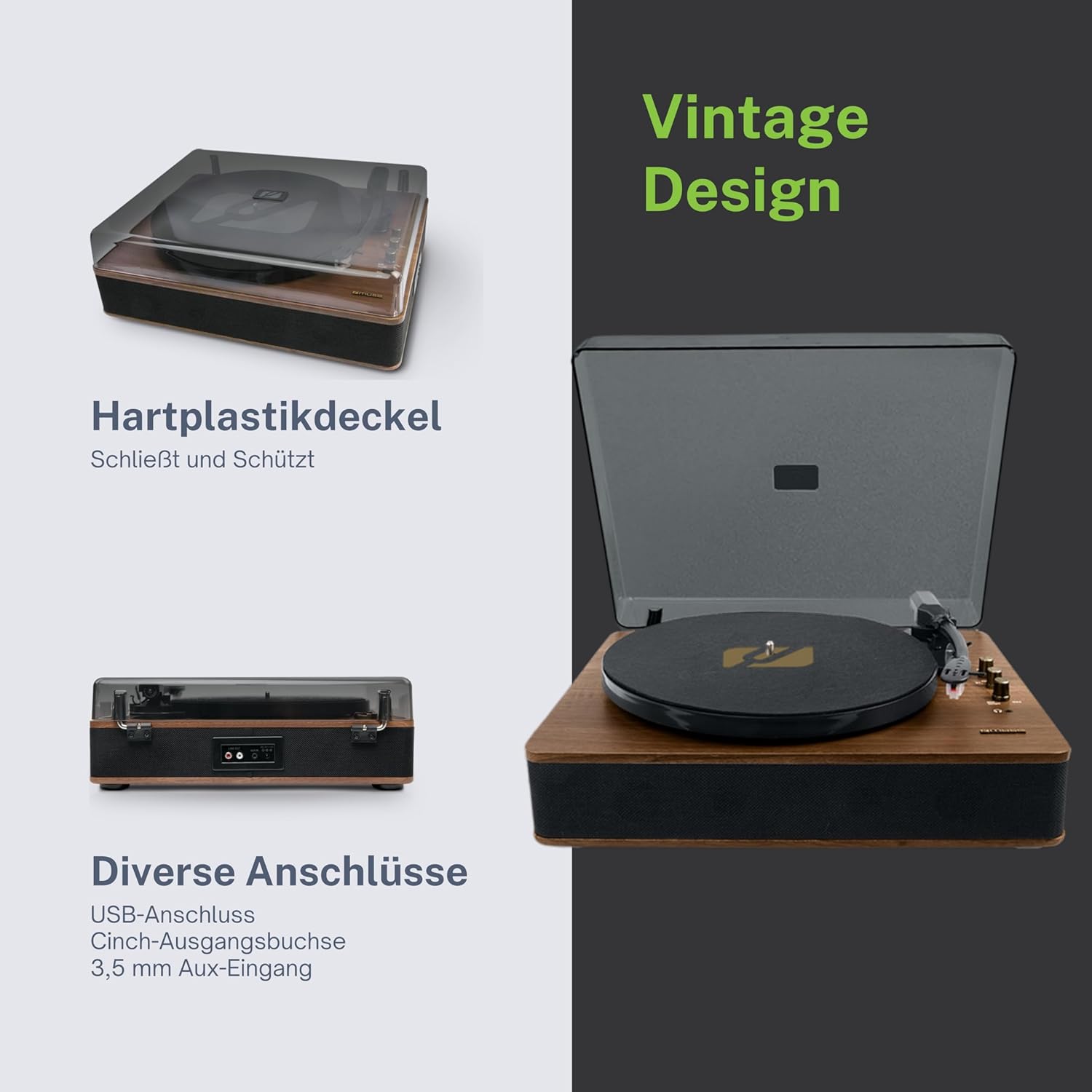
Figure 4.3: Rear Connections. The rear panel of the turntable is shown, featuring various connection ports including RCA audio outputs, a USB port, and an auxiliary input jack, allowing connection to external audio systems or devices.
4.3 Rear and Side Connections
- RCA Output Jacks (L/R): Nyambung ka éksternal amplifier atanapi speaker Powered.
- Port USB: Pikeun muterkeun MP3 files from a USB drive or encoding vinyl to USB.
- Soket AUX-IN (3.5mm): Sambungkeun alat audio éksternal.
- DC IN Jack: Sambungkeun adaptor kakuatan.
- Jack Headphone (3.5mm): Pikeun déngékeun pribadi.

Figure 4.4: Key Functions Overview. An illustrative graphic highlighting the key functions and connectivity options of the turntable. Icons represent features such as USB encoding, MP3 playback via USB, RCA output, auto-stop, integrated speakers, headphone jack, auxiliary input, and AC power input.
5. Setélan
5.1 Ngabongkar bungkusan
- Sacara saksama piceun unit tina bungkusanna.
- Cabut sadaya bahan bungkus sareng pilem pelindung.
- Keep the packaging for future transport or storage.
5.2 Nempatkeun
- Place the turntable on a flat, stable, and level surface.
- Avoid placing it near strong magnetic fields, direct sunlight, or heat sources.
- Pastikeun aya cukup spasi sabudeureun unit pikeun ventilasi ditangtoskeun.
5.3 Sambungan Daya
- Connect the supplied power adapter to the DC IN jack on the rear of the turntable.
- Colokkeun adaptor kakuatan kana stop kontak témbok nu cocog.
5.4 Pamasangan Panutup Kekebul
- Carefully attach the dust cover to the hinges on the back of the turntable.
- The dust cover protects the unit when not in use. Remove it or lift it fully when playing records.
6. Parentah Operasi
6.1 Maénkeun Rekaman Vinyl
- Angkat panutup lebu.
- Rotate the Power/Volume knob clockwise to turn on the unit.
- Set the Function Selector knob to 'Phono'.
- Teundeun catetan dina piring. Lamun maén single 45 RPM, nempatkeun adaptor 45 RPM dina spindle munggaran.
- Select the correct speed (33, 45, or 78 RPM) using the Speed Selector switch.
- Cabut pelindung stylus tina stylus.
- Lift the tonearm using the cue lever.
- Pindahkeun tonearm di luhur titik awal anu dipikahoyong tina rékaman.
- Gently lower the tonearm onto the record using the cue lever. The music will begin to play.
- Saluyukeun polumeu nganggo kenop Power/Volume.
- At the end of the record, if the Auto Stop switch is ON, the platter will stop rotating. If OFF, the platter will continue to rotate. Manually lift the tonearm and return it to its rest.
6.2 Modeu Bluetooth
- Rotate the Power/Volume knob clockwise to turn on the unit.
- Set the Function Selector knob to 'BT' (Bluetooth). The Bluetooth indicator will flash, indicating pairing mode.
- Aktipkeun Bluetooth dina alat éksternal anjeun (smartphone, tablet, jsb.) teras milarian alat anu sayogi.
- Select 'MUSE MT-106 BT' from the list of devices. Once connected, the Bluetooth indicator will stop flashing and remain solid.
- You can now play music from your external device through the turntable's speakers. Adjust volume using both the turntable's knob and your external device.
6.3 Playback USB jeung Encoding
6.3.1 Playback USB
- Rotate the Power/Volume knob clockwise to turn on the unit.
- Set the Function Selector knob to 'USB'.
- Insert a USB flash drive into the USB port. The unit will automatically detect and begin playing MP3 files.
- Use the Playback Control Buttons (Play/Pause, Skip Forward, Skip Backward) to navigate tracks.
6.3.2 USB Encoding (Recording Vinyl to USB)
The MT-106 BT allows you to convert your vinyl records into digital MP3 files on a USB drive.
- Pastikeun USB flash drive parantos dipasangkeun kana port USB.
- Set the Function Selector knob to 'Phono'.
- Start playing your vinyl record as described in section 6.1.
- Press the 'Record' button (refer to Figure 4.2 for button location, typically indicated by a circle or 'REC' label). The recording indicator will illuminate.
- To stop recording, press the 'Record' button again. The recording indicator will turn off.
- The recorded audio will be saved as an MP3 file on your USB drive.
6.4 Input Auxiliary (AUX IN)
- Rotate the Power/Volume knob clockwise to turn on the unit.
- Set the Function Selector knob to 'AUX'.
- Connect an external audio device (e.g., MP3 player, CD player) to the AUX IN jack (3.5mm) on the rear of the turntable using an audio cable (not supplied).
- Puterkeun audio tina alat éksternal anjeun. Sora bakal dikaluarkeun ngalangkungan spiker turntable.
6.5 Kaluaran RCA
To connect your turntable to an external amplifier or powered speakers:
- Ensure the turntable and the external audio system are turned off.
- Connect an RCA audio cable (not supplied) from the RCA Output Jacks (L/R) on the rear of the turntable to the corresponding audio input jacks on your amplifier atanapi speaker Powered.
- Turn on both the turntable and your external audio system.
- Pilih input anu merenah dina sistem audio éksternal anjeun.
7. Pangropéa
7.1 Ngabersihkeun Stylus
- Use a soft brush, specifically designed for stylus cleaning, to gently brush the stylus from back to front.
- Do not use excessive force or brush from side to side, as this can damage the stylus.
- Ganti stylus kira-kira unggal 300-500 jam pamuteran, atanapi upami anjeun perhatoskeun aya panurunan kualitas sora.
7.2 Ngabersihan Unit
- Wipe the exterior of the turntable with a soft, dry, lint-free cloth.
- Ulah make cleaners abrasive, lilin, atawa pangleyur sabab bisa ngaruksak finish.
- Pikeun panutup lebu, anggo lawon lemes sareng pembersih anu hampang sareng henteu abrasif upami diperyogikeun.
8. Cara ngungkulan
If you experience issues with your turntable, please consult the following table before contacting support.
| Masalah | Mungkin Cukang lantaranana | Solusi |
|---|---|---|
| Taya kakuatan | Adaptor daya teu nyambung atawa stop kontak faulty. | Pastikeun adaptor daya disambungkeun kalayan pageuh sareng stop kontakna tiasa dianggo. |
| Taya sora | Volume too low; incorrect function mode; external speakers not connected/powered. | Increase volume; select correct function (Phono, BT, USB, AUX); check external speaker connections and power. |
| Kualitas sora anu goréng (vinil) | Dirty or worn stylus; dirty record; incorrect speed selected. | Clean or replace stylus; clean record; select correct RPM. |
| Bluetooth teu nyambung | Turntable not in pairing mode; device too far; already connected to another device. | Ensure turntable is in BT mode and flashing; move device closer; disconnect from other devices. |
| playback USB teu jalan | Drive USB teu dipasang kalawan bener; teu dirojong file format; drive USB rusak. | Reinsert USB drive; ensure files are MP3 format; try a different USB drive. |
9. Spésifikasi
| merek | MUSE |
| Ngaran modél | MT-106 BT |
| Warna | Kai |
| Bahan | Kai |
| Item Beurat | 4.3 kg |
| Laju Rotasi | 33, 45, 78 RPM |
| Konektipitas | Bluetooth, USB, RCA Output, 3.5mm AUX Input, 3.5mm Headphone Jack |
| Fitur husus | Integrated Speaker, Dust Protection, Adjustable Speed, USB Encoding |
| Alat nu cocog | Smartphone, Tablet |
| Sumber Daya | AC Adapter (1 AAAA battery required for unspecified function, likely remote or internal clock) |
| Negara asal | Cina |
10. Garansi jeung Rojongan
This product is covered by a manufacturer's warranty. Please refer to the warranty card included with your purchase or visit the official MUSE websitus pikeun istilah jeung kaayaan jaminan lengkep.
For technical support, troubleshooting assistance, or inquiries regarding spare parts, please contact MUSE customer service through their official channels. Information regarding spare parts availability is currently not available.


