Bubuka
Thank you for choosing the Senicare Digital LED Alarm Clock. This manual provides detailed instructions for setting up, operating, and maintaining your new alarm clock. Please read this manual thoroughly before use to ensure proper functionality and to maximize your experience with its features, including dual alarms, a 7-color night light, a dimmable display, and a convenient USB charging port.
Émbaran Kasalametan
- Ensure the power adapter is compatible with your local power supply (100-240V AC).
- Ulah ngalaan alat ka cai atawa kalembaban kaleuleuwihan.
- Avoid placing the clock in direct sunlight or near heat sources.
- Paké ngan adaptor kakuatan disadiakeun.
- Jauhkeun tina jangkauan barudak leutik.
- Ulah nyobian ngabongkar atawa ngalereskeun alat sorangan. Kontak rojongan customer lamun masalah timbul.
- Insert batteries correctly, observing polarity (+/-).
Eusi pakét
- Senicare Digital LED Alarm Clock (Model KT279)
- Adaptor kakuatan
- Kabel Ngecas USB
- Manual pangguna (dokumén ieu)

Figure 1: Senicare Digital LED Alarm Clock and included accessories.
Produk Leuwihview
Hareupeun View
The front of the clock features a large LED display for time, and indicators for PM, Alarm 1, and Alarm 2.
Puncak View (Kadali)
The top panel houses the main control buttons and the integrated night light bar.
- ALT SET: Alarm 1 Set button.
- AL2 SET: Alarm 2 Set button.
- WAKTU: Time setting button.
- WARNA: Night light color selection button.
- TUNDA / LAMPU: Snooze function and night light on/off.
- HOUR +: Adjusts hour, increases alarm volume.
- MIN -: Adjusts minute, decreases alarm volume.
Samping View (Ports & Dimmer)
The side of the clock includes the power input, USB charging port, and display dimmer slider.
- Port kakuatan DC 5V: Nyambung ka adaptor kakuatan.
- USB Charging Port (5V-1A): Pikeun ngecas alat éksternal.
- DISPLAY DIMMER: Slider to adjust the brightness of the time display (0-100%).
Handapeun View (Battery Compartment)
The bottom of the clock contains the battery compartment for backup power.

Gambar 2: Tukangeun view highlighting the USB charging port and power input.

Figure 3: Battery compartment for backup power.
Disetél
1. Sambungan Daya
- Connect the provided power adapter to the DC 5V Power Port on the back of the clock.
- Plug the power adapter into a standard 100-240V AC wall outlet.
- The LED display will light up, indicating the clock is powered on.
2. Nyadangkeun Batré (Opsional)
Pikeun kakuatan anjeuntage protection, install 2 x AAA batteries (not included) into the battery compartment on the bottom of the clock. This will preserve time and alarm settings during a power interruption, though the display will go black.

Figure 4: The clock retains settings during power outages with battery backup.
Parentah Operasi
1. Netepkeun Waktos
- Pencét jeung tahan tombol WAKTU tombol nepi ka digit jam mimiti flash.
- Pencét éta JAM + tombol pikeun ngaluyukeun sajam.
- Pencét éta MIN - tombol pikeun ngatur menit.
- Pencét éta WAKTU tombol deui pikeun ngonfirmasi tur kaluar mode setelan waktos.
2. Setting Dual Alarms (Alarm 1 & Alarm 2)
The clock features two independent alarms for different schedules.

Gambar 5: Kelample of dual alarm functionality.
- To Set Alarm 1: Pencét jeung tahan tombol ALT SET button until the hour digits for Alarm 1 flash.
- Ngagunakeun éta JAM + jeung MIN - tombol pikeun ngeset waktos alarm nu dipikahoyong.
- Pencét ALT SET again to confirm and activate Alarm 1. The Alarm 1 indicator will appear on the display.
- To Set Alarm 2: Follow the same steps using the AL2 SET kancing.
- To turn an alarm on or off, briefly press the corresponding ALT SET or AL2 SET button. The alarm indicator will appear/disappear.
3. Fungsi Snooze
Lamun alarm disada, pencét badag SNOOZE / CAHAYA button on top of the clock to activate the 9-minute snooze function. The alarm will sound again after 9 minutes.

Figure 6: The SNOOZE / LIGHT button for snooze functionality.
4. Nyaluyukeun Kacaangan Layar
The clock features a 0-100% full-range dimmer for the LED time display. Use the TAMPILAN DIMMER slider located on the side of the clock to adjust the brightness to your preference.

Figure 7: Adjusting display brightness with the dimmer slider.
5. Night Light Features
The integrated night light offers 7 different colors and adjustable brightness.

Figure 8: The 7-color night light feature.
- Ngarobah Warna: Ketok sakeudeung WARNA button to cycle through the 7 available colors.
- Color Loop Mode: Pencét jeung tahan tombol WARNA button for 2 seconds to enter a continuous color-changing loop.
- Turning Off Night Light: Pencét éta SNOOZE / CAHAYA button to turn the night light off.
- Adjusting Night Light Brightness: The night light brightness can also be adjusted from 0-100% using the TAMPILAN DIMMER slider, similar to the main display.
6. Nyaluyukeun Volume Alarm
The alarm volume has 5 adjustable levels, ranging from 45dB to 85dB.
- While an alarm is sounding, or when setting an alarm, press the JAM + tombol pikeun ngaronjatkeun polumeu.
- Pencét éta MIN - tombol pikeun ngurangan polumeu.

Figure 9: Volume adjustment using HOUR + and MIN - buttons.
7. Palabuhan Ngecas USB
The clock includes a 5V-1A USB charging port on its side, allowing you to charge small electronic devices like smartphones or tablets while the clock is plugged into power.
Pangropéa
- Ngabersihan jam ku lawon lemes, garing. Ulah make cleaners abrasive atawa pangleyur.
- Keep the clock away from dust and moisture.
- If not in use for an extended period, remove the backup batteries to prevent leakage.
Pamérésan masalah
| Masalah | Mungkin Cukang lantaranana | Solusi |
|---|---|---|
| Tampilan jam pareum. | No power, or display dimmer set to 0%. | Check power connection. Adjust DISPLAY DIMMER slider. |
| Alarm teu disada. | Alarm teu disetel, volume alarm handap teuing, atanapi alarm dipareuman. | Ensure alarm is set and activated (indicator visible). Increase alarm volume. |
| Waktos / setélan leungit sanggeus kakuatan outage. | No backup batteries installed, or batteries are dead. | Install fresh 2 x AAA batteries for backup. |
| Ngecas USB teu jalan. | Clock not powered by AC, or device requires more than 1A. | Ensure clock is plugged into AC power. Check device's charging requirements. |
spésifikasi
| Fitur | Rincian |
|---|---|
| Modél | KT279 |
| Tipe tampilan | LED |
| Sumber Daya | Corded Electric (100-240V AC) |
| Nyadangkeun batré | 2 x batré AAA (teu kaasup) |
| Port Ngecas USB | 5V-1A |
| Warna Lampu Peuting | 7 kelir |
| Paparan Dimmer | 0-100% adjustable |
| Volume alarem | 5 tingkat (45dB dugi ka 85dB) |
| Lilana Snooze | 9 menit |
| Dimensi produk | 5.91"W x 3.15"H (approx. 150mm x 80mm) |
| Item Beurat | 11.7 ons |
| Bahan | palastik |
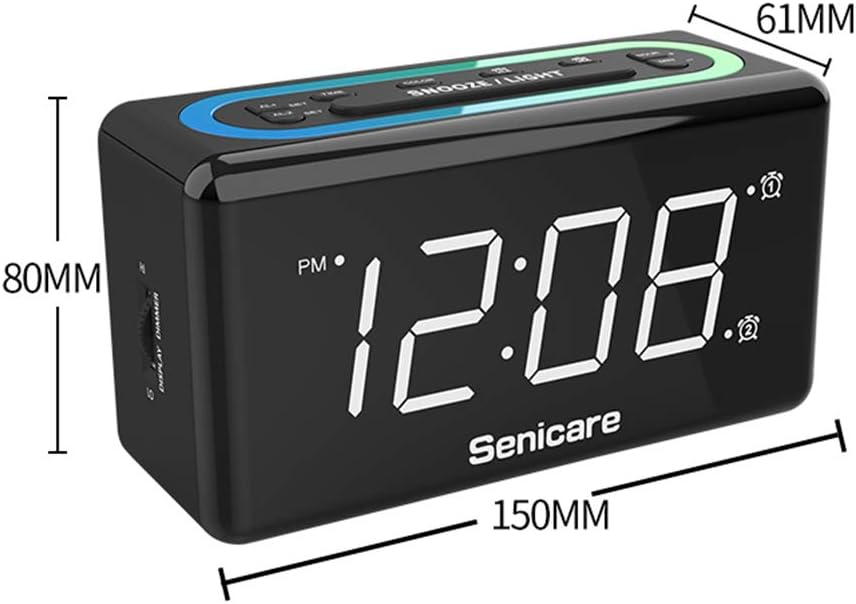
Gambar 10: Dimensi produk.
Garansi sareng Rojongan
The Senicare Digital LED Alarm Clock comes with a jaminan hiji taun. We also offer a 30 poé jaminan duit-balik. For any questions or assistance, please contact our customer service team, available 24 jam a day. Your satisfaction is our priority.