1. Produk Langkungview
The Hikvision DS-KIS202T is a 7-inch analog video door phone kit designed for residential use. This kit includes an outdoor unit (DS-KB2411T-IM) and an indoor monitor (DS-KH2220), providing secure and convenient communication with visitors. It supports hands-free video intercom, remote unlocking, and monitoring of the external camera.
fitur konci ngawengku:
- 7-inch TFT LCD color display for clear video.
- Hands-free video intercom communication.
- Support for up to three indoor stations simultaneously.
- Monitoring of the outdoor unit and external analog cameras.
- Remote unlock function.
- Outdoor unit with self-adaptive IR supplement for night vision.
- Easy installation with a 4-wire connection.

Figure 1: Hikvision DS-KIS202T Video Door Phone Kit, featuring the indoor monitor displaying a family and the sleek outdoor unit.
2. Eusi Paket
Sateuacan dipasang, mangga pastikeun sadaya komponén aya:
- 1 x DS-KH2220 Indoor Monitor (7-inch)
- 1 x DS-KB2411T-IM Outdoor Unit
- 1 x 5-meter 4-wire cable
- Asesoris pamasangan (screws, colokan témbok)
- Manual pangguna (dokumén ieu)
3. Setup jeung Instalasi
This section provides general guidelines for installing your Hikvision DS-KIS202T video door phone. Professional installation is recommended.
3.1 Pancegahan Kasalametan
- Pastikeun kakuatan dipegatkeun saméméh instalasi.
- Avoid installing the outdoor unit in direct sunlight or heavy rain.
- Do not expose the indoor monitor to high humidity or extreme temperatures.
- Use only the specified power adapter (12 VDC).
3.2 Idéntifikasi komponén

Figure 2: The Hikvision DS-KIS202T indoor monitor and outdoor unit, illustrating their relative sizes and placement near a door.
- Outdoor Unit (DS-KB2411T-IM): Equipped with a camera, microphone, speaker, call button, and IR illuminator.
- Indoor Monitor (DS-KH2220): Features a 7-inch display, physical buttons for operation, microphone, and speaker.
3.3 Diagram Kabel (Sambungan 4-Kawat)
The system uses a 4-wire interface for connection between the outdoor unit and the indoor monitor. These wires typically include:
- Video Input Channel
- Audio Input/Output Channel
- Power Supply Channel (12 VDC)
- Saluran taneuh
Connect the corresponding terminals on both units using the provided 4-wire cable. Ensure correct polarity for power connections.
Warning: Incorrect wiring can damage the device. Refer to the detailed wiring diagram in the full technical manual if available.
3.4 Pasang Unit-unitna
- Unit outdoor: Mount the outdoor unit at a height that allows the camera to capture visitors' faces clearly (typically 1.4 to 1.6 meters from the ground). Use the provided screws and wall plugs.
- Monitor Jero Ruangan: Mount the indoor monitor in a convenient location inside your home, away from direct heat sources or moisture.
4. Parentah Operasi
4.1 Narima Telepon
When a visitor presses the call button on the outdoor unit, the indoor monitor will ring and display the visitor's video feed. You can then:
- jawaban: Press the "Answer" button (usually represented by a phone icon) on the indoor monitor to initiate hands-free two-way communication.
- teu malire: The call will automatically end after a set period if not answered.
4.2 Komunikasi Dua Arah
Once a call is answered, you can speak with the visitor through the integrated microphone and speaker on both units. The system supports noise suppression and acoustic echo cancellation for clear audio.
4.3 Muka konci Jarak Jauh
During a call or while monitoring, press the "Unlock" button (often represented by a key icon) on the indoor monitor to remotely open an electronically controlled door lock (if connected to the outdoor unit's unlock control terminals).
4.4 Monitoring the Outdoor Unit
Anjeun tiasa sacara manual view the live video feed from the outdoor unit at any time without a visitor pressing the call button. Press the "Monitor" button (usually an eye icon) on the indoor monitor to activate this function.
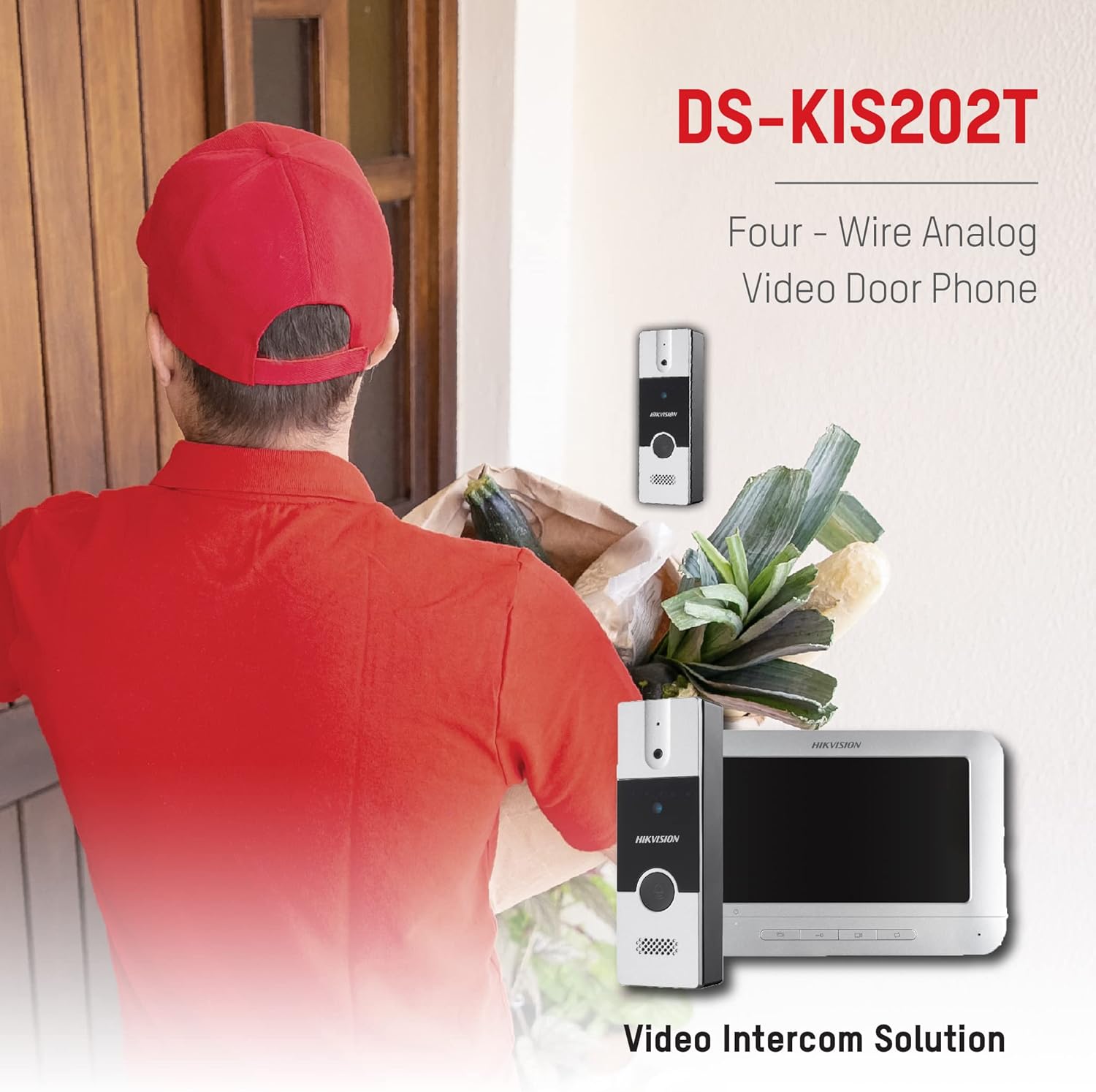
Figure 3: The Hikvision DS-KIS202T in operation, showing a delivery person at the door and the corresponding view on the indoor monitor.
4.5 Intercom Between Indoor Stations
If multiple indoor monitors are installed, they can communicate with each other. Refer to the specific instructions for initiating an intercom call between indoor stations.
5. Pangropéa
- beberesih: Use a soft, dry cloth to clean the indoor monitor and outdoor unit. Do not use abrasive cleaners or solvents.
- Kaayaan Lingkungan: Ensure the units operate within the specified temperature and humidity ranges (-10°C to +55°C, 10% to 90% humidity).
- Pamariksaan kabel: Periodically check all wiring for signs of wear or damage.
- Pembaruan firmware: Pariksa resmi Hikvision website for any available firmware updates for improved performance and security.
6. Cara ngungkulan
| Masalah | Mungkin Cukang lantaranana | Solusi |
|---|---|---|
| Teu aya gambar dina monitor jero ruangan. |
|
|
| No sound during intercom. |
|
|
| Buka konci jarak jauh teu tiasa dianggo. |
|
|
| Outdoor unit not ringing indoor monitor. |
|
|
7. Spésifikasi
7.1 Indoor Monitor (DS-KH2220)
- Layar tampilan: 7 inci TFT Warna LCD
- Resolusi tampilan: 800 x 480
- Métode operasi: Tombol Fisik
- Input Audio: Diwangun-di Mikropon Omnidirectional
- Kaluaran Audio: Diwangun-di Loudspeaker
- Kualitas Audio: Noise Suppression and Acoustic Echo Cancellation
- 4-Wire Interface: 4 interfaces (1-ch video input, 1-ch audio input/output, 1-ch power supply, 1-ch ground)
- Sasayogian tanaga: 12 VDC
- Konsumsi Daya: Max. 5W
- Suhu operasi: -10°C nepi ka +55°C (14°F nepi ka 131°F)
- Kalembaban Operasi: 10% nepi ka 90%
- Ukuran (L x W x H): 133 mm x 197 mm x 14 mm
7.2 Outdoor Unit (DS-KB2411T-IM)
- Kaméra: 1/4" CMOS
- Resolusi: 720 x 576
- Laju Pigura Video: PAL: 25 fps
- Input Audio: Diwangun-di Mikropon Omnidirectional
- Kaluaran Audio: Diwangun-di Loudspeaker
- Kualitas Audio: Noise Suppression and Acoustic Echo Cancellation
- Modeu iluminasi: Self-adaptive IR Supplement
- Tombol Telepon: One-touch call
- Unlock Control: Dirojong
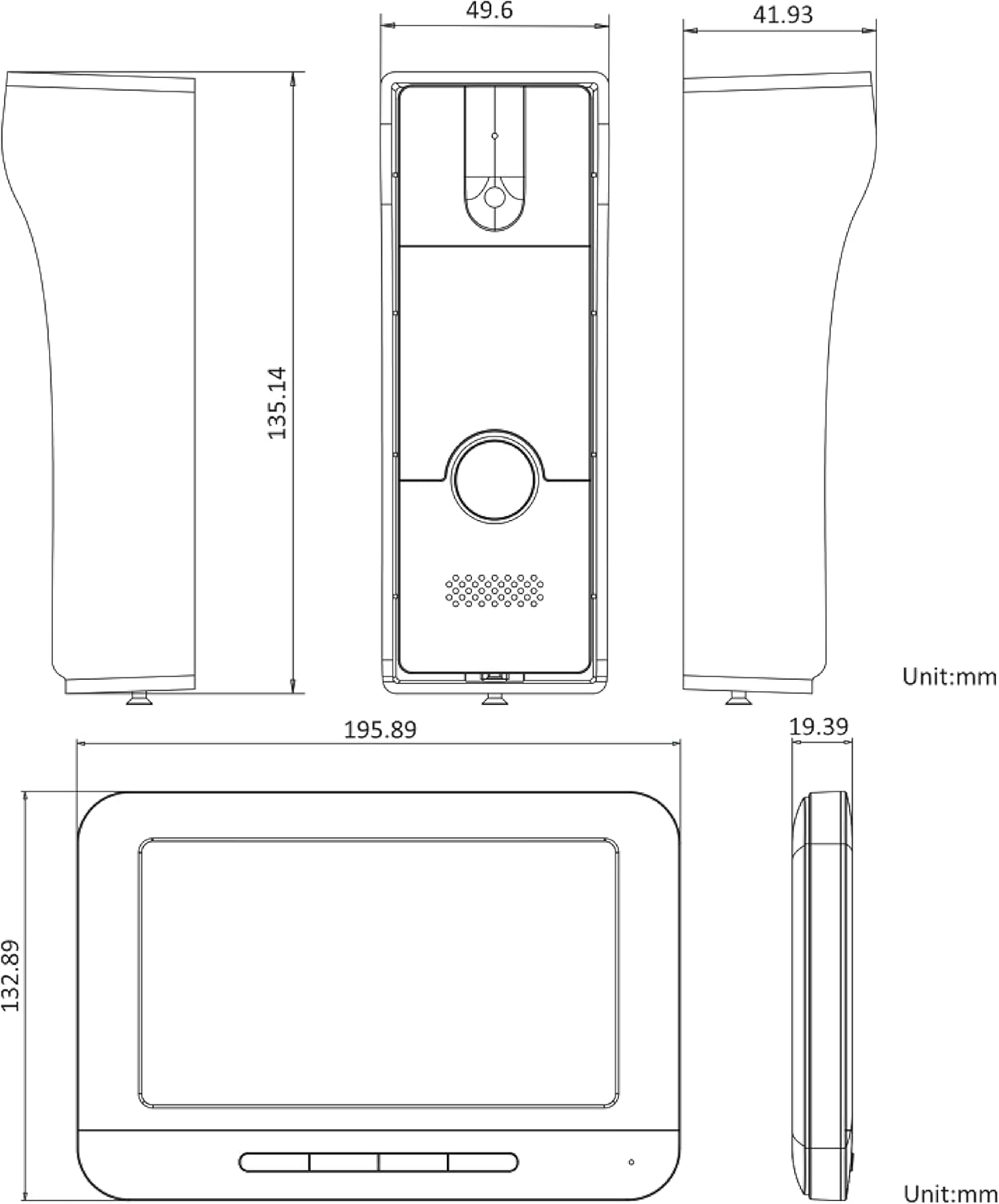
Figure 4: Detailed technical drawing showing the dimensions of both the indoor monitor and the outdoor unit of the Hikvision DS-KIS202T system.
8. Garansi jeung Rojongan
Hikvision products typically come with a limited manufacturer's warranty. Please refer to the warranty card included with your product or visit the official Hikvision websitus pikeun istilah jaminan lengkep jeung kaayaan husus pikeun wewengkon Anjeun.
For technical support, troubleshooting assistance, or service inquiries, please contact your local Hikvision dealer or authorized service center. You may also find additional resources, FAQs, and support documentation on the official Hikvision support websitus.
When contacting support, please have your product model number (DS-KIS202T) and serial number ready.


