1. Bubuka
This manual provides detailed instructions for the proper setup, operation, and maintenance of your Bietrun UHF Wireless Microphone System. This system features high-sensitivity dynamic microphones and a rechargeable receiver, designed for various applications including karaoke, public speaking, church events, and parties. Please read this manual thoroughly before use to ensure optimal performance and longevity of your device.
2. Eusi Paket
Punten parios yén sadaya barang anu didaptarkeun di handap kalebet kana pakét anjeun:
- 2 x Bietrun UHF Wireless Handheld Microphones
- 1 x Rechargeable Receiver (with 1/4'' plug)
- 1 x 1/4'' to 3.5mm Adapter
- 1 x USB Charging Cable for Receiver
- 1 x Manual Pamaké (dokumén ieu)
- Kartu Garansi

Image: The complete Bietrun UHF Wireless Microphone System, including two handheld microphones, the compact rechargeable receiver, and a 1/4'' to 3.5mm adapter.
3. Setup Guide
3.1 Pamasangan Batré Mikropon
Each microphone requires dua batré AA (not included). To install, unscrew the bottom part of the microphone handle and insert the batteries according to the polarity markings. Screw the handle back on securely.
3.2 Receiver Charging
The receiver has a built-in 720mAh rechargeable battery. Before first use, fully charge the receiver using the provided USB charging cable. A full charge takes approximately 3 hours and provides up to 4.5 hours of working time. The display on the microphone will show the receiver's battery power and signal strength.
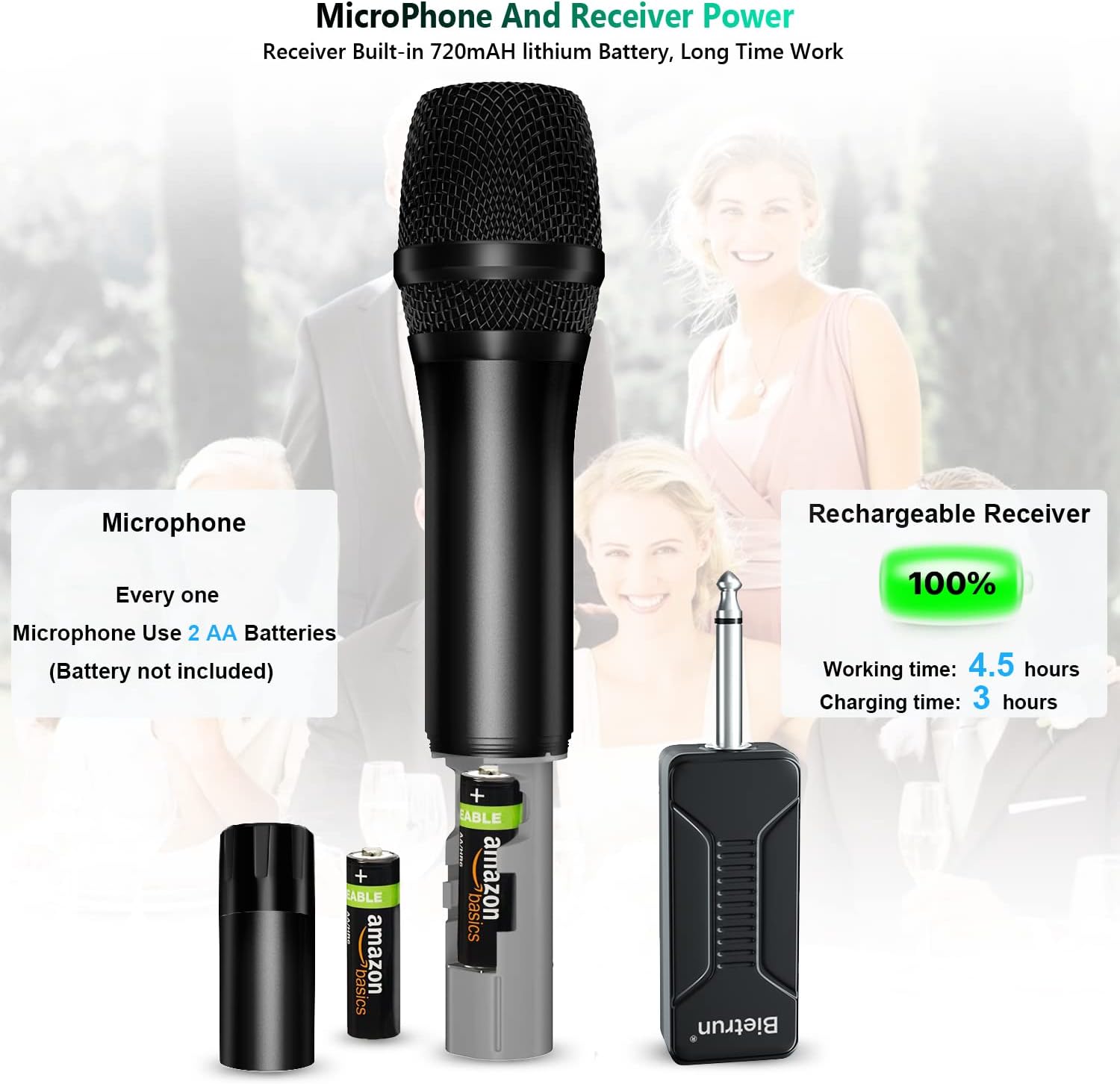
Image: Illustration showing how to insert AA batteries into the microphone and the charging process for the rechargeable receiver.
3.3 Nyambungkeun panarima
The receiver features a 6.35mm (1/4'') plug. It must be connected to a device with a jack input MIC. Naha TEU plug it into an AUX jack, as this will result in no sound. If your device has a 3.5mm MIC input, use the included 1/4'' to 3.5mm adapter.
Alat anu cocog kalebet:
- Sistem PA
- Kakuatan Amplifsters
- Karaoke Machines
- Speaker outdoor
- Street Stereo Speakers
- Adun
- Interfaces Audio
Important Note: This system is not compatible with Bluetooth speakers or MacBooks.

Image: Visual guide illustrating the correct 6.35mm (1/4'') MIC input jack for connection, emphasizing not to use the AUX jack.
3.4 Sambungan otomatis
The Bietrun Wireless Microphone System is designed for plug-and-play operation. Once the microphones have batteries and the receiver is charged and plugged into a compatible MIC input, they should automatically connect without manual pairing.
4. Parentah Operasi
4.1 Powering on / Pareum
Press and hold the power button on each microphone to turn it on or off. The receiver will power on automatically when plugged in and power off when unplugged or its battery is depleted.
4.2 Nyaluyukeun Volume
The microphones feature a switch to control the volume level (levels 8-1). Adjust this switch to achieve the desired output volume.
4.3 Switching Channels
The system operates on UHF frequencies and offers 15 adjustable channels to prevent interference. If you experience interference or need to use multiple wireless microphone systems simultaneously, press the channel button on the microphone to switch to a different channel. Ensure that each microphone operates on a unique channel when using multiple units.
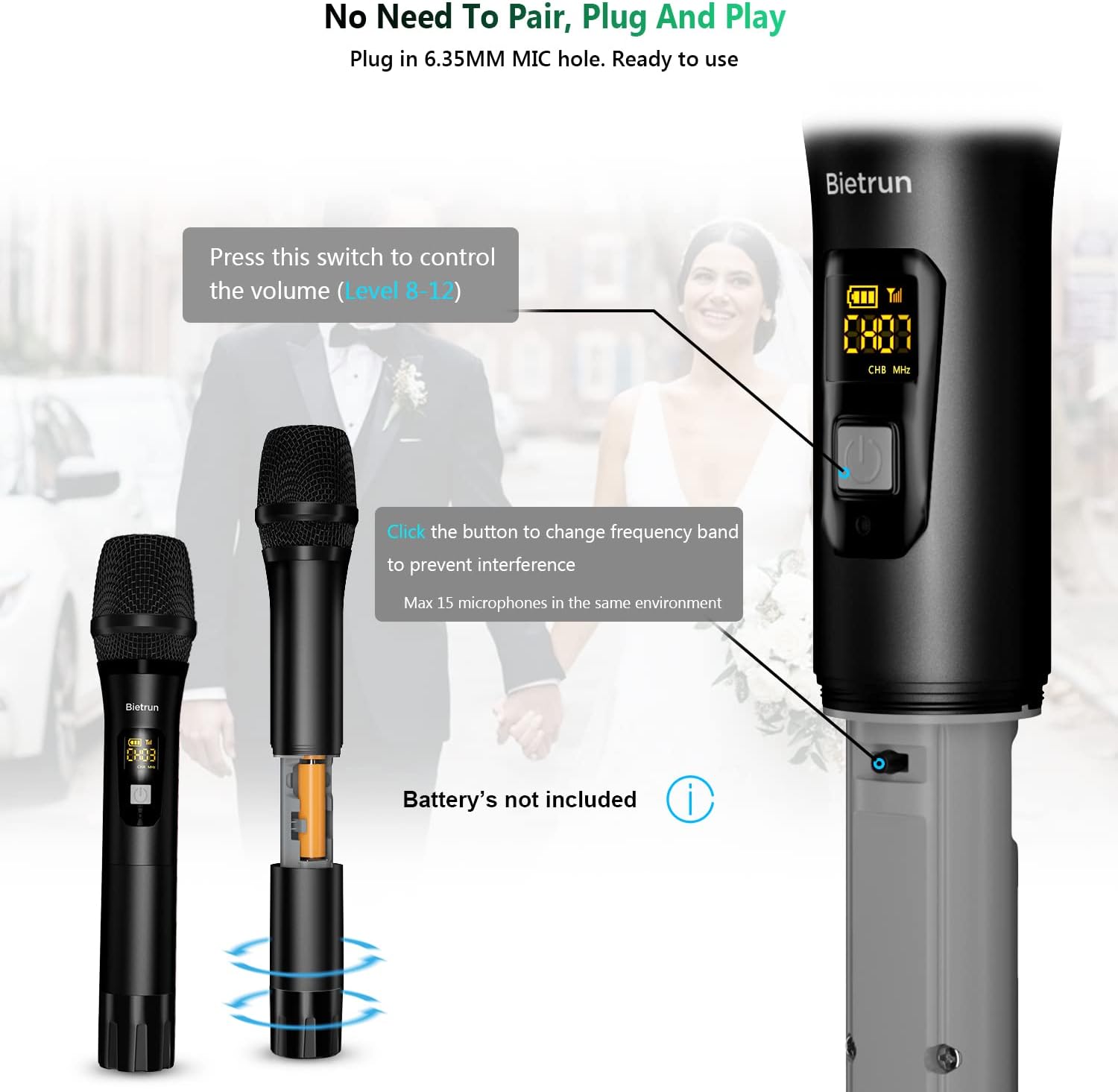
Gambar: Deukeut view of the microphone showing the volume control switch and the channel change button.
4.4 Rentang Operasi
The system provides a stable wireless transmission distance of up to 160 feet (50 meters) in an open environment. Factors such as obstacles, walls, and other wireless devices may affect the actual range.

Image: Depiction of the 160ft UHF wireless signal range for the microphone system.
5. Pangropéa
To ensure the longevity and optimal performance of your Bietrun Wireless Microphone System, follow these maintenance guidelines:
- beberesih: Use a soft, dry cloth to clean the microphones and receiver. Do not use abrasive cleaners or solvents.
- Panyimpenan: Simpen sistem di tempat anu tiis sareng garing, jauh tina sinar panonpoé langsung sareng suhu anu ekstrim.
- Perawatan batré: Remove AA batteries from the microphones if they will not be used for an extended period to prevent leakage. Recharge the receiver periodically if stored for long durations to maintain battery health.
- Penanganan: Handle the microphones and receiver with care. Avoid dropping them or subjecting them to strong impacts.

Gambar: Detil view of the microphone's internal components, including the steel meshed microphone head and high-quality capsule, highlighting its durable metal construction.
6. Cara ngungkulan
If you encounter any issues with your Bietrun Wireless Microphone System, please refer to the following common problems and solutions:
| Masalah | Mungkin Cukang lantaranana | Solusi |
|---|---|---|
| Taya sora tina mikropon |
|
|
| Gangguan atanapi kualitas sora anu goréng |
|
|
| Layar mikropon teu tiasa dianggo | Batré lemah atawa paéh. | Replace AA batteries in the microphone. |
If the problem persists after trying these solutions, please contact Bietrun customer support for assistance.
7. Spésifikasi
| Fitur | Spésifikasi |
|---|---|
| Nomer modél | WXM02 |
| Téhnologi konektipitas | UHF Wireless |
| Faktor Bentuk Mikropon | Dicekel |
| Bahan Mikropon | logam |
| Pola Polar | Dua arah |
| Jumlah Saluran | 2 (15 UHF Adjustable Channels) |
| Rasio Signal-to-Noise | 120 dB |
| Jarak Pangiriman | Nepi ka 160 suku (50 méter) |
| Sumber Daya Mikropon | 2 x Batré AA (teu kalebet) |
| Tipe Batré panarima | Polimér Litium (720mAh) |
| Waktu Gawé Panarima | Nepi ka 4.5 jam |
| Receiver Ngecas Time | Kira-kira. 3 jam |
| Tipe Panyambung | 6.35 mm (1/4") Jack (with 3.5mm adapter) |
| Item Beurat | 1.54 pon (total pakét) |
| Dimensi (Pakét) | 10.2 x 3.9 x 2.76 inci |

Image: Diagram illustrating the physical dimensions of the Bietrun wireless microphones and receiver.
8. Garansi jeung Rojongan
Bietrun offers a garansi 1 taun and free replacement service for this product. If you have any questions, concerns, or require technical assistance, please do not hesitate to contact Bietrun customer support. Refer to the warranty card included in your package for specific contact details or visit the official Bietrun websitus.


