1. Bubuka
This manual provides detailed instructions for the setup, operation, and maintenance of the Futaba 10PX 2.4GHz 10-Channel Radio System and R404SBSE Receiver. Please read this manual thoroughly before using your system to ensure proper function and safety. Keep this manual in a safe place for future reference.
2. Produk Langkungview
The Futaba 10PX is a high-performance 2.4GHz 10-channel radio system designed for advanced RC applications. It features an F-4G system for fast response and telemetry capabilities. The system includes a 4.3-inch backlit color TFT liquid crystal touch panel for intuitive control and configuration.
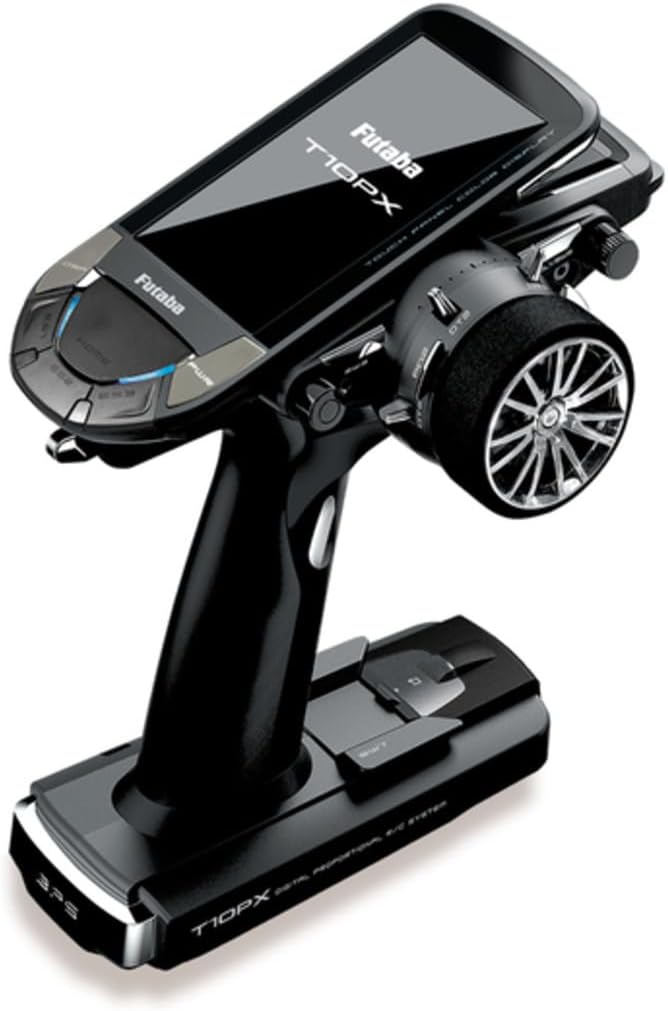
Gambar 1: Futaba 10PX Transmitter. This image displays the Futaba 10PX 2.4GHz 10-Channel Radio System, featuring a black transmitter with a large color touch screen display, a steering wheel on the right, and various control buttons for precise control of RC vehicles.
Fitur konci:
- F-4G System: Enables telemetry with faster response compared to T-FHSS SR.
- Software Updates: MicroSD card slot for software updates and model data saving.
- Telemetry Log Data: Ability to save telemetry log data to a microSD card.
- Model Memory: Supports up to 15 characters for model names and model copy function for different setups.
- Ergonomic Controls: Paddle switch near the wheel, 3-position switch on the grip, and a bottom switch for multiple channels and functions.
- Power Supply: Compatible with optional LT2F2000B LiPo battery for extended running time.
- Advanced Mixing: Independent brake mixing for front and rear wheels (e.g., 1/5GP cars).
- Steering Adjustments: Independent left and right steering servo settings for smooth cornering.
- 4WS Function: Supports 4-wheel steering type vehicles like crawlers.
- Dual ESC Control: Allows independent control of front and rear ESCs.
- Display: 4.3-inch backlit color TFT liquid crystal touch panel.
3. Eusi Paket
Pastikeun yén sadaya item aya dina bungkusan:
- (1) Futaba 10PX Transmitter
- (1) Futaba R404SBS F-4G Receiver
4. Setélan
4.1 Pamasangan Batré pamancar
- Buka panutup kompartemen batré anu aya di tukangeun pemancar.
- Insert the recommended battery pack (e.g., optional LT2F2000B LiPo battery) into the compartment, ensuring correct polarity.
- Tutup panutup kompartemen batré aman.
4.2 Sambungan panarima
Connect the R404SBS F-4G receiver to your RC vehicle's electronic speed controller (ESC) and servos according to your vehicle's specific wiring diagram. Ensure all connections are secure and correctly oriented.
4.3 Ngabeungkeut Pemancar sareng Panampi
To establish communication between the 10PX Transmitter and the R404SBS F-4G Receiver:
- Hurungkeun pamancar.
- Power on the receiver while holding the bind button on the receiver.
- Observe the LED indicator on the receiver. Once it indicates a successful bind (refer to receiver manual for specific LED patterns), release the bind button.
- Turn off both the transmitter and receiver, then power them on again to confirm the bind.
4.4 Initial Calibration and Model Setup
After binding, perform initial calibration of your vehicle's steering and throttle. Use the 4.3-inch touch panel to access the system menu for model creation, servo reversing, endpoint adjustments, and other advanced settings. The model copy function allows for quick duplication of settings for similar vehicles.
5. Parentah Operasi
5.1 Operasi Dasar
Turn on the transmitter first, then the receiver. To power off, turn off the receiver first, then the transmitter.
5.2 Using the Touch Panel
The 4.3-inch color TFT liquid crystal touch panel provides access to all system functions. Navigate menus by touching the screen. Refer to the on-screen prompts and the detailed digital manual (if available via microSD) for specific menu structures and parameter adjustments.
5.3 Advanced Control Functions
- Paddle switch: Located near the steering wheel, this switch can be assigned to various functions for quick access during operation.
- 3-Posisi Switch: Situated on the grip, this switch offers three distinct positions for controlling auxiliary channels or specific vehicle functions.
- Saklar handap: An additional switch at the bottom of the transmitter provides further customization options for channel control.
- Brake Mixing: For vehicles with independent front and rear brakes (e.g., 1/5GP cars), this function allows for separate adjustment of brake force, enhancing cornering performance.
- Independent Steering Servo Setting: Adjust left and right steering servo parameters independently to achieve precise and smooth cornering characteristics.
- 4WS Function: Configure the 4-wheel steering function for crawlers and other compatible vehicles through the system menu.
- Dual ESC Control: If your vehicle uses dual ESCs, the 10PX allows for independent control of the front and rear ESCs, offering advanced power management.
5.4 Telemetry Data
The F-4G system supports telemetry. Monitor real-time data from your vehicle on the transmitter's display. Telemetry log data can be saved to a microSD card for later analysis.
6. Pangropéa
- beberesih: Use a soft, dry cloth to clean the transmitter and receiver. Avoid using solvents or abrasive cleaners.
- Panyimpenan: Store the system in a cool, dry place away from direct sunlight and extreme temperatures. Remove batteries if storing for extended periods.
- Perawatan batré: If using a LiPo battery (LT2F2000B), follow all manufacturer guidelines for charging, discharging, and storage to ensure safety and prolong battery life.
- Apdet parangkat lunak: Periodically check the Futaba website for available software updates for your 10PX transmitter. Use a microSD card to perform updates as instructed.
7. Cara ngungkulan
- Henteu aya kakuatan: Ensure batteries are correctly installed and charged. Check power switch.
- No Response from Vehicle: Verify transmitter and receiver are properly bound. Check all connections between receiver, ESC, and servos. Ensure vehicle battery is charged.
- Kontrol Intermiten: Check for potential radio interference. Ensure antenna is properly positioned on both transmitter and receiver.
- Masalah tampilan layar: If bright dots appear on the screen, this is an intrinsic characteristic of TFT manufacturing technology and not a defect. If other display issues occur, try restarting the transmitter.
- Telemetri Henteu Jalan: Ensure the F-4G system is active and the receiver is compatible. Check sensor connections if external sensors are used.
8. Spésifikasi
| Fitur | Spésifikasi |
|---|---|
| Nomer modél | 10PX |
| Saluran | 10-Kanal |
| Frékuénsi | 2.4GHz (F-4G System) |
| Receiver Included | R404SBS F-4G Receiver |
| tampilan | 4.3-inch Backlit Color TFT Liquid Crystal Touch Panel |
| Sumber Daya | Battery Powered (Optional LT2F2000B LiPo battery recommended) |
| Dimensi produk | 10 x 10 x 5.75 inci |
| Item Beurat | 3.5 pon |
| Warna | Hideung |
| Produsén | Futaba |
| Tanggal Kahiji Sadia | 31 Maret 2022 |
9. Émbaran Kasalametan
Always operate your RC equipment responsibly and safely. Failure to follow safety guidelines can result in injury or damage to property.
- Keep the transmitter and receiver away from water and moisture.
- Do not operate the system in thunderstorms or adverse weather conditions.
- Ensure proper ventilation for all electronic components to prevent overheating.
- Always turn on the transmitter first and turn off the receiver first.
- Do not modify the system components. Unauthorized modifications can void your warranty and compromise safety.
- Produk ieu tiasa ngandung bahan kimia anu dipikanyaho ku Nagara Bagian California tiasa nyababkeun kanker sareng cacad lahir atanapi gangguan réproduktif anu sanés (peringatan Proposisi 65).


