1. Produk Langkungview
The Hantek HDP135V6 is a single-channel programmable DC power supply designed for various electronic applications. It offers precise control over voltage and current output, with a maximum output of 35V and 6A. Key features include a clear 4-digit display, multiple protection mechanisms, and memory settings for frequently used configurations.
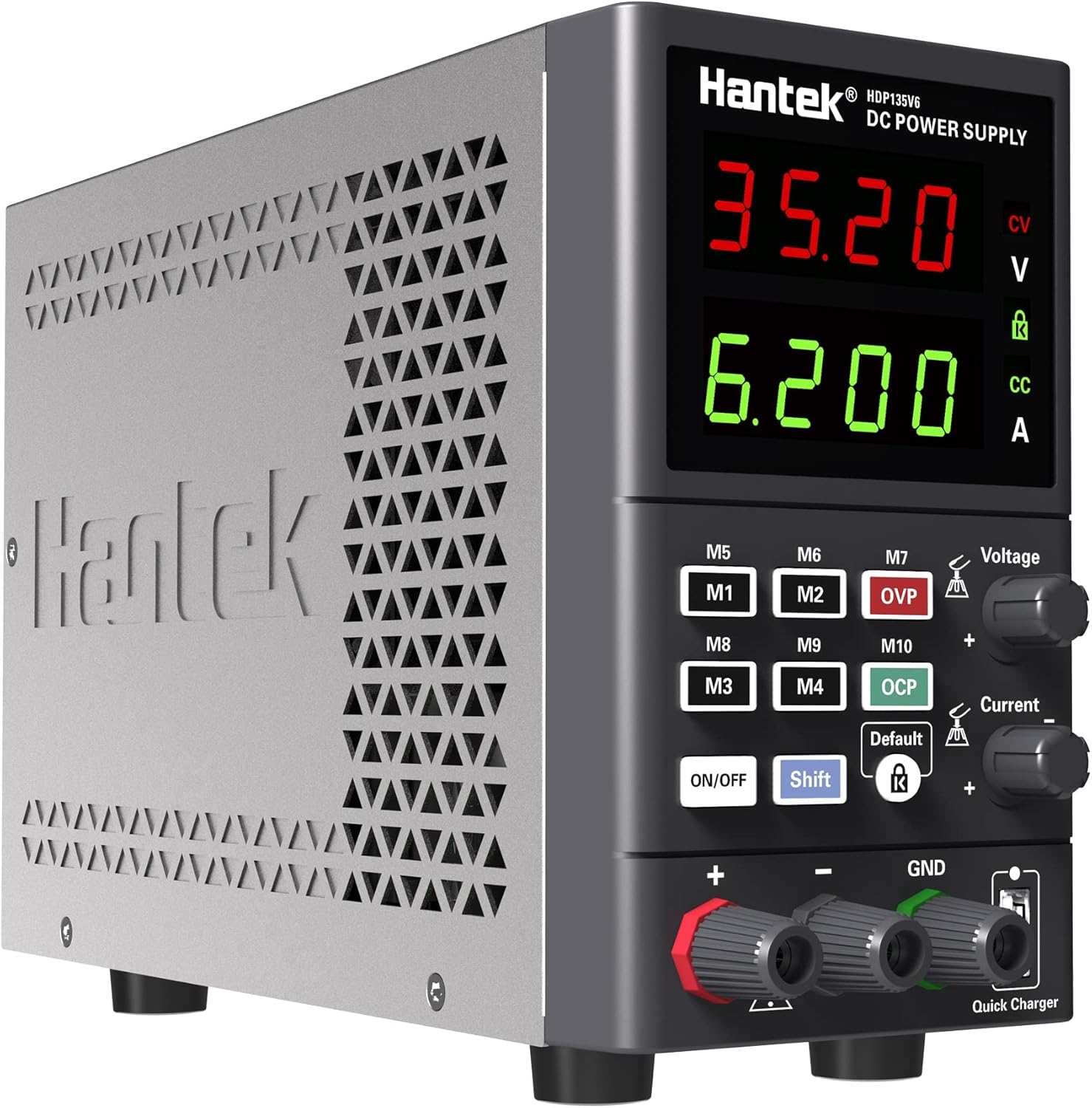
Gambar 1.1: Hareupeun view of the Hantek HDP135V6 Programmable DC Power Supply, showing the display, control knobs, and output terminals.
Fitur konci:
- Easy setup with two separate rapid adjustment knobs for voltage jeung ayeuna.
- 4-digit display for voltage and current, with 10mV/1mA resolution.
- Selectable 230V/115V input voltage.
- Maximum output of 35V/6A.
- Standard 5~12V USB quick charge port.
- 10 save/recall memory settings (M1-M10).
- Comprehensive protection features: Over Current (OC), Over Voltage (OV), Overload, Overheat, and Short-circuit protection.
- Key lock function to prevent accidental changes.
- Output ON/OFF switch lock.
- Smart temperature-controlled cooling fan.
- Desain kompak sareng hampang pikeun portabilitas.
2. Parentah Kasalametan
To ensure safe operation and prevent damage to the device or connected equipment, please read and follow these safety instructions carefully.
- Sumber Daya: Ensure the power supply is connected to a grounded AC outlet with the correct voltage. Verify the AC selector switch on the rear panel is set to the appropriate voltage (115V or 230V) for your region before connecting the power cord.
- Ventilasi: Do not block the ventilation openings on the device. Ensure adequate airflow around the unit to prevent overheating.
- Lingkungan: Operate the power supply in a dry, well-ventilated area, away from direct sunlight, high temperatures, humidity, and dust.
- Sambungan beban: Always connect the load to the output terminals before turning on the output. Ensure the load is within the specified voltage and current limits of the power supply.
- Terminal Kaluaran: Do not touch the output terminals when the power supply is operating.
- Pangropéa: Refer all servicing to qualified personnel. Do not attempt to open or repair the unit yourself.
- Sekering: Replace fuses only with the specified type and rating.
3. Setélan
3.1 Ngabongkar sareng Inspeksi
Upon receiving your Hantek HDP135V6, carefully unpack the unit and inspect it for any signs of damage during transit. Retain the packaging materials for future transport or storage.
3.2 Sambungan Daya
- Locate the AC selector switch on the rear panel of the power supply.
- Set the switch to the appropriate voltage pikeun wilayah anjeun (115V atanapi 230V). Incorrect setting can cause damage to the unit.
- Connect the provided AC power cord to the power input socket on the rear panel and then to a grounded AC outlet.

Gambar 3.1: Tukangeun view of the Hantek HDP135V6, highlighting the AC selector switch, power input, and cooling fan.
3.3 Kontrol Panel hareup jeung Indikator
The front panel provides all necessary controls and displays for operating the power supply.
- Voltage tampilan: Némbongkeun set atanapi volum kaluaran anu saleresnatage.
- Tampilan ayeuna: Némbongkeun arus kaluaran anu disetel atanapi sabenerna.
- Voltage kenop adjustment: Dianggo pikeun nangtukeun voltase kaluarantage.
- kenop adjustment ayeuna: Used to set the output current limit.
- Tombol M1-M10: Memory buttons for saving and recalling settings.
- Tombol ON/OFF: Toggles the output power.
- Tombol Shift: Used in combination with other buttons for advanced functions.
- Tombol konci: Activates/deactivates the key lock function.
- Output Terminals (+, -, GND): Connect your load here.
- Quick Charger USB Port: Provides 5~12V USB output.
4. Parentah Operasi
4.1 Operasi Dasar
- Ensure the power supply is properly connected to AC power.
- Press the main power switch on the rear panel to turn on the unit. The display will illuminate.
- Setélan Voltage: Puterkeun Voltage kenop adjustment pikeun nyetel volume kaluaran anu dipikahoyongtage.
- Nyetél Wates Ayeuna: Puterkeun Knob adjustment ayeuna to set the desired maximum output current. This acts as a current limit for your connected load.
- Beban Nyambungkeun: Connect your device or circuit to the output terminals (Red for positive '+', Black for negative '-', Green for Ground 'GND').
- Activating Output: Pencét éta ON/OFF button on the front panel to enable the output. The display will show the actual output voltage jeung ayeuna.
- Deactivating Output: Pencét éta ON/OFF button again to disable the output.
4.2 Fungsi Mémori (M1-M10)
The power supply allows you to save and recall up to 10 sets of voltage sareng setélan ayeuna.
- Nyimpen Setélan: Nyetél vol nu dipikahoyongtage and current. Press and hold the Pindah button, then press one of the M1-M10 buttons until the display indicates the setting is saved.
- Setélan Pangéling-ngéling: Pencét anu dipikahoyong M1-M10 button to recall the saved voltage sareng setélan ayeuna.
4.3 Fungsi panyalindungan
The HDP135V6 includes several protection features to safeguard the unit and connected devices:
- Over Current Protection (OCP): Automatically limits or shuts down output if current exceeds the set limit.
- Langkung Voltage Perlindungan (OVP): Shuts down output if voltage exceeds a preset limit.
- Perlindungan Overload: Ngajaga tina panggunaan daya anu kaleuleuwihi.
- Perlindungan overheat: Activates the cooling fan and may shut down if internal temperature is too high.
- Perlindungan Sirkuit pondok: Immediately cuts off output in case of a short circuit.
4.4 Fungsi konci konci
To prevent accidental changes to settings during operation, you can activate the key lock function.
- Aktipkeun konci: Pencét éta Konci button. A lock icon will appear on the display.
- Nonaktipkeun konci: Pencét éta Konci button again. The lock icon will disappear.
4.5 USB Quick Charge
The front panel features a USB port for quick charging compatible devices. This port provides a variable output from 5V to 12V, depending on the connected device's charging protocol.
5. Pangropéa
5.1 beberesih
To clean the exterior of the power supply, use a soft, damp cloth. Do not use abrasive cleaners or solvents. Ensure the unit is powered off and disconnected from the AC supply before cleaning.
5.2 Ngagantian sekering
If the power supply fails to power on, the fuse may need replacement. The fuse holder is located on the rear panel, integrated with the AC input socket.
- Disconnect the power supply from the AC outlet.
- Using a small flat-head screwdriver, gently pry open the fuse compartment within the AC input socket.
- Remove the old fuse and replace it with a new fuse of the same type and rating (e.g., 5.0AT/250V for 110V/115V input, or 3.15AT/250V for 220V/230V input). Refer to the rating label on the rear panel.
- Tutup kompartemen sekering aman.
6. Cara ngungkulan
If you encounter issues with your Hantek HDP135V6, refer to the following common problems and solutions:
| Masalah | Mungkin Cukang lantaranana | Solusi |
|---|---|---|
| Unit teu hurung. | No AC power, faulty power cord, blown fuse, incorrect AC selector setting. | Check AC power connection. Verify AC selector switch is correct. Replace fuse if blown (refer to Section 5.2). |
| Teu aya kaluaran voltage/ayeuna. | Output is OFF, OCP/OVP activated, short circuit in load. | Press the ON/OFF button to enable output. Check for OCP/OVP indicators. Disconnect load and check for short circuits. |
| Kaluaran voltage/current is unstable or incorrect. | Loose connections, faulty load, internal issue. | Check all connections. Test with a different load. If problem persists, contact support. |
| Unitna panas teuing. | Ventilasi tersumbat, beban anu kaleuleuwihi. | Ensure ventilation openings are clear. Reduce load or operate in a cooler environment. |
| Teu kaduga voltage spikes on output activation. | Characteristic of power supply design, especially with very light or no load. | Always connect a suitable load before activating output. Monitor output carefully, especially with sensitive devices. If critical, consider adding a dummy load or using a power supply with soft-start features. |
7. Spésifikasi
| Parameter | Nilai |
|---|---|
| Modél | HDP135V6 |
| Kaluaran Voltage | 0-35V |
| Kaluaran Ayeuna | 0-6A |
| Voltage Resolusi | 10mV |
| Resolusi ayeuna | 1mA |
| Masukan Voltage | 115V/230V AC (Switchable) |
| Kaluaran Wattage | 210 Watt |
| USB Gancang Charge Kaluaran | 5 ~ 12V |
| Ukuran produk (L x W x H) | 5.91 x 3.35 x 9.06 inci (150 x 85 x 230 mm) |
| Item Beurat | 4.44 pon (2.01 kg) |
| Produsén | Qingdao Hantek Electronic Co., Ltd. |
8. Garansi jeung Rojongan
8.1 Émbaran jaminan
Hantek products are typically covered by a manufacturer's warranty against defects in materials and workmanship. Please refer to the warranty card included with your product or contact Hantek customer service for specific warranty terms and conditions.
8.2 Rojongan Palanggan
For technical assistance, troubleshooting, or service inquiries, please contact Hantek customer support. Contact information can usually be found on the manufacturer's official websitus atanapi dina bungkusan produk.


