1. Bubuka
This manual provides detailed instructions for the setup, operation, and maintenance of your KECAG 10.1 Inch Digital Picture Frame. Please read this manual thoroughly before using the device to ensure proper functionality and to maximize your user experience. Keep this manual for future reference.
2. Produk Langkungview
2.1 Fitur konci
- 10.1 Inch 1080P HD IPS Screen: Features a 1920x1080 resolution with a 180° wide-angle IPS display for clear viewngungkulan tina rupa-rupa sudut pandang.
- Puteran Multimédia: Supports photo slideshows, video playback, and music playback.
- Sénsor gerak: Automatically turns the frame on/off based on detected movement to conserve energy.
- Timing On/Off Function: Allows scheduled power on and off times.
- Rojongan Media Serbaguna: Compatible with SD cards and USB flash drives.
- Antarmuka anu ramah-pamaké: Simple main menu for easy navigation.
- Kadali jauh: Provides convenient operation from a distance.
- Fungsi tambahan: Includes calendar and alarm features.
2.2 Eusi pakét
- KECAG 10.1 Inch Digital Picture Frame
- 32GB USB Flash Drive
- Kadali jauh
- Adaptor kakuatan
- Manual pamaké

Gambar 2.2.1: The KECAG 10.1 Inch Digital Picture Frame displaying a family photo, accompanied by its remote control.
3. Setélan
3.1 Sambungan Daya
- Locate the power adapter included in the package.
- Connect the small end of the power adapter cable to the DC IN port on the back of the digital picture frame.
- Colokkeun tungtung adaptor daya anu sanésna kana stop kontak listrik standar.
- The frame will automatically power on or enter standby mode.
3.2 Inserting Media (USB Drive or SD Card)
The digital picture frame supports both USB flash drives and SD cards for media playback.
- Identify the USB port and SD card slot on the side or back of the frame.
- For a USB drive: Carefully insert the USB flash drive into the USB port.
- For an SD card: Insert the SD card into the SD card slot with the metal contacts facing down, until it clicks into place.
- Ensure the media is inserted correctly to avoid damage.

Gambar 3.2.1: Illustrated steps for connecting media (USB/SD card) and power to the digital picture frame.
3.3 Setélan Mimiti Hurung jeung Basa
- Once powered on, the frame may display a language selection screen.
- Use the remote control's navigation buttons (Up/Down/Left/Right) to select your preferred language.
- Pencét éta Asupkeun tombol pikeun mastikeun pilihan Anjeun.
4. Parentah Operasi
4.1 Fungsi Remote Control
The remote control allows for convenient navigation and setting adjustments. Ensure the remote is aligned with the infrared sensor on the frame during use.
- MENU: Access the main menu or return to the previous menu.
- FOTO: Directly enter photo playback mode.
- MUSIK: Directly enter music playback mode.
- Pilem: Directly enter video playback mode.
- KALUAR: Exit current function or menu.
- Asupkeun: Confirm selection or play/pause media.
- DISETÉL: Setélan sistem aksés.
- Tombol Navigasi (Kaluhur/Turun/Kénca/Katuhu): Napigasi ngaliwatan ménu jeung pilihan.
- VOL + / VOL-: Adjust volume during video or music playback.
4.2 Napigasi Menu Utama
From the main menu, you can select different functions:
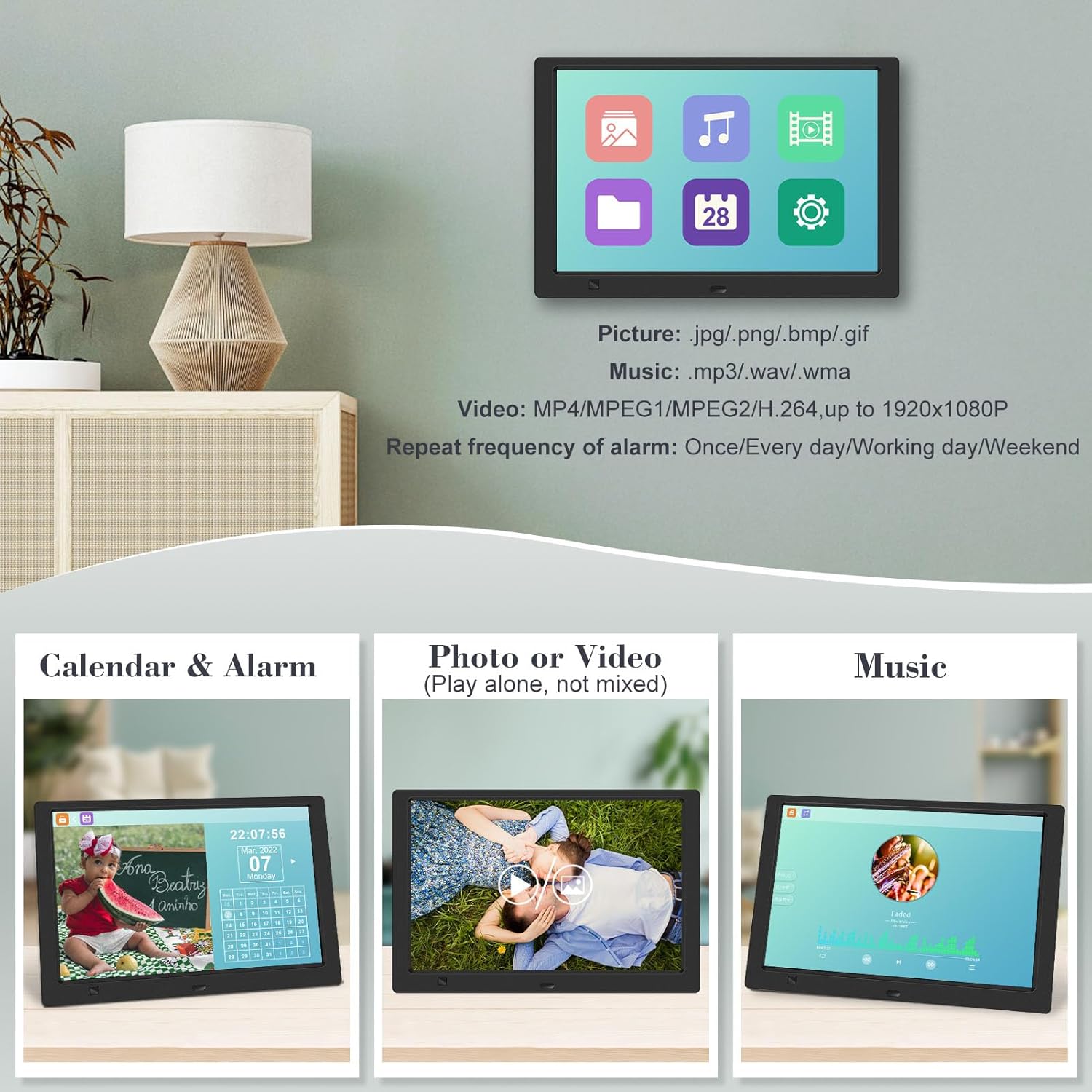
- Gambar: View photos in a slideshow.
- Musik: Puterkeun audio files.
- Kalénder: Display calendar and set alarms.
- Setélan: Configure device preferences.

Gambar 4.2.1: The digital picture frame's interface showing options for Calendar, Photo/Video, and Music playback.
4.3 Photo Playback
- Tina ménu utama, pilih Gambar atawa pencét éta FOTO tombol dina remote.
- The frame will automatically start a slideshow of photos found on the inserted media.
- Pesenan Puterkeun: In settings, you can choose between Shuffle, Sequential, or Repeat All.
- Transition Effects: Select from various effects like Up/Down, Mosaic, Left/Right, or Random.
- Gambar Praview: Access a thumbnail view of your photos.
- Rotasi Gambar: Adjust the orientation of images (vertical/horizontal).
- Kacaangan layar: Adjust the display brightness in the settings menu.
Gambar 4.3.1: The digital picture frame displaying a photo slideshow with background music and various image transition options.

Gambar 4.3.2: Visual representation of slideshow and image preview options, including settings for playback order, display scale, picture rotation, time window, and screen brightness adjustment.
4.4 Video and Music Playback
- Tina ménu utama, pilih Pilem or Musik, or use the corresponding buttons on the remote.
- Arahkeun ka nu dipikahoyong file using the remote control and press Asupkeun maén.
- Supported video formats: MP4/MPEG1/MPEG2/H.264 up to 1920x1080.
- Supported music formats: MP3/WAV/WMA.
4.5 Fungsi Sensor Gerak
The motion sensor helps save energy by automatically turning the frame on or off.
- To enable/disable the motion sensor, go to the Setélan ménu.
- Select the motion sensor option and toggle it On or Off.
- When enabled, the frame will power on when movement is detected and turn off after a period of inactivity.
4.6 Timing On/Off Function
Set specific times for the frame to automatically power on and off.
- Aksés ka Setélan ménu.
- Locate the Timing On/Off function.
- Set your desired power-on time and power-off time. You can also configure this for specific days (e.g., weekdays, weekends, every day).

Gambar 4.6.1: Demonstrates the smart motion sensor turning on the frame when movement is detected and the timing on/off function for scheduled operation.
5. Pangropéa
5.1 Ngabersihan Layar
Pikeun ngabersihkeun layar, usap lembut nganggo lawon anu lemes, garing, sareng teu aya serat. Pikeun tanda nekad, rada dampen lawon jeung cai atawa solusi beberesih layar-aman. Ulah make bahan kimia kasar atawa bahan abrasive.
5.2 Perawatan Umum
- Keep the frame away from direct sunlight, heat sources, and excessive moisture.
- Hindarkeun ngaragragkeun alatna atanapi mangaruhan kana tabrakan anu kuat.
- Ulah nyobian ngabongkar pigura; ieu bakal ngabatalkeun garansi.
- Pastikeun ventilasi ditangtoskeun sabudeureun alat.
6. Cara ngungkulan
If you encounter issues with your digital picture frame, please refer to the following common problems and solutions:
| Masalah | Mungkin Cukang lantaranana | Solusi |
|---|---|---|
| Pigura teu hurung. | Adaptor daya teu nyambung atawa stop kontak faulty. | Pastikeun adaptor daya disambungkeun pageuh kana pigura sareng stop kontak anu tiasa dianggo. Cobi stop kontak anu sanés. |
| No photos/videos/music displayed. | No media inserted, media not recognized, or unsupported file formatna. | Ensure a USB drive or SD card is properly inserted. Check if files are in supported formats (JPG/PNG/BMP/GIF for photos; MP4/MPEG1/MPEG2/H.264 for video; MP3/WAV/WMA for music). Try reformatting the media (backup data first). |
| Kadali jauh teu jalan. | Battery depleted, remote not aimed correctly, or sensor obstructed. | Replace the remote control battery. Ensure the remote is pointed directly at the frame's infrared sensor. Remove any obstructions between the remote and the frame. |
| Layar kosong atawa beku. | glitch software samentara. | Cabut adaptor daya, antosan 10 detik, teras colokkeun deui pikeun ngabalikan deui pigura. |
7. Spésifikasi
| Fitur | Spésifikasi |
|---|---|
| Ukuran layar | 10.1 inci |
| Resolusi | 1920 x 1080 (1080p HD IPS) |
| Rasio Aspék | 16:9 |
| Viewdina Angle | 180° |
| Alat nu cocog | SD Card, USB Drive |
| Format Poto anu Didukung | JPG, PNG, BMP, GIF |
| Format Pidéo anu Dirojong | MP4, MPEG1, MPEG2, H.264 (up to 1920x1080) |
| Format Musik anu Dirojong | MP3, WAV, WMA |
| Sénsor gerak | Sumuhun |
| Nomer Modél Item | KECAG-CA-001 |
| Dimensi produk | 6.4 x 9.7 x 0.99 inci |
| Item Beurat | 1.59 pon |
| Batré (Jauh) | 1 batré Litium Metal (kaasup) |
| Produsén | KECAG |
8. Garansi jeung Rojongan
For warranty information, please refer to the documentation included with your product packaging. KECAG provides 24-hour customer service to assist with any issues or questions you may have regarding your digital picture frame. Please contact customer support for assistance.


