EKids LY-157 Buzz Disney Pixar Lightyear Steering Wheel
Instruksi Manual
Bubuka
Welcome to the instruction manual for the EKids LY-157 Buzz Disney Pixar Lightyear Steering Wheel. This interactive toy is designed to immerse young fans in the world of Disney Pixar's Lightyear, allowing them to embark on exciting space missions with Buzz Lightyear. Featuring kid-friendly controls, authentic sound effects, and a vibrant light-up display, this device provides an engaging and imaginative play experience.
Naon dina Box
Upon opening your package, please ensure all components are present:
- Starship mission controller
Lamun aya item nu leungit atawa ruksak, mangga ngahubungan rojongan customer.
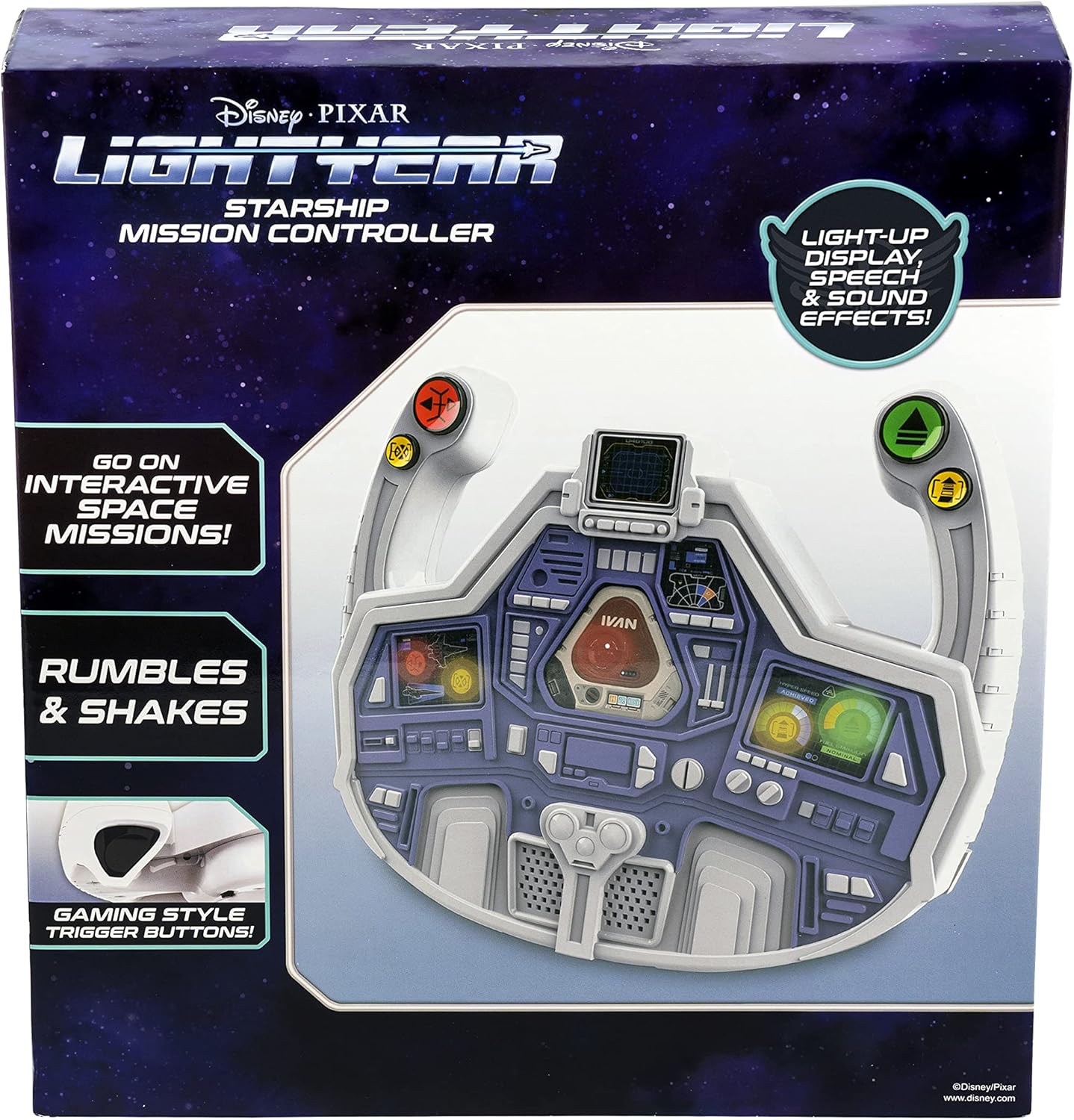
Image: The EKids LY-157 Buzz Lightyear Steering Wheel as packaged in its retail box.
Fitur
The EKids LY-157 Buzz Disney Pixar Lightyear Steering Wheel is equipped with several features designed for an interactive play experience:
- Steering Wheel Toy: Ready for lift-off, this controller allows for interactive space missions with Buzz Lightyear using kid-friendly, easy-to-use controls and gaming-style trigger buttons.
- Light Up Display: Enjoy hours of pretend play as you follow prompts from the colorful light-up 'dashboard'. The Starship Mission Controller reacts to your movements with vibration feedback as you navigate missions.
- Balukar Sora Bawaan: Press buttons on the dashboard to activate a variety of action-packed sound effects while you play!
- Buzz Lightyear Design: The cool Lightyear design is sure to please any fan of the popular character. Durable and lightweight, this toy is ideal for car seats for toddlers aged 4 and up.
- Official Disney Pixar Lightyear Licensed Product: Ensures authenticity and quality.

Image: A visual representation of the steering wheel highlighting its key features, including the light-up display, gaming-style trigger buttons, and shaking action.
Disetél
Before beginning your space missions, ensure the steering wheel is properly set up.
Pamasangan batré
The EKids LY-157 Buzz Disney Pixar Lightyear Steering Wheel requires 3 AA batteries, which are included with the product. To install or replace batteries:
- Tangtukeun lokasi kompartemen batré dina tonggong unit.
- Using a Phillips head screwdriver, carefully open the battery compartment cover.
- Insert 3 AA batteries, ensuring the positive (+) and negative (-) terminals align with the indicators inside the compartment.
- Ganti panutup kompartemen batré jeung amankeun ku screw nu.
For optimal performance, use new alkaline batteries. Do not mix old and new batteries, or different types of batteries.

Gambar: A lengkep view of the steering wheel, showing the location of the battery compartment, power/volume switches, and various control buttons.
Parentah Operasi
Once batteries are installed, you are ready to begin your mission!
Kakuatan Hurung / Pareuman sareng Kontrol Volume
- Locate the 'Demo/Off/On' slide switch, typically found on the top or back of the unit. Slide it to the 'On' position to power on the device.
- To adjust the sound volume, use the 'Hi/Med/Low' slide switch. Select 'Hi' for maximum volume, 'Med' for moderate, or 'Low' for quieter play.
Play Interaktif
- The steering wheel features a light-up dashboard that provides visual prompts for various missions and actions. Follow these prompts to engage in interactive space missions.
- The controller reacts to your movements and mission progress with vibration feedback, enhancing the immersive experience.
Fungsi Tombol
Utilize the various buttons on the steering wheel to control your mission:
- 'Stop' Button (Red): Used to halt actions or missions.
- 'Repair' Button (Yellow): Activates repair sequences or fixes issues during a mission.
- 'Go' Button (Green): Initiates movement or mission progression.
- 'Boost' Button (Yellow): Provides a temporary speed or power boost for critical moments.
- Press the gaming-style trigger buttons (located on the handles) for additional action-packed sound effects and interactive responses.

Image: A child demonstrating the use of the steering wheel, highlighting its interactive nature.
Pangropéa
Proper care will ensure the longevity of your EKids LY-157 Buzz Disney Pixar Lightyear Steering Wheel.
beberesih
- Wipe the surface of the steering wheel with a soft, dry cloth.
- Do not use abrasive cleaners, solvents, or harsh chemicals, as these may damage the plastic or electronic components.
- Avoid submerging the unit in water or exposing it to excessive moisture.
Panyimpenan
- When not in use for extended periods, store the steering wheel in a cool, dry place, away from direct sunlight and extreme temperatures.
- Remove batteries if the unit will not be used for several weeks or months to prevent battery leakage and potential damage.
Pamérésan masalah
If you encounter any issues with your EKids LY-157 Buzz Disney Pixar Lightyear Steering Wheel, please refer to the following common solutions:
| Masalah | Mungkin Cukang lantaranana | Solusi |
|---|---|---|
| No power, lights, or sound. | Batteries are depleted or incorrectly installed. Power switch is off. | Ensure batteries are correctly installed with proper polarity. Replace with fresh AA batteries. Check that the 'Demo/Off/On' switch is in the 'On' position. |
| Sora na leutik teuing atawa teu aya. | Volume switch is set to 'Low' or 'Off'. | Adjust the 'Hi/Med/Low' slide switch to 'Hi' or 'Med'. |
| Limited or no vibration feedback. | Daya batre lemah. | Replace batteries with fresh ones. Ensure the toy is being used on a stable surface. |
| Tombol teu ngabales. | Temporary electronic glitch. Debris obstructing buttons. | Turn the unit off and then on again to reset. Check for any foreign objects obstructing the buttons and carefully remove them. |
spésifikasi
| Atribut | Rincian |
|---|---|
| Dimensi produk | 7 x 26.3 x 27.9 cm; 581 g |
| Batré Diperlukeun | 3 batré AA (kaasup) |
| Produsén Disarankeun Umur | 3 taun ka luhur |
| Nomer Modél Item | LY-157 |
| Tujuan Atikan | Literacy |
| Jumlah Pamaén Kaulinan | 1 |
| Majelis Diperlukeun | No |
| Jenis Bahan | palastik |
| Warna | Bodas |
| ASIN | B09XZCQT73 |
| Tanggal Kahiji Sadia | 23 April 2022 |
Garansi sareng Rojongan
For product support, warranty information, or to inquire about replacement parts, please refer to the contact information provided on the product packaging or visit the official eKids websitus. Simpen resi pameseran anjeun salaku bukti pameseran pikeun klaim garansi.


