Produk Leuwihview
The Mesqool Digital Alarm Clock is a versatile device designed to enhance your living space with its multi-functional display and convenient features. It provides accurate time, date, temperature, and humidity readings, along with dual alarm capabilities and charging ports for your electronic devices.

Figure 1: Mesqool Digital Alarm Clock with charging capabilities.
Naon dina Box
- Jam Alarm Digital kai
- US AC Power Adapter
- Kabel ngecas
- Buku manual

Gambar 2: Eusi Paket.
Fitur konci
- Tampilan ageung: An 8.7-inch screen clearly displays time, date, and day of the week.
- Pangimeutan Suhu sareng Kelembapan: Assists in monitoring indoor environment conditions.
- Loud Alarm with Snooze: Adjustable alarm volume from 65dB to 120dB with a 9-minute snooze function.
- Multiple Alarm Settings: Four alarm modes available: Every day, Weekend, Weekdays, or One Time Alarm. Supports dual alarm settings.
- USB and Type-C Charging Ports: Equipped with both USB and Type-C ports to charge two electronic devices simultaneously.
- 5 Levels Dimmer: Easily adjust display brightness with five levels to suit various lighting conditions.
- Desain stylish: Features a wood grain pattern and metal buttons for a modern aesthetic.
- Power Cord Operated with Battery Backup: Primarily AC powered, with 2x AAA batteries (not included) for memory backup during power outages.
Video 1: Leuwihview of Mesqool Digital Alarm Clock features, including dual alarm, adjustable brightness, charging ports, and environmental monitoring.
Disetél
1. Sambungan Daya
Connect the provided AC power adapter to the clock's power input port and plug it into a standard wall outlet. The clock is primarily AC powered.

Figure 3: Power connection and battery backup.
2. Pamasangan Cadangan Batré
For memory backup during power outages, install 2x AAA batteries (not included) into the battery compartment located at the back of the clock. This ensures that time and alarm settings are retained.
Parentah Operasi
1. Nyetel Waktos sareng Tanggal
- Pencét éta TANGGAL button to cycle through date display modes (e.g., MM-DD-YYYY).
- Pencét éta TIME 12/24H button to switch between 12-hour and 24-hour time formats.
- Pikeun nyetel waktos, pencét jeung tahan tombol TIME 12/24H button until the hour digits flash. Use the +HOUR jeung -MIN buttons to adjust the hour and minute. Press SNOOZE / OKÉ pikeun mastikeun unggal setélan.
- To set the date, press and hold the TANGGAL button until the year digits flash. Use the +HOUR jeung -MIN buttons to adjust the year, month, and day. Press SNOOZE / OKÉ pikeun mastikeun unggal setélan.

Figure 4: Multiple display styles and unit switching.
2. Nyetel Alarm
The clock supports dual alarms (ALM1 and ALM2).
- Pencét éta ALM1 or ALM2 button to select the alarm you wish to set.
- Press and hold the selected alarm button (e.g., ALM1) until the alarm time flashes. Use +HOUR jeung -MIN to set the desired alarm time. Press SNOOZE / OKÉ pikeun mastikeun.
- After setting the time, the alarm mode will flash. Use +HOUR or -MIN to select one of the four alarm modes:
- Senén-Minggu: Alarm disada unggal dinten.
- Sen-Jum: Alarm disada ngan ukur dina dinten kerja.
- Saptu-Minggu: Alarm disada ngan ukur dina ahir pekan.
- Hiji waktos: Alarm sounds once.
- To turn an alarm ON/OFF, short press the corresponding ALM1 or ALM2 kancing. Ikon alarem bakal muncul / ngaleungit dina tampilan.

Figure 5: Dual alarm settings and modes.
3. Adjusting Brightness (Dimmer)
Pencét éta DIMMER button to cycle through 5 levels of display brightness. Select the level that best suits your environment and preference.

Gambar 6: Pangaturan kacaangan tampilan.
4. Nyaluyukeun Volume Alarm
Pencét éta VOL DST button to adjust the alarm volume. The volume can be set between 65dB and 120dB across 5 levels.

Figure 7: Alarm volume adjustment and snooze button.
5. Fungsi Snooze
Lamun alarm disada, pencét badag SNOOZE / OKÉ button on top of the clock to activate the snooze function. The alarm will pause for 9 minutes and then sound again.
6. Tampilan Suhu sareng Kalembaban
The clock displays indoor temperature and humidity. Press the °F/°C button to switch between Fahrenheit and Celsius temperature units.
7. Ngecas Alat Éléktronik
Utilize the USB and Type-C charging ports located at the back of the clock to charge your smartphones, tablets, or other compatible electronic devices.

Figure 8: USB and Type-C charging ports in use.
Pangropéa
- Ngabersihan jam ku lawon lemes, garing. Ulah make cleaners abrasive atawa pangleyur.
- Ulah ngalaan jam kana suhu anu ekstrim, sinar panonpoé langsung, atanapi kalembaban anu luhur.
- Ensure proper ventilation around the clock, especially if using the charging ports for extended periods.
Pamérésan masalah
| Masalah | Mungkin Cukang lantaranana | Solusi |
|---|---|---|
| Pintonan kosong atanapi taram. | Teu aya daya, euweuh dayatage, or brightness set too low. | Check power adapter connection. Ensure batteries are installed for backup. Press the DIMMER tombol pikeun ngaronjatkeun kacaangan. |
| Alarm teu disada. | Alarm is off, volume is too low, or incorrect alarm mode. | Ensure the alarm is activated (icon visible). Increase alarm volume using VOL DST. Verify the alarm mode (Mon-Sun, Mon-Fri, etc.) is correctly set. |
| Waktos/Tanggal lepat. | Not set correctly or power interruption without battery backup. | Follow the "Setting Time and Date" instructions to reset. Install fresh AAA batteries for backup. |
| Devices not charging. | Incorrect cable, device not compatible, or clock not powered. | Ensure correct USB/Type-C cable is used. Verify the clock is powered on. Check device compatibility. |
spésifikasi
- merek: Mesqool
- Jumlah modél: MQL-CR1019
- Jenis tampilan: Digital
- Ukuran produk: 8.07" W x 3.62" H
- Sumber Daya: Corded Electric (AC Adapter included)
- Cadangan batré: 2 x batré AAA (teu kaasup)
- Volume alarem: 65dB - 120dB (5 levels)
- Kacaangan tampilan: 5 tingkat adjustable
- Port ngecas: 1 x USB, 1 x Type-C
- Bahan: Plastic (wood grain finish)
- Fitur husus: Calendar Display, Temperature Display, Humidity Display, Dual Alarm, Large Screen Display, Snooze
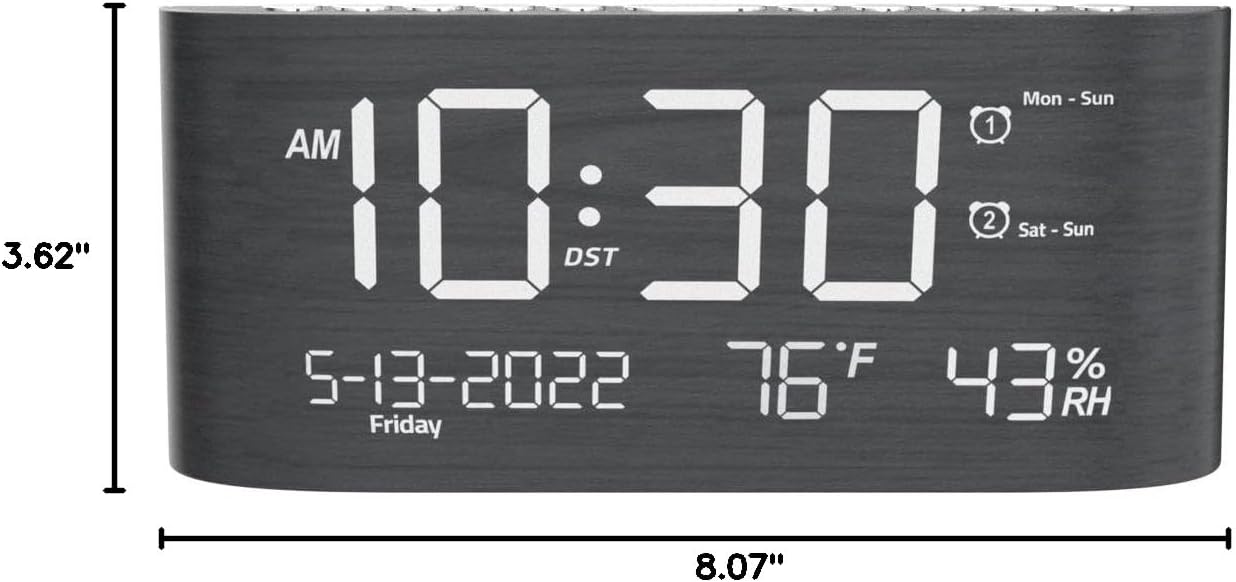
Gambar 9: Dimensi Produk.
Garansi sareng Rojongan
This Mesqool product comes with a 2 Years Exchange Warranty. For any support inquiries, troubleshooting assistance, or warranty claims, please refer to the official Mesqool websitus atanapi ngahubungan layanan palanggan maranéhanana langsung.
Versi éléktronik tina manual pangguna ieu sayogi kanggo diunduh: Unduh Buku Panduan Pamaké (PDF)


