1. Bubuka
Welcome to the user manual for your Roborock S7 Pro Ultra Robot Vacuum Cleaner. This advanced cleaning device is designed to provide a comprehensive and hands-free cleaning experience for your home. Featuring powerful suction, intelligent navigation, and an innovative Empty Wash Fill Dock, the S7 Pro Ultra simplifies floor care by automating dust collection, water refilling, and mop cleaning.
Please read this manual thoroughly before using the product to ensure proper operation, maintenance, and to maximize its lifespan. Keep this manual for future reference.

Gambar 1.1: The Roborock S7 Pro Ultra robot vacuum cleaner alongside its Empty Wash Fill Dock. This image showcases the sleek design of both the robot and the multi-functional dock, which handles automatic dust emptying, water refilling, and mop washing.
2. Setélan
2.1 Unboxing jeung Cék Komponén
Sacara saksama miceun sadaya komponén tina bungkusan. Pastikeun sadaya item anu didaptarkeun di handap aya:
- Roborock S7 Pro Ultra Robot Vacuum Cleaner
- Kosong Nyeuseuh Eusian Dock
- Kabel Daya
- Sikat Sisi
- Tangki cai (dipasang atanapi misah)
- Mop Cloth (pre-installed or separate)
- Disposable Dust Bag (one pre-installed in dock, one spare)
- Manual pangguna (dokumén ieu)
2.2 Penempatan Dermaga
Place the Empty Wash Fill Dock on a hard, level surface against a wall. Ensure there is at least 0.5 meters (1.6 feet) of clear space on both sides and 1.5 meters (4.9 feet) in front of the dock for optimal robot navigation and docking. Connect the power cable to the dock and plug it into a power outlet.
2.3 Ngecas Awal
Place the robot onto the Empty Wash Fill Dock. The robot will automatically power on and begin charging. For first-time use, it is recommended to fully charge the robot before its initial cleaning cycle. The battery indicator on the robot will show charging status.

Gambar 2.1: The Roborock S7 Pro Ultra robot vacuum charging on its dock. The image highlights the faster charging capability, ensuring the robot is ready for cleaning efficiently.
2.4 Ngeusian Tangki Cai
The Empty Wash Fill Dock features two water tanks: a clean water tank and a dirty water tank.
- Remove the clean water tank from the dock and fill it with clean tap water. Do not use cleaning solutions or detergents unless specifically approved by Roborock, as they may damage the system.
- Pastikeun tangki cai kotor kosong sateuacan ngamimitian siklus beberesih.
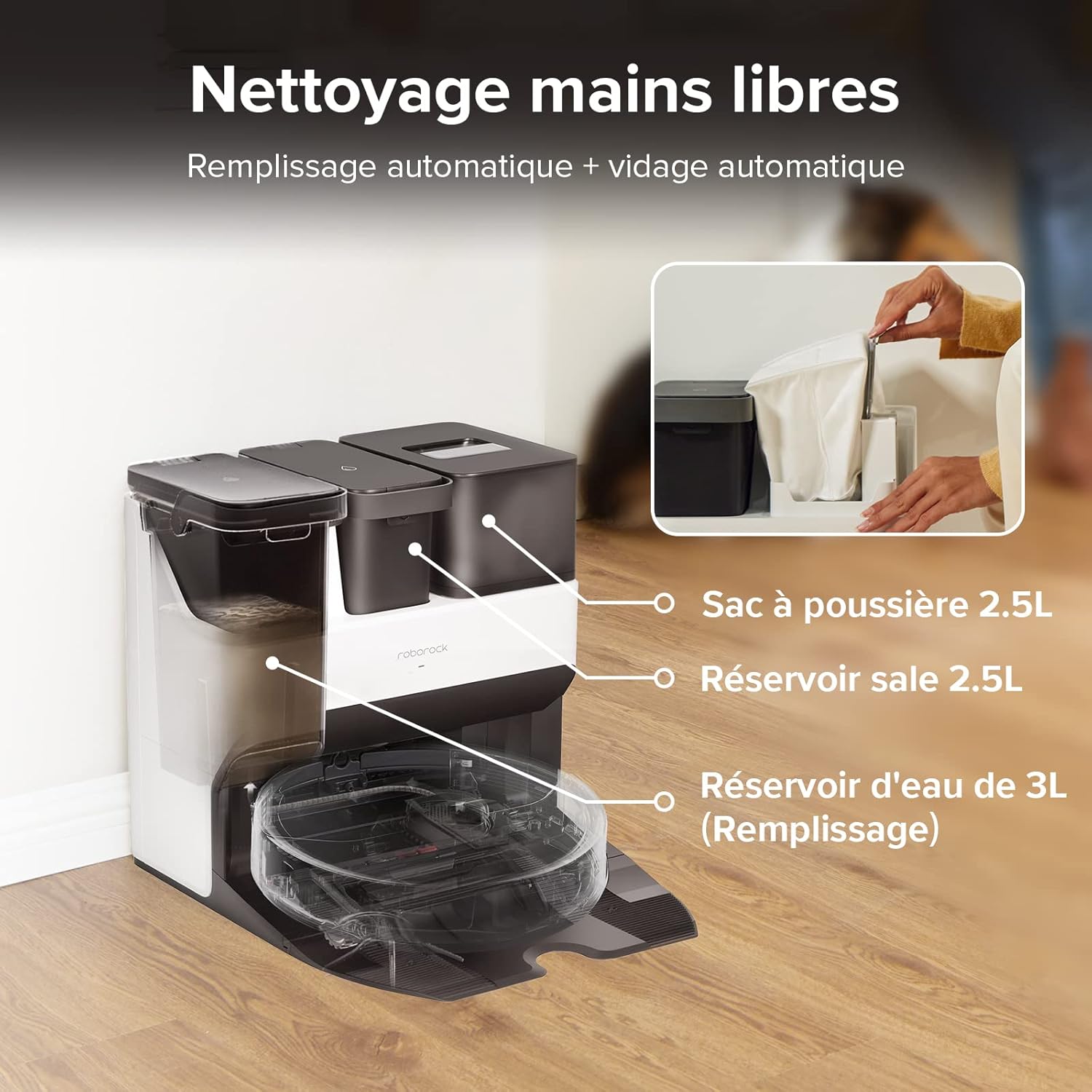
Gambar 2.2: An illustration of the Empty Wash Fill Dock's components, including the 2.5L dust bag, 2.5L dirty water tank, and 3L clean water tank. This setup enables hands-free operation by automating dust collection and water management.
2.5 Pamasangan Aplikasi sareng Pemetaan Awal
Download the Roborock app from the App Store (iOS) or Google Play Store (Android).
- Buka aplikasi sareng jieun akun atanapi log in.
- Tap the "+" icon to add your device and follow the on-screen instructions to connect your S7 Pro Ultra to your Wi-Fi network.
- Once connected, initiate a "Quick Mapping" or "Full Clean" cycle. The robot will navigate your home to create an accurate map, which is essential for advanced features like zone cleaning and virtual walls.

Gambar 2.3: The Roborock mobile application interface, demonstrating features such as intelligent scene routines, defining no-mop zones, setting cleaning intensity, multi-floor mapping, and route tracking. This app provides comprehensive control over the robot's functions.
3. Parentah Operasi
3.1 Mimitian jeung Ngareureuhkeun beberesih
- Ti Robot: Pencét éta Bersih / Kakuatan button once to start a full cleaning cycle. Press again to pause.
- Tina Aplikasi: Tap the "Clean" button on the app's main screen to start. Tap "Pause" to pause.
3.2 Modeu beberesih
The S7 Pro Ultra offers various cleaning modes accessible via the Roborock app:
- Vakum Ngan: Pikeun ngumpulkeun runtah garing.
- Ngepel wungkul: For wet mopping without vacuuming.
- vakum & pel: Simultaneous vacuuming and mopping. The robot's VibraRise® mopping system lifts the mop automatically when carpets are detected.
- Adat: Adjust suction power and scrubbing intensity for specific areas or room types.

Gambar 3.1: The Roborock S7 Pro Ultra performing deep cleaning with sonic vibration technology, achieving up to 3000 scrubs per minute. The image also illustrates its ultrasonic carpet identification feature, allowing the robot to intelligently adjust its cleaning mode.
3.3 Fitur Aplikasi Canggih
Leverage the full potential of your S7 Pro Ultra with these app features:
- Manajemén Peta: View and edit maps, including room division, merging, and naming. Supports up to 4 different maps for multi-floor homes.
- Zona No-Go & Tembok Virtual: Draw virtual boundaries on the map to restrict the robot from entering certain areas or crossing specific lines.
- Zona No-Mop: Define areas where the robot should only vacuum and not mop, ideal for carpeted areas.
- Dijadwalkeun beberesih: Set specific times and days for the robot to clean automatically.
- Ngabersihan Zona: Pilih wewengkon husus dina peta pikeun robot pikeun ngabersihan.
- Pin n Go: Tap a point on the map, and the robot will clean that specific spot.
3.4 Kontrol sora
The Roborock S7 Pro Ultra is compatible with Amazon Alexa. Link your Roborock account in the Alexa app to enable voice commands.
Exampparéntah le:
- "Alexa, ask Roborock to start cleaning."
- "Alexa, ask Roborock to clean the kitchen."
- "Alexa, ask Roborock to stop cleaning."
4. Pangropéa
Regular maintenance is crucial for optimal performance and longevity of your Roborock S7 Pro Ultra.
4.1 Empty Wash Fill Dock Maintenance
- Ngaganti Kantong Debu: The 2.5L dust bag in the dock can hold debris for up to 7 weeks. Replace it when the app indicates it's full.
- Tangki cai bersih: Eusian deui ku cai bersih sakumaha diperyogikeun.
- Tangki Cai Kotor: Empty and rinse the dirty water tank after each mopping session or when full to prevent odors and bacterial growth.
- Dock Base Cleaning: The dock features an auto-washing function for the mop. Periodically clean the dock's base plate and the filter screen to remove accumulated dirt and debris.

Gambar 4.1: The Empty Wash Fill Dock, illustrating its comprehensive automation capabilities: auto-emptying of dust, auto-refilling of water, auto-cleaning of the dock itself, and auto-washing of the robot's mop. This dock significantly reduces manual intervention.
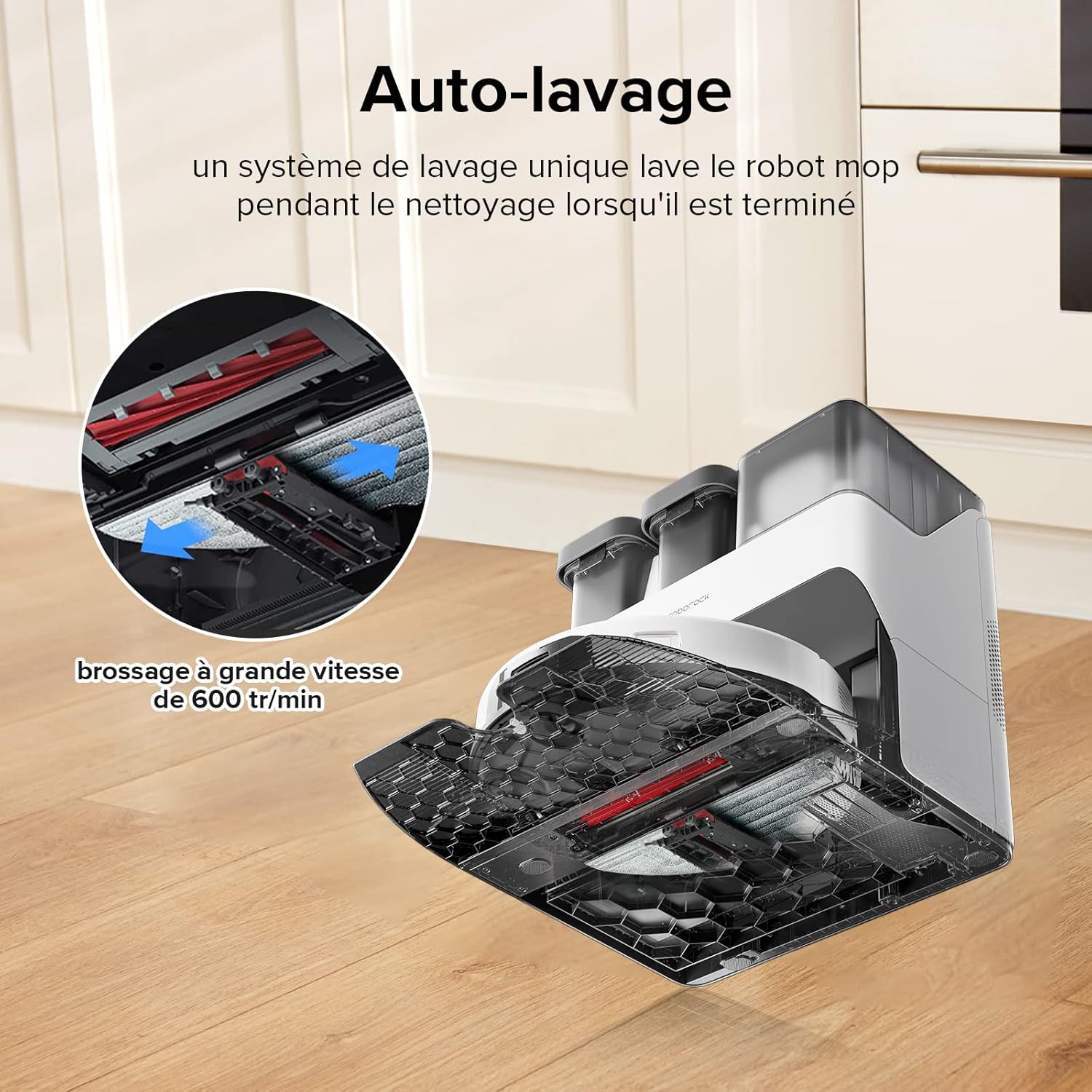
Gambar 4.2: A nutup-up view of the Roborock S7 Pro Ultra's auto-washing system, which cleans the robot's mop during and after cleaning cycles. This process involves high-speed brushing at 600 rotations per minute to ensure the mop remains clean and effective.
4.2 Robot Components Cleaning
- Sikat utama: Remove and clean the main brush regularly, especially if hair or debris is tangled around it. The rubber brush design helps minimize tangles.
- Sikat samping: Pariksa bulu kusut atawa lebu tur bersih sakumaha diperlukeun.
- Dustbin & Filter: Although the dock auto-empties, periodically remove the robot's internal dustbin and clean the filter. The filter is washable; rinse with water and allow to air dry completely before reinstallation.
- Kain Pel: Remove and wash the mop cloth after each mopping session.
- Sénsor: Wipe all sensors (cliff sensors, wall sensor, charging contacts) with a soft, dry cloth to ensure accurate navigation.
5. Cara ngungkulan
If you encounter issues with your Roborock S7 Pro Ultra, refer to the table below for common problems and solutions.
| Masalah | Mungkin Cukang lantaranana | Solusi |
|---|---|---|
| Robot teu bisa dihurungkeun. | Batré lemah; teu dipasang kalawan bener. | Place the robot on the dock and ensure charging contacts are aligned. Allow it to charge for several hours. |
| Robot cannot find the dock. | Dock is obstructed; dock moved; poor Wi-Fi signal. | Ensure the dock has clear space around it. Relocate the dock if necessary. Check Wi-Fi signal strength. |
| Kinerja beberesih goréng. | Full dustbin/dust bag; clogged filter; tangled brushes; dirty sensors. | Empty dustbin/replace dust bag. Clean or replace filter. Clean main and side brushes. Wipe all sensors. |
| Mop leaves streaks or dirty marks. | Dirty mop cloth; dirty water tank full; dock base needs cleaning. | Wash or replace mop cloth. Empty and rinse dirty water tank. Clean the dock's base plate. |
| Robot sering macét. | Obstacles on floor; robot stuck on high thresholds/carpets. | Clear cables, toys, and other small objects. Use no-go zones or virtual walls for problematic areas. |
| Masalah konektipitas aplikasi. | Incorrect Wi-Fi password; router issues; robot offline. | Verifikasi kecap akses Wi-Fi. Pareuman terus hurungkeun deui router sareng robot. Pastikeun robot aya dina jangkauan Wi-Fi. |
For more detailed troubleshooting or persistent issues, please refer to the Roborock app's help section or contact Roborock customer support.
6. Spésifikasi
| Fitur | Rincian |
|---|---|
| Ngaran modél | S7 Pro Ultra |
| Nomer modél | S7PRO |
| Ukuran (L x W x H) | 33 x 33 x 7 cm (Robot); 16.8 kg (Total weight) |
| Daya nyeuseup | 5100 Pa |
| Mopping Technology | Sonic Vibration (up to 3000 scrubs/min) |
| Jenis Batré | Litium-ion |
| Kahirupan batré | Nepi ka 150 menit |
| Kapasitas Kantong Lebu (Dock) | 2.5 L (up to 7 weeks capacity) |
| Clean Water Tank Capacity (Dock) | 3 L |
| Dirty Water Tank Capacity (Dock) | 2.5 L |
| Jenis Filter | Washable Fabric Filter |
| Napigasi | LIDAR |
| Kontrol Aplikasi | Roborock App (iOS/Android) |
| Kontrol sora | Amazon Alexa |
| Recommended Surface Types | Marble, Laminate, Linoleum, Upholstery, Glass, Tile, Carpet, Wood, Vinyl, Bamboo, Concrete, Engineered Wood |
7. Jaminan & Dukungan
Your Roborock S7 Pro Ultra comes with a standard manufacturer's warranty. The duration and terms of the warranty may vary by region and retailer. Please refer to the warranty card included in your product packaging or visit the official Roborock websitus kanggo inpormasi garansi lengkep.
For technical support, troubleshooting assistance, or to purchase replacement parts, please contact Roborock Customer Service through their official website or the Roborock app. Providing your product model number (S7PRO) and purchase details will help expedite your support request.
Official Roborock Websitus: https://us.roborock.com/ (Please check your regional Roborock website for specific contact information.)


