1. Bubuka
This manual provides comprehensive instructions for the Naxa NDS-6501 Portable Dual 6.5-inch Bluetooth Speaker. Please read this manual thoroughly before operating the device to ensure proper use and to maximize your experience. Keep this manual for future reference.
2. Eusi Paket
Pastikeun yén sadaya item anu didaptarkeun di handap kalebet kana pakét anjeun:
- Naxa NDS-6501 Portable Bluetooth Speaker
- Mikropon kabel
- Kabel Ngecas USB
- Manual pangguna (dokumén ieu)
3. Fitur Produk
The Naxa NDS-6501 speaker offers a range of functionalities designed for portable audio entertainment:
- Dual 6.5-inch full-frequency speakers for clear audio output.
- Bluetooth connectivity for wireless audio streaming from compatible devices.
- Integrated multi-color flame lights with various lighting effects.
- True Wireless Stereo (TWS) function for connecting two NDS-6501 speakers wirelessly.
- Wired microphone input for vocal use.
- Built-in FM radio tuner for local station access.
- USB port and MicroSD/TF card slot for playing audio files from external storage.
- Auxiliary (3.5mm) input for wired audio connections.
- Rechargeable battery providing up to 2 hours of playback time.
4. Kontrol jeung palabuhan
The speaker features various controls and input/output ports. A typical layout includes a power button, volume controls, mode selection, playback controls (play/pause, skip tracks), microphone input, USB port, MicroSD card slot, auxiliary input, and a charging port. Refer to the diagram below for specific locations.
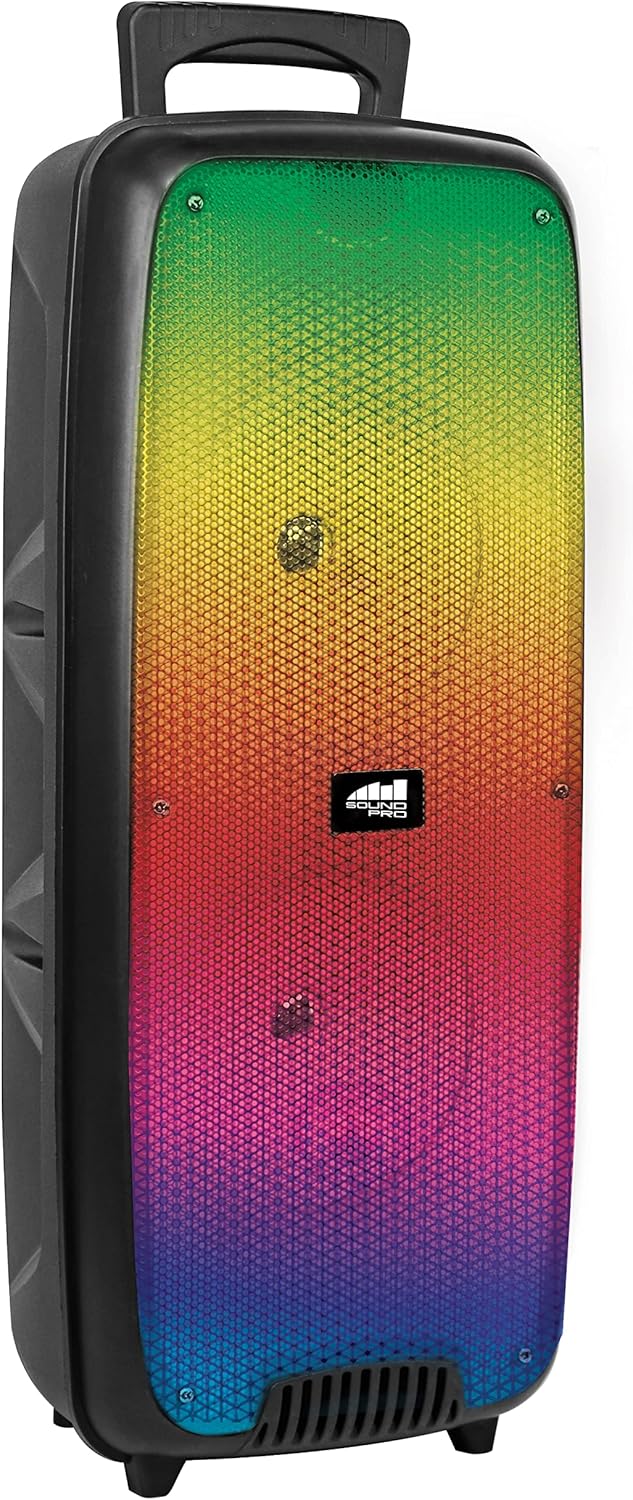
Gambar 4.1: Hareupeun view of the Naxa NDS-6501 speaker, showcasing the dual 6.5-inch drivers and multi-color flame lights.

Gambar 4.2: Samping view of the Naxa NDS-6501 speaker, illustrating its portable design with an integrated handle.
5. Setélan
5.1 Ngecas Speaker
- Sambungkeun kabel ngecas USB anu disayogikeun kana port ngecas speaker.
- Sambungkeun tungtung kabel USB anu sanés ka adaptor kakuatan USB anu cocog (teu kalebet) atanapi port USB komputer.
- The charging indicator light will illuminate, typically red, during charging.
- Once fully charged, the indicator light will change color or turn off (refer to specific LED behavior in your product). A full charge provides approximately 2 hours of playback.
5.2 Powering on / Pareum
- To power on: Press and hold the Power button for a few seconds until the speaker activates.
- Pikeun mareuman: Pencét terus tahan tombol Daya deui dugi ka speaker pareum.
6. Parentah Operasi
6.1 Nyapasangkeun Bluetooth
- Ensure the speaker is powered on and in Bluetooth mode. If not, press the Mode button to switch to Bluetooth. The speaker will indicate it is ready for pairing (e.g., a flashing LED or an audible prompt).
- Dina alat Bluetooth-diaktipkeun anjeun (smartphone, tablet, jsb), buka setélan Bluetooth.
- Milarian pikeun available devices. You should see "NDS-6501" or a similar name in the list.
- Select "NDS-6501" to initiate pairing.
- Sakali dipasangkeun kalayan suksés, speaker bakal masihan konfirmasi anu tiasa disada, sareng lampu indikator Bluetooth bakal hurung.
6.2 Leres Wireless Stereo (TWS) papasangan
The TWS function allows you to connect two NDS-6501 speakers for a stereo sound experience.

Gambar 6.1: Illustration of the True Wireless Stereo (TWS) function, enabling two speakers to connect wirelessly from a single Bluetooth source.
- Ensure both NDS-6501 speakers are powered on and in Bluetooth mode, but not yet paired to any device.
- On one of the speakers (this will be the primary speaker), press and hold the TWS button (or a designated pairing button) for a few seconds.
- Spiker utama bakal milarian spiker sekundér. Sakali nyambung, kadua spiker bakal masihan konfirmasi anu tiasa disada.
- Now, pair your Bluetooth device to the primary speaker as described in Section 6.1. Audio will play through both speakers in stereo.
6.3 Operasi Radio FM
- Pencét tombol Modeu pikeun pindah ka modeu Radio FM.
- Pencét tombol Puter/Pause pikeun otomatis nyeken sareng nyimpen stasiun FM anu sayogi.
- Pake tombol lagu saméméhna/Salajengna pikeun nganapigasi antara stasiun nu disimpen.
6.4 USB / MicroSD Playback
- Insert a USB flash drive or a MicroSD/TF card (with audio files) into the corresponding port.
- The speaker should automatically switch to USB or MicroSD mode and begin playing audio. If not, press the Mode button to select the correct input.
- Use the playback controls (Play/Pause, Previous/Next) to manage your music.
6.5 Paké Mikropon
- Connect the wired microphone to the microphone input jack on the speaker.
- Adjust the microphone volume control (if available) on the speaker to your desired level.
- The microphone audio will be mixed with any music playing through the speaker.
6.6 Pangaruh cahaya
- The speaker features integrated multi-color flame lights.
- Press the Light button (if available) to cycle through different lighting modes or to turn the lights on/off.
- The lights may synchronize with the music playback.
7. Pangropéa
- beberesih: Anggo kaén anu garing sareng lemes pikeun ngabersihan bagian luar spéker. Ulah make cleaners abrasive, lilin, atawa pangleyur.
- Panyimpenan: Lamun teu dipaké pikeun période nambahan, nyimpen speaker dina tiis, tempat garing jauh ti sinar panonpoé langsung jeung hawa ekstrim.
- Perawatan batré: Pikeun manjangkeun umur batre, ulah miceun batre pinuh. Ngeusi batre spéker rutin, sanajan teu dipake.
- Paparan cai: Spiker ieu henteu tahan cai. Ulah kakeunaan cai atanapi kalembaban anu kaleuleuwihi.
8. Cara ngungkulan
| Masalah | Mungkin Cukang lantaranana | Solusi |
|---|---|---|
| Speaker teu hurung. | Batré béak. | Ngecas spéker nganggo kabel USB anu disayogikeun. |
| Taya sora tina speaker. | Volume is too low; incorrect input mode; device not paired. | Increase volume; press Mode button to select correct input; re-pair Bluetooth device. |
| Alat Bluetooth teu tiasa mendakan spiker. | Speaker henteu dina mode papasangan; alat jauh teuing; gangguan. | Ensure speaker is in Bluetooth pairing mode; move device closer; avoid obstacles. |
| Papasangan TWS gagal. | Spiker parantos dipasangkeun kana alat; jauh teuing. | Ensure both speakers are unpaired from other devices; place speakers within 33 feet of each other. |
| Mikropon teu jalan. | Microphone not fully plugged in; microphone volume low. | Ensure microphone is securely connected; adjust microphone volume. |
9. Spésifikasi
| Fitur | Spésifikasi |
|---|---|
| Nomer modél | NDS-6501 |
| Ukuran Speaker | Dual 6.5 inci |
| Téhnologi konektipitas | Bluetooth, USB, MicroSD, Aux (3.5mm) |
| Input Audio | Mikropon kabel |
| Mode Kaluaran Audio | Stereo |
| Daya Kaluaran Maksimum | 3 Watt |
| Speaker AmpTipe Lification | Aktif |
| Jenis Batré | Lithium Ion (rechargeable, included) |
| Batré Rata Kahirupan | Nepi ka 2 Jam |
| Ukuran produk (L x W x H) | 24.13 x 19.05 x 57.91 cm (9.5 x 7.5 x 22.8 inci) |
| Item Beurat | 2.81 kg (6.2 lbs) |
| Warna | Hideung |
| UPC | 840005017555 |
10. Garansi jeung Rojongan
For warranty information or technical support, please refer to the warranty card included with your product or visit the official Naxa Electronics websitus. Simpen resi pameseran anjeun salaku bukti pameseran pikeun klaim garansi.


