Bubuka
Thank you for choosing the WARSUN Y36 and Y39 LED Work Lights. These portable, rechargeable work lights are designed for various applications, including car repair, camping, and emergency situations. This manual provides essential information for the safe and effective use of your device. Please read it thoroughly before operation and retain it for future reference.

Image: WARSUN Y36 (yellow) and Y39 (orange) LED Work Lights.
Émbaran Kasalametan
Pikeun mastikeun operasi aman, punten perhatikeun pancegahan ieu:
- Do not look directly into the LED light when it is on, as it can cause eye strain or damage.
- Keep the device away from water and moisture. This product is not water-resistant.
- Do not disassemble, repair, or modify the device. Contact authorized service personnel for any repairs.
- Jauhkeun tina jangkauan barudak.
- Anggo ukur kabel sareng adaptor ngecas anu disayogikeun atanapi disarankeun.
- Hindarkeun ngalaan alat ka suhu anu ekstrim atanapi sinar panonpoé langsung kanggo waktos anu berkepanjangan.
- Buang batré sareng komponén éléktronik numutkeun peraturan lokal.
Produk Leuwihview
Familiarize yourself with the components of your WARSUN LED Work Light.

Image: WARSUN Y36 Component Diagram. This diagram illustrates the key features of the Y36 model, including the COB light panel, magnetic base, integrated hook, and USB port.

Image: WARSUN Y39 Component Diagram. This diagram highlights the COB panel, power switch, wall hanging hole, metal hook, strong magnet, and Micro USB port for the Y39 model.
- Panel LED COB: Provides bright, wide-angle illumination.
- Tombol Daya: Ngadalikeun kakuatan sareng switch antara modeu cahaya.
- USB Input/Output Port: For charging the work light and for using it as a power bank.
- Dasar Magnét: Ngamungkinkeun napelna kana permukaan logam pikeun operasi tanpa kedah dipencet.
- Pancing Terpadu: For hanging the light in various locations.
- Bracket Design (Y36): Provides a stand for directional lighting.
- Wall Hanging Hole (Y39): For mounting on a wall.
Disetél
Ngecas Lampu Gawé
Before first use, fully charge your WARSUN LED Work Light.
- Locate the USB input/output port on the side of the work light.
- Connect the provided USB charging cable to the port and plug the other end into a suitable USB power source (e.g., wall adapter, computer USB port).
- Lampu indikator ngecas bakal nyaangan beureum nalika ngecas.
- Sakali dicas pinuh, lampu indikator bakal ngahurungkeun héjo.

Image: Charging Indicator. The red light signifies that the device is currently charging, while the green light indicates that the battery is fully charged.
Ngagunakeun salaku Power Bank
The work light can also be used to charge other devices.
- Connect your mobile phone or other electronic device to the USB output port of the work light using your device's charging cable.
- The work light's internal battery will begin charging your connected device.

Image: Power Bank Function. The Y36 work light can be used to charge mobile phones and other USB-powered devices.
Parentah Operasi
Turning On and Changing Modes
The work light features multiple lighting modes:
- Press the power button once to turn on the light in High brightness mode.
- Press the power button again to switch to Medium brightness mode.
- Press the power button a third time to switch to Low brightness mode (or Strobe mode, depending on model).
- Pencét tombol daya pikeun kaopat kalina pikeun mareuman lampu.
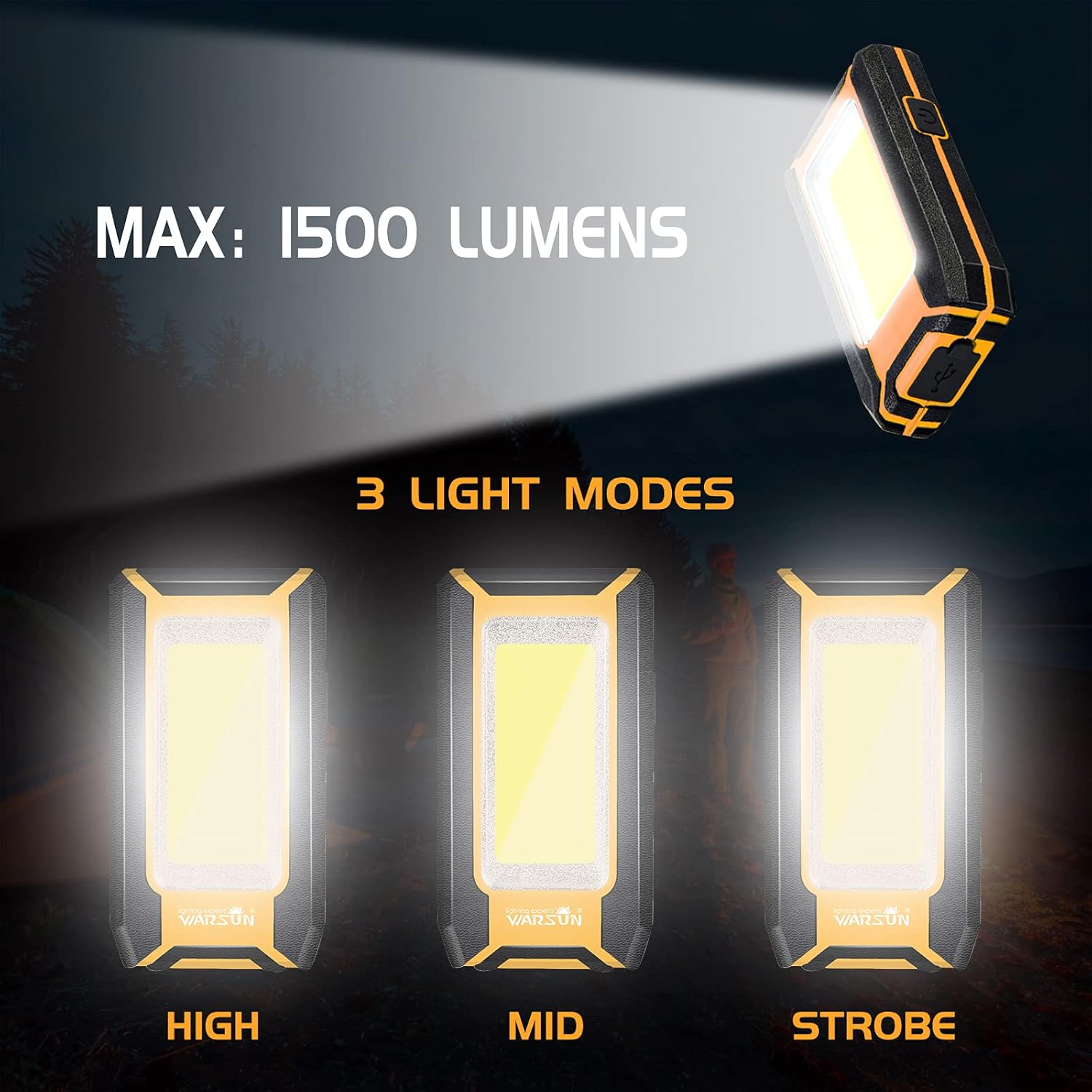
Image: Three Light Modes. The work light offers High, Mid, and Strobe (or Low) brightness settings for various needs.
Ngagunakeun Dasar Magnét
The strong magnetic base allows for hands-free operation.
- Attach the magnetic base to any ferrous metal surface, such as a car hood, metal beam, or workbench.
- Ensure the light is securely attached before releasing éta.

Image: Magnetic Design in Use. The integrated magnet allows the light to be securely attached to metal surfaces, providing convenient hands-free illumination for tasks like car repair.
Using the Integrated Hook
The integrated hook provides additional mounting options.
- Extend the hook from the back of the work light.
- Hang the light on tents, pipes, or other suitable structures for overhead or directional lighting.

Image: Hook Design. The retractable hook allows for versatile hanging options, making it suitable for various environments.
Pangropéa
beberesih
- Pastikeun alat dipareuman sareng dicabut tina sumber daya naon waé sateuacan dibersihkeun.
- Lap bagian luar lampu kerja ku kaén nu lemes,amp lawon.
- Ulah make cleaners abrasive, pangleyur, atawa bahan kimia kasar, sabab ieu bisa ngaruksak finish.
Panyimpenan
- Simpen lampu kerja di tempat anu tiis sareng garing, jauh tina sinar panonpoé langsung sareng suhu anu ekstrim.
- If storing for an extended period, charge the battery to approximately 50% every 3-6 months to maintain battery health.
Pamérésan masalah
If you encounter issues with your WARSUN LED Work Light, refer to the table below:
| Masalah | Mungkin Cukang lantaranana | Solusi |
|---|---|---|
| Lampu henteu hurung. | Batré béak. | Ngecas lampu gawé pinuh. |
| Cahya taram. | Batré lemah. | Cas deui lampu kerjana. |
| Teu tiasa ngecas alat éksternal. | Work light battery is too low or cable is faulty. | Ensure work light is sufficiently charged. Try a different USB cable. |
| Indikator ngecas teu jalan. | Masalah kabel ngecas atanapi sumber listrik. | Coba kabel ngecas atanapi adaptor daya USB anu béda. |
spésifikasi
| Fitur | Rincian |
|---|---|
| merek | WARSUN |
| Modél | Y36, Y39 |
| Tipe Sumber Cahaya | COB LED |
| Caang | Up to 1200 Lumens (Y36), Up to 1500 Lumens (Y39) |
| Sumber Daya | Batré Powered (Rechargeable Lithium Ion) |
| Kapasitas batré | 2 x 1800 mAh (Total 3600 mAh) |
| Voltage | 3.7 Volt (DC) |
| Bahan | Aluminium Alloy |
| Fitur husus | Durable, Portable, Rechargeable, Magnetic Base, Integrated Hook, Power Bank Function |
| Tingkat Résistansi Cai | Henteu Tahan Cai |
| Komponén Kaasup | Batré |
Garansi sareng Rojongan
WARSUN offers a 30-day money-back guarantee and a 1-year limited warranty for this product. For warranty claims or technical support, please refer to your purchase documentation or contact WARSUN customer service through the retailer where the product was purchased.